问题现象
使用了自定义字体的注册功能,但是字体无法正确显示?
问题现象1(注册字体失败):

问题现象2(字体显示与字体资源文件中的字形显示不一致):
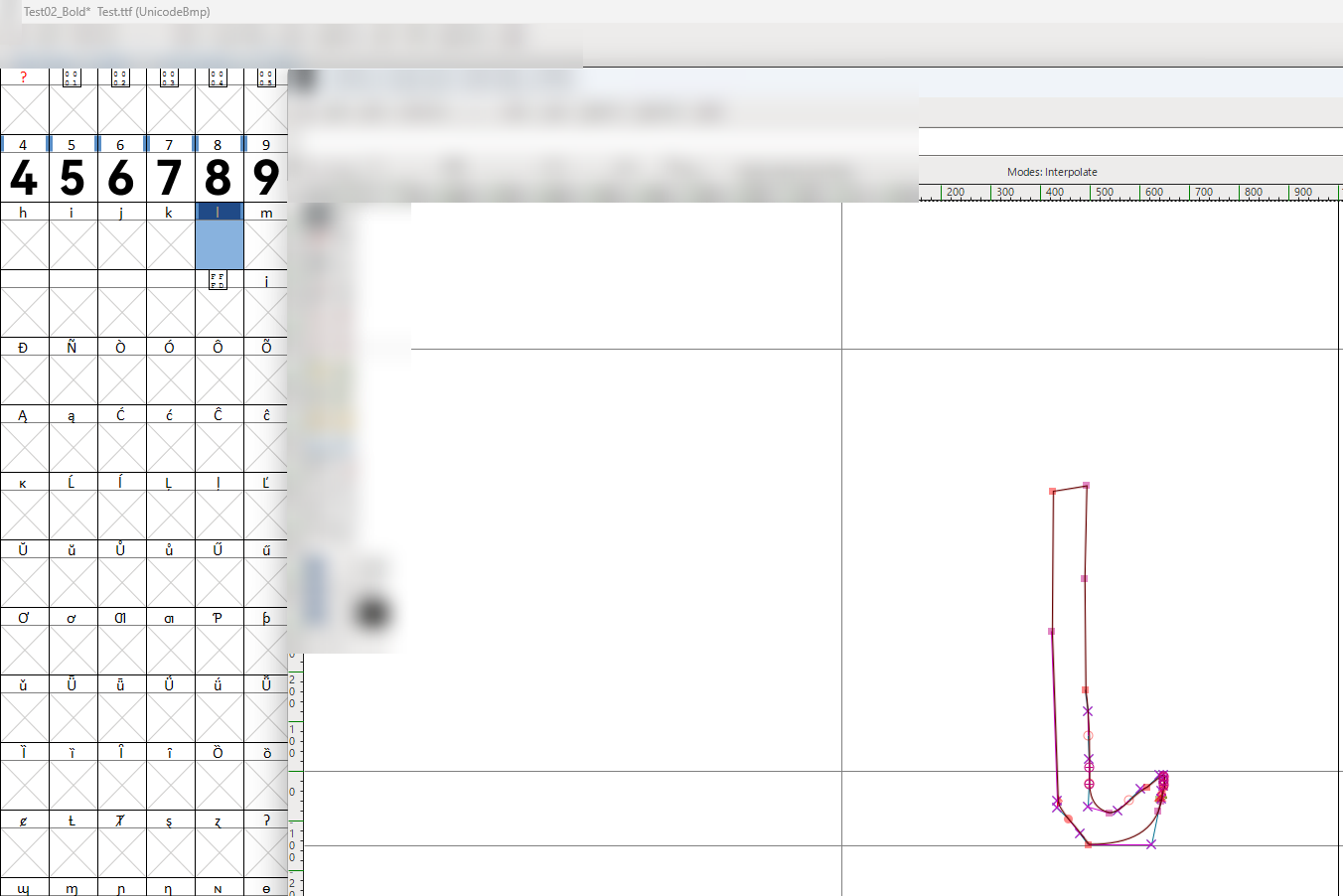
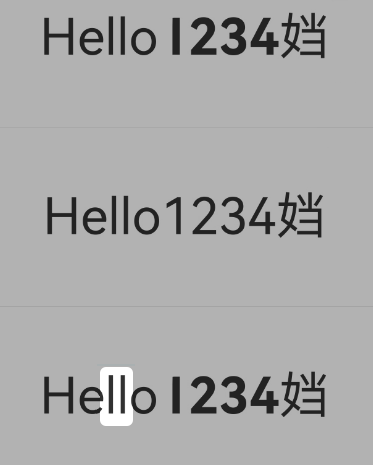
问题代码如下:
import { text } from '@kit.ArkGraphics2D';

@Entry
@Component
struct Index {
  // Hello1234밠
  message: string = 'Hello1\u{0032}34\u{2BC20}';
  buttonName: string = '跳转至正确显示页面';
  private pathStack: NavPathStack = new NavPathStack();

  aboutToAppear(): void {
    let fontCollection = text.FontCollection.getGlobalInstance();
    // 注册自定义字体
    // 注册成功场景
    fontCollection.loadFontSync('testSuccess', $rawfile('Test.ttf'));
    // 注册失败场景
    fontCollection.loadFontSync('testError', $rawfile('TestError.ttf'));
    // 日志显示注册成功,实际未注册成功
    fontCollection.loadFontSync('testSuccess', $rawfile('Test02.ttf'));
  }

  build() {
    Navigation(this.pathStack) {
      Column({ space: 60 }) {
        Text(this.message)
          .id('testSuccess')
          .fontFamily('testSuccess')
          .fontSize($r('app.float.page_text_font_size'))
          .fontWeight(FontWeight.Normal);
        Divider();
        Text(this.message)
          .id('testError')
          .fontFamily('testError')
          .fontSize($r('app.float.page_text_font_size'))
          .fontWeight(FontWeight.Normal);
        Divider();
        Text(this.message)
          .id('testSuccess')
          .fontFamily('testSuccess')
          .fontSize($r('app.float.page_text_font_size'))
          .fontWeight(FontWeight.Normal);


        Button(this.buttonName).onClick(() => {
          this.pathStack.pushPathByName('Solution', null);
        });
      };
    }
    .height('100%')
    .width('100%');
  }
}
背景知识
- 存在系统不支持字体的场景时,可以参考自定义字体注册和使用来实现。
- Text组件支持Unicode码,可以参考Text组件如何加载Unicode字符。经过其他编码处理的需要进行对应的解码才能正确显示,参考应用里的文本内容显示乱码。
- 获取已注册的字体,可以参考getSystemFontFullNamesByType接口。查询字体是否已经注册,可以参考getFontDescriptorByFullName接口。
- 注意字体文件也会占用App包大小,参考字体管理器中注册自定义字体时字体文件的路径如何填写。


分析结论
// 注册成功场景
fontCollection.loadFontSync('testSuccess', $rawfile('Test.ttf'));
// 注册失败场景
fontCollection.loadFontSync('testError', $rawfile('TestError.ttf'));
// 日志显示注册成功,实际未注册成功
fontCollection.loadFontSync('testSuccess', $rawfile('Test02.ttf')); - line 2模拟了字体资源异常,注册字体失败的场景。
- line 3模拟了已经注册了fontFamily为testSuccess的字体,导致后注册的字体未能正确注册上(尽管日志显示字体注册成功)。
修改建议
- 字体资源异常:更换可使用/正确的字体资源文件。
- 使用自定义字体前,先查询对于fontFamily的名称是否已经注册,有两种方式。
- 方式一:查询所有注册的字体,与需要注册的字体进行匹配。代码如下:
// 获取所有已经注册的字体(包括系统字体) let promise = text.getSystemFontFullNamesByType(text.SystemFontType.CUSTOMIZED); await promise.then((data) => { console.info(`then font list size: ${data.length}`); data.forEach((fontItem) => { if (fontItem.match('testSuccess')) { this.registerFontName = 'test02'; } console.info(fontItem); }); }).catch((error: BusinessError) => { console.error(`Failed to get font fullNames by type, error: ${JSON.stringify(error)}`); }); - 方式二:通过需要注册的字体调用getFontDescriptorByFullName去查询是否存在。代码如下:
// 根据字体名称和类型获取字体描述符
let promise2 = text.getFontDescriptorByFullName('testSuccess', text.SystemFontType.CUSTOMIZED);
await promise2.then((fontDescriptor) => {
  console.info(`find fontName=testSuccess.desc: ${JSON.stringify(fontDescriptor)}`);
}).catch((error: BusinessError) => {
  console.error(`Failed to get fontDescriptor by fullName, error: ${JSON.stringify(error)}`);
});
- 方式一:查询所有注册的字体,与需要注册的字体进行匹配。代码如下:
完整代码如下:
import { text } from '@kit.ArkGraphics2D';

@Builder
export function SolutionBuilder() {
  Solution();
}

@Entry
@Component
struct Solution {
  // Hello1234밠
  message: string = 'Hello1\u{0032}34\u{2BC20}';
  @State registerFontName: string = 'testSuccess';

  aboutToAppear(): void {

    // 注册自定义字体:先检测name为test01是否已经注册,若已经注册,则注册test02的字体
    this.registerTestFont();

  }

  async registerTestFont() {
    // 获取所有已经注册的字体(包括系统字体)
    let promise = text.getSystemFontFullNamesByType(text.SystemFontType.CUSTOMIZED);
    await promise.then((data) => {
      console.info(`then font list size: ${data.length}`);
      data.forEach((fontItem) => {
        if (fontItem.match('testSuccess')) {
          this.registerFontName = 'test02';
        }
        console.info(fontItem);
      });
    }).catch((error: BusinessError) => {
      console.error(`Failed to get font fullNames by type, error: ${JSON.stringify(error)}`);
    });

    // 根据字体名称和类型获取字体描述符
    let promise2 = text.getFontDescriptorByFullName('testSuccess', text.SystemFontType.CUSTOMIZED);
    await promise2.then((fontDescriptor) => {
      console.info(`find fontName=testSuccess.desc: ${JSON.stringify(fontDescriptor)}`);
    }).catch((error: BusinessError) => {
      console.error(`Failed to get fontDescriptor by fullName, error: ${JSON.stringify(error)}`);
    });

    // 实际需要自定义注册的字体
    text.FontCollection.getGlobalInstance().loadFontSync(this.registerFontName, $rawfile('Test02.ttf'));
  }

  build() {
    NavDestination() {
      Column() {
        Text(this.message)
          .id('testSuccess')
          .fontFamily('testSuccess')
          .fontSize($r('app.float.page_text_font_size'))
          .fontWeight(FontWeight.Normal);
        Divider();
        Text(this.message)
          .id(this.registerFontName)
          .fontFamily(this.registerFontName)
          .fontSize($r('app.float.page_text_font_size'))
          .fontWeight(FontWeight.Normal);
      };
    }
    .height('100%')
    .width('100%');
  }
}
常见FAQ
Q:使用drawTextBlob接口,部分字符不显示,是什么原因?
A:使用的是drawTextBlob接口,若构造blob的字体不支持待绘制的字符,则该部分字符无法绘制。drawSingleCharacter接口支持绘制字体退化功能。若是系统字体支持,则可以使用drawSingleCharacter接口。
Q:文件转换后HarmonyOS下无法正常显示对应的宋体字体?
A:可以使用system/fonts目录下ShuS-SC.ttf。