问题现象
使用bindSheet半模态窗口实现应用分享的弹窗,在点击空白处或者拖动关闭bindSheet时,半模态窗口退出动效会执行两次。
问题现象图:
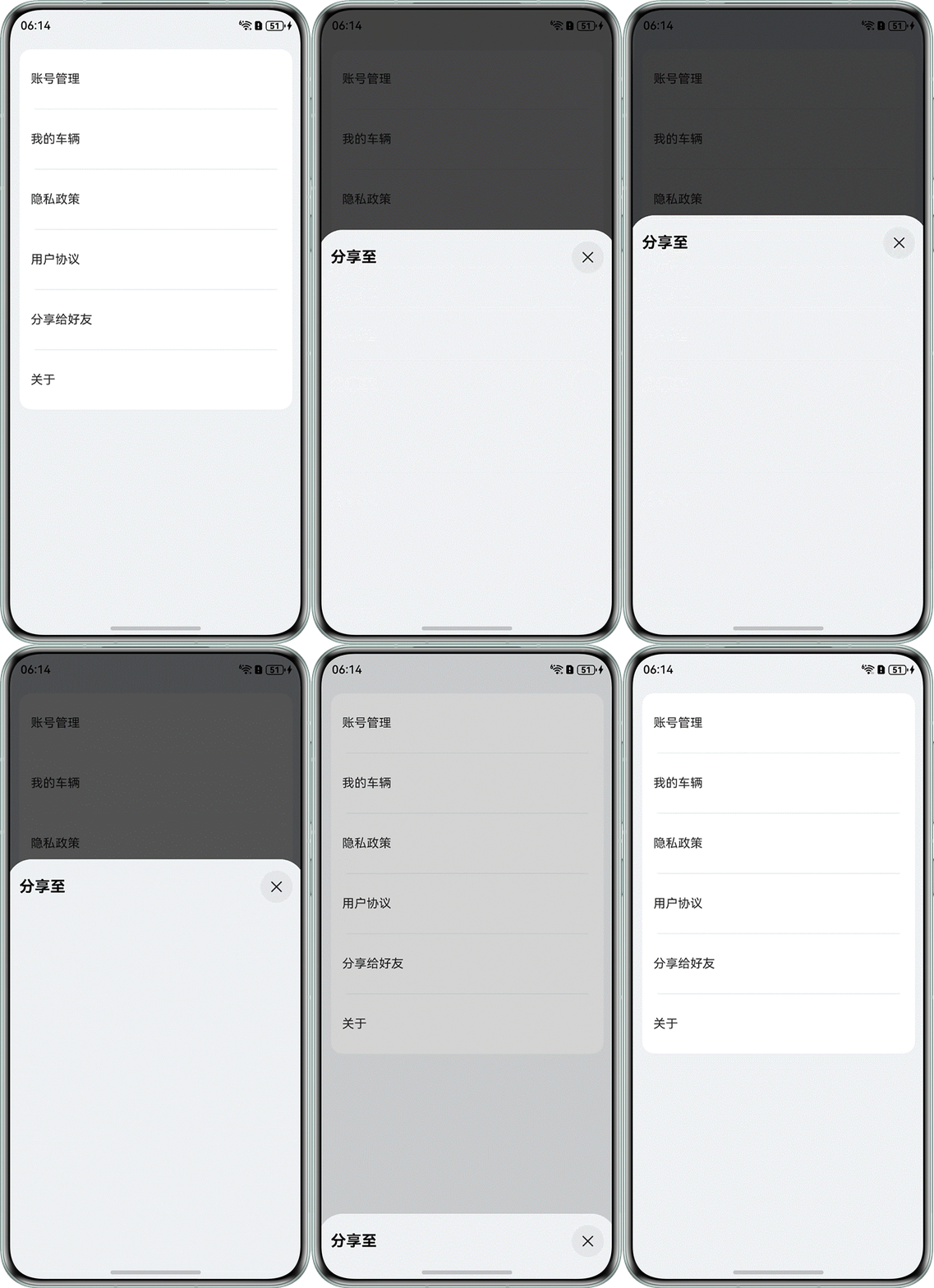
效果预览:
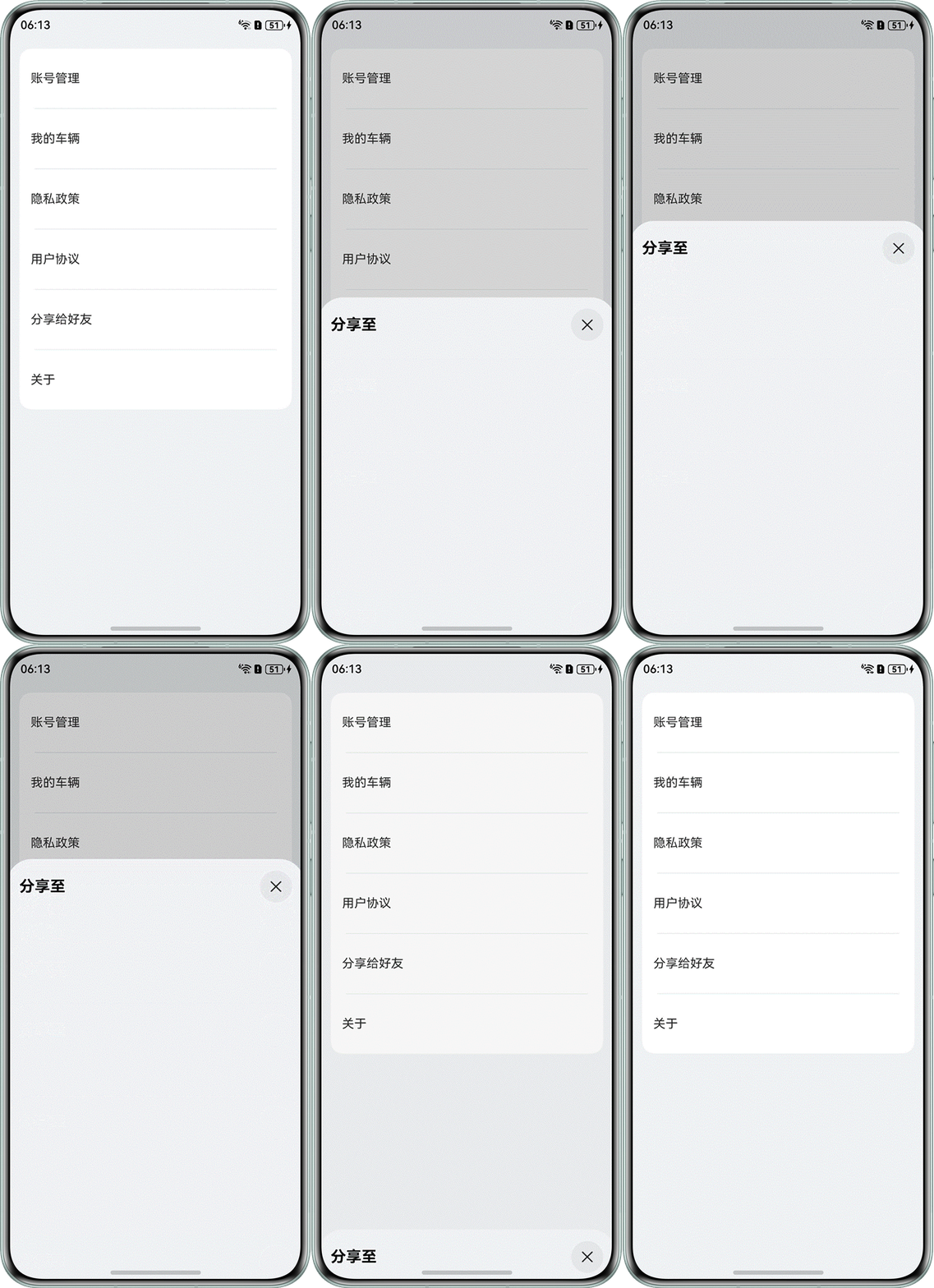
复现问题示例代码如下:
List() {
  ForEach(this.listObjs, (item: MenuObject, index: Number) => {
    ListItem() {
      MenuComponent({value: item}) // 自定义组件
        .width('100%')
        .onClick(() => {
          if (item.title === '分享给好友') {
            this.isShow = true
          } else {
            // 跳转逻辑
          }
        })
        .bindSheet($$this.isShow, this.ShareBuilder(), {
          detents: [SheetSize.FIT_CONTENT],
          dragBar: false,
          showClose: false,
          title: this.shareTitleBuilder,
        })
    }
  })
}
.width('100%')
.height('100%')
.divider({
  strokeWidth: 1,
  color: '#ffe9f0f0',
  startMargin: 20,
  endMargin: 20
})
背景知识
- 半模态页面(bindSheet)默认是模态形式的非全屏弹窗式交互页面,允许部分底层父视图可见,帮助用户在与半模态交互时保留其父视图环境。用户可以通过bindSheet首参数控制半模态窗口的显示和退出,通过第二个参数设置CustomBuilder自定义半模态窗口显示的内容布局。
- List列表包含一系列相同宽度的列表项。适合连续、多行呈现同类数据,例如图片和文本。
- ListItem用来展示列表具体item,必须配合List来使用。
问题定位
出现bindSheet半模态窗口退出动效执行两次,一般需要考虑bindSheet是否为多个组件绑定了半模态窗口。结合本案例问题分析如下:
- 案例使用了ForEach循环布局,循环创建多个ListItem。bindSheet绑定在ListItem的子节点上,所以会有多个循环子组件都绑定了半模态窗口,且设置了相同的ShareBuilder。
- 当点击“分享给好友”时,设置isShow为true,实际上同时弹出了多个半模态窗口叠加在一起。
- 当点击空白处关闭半模态窗口时,先关闭当前点击的窗口,关闭后通过双向绑定$$将isShow设置成false,这个时候剩余的半模态窗口都同时退出,触发退出的动效,所以从视觉上退出动效执行了两次。
修改建议
为了避免出现bindSheet半模态窗口退出动效执行两次的问题,使用bindSheet半模态窗口时,只给指定的子组件绑定半模态窗口,其余子组件可以把bindSheet第二个参数CustomBuilder设置成undefined。示例代码如下:
class MenuObject {
  title: string;

  constructor(title: string) {
    this.title = title;
  }
}

@Entry
@Component
struct BindSheetExample {
  pathStack: NavPathStack = new NavPathStack();
  @State isShow: boolean = false;
  private listObjs: MenuObject[] =
    [new MenuObject('账号管理'), new MenuObject('我的车辆'), new MenuObject('隐私政策'), new MenuObject('用户协议'),
      new MenuObject('分享给好友'), new MenuObject('关于')];

  @Builder
  title() {
    Row() {
      Text('分享至')
        .fontSize(20)
        .fontWeight(700)
        .fontColor(Color.Black);
      Image($r('app.media.close'))
        .width(42)
        .height(42)
        .onClick(() => {
          this.isShow = false;
        });
    }
    .width('100%')
    .justifyContent(FlexAlign.SpaceBetween);
  }

  @Builder
  ShareBuilder() {
    Column() {
    }
    .width('100%')
    .height(500)
    .justifyContent(FlexAlign.Center);
  }

  build() {
    Navigation(this.pathStack) {
      Column() {
        List() {
          ForEach(this.listObjs, (item: MenuObject) => {
            ListItem() {
              // 自定义组件
              MenuComponent({ value: item })
                .width('100%')
                .onClick(() => {
                  if (item.title === '分享给好友') {
                    this.isShow = true;
                  } else {
                    // 跳转页面逻辑

                  }
                })
                // 不需要bindSheet的子组件设置undefined
                .bindSheet($$this.isShow, item.title === '分享给好友' ? this.ShareBuilder() : undefined,
                  {
                    detents: [SheetSize.FIT_CONTENT],
                    dragBar: false,
                    showClose: false,
                    title: this.title(),
                  });
            }
            .padding({
              top: 20,
              bottom: 20
            });
          });
        }
        .width('100%')
        .backgroundColor(Color.White)
        .borderRadius(16)
        .divider({
          strokeWidth: 1,
          color: '#ffe9f0f0',
          startMargin: 20,
          endMargin: 20
        });
      }
      .width('100%')
      .height('100%')
      .padding({
        left: 16,
        right: 16,
        top: 16
      });
    }
    .width('100%')
    .height('100%')
    .backgroundColor('#fff1f3f5');
  }
}

@Component
struct MenuComponent {
  @Prop value: MenuObject;

  build() {
    Row() {
      Text(this.value.title)
        .padding({ left: 15, top: 10, bottom: 10 });
    };
  }
}