背景知识
在开发文本展示和编辑功能时,我们可以使用几个关键组件、接口来增强用户体验。以下是这些组件和接口的功能概述及其使用方式:
- Span组件是Text子组件,主要用于显示行内文本,并允许为不同的文字部分设置不同的属性,如颜色、字体大小等,从而实现高亮或其他视觉效果。
- AttributeModifier是属性修改器接口,提供了applyXxxAttribute方法,让开发者能够根据具体需求调整文本属性。
- MutableStyledString是方便灵活应用文本样式的对象。可以通过TextController中的setStyledString方法与Text组件绑定,实现动态地改变文本样式。
- RichEditor组件支持图文混排和文本交互编辑,可以实时更新文本样式,实现搜索匹配内容的高亮样式。适合需要编辑的场景,其他场景不推荐。
解决方案
- 场景一:行内部分文本高亮样式设置可以通过Span组件、AttributeModifier属性修改器、MutableStyledString属性字符串、RichEditor组件等实现。
- Span组件和AttributeModifier属性修改器方案主要是基于Text组件嵌套Span子组件,通过Span组件对需要高亮显示的文本单独设置高亮样式。
- MutableStyledString属性字符串可以为指定范围的文字设置指定样式,Text组件和RichEditor组件均可通过setStyledString方法设置MutableStyledString属性。
- RichEditor组件可以通过控制器RichEditorController的addTextSpan方法添加文本内容,并设置文本内容的样式。
具体有以下四个实现方案:
- 方案一:Text组件将匹配的字符串通过Span设置高亮样式。
@Entry @Component struct OptionOne { searchValue: string = ''; dataArr: string[] = [ '南窗枕书卧,醉眼看山横', '海棠花下思朦胧,醉春风', '醉里挑灯看剑,梦回吹角连营', '醉后不知天在水,满船清梦压星河', '指洞庭为酒,渴时浩饮,君山作枕,醉后高眠' ]; @State dataArr2: string[] = []; build() { Row() { Column() { Search({ value: $$this.searchValue, placeholder: 'Type to search...' }) .width('90%') .onChange(() => { let dataArr3: string[] = []; this.dataArr.filter((item: string) => { let index = item.indexOf(this.searchValue); if (this.searchValue && index != -1) { dataArr3.push(item); } }); this.dataArr2 = dataArr3; }); Column() { ForEach(this.dataArr2, (item: string) => { Row() { // 多关键字匹配 Text() { Span(item.substring(0, item.indexOf(this.searchValue))); // 青色高亮文字 Span(this.searchValue).fontColor('#87ceeb'); Span(item.substring(item.indexOf(this.searchValue) + this.searchValue.length, item.length - 1)); // 最后一个文字显示为蓝色 Span(item.substring(item.length - 1)).fontColor(Color.Blue); }; } .width('100%') .height(40) .justifyContent(FlexAlign.Center); }); }; } .width('100%'); } .height('100%'); } } - 方案二:AttributeModifier属性修改器通过applyNormalAttribute方法对Span类型组件回调,获取其属性对象并设置高亮样式。
@Entry @Component struct OptionTwo { searchValue: string = ''; dataArr: string[] = [ '南窗枕书卧,醉眼看山横', '海棠花下思朦胧,醉春风', '醉里挑灯看剑,梦回吹角连营', '醉后不知天在水,满船清梦压星河', '指洞庭为酒,渴时浩饮,君山作枕,醉后高眠' ]; @State dataArr2: string[] = []; build() { Row() { Column() { Search({ value: $$this.searchValue, placeholder: 'Type to search...' }) .width('90%') .onChange(() => { let dataArr3: string[] = []; this.dataArr.filter((item: string) => { let index = item.indexOf(this.searchValue); if (this.searchValue && index != -1) { dataArr3.push(item); } }); this.dataArr2 = dataArr3; }); Column() { ForEach(this.dataArr2, (item: string) => { Row() { // 多关键字匹配 Text() { Span(item.substring(0, item.indexOf(this.searchValue))).attributeModifier(new HighlightModifier(false)); // 青色高亮文字 Span(this.searchValue).attributeModifier(new HighlightModifier(true)); Span(item.substring(item.indexOf(this.searchValue) + this.searchValue.length, item.length - 1)) .attributeModifier(new HighlightModifier(false)); // 最后一个文字显示为蓝色 Span(item.substring(item.length - 1)) .fontColor(Color.Blue); }; } .width('100%') .height(40) .justifyContent(FlexAlign.Center); }); }; } .width('100%'); } .height('100%'); } } export class HighlightModifier implements AttributeModifier<SpanAttribute> { isHighlight: boolean = false; constructor(isHighlight: boolean) { this.isHighlight = isHighlight; } applyNormalAttribute(instance: SpanAttribute): void { instance.fontColor(this.isHighlight ? '#87ceeb' : Color.Black).fontSize(15); } } - 方案三:使用属性字符串MutableStyledString给字符串添加高亮样式,然后通过Text组件的setStyledString方法设置其展示。以下核心代码:
import { cryptoFramework } from '@kit.CryptoArchitectureKit'; @Entry @Component struct OptionFour { value: string = ''; dataArr: string[] = [ '南窗枕书卧,醉眼看山横', '海棠花下思朦胧,醉春风', '醉里挑灯看剑,梦回吹角连营', '醉后不知天在水,满船清梦压星河', '指洞庭为酒,渴时浩饮,君山作枕,醉后高眠' ]; @State showArr: TmpFour[] = []; Style1: TextStyle = new TextStyle({ fontColor: '#87ceeb' }); Style2: TextStyle = new TextStyle({ fontColor: Color.Blue }); build() { Row() { Column() { Search({ value: $$this.value, placeholder: 'Type to search...' }) .width('90%') .onChange(() => { this.showArr = []; this.dataArr.filter((item: string) => { let index = item.indexOf(this.value); // 匹配关键词,并设置对应Style样式 if (this.value && index != -1) { let mutableStyledString = new MutableStyledString(item, [ { start: index, length: this.value.length, styledKey: StyledStringKey.FONT, styledValue: this.Style1 }, { start: item.length - 1, length: 1, styledKey: StyledStringKey.FONT, styledValue: this.Style2 }]); this.showArr.push(new TmpFour(mutableStyledString, new TextController())); } }); }); ForEach(this.showArr, (item: TmpFour) => { Row() { Text(undefined, { controller: item.controller }) .onAppear(() => { // 通过setStyledString方法,添加对应文本样式 item.controller.setStyledString(item.style); }); }.width('100%').height(40).justifyContent(FlexAlign.Center); }, (item: TmpFour, index: number) => { return index + '__' + item.style.getString() + JSON.stringify(cryptoFramework.createRandom().generateRandom(10)); }); } .width('100%') .height('100%') .padding(16) .justifyContent(FlexAlign.Center); }; } } class TmpFour { style: MutableStyledString; controller: TextController; constructor(style: MutableStyledString, controller: TextController) { this.style = style; this.controller = controller; } } - 方案四:RichEditor组件获取匹配的字符串列表,然后通过addTextSpan方法对已匹配文本设置高亮样式。
class TmpThree {
  controller: RichEditorController;
  value: string;

  constructor(controller: RichEditorController, value: string) {
    this.controller = controller;
    this.value = value;
  }
}

@Entry
@Component
struct OptionThree {
  searchValue: string = '';
  dataArr: string[] = [
    '南窗枕书卧,醉眼看山横',
    '海棠花下思朦胧,醉春风',
    '醉里挑灯看剑,梦回吹角连营',
    '醉后不知天在水,满船清梦压星河',
    '指洞庭为酒,渴时浩饮,君山作枕,醉后高眠'
  ];
  @State dataArr2: TmpThree[] = [];

  // 设置空键盘
  @Builder
  TestBoard() {
  }

  build() {
    Row() {
      Column() {
        Search({ value: $$this.searchValue, placeholder: 'Type to search...' })
          .width('90%')
          .onChange(() => {
            let dataArr3: TmpThree[] = [];
            this.dataArr.filter((item: string) => {
              let index = item.indexOf(this.searchValue);
              if (this.searchValue && index != -1) {
                let controller: RichEditorController = new RichEditorController();
                let temp: TmpThree = new TmpThree(controller, item);
                dataArr3.push(temp);
              }
            });
            this.dataArr2 = dataArr3;
          });
        ForEach(this.dataArr2, (item: TmpThree) => {
          Row() {
            RichEditor({ controller: item.controller })
              .customKeyboard(this.TestBoard()) // 绑定空键盘,禁止编辑。
              .onReady(() => {
                // 添加高亮显示的属性
                item.controller.addTextSpan(item.value.substring(0, item.value.indexOf(this.searchValue)),
                  {
                    style: { fontColor: Color.Black, fontSize: 16 }
                  });
                item.controller.addTextSpan(this.searchValue,
                  {
                    style: { fontColor: '#87ceeb', fontSize: 16 }
                  });
                item.controller.addTextSpan(item.value.substring(item.value.indexOf(this.searchValue) +
                this.searchValue.length,
                  item.value.length - 1),
                  {
                    style: { fontColor: Color.Black, fontSize: 16 }
                  });
                item.controller.addTextSpan(item.value.substring(item.value.length - 1),
                  {
                    style:
                    {
                      fontColor: Color.Blue,
                      fontSize: 16
                    }
                  });
              })
          }.width('100%').height(40).justifyContent(FlexAlign.Center);
        });
      }
      .width('100%');
    }
    .height('100%');
  }
}
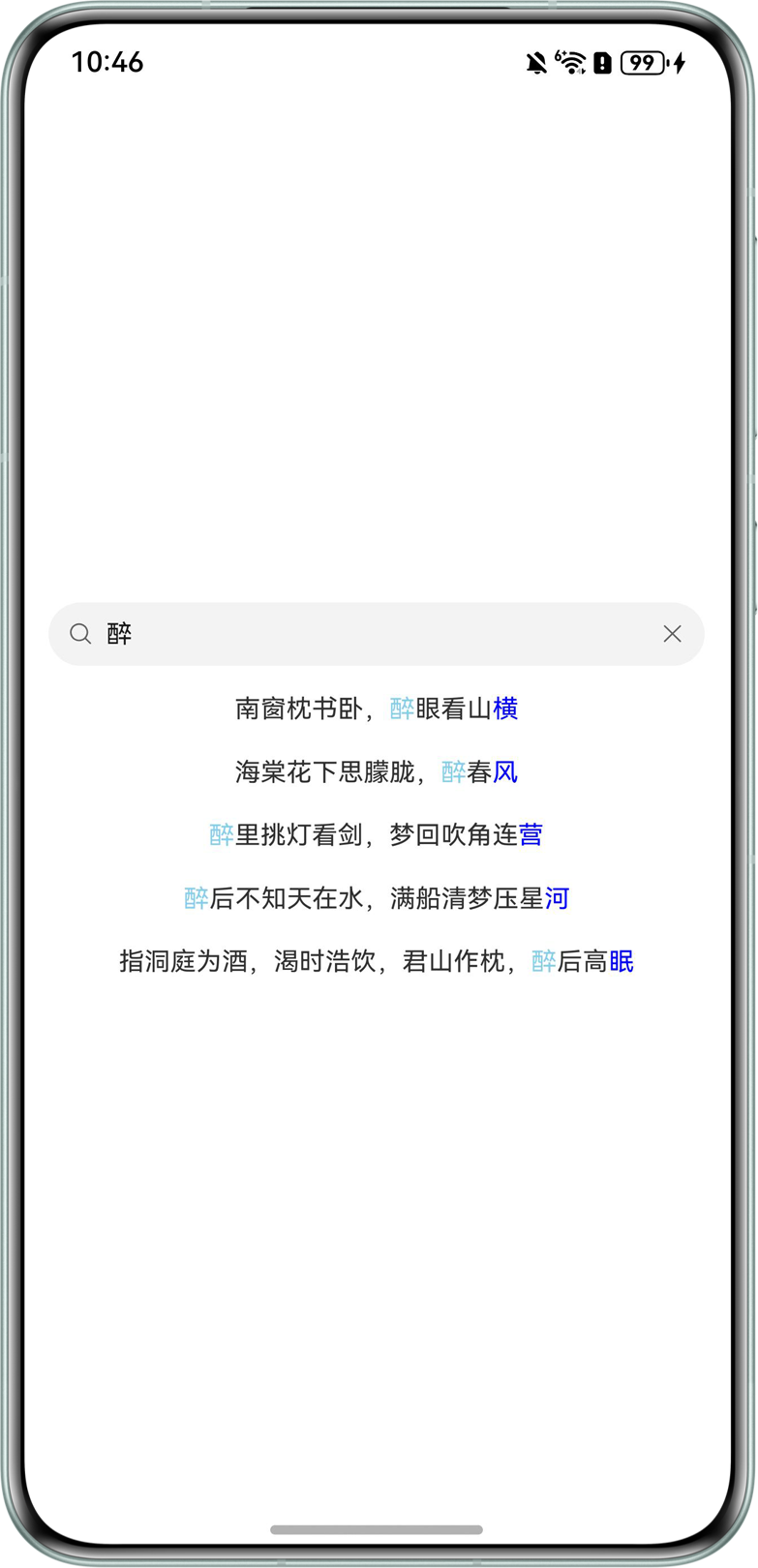
效果如下:
- 场景二:使用Stack层叠布局,TextArea区域显示文本,当弹出弹窗时,冻结高亮选项,TextArea 文本颜色变透明,上方覆盖一层 Text + Span 模拟选区高亮。关闭弹窗后恢复TextArea的选择能力。
@Entry
@Component
struct Index {
  @State showPopup: boolean = false;

  /**
   * 是否冻结下方选区高亮。
   *
   * false:显示原生 TextArea,用户可以手动选择文本。
   * true:上层弹窗获取焦点,下方用 Span 模拟刚才的系统选区。
   */
  @State freezeHighlight: boolean = false;

  /**
   * 用户手动选择时记录的系统选区。
   */
  @State manualStart: number = -1;
  @State manualEnd: number = -1;

  /**
   * 打开弹窗时锁定的选区。
   */
  @State lockedStart: number = -1;
  @State lockedEnd: number = -1;
  @State content: string =
    '下面是一个 TextArea。\n\n' +
      '请先手动长按并拖拽选择这段文本中的一部分内容。\n\n' +
      '然后点击上方按钮打开弹窗。弹窗中的 TextInput 会获取焦点并拉起输入法。\n\n' +
      '由于焦点已经切换到上层弹窗,下方 TextArea 的系统原生选区无法继续保持激活高亮。\n\n' +
      '因此 Demo 会记录你手动选择的 start/end,然后在下方 TextArea 区域上方绘制一层 Span 高亮,用来模拟系统选区效果。';

  build() {
    Stack({ alignContent: Alignment.Top }) {
      Column() {
        Text('TextArea 手动选区 + 上层弹窗输入法 Demo')
          .fontSize(20)
          .fontWeight(FontWeight.Bold)
          .fontColor('#222222')
          .width('100%')
          .margin({ bottom: 12 })


        Button('打开上层输入弹窗,并保持下方选区高亮')
          .width('100%')
          .height(44)
          .onClick(() => {
            this.openPopup();
          })

        this.BottomTextAreaBox();

        Blank();
      }
      .width('100%')
      .height('100%')
      .padding({
        left: 20,
        right: 20,
        top: 50,
        bottom: 20
      })
      .backgroundColor('#F5F6F7')

      if (this.showPopup) {
        this.PopupInputLayer();
      }
    }
    .width('100%')
    .height('100%')
  }

  /**
   * 下方 TextArea 区域。
   *
   * 这里 TextArea 始终存在。
   * 未冻结时:用户使用系统原生选区。
   * 冻结后:TextArea 文本颜色变透明,上方覆盖一层 Text + Span 模拟选区高亮。
   */
  @Builder
  BottomTextAreaBox() {
    Column() {
      Stack({ alignContent: Alignment.TopStart }) {
        TextArea({
          text: this.content,
          placeholder: ''
        })
          .width('100%')
          .height('100%')
          .fontSize(17)
          .fontColor(this.freezeHighlight ? '#00000000' : '#222222')
          .lineHeight(28)
          .backgroundColor(Color.White)
          .borderRadius(8)
          .padding(12)
          .border({
            width: 1,
            color: '#DDDDDD'
          })
          /**
           * 如果你的 SDK 支持 selectedBackgroundColor,
           * 可以打开这一行来设置系统原生选区颜色。
           *
           * 注意:
           * 这个颜色只对 TextArea 自己获得焦点时的系统选区有效。
           * 一旦焦点切到上层 TextInput,系统选区仍然无法保证保持显示。
           */
          // .selectedBackgroundColor('#6633B5E5')
          .onChange((value: string) => {
            this.content = value;
          })
          .onTextSelectionChange((selectionStart: number, selectionEnd: number) => {
            const start = Math.min(selectionStart, selectionEnd);
            const end = Math.max(selectionStart, selectionEnd);

            /**
             * 只记录有效的非空选区。
             * 因为焦点切换或点击按钮时,系统可能回调 start == end。
             * 这种情况下不要覆盖之前用户手动选中的范围。
             */
            if (end > start) {
              this.manualStart = start;
              this.manualEnd = end;
            };
          })

        if (this.freezeHighlight) {
          this.FrozenHighlightOverlay();
        }
      }
      .width('100%')
      .height(330)
    }
    .width('100%')
    .margin({ top: 24 })
  }

  /**
   * 覆盖在 TextArea 上方的冻结高亮层。
   *
   * 这不是系统原生 selection,
   * 而是在焦点转移到上层 TextInput 后,用来保持视觉高亮的方案。
   */
  @Builder
  FrozenHighlightOverlay() {
    Text() {
      Span(this.getPrefixText())
        .fontSize(17)
        .fontColor('#222222')

      Span(this.getSelectedText())
        .fontSize(17)
        .fontColor('#111111')
        .textBackgroundStyle({
          color: '#6633B5E5',
          radius: 3
        })

      Span(this.getSuffixText())
        .fontSize(17)
        .fontColor('#222222')
    }
    .width('100%')
    .height('100%')
    .padding(12)
    .lineHeight(28)
    .backgroundColor(Color.White)
    .borderRadius(8)
    .border({
      width: 1,
      color: '#DDDDDD'
    })
    .zIndex(2)
  }

  /**
   * 上层弹窗。
   *
   * 弹窗中的 TextInput 获取焦点后,输入法会弹出。
   */
  @Builder
  PopupInputLayer() {
    Stack({ alignContent: Alignment.Top }) {
      /**
       * 半透明遮罩,可根据需求删除。
       */
      Column()
        .width('100%')
        .height('100%')
        .backgroundColor('#33000000')
        .onClick(() => {
          // 点击遮罩是否关闭弹窗可按业务决定this.closePopup()。
        })

      Column() {
        Row() {
          Text('上层弹窗输入框')
            .fontSize(18)
            .fontWeight(FontWeight.Medium)
            .fontColor('#222222')
            .layoutWeight(1)

          Text('关闭')
            .fontSize(15)
            .fontColor('#0A59F7')
            .padding({
              left: 12,
              right: 4,
              top: 4,
              bottom: 4
            })
            .onClick(() => {
              this.closePopup();
            })
        }
        .width('100%')
        .margin({ bottom: 12 })

        TextInput({
          placeholder: '焦点在这里,输入法会弹出'
        })
          .id('popup_input')
          .width('100%')
          .height(44)
          .fontSize(16)
          .backgroundColor('#F2F3F5')
          .borderRadius(8)
          .padding({
            left: 12,
            right: 12
          })
          .focusable(true)
          .defaultFocus(true)
      }
      .width('90%')
      .padding(16)
      .backgroundColor(Color.White)
      .borderRadius(12)
      .shadow({
        radius: 20,
        color: '#33000000',
        offsetX: 0,
        offsetY: 6
      })
      .margin({ top: 90 })
    }
    .width('100%')
    .height('100%')
    .zIndex(100)
  }

  private openPopup() {

    /**
     * 锁定用户最后一次手动选择的系统选区。
     */
    this.lockedStart = this.manualStart;
    this.lockedEnd = this.manualEnd;

    /**
     * 开启冻结高亮。
     *
     * 注意:
     * 此后下方视觉高亮不再依赖系统 selection,
     * 因为焦点马上会切到上层 TextInput。
     */
    this.freezeHighlight = true;
    this.showPopup = true;


    /**
     * 等待弹窗 TextInput 渲染完成后请求焦点。
     * TextInput 获得焦点后会拉起输入法。
     */
    setTimeout(() => {
      focusControl.requestFocus('popup_input');
    }, 100);
  }

  private closePopup() {
    this.showPopup = false;

    /**
     * 关闭弹窗后恢复 TextArea 的原生选择能力。
     * 如果你希望关闭弹窗后仍然保持视觉高亮,可以不改这个值。
     */
    this.freezeHighlight = false;
  }

  private getPrefixText(): string {
    if (!this.isLockedRangeValid()) {
      return this.content;
    };
    return this.content.substring(0, this.lockedStart);
  }

  private getSelectedText(): string {
    if (!this.isLockedRangeValid()) {
      return '';
    };
    return this.content.substring(this.lockedStart, this.lockedEnd);
  }

  private getSuffixText(): string {
    if (!this.isLockedRangeValid()) {
      return '';
    };
    return this.content.substring(this.lockedEnd);
  }

  private isLockedRangeValid(): boolean {
    return this.lockedStart >= 0 &&
      this.lockedEnd > this.lockedStart &&
      this.lockedEnd <= this.content.length;
  }
}