背景知识
UI测试框架(UITest)为开发者提供UI界面查找和模拟操作的能力,可覆盖UI自动化测试的关键场景,包括界面控件精准查找、UI交互操作(如点击、滑动、文本输入等)、外设行为模拟(如键盘输入、鼠标操作、触控板手势、手写笔动作等),助力开发者开发高效可靠的界面自动化测试用例。
解决方案
- 创建HarmonyOS工程,在工程目录\entry\src\main\ets\pages\Index.ets中编写被测页面。
@Entry @Component struct SliderDemo { @State sliderValue: number = 10; build() { Column({ space: 30 }) { // 垂直排列的容器,子组件间距30 Slider({ // 滑动条组件 value: this.sliderValue, min: 0, max: 100, step: 1, style: SliderStyle.OutSet }) .onChange((value: number) => { this.sliderValue = value; }) .width('80%') .height(40) Text(`当前滑动值:${this.sliderValue}`) .fontSize(20) .fontWeight(FontWeight.Bold) } .alignItems(HorizontalAlign.Center) // 子组件水平居中 .width('100%') .height('100%') .justifyContent(FlexAlign.Center) // 子组件垂直居中 } } - 创建Instrument Test的ArkTS测试用例,在工程目录\entry\src\ohosTest\ets\test\uitest.test.ets中实现单元测试代码。
import { describe, it, expect, Level } from '@ohos/hypium';
import { abilityDelegatorRegistry, Driver, ON, Component } from '@kit.TestKit';
import { UIAbility, Want } from '@kit.AbilityKit';


const delegator: abilityDelegatorRegistry.AbilityDelegator = abilityDelegatorRegistry.getAbilityDelegator();


export default function abilityTest() {
  describe('ActsAbilityTest1', () => {
    it('testUiExample', Level.LEVEL3, async (done: Function) => {
      console.info("uitest: TestUiExample begin");


      // 初始化Driver对象
      const driver = Driver.create();
      const bundleName = abilityDelegatorRegistry.getArguments().bundleName;


      // 指定被测应用包名、ability名
      const want: Want = {
        bundleName: bundleName,
        abilityName: 'EntryAbility'
      }


      // 拉起被测应用
      await delegator.startAbility(want);


      // 等待应用拉起完成
      await driver.waitForIdle(4000, 5000);


      // 确认当前应用顶部Ability为指定的ability
      const ability: UIAbility = await delegator.getCurrentTopAbility();
      console.info("get top ability");
      expect(ability.context.abilityInfo.name).assertEqual('EntryAbility');


      // 查找对应的组件
      let slider: Component = await driver.findComponent(ON.type('Slider'));
      expect(slider != null).assertTrue();
      let bounds = await slider.getBounds();
      console.info('count: ', bounds);


      // 设置slider的进度条
      const progress = 20;
      const startX = Math.round((bounds.left + bounds.right) / 2);
      const startY = Math.round((bounds.top + bounds.bottom) / 2);
      const endX = Math.round(startX + bounds.left + (bounds.right - bounds.left) * (progress / 100));
      const endY = startY;


      // 执行滑动操作
      await driver.swipe(startX, startY, endX, endY);
      done();
    });
  });
}
常见FAQ
Q:如何通过UI单元测试框架获取到菜单项并点击进行action操作?
A:使用DevEco Studio中的ArkUI Inspector检查菜单的属性,如果菜单的属性是Button和Option,可以使用findComponent或findComponents基于ON.type找到对应的组件,然后进行action操作。
Q:控件树中类型为空串、root和WindowScene分别代表什么含义?基于控件树如何进行UI自动化?
A:控件树中类型为空串的结点代表当前的屏幕信息,类型为root和WindowScene的节点与当前屏幕的对应关系可以通过DevEco Testing Hypium安装向导的UiViewer进行查看和实现UI自动化。
Q:UiTest中Component提供控件属性获取,但是只能获取id、文本信息、类型等少数属性,无法获取对齐方式AlignType、输入类型InputType等更多属性,如何获取这些属性?
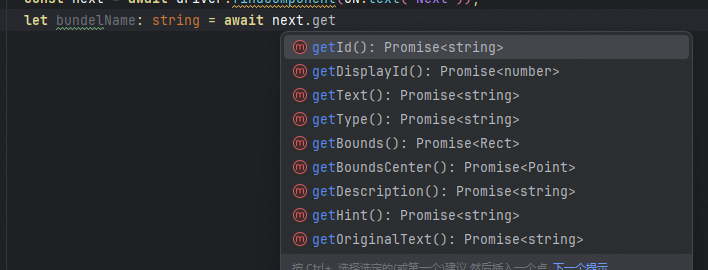
A:使用getInspectorInfo获取节点的结构信息,获取的信息和DevEco Studio内置ArkUI Inspector工具里面的一致(getInspectorInfo接口用于获取所有节点的信息,作为调试接口使用,频繁调用会导致性能下降)。