问题现象
给List中每一个ListItem绑定id,使用componentSnapshot进行组件截图,id发生变化后还是只截到第一个ListItem。
import { image } from '@kit.ImageKit';
import { fileIo, fileUri } from '@kit.CoreFileKit';
import { common } from '@kit.AbilityKit';

@Entry
@Component
struct ListScreenshot {
  @State imageUrl: Resource = $r('app.media.img_1'); // 替换已有图片资源
  @State studyPath: Resource = $r('app.media.img_2'); // 替换已有图片资源
  @State currentImage: string = '1';
  @State currentIndex: number = 0;
  @State secondImageUrl: string = '';
  @State secondStudyPath: string = '';

  async screenshot() {
    // 1.截图
    const pixelMap = await this.getUIContext().getComponentSnapshot().get(this.currentImage);
    // 2.获取图片二进制数据
    const imagePacker = image.createImagePacker();
    // format图片类型quality图片质量,原图100
    const arrayBuffer = await imagePacker.packToData(pixelMap, { format: 'image/png', quality: 98 });
    // 3.存储在应用下
    const ctx = this.getUIContext().getHostContext() as common.UIAbilityContext;
    const path = ctx.cacheDir + '/' + Date.now() + '.jpg';
    // 打开一个未创建的图片,让它具备创建和读写能力
    const file = fileIo.openSync(path, fileIo.OpenMode.CREATE | fileIo.OpenMode.READ_WRITE);
    if (this.currentImage == '0') {
      this.secondImageUrl = fileUri.getUriFromPath(path);
    } else {
      this.secondStudyPath = fileUri.getUriFromPath(path);
    }
    // 写入沙箱
    fileIo.writeSync(file.fd, arrayBuffer);
    fileIo.closeSync(file.fd);
  }

  build() {
    Column() {
      List() {
        ForEach([this.imageUrl, this.studyPath], (item: string, index: number) => {
          ListItem() {
            // 上部分
            Column() {
              Image(item)
                .width(240)
                .height(220)
                .objectFit(ImageFit.Contain)
                .margin({ top: 5 });
            }
            .margin({ top: 60 })
            .height(300)
            .width(240)
            .backgroundColor(Color.White);
          }
          .id(this.currentImage)
          .margin({ right: 20 });
        });
      }
      .onScrollIndex((start: number, end: number, center: number) => {
        this.currentIndex = center;
        if (this.currentIndex == 0) {
          this.currentImage = '0';
        } else {
          this.currentImage = '1';
        }
      })
      .padding({ left: 20 })
      .height(585)
      .listDirection(Axis.Horizontal)
      .scrollBar(BarState.Off);

      Button('截图')
        .onClick(() => {
          // 截图方法
          this.screenshot();
        });
      // 展示保存在沙箱图片
      Row() {
        Image(this.secondImageUrl)
          .width(100)
          .height(100);
        Image(this.secondStudyPath)
          .width(100)
          .height(100);
      };
    }
    .height('100%')
    .width('100%');
  }
}
问题效果预览:
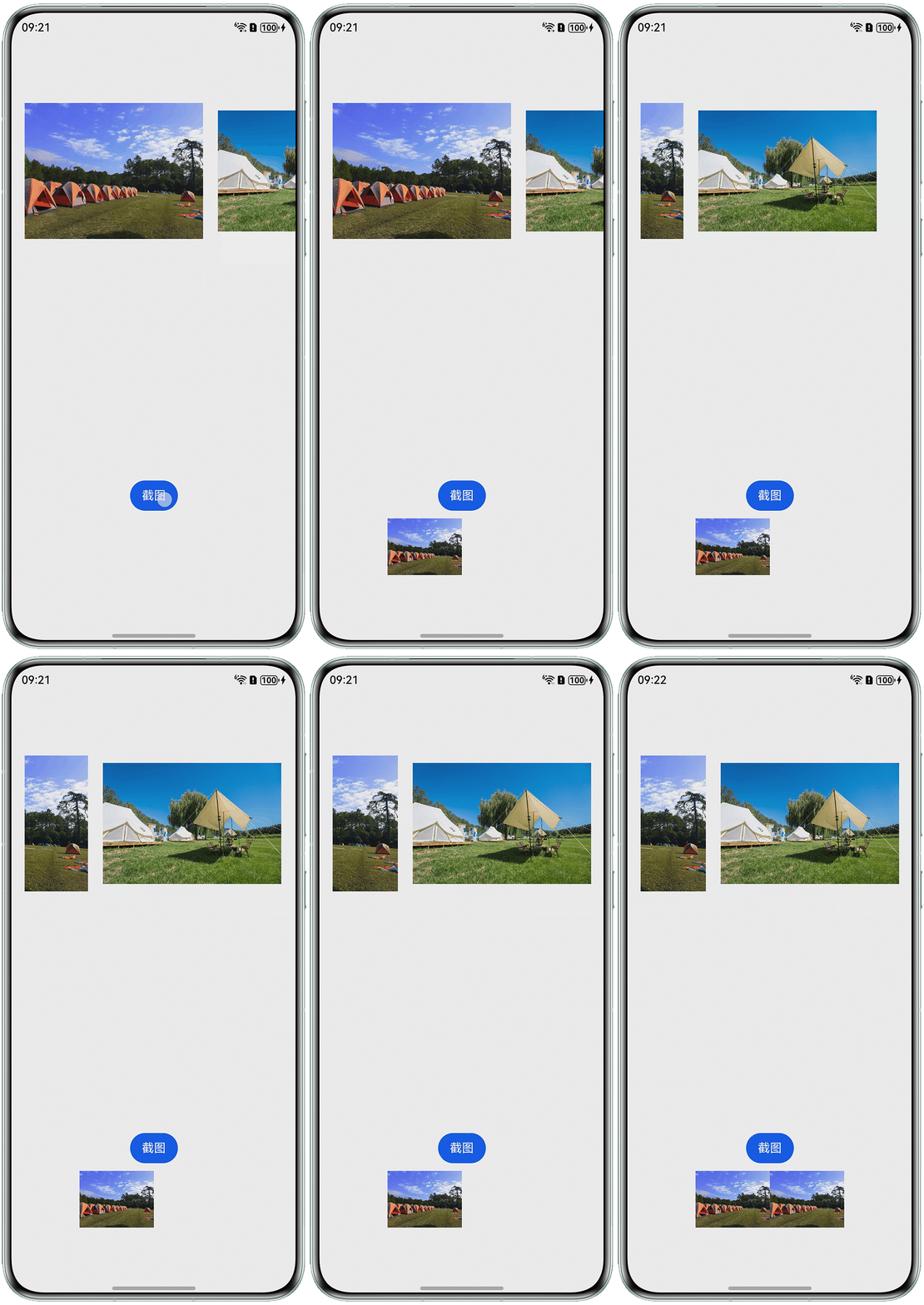
背景知识
- 组件截图componentSnapshot.get:获取已加载的组件的截图,传入组件的组件标识,找到对应组件进行截图。
- 组件标识:id为组件的唯一标识,在整个应用内唯一,唯一性由使用者保证。
- ForEach循环渲染:会为每一个循环单独生成唯一且不重复的索引和key。
问题定位
分析问题代码,发现所有ListItem绑定的id都是this.currentImage,该状态变量在ForEach循环渲染时,不会根据不同的ListItem变化,而是赋予所有的ListItem相同的值。所以组件id重复。
修改建议
- 根据ForEach的创建规律,每个ListItem组件的索引是唯一的,所以将ListItem组件id修改为索引值:
ListItem() { // 上部分 Column() { Image(item) .width(240) .height(220) .objectFit(ImageFit.Contain) .margin({ top: 5 }); } .margin({ top: 60 }) .height(300) .width(240) .backgroundColor(Color.White); } .id(index.toString()) // 用变量控制 .margin({ right: 20 }); - 重写截图方法,当显示当前ListItem时,截取对应的图片:
// 根据对应的id截图,此处根据滚动的索引this.currentIndex为截图id
const pixelMap = await this.getUIContext().getComponentSnapshot().get(this.currentIndex.toString());
完整代码如下:
import { image } from '@kit.ImageKit';
import { fileIo, fileUri } from '@kit.CoreFileKit';
import { common } from '@kit.AbilityKit';

@Entry
@Component
struct ListScreenshot {
  @State imageUrl: Resource = $r('app.media.startIcon'); // 可替换为其它图片
  @State studyPath: Resource = $r('app.media.background'); // 可替换为其它图片
  @State currentImage: string = '1';
  @State currentIndex: number = 0;
  @State secondImageUrl: string = '';
  @State secondStudyPath: string = '';

  async screenshot() {
    // 根据对应的id截图,此处根据滚动的索引this.currentIndex为截图id
    const pixelMap = await this.getUIContext().getComponentSnapshot().get(this.currentIndex.toString());
    // 2.获取图片二进制数据
    const imagePacker = image.createImagePacker();
    // format图片类型quality图片质量,原图100
    const arrayBuffer = await imagePacker.packToData(pixelMap, { format: 'image/png', quality: 98 });
    // 3.存储在应用下
    const ctx = this.getUIContext().getHostContext() as common.UIAbilityContext;
    const path = ctx.cacheDir + '/' + Date.now() + '.jpg';
    // 打开一个未创建的图片,让它具备创建和读写能力
    const file = fileIo.openSync(path, fileIo.OpenMode.CREATE | fileIo.OpenMode.READ_WRITE);
    if (this.currentImage == '0') {
      this.secondImageUrl = fileUri.getUriFromPath(path);
    } else {
      this.secondStudyPath = fileUri.getUriFromPath(path);
    }
    // 写入沙箱
    fileIo.writeSync(file.fd, arrayBuffer);
    fileIo.closeSync(file.fd);
  }

  build() {
    Column() {
      List() {
        ForEach([this.imageUrl, this.studyPath], (item: string, index: number) => {
          ListItem() {
            // 上部分
            Column() {
              Image(item)
                .width(240)
                .height(220)
                .objectFit(ImageFit.Contain)
                .margin({ top: 5 });
            }
            .margin({ top: 60 })
            .height(300)
            .width(240)
            .backgroundColor(Color.White);
          }
          .id(index.toString()) // 用变量控制
          .margin({ right: 20 });
        });
      }
      .onScrollIndex((start: number, end: number, center: number) => {
        this.currentIndex = center;
        if (this.currentIndex == 0) {
          this.currentImage = '0';
        } else {
          this.currentImage = '1';
        }
      })
      .padding({ left: 20 })
      .height(585)
      .listDirection(Axis.Horizontal)
      .scrollBar(BarState.Off);

      Button('截图')
        .onClick(() => {
          // 截图方法
          this.screenshot();
        });
      // 展示保存在沙箱图片
      Row() {
        Image(this.secondImageUrl)
          .width(100)
          .height(100);
        Image(this.secondStudyPath)
          .width(100)
          .height(100);
      };
    }
    .height('100%')
    .width('100%');
  }
}