问题现象
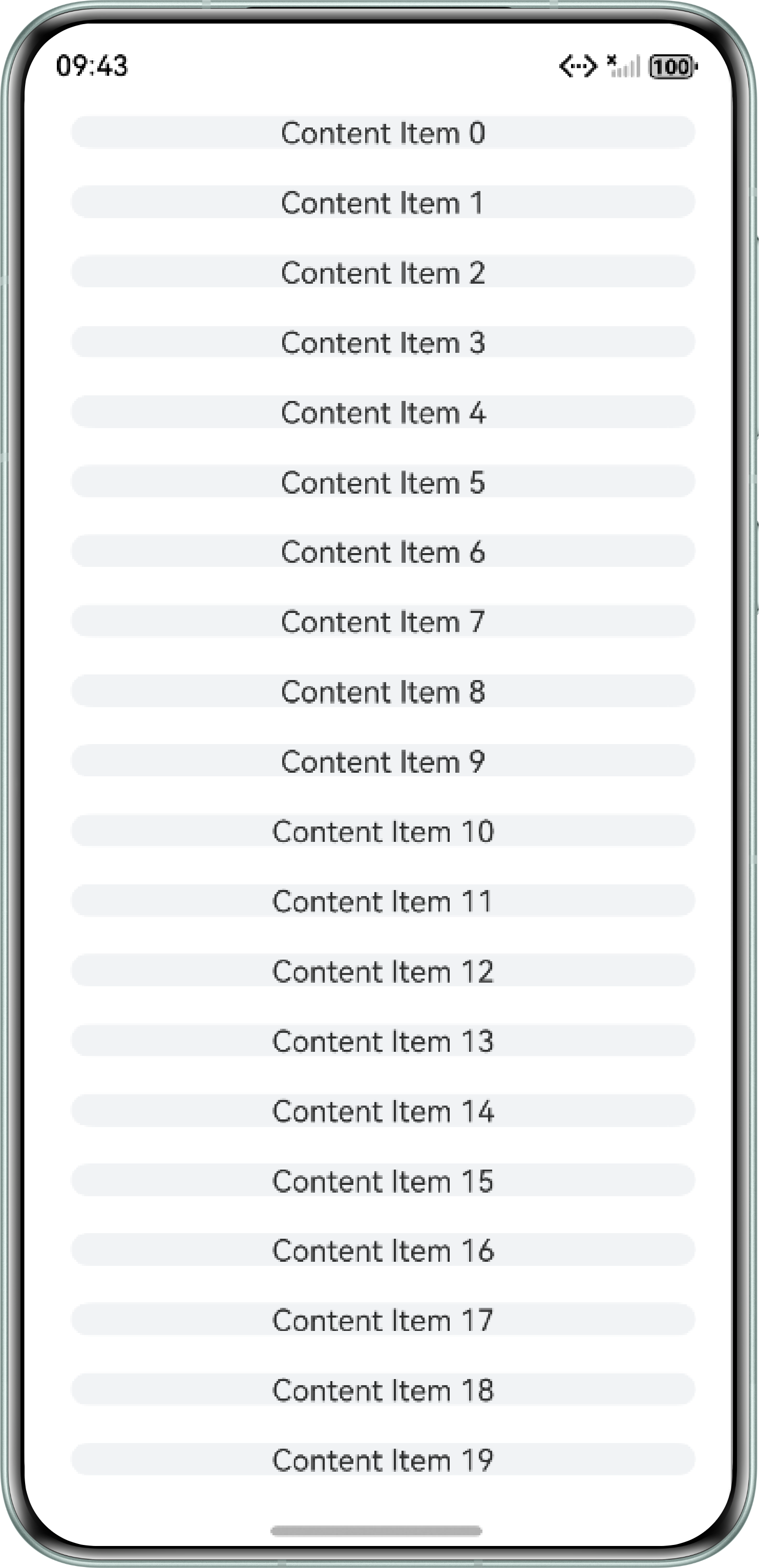
Flex容器组件设置minHeight属性后,多个子组件的高度总和超出容器高度,会导致子组件高度被压缩。
问题代码如下:
@Entry
@Component
struct FlexMin {
  @State scrollHeight: number | undefined = undefined;
  @State itemArray: string[] = [];

  aboutToAppear(): void {
    for (let i = 0; i < 20; i++) {
      this.itemArray.push(`${i}`)
    }
  }

  build() {
    Column() {
      Scroll() {
        Flex({ direction: FlexDirection.Column }) {
          ForEach(this.itemArray, (item: string) => {
            Text(`Content Item ${item}`)
              .textAlign(TextAlign.Center)
              .width('92%')
              .height(85)
              .backgroundColor('#F1F3F5')
              .borderRadius(24)
              .margin(10);
          });
        }
        .constraintSize({ minHeight: this.scrollHeight })
        .width('100%');
      }
      .padding({ left: 16 })
      .align(Alignment.TopStart)
      .width('100%')
      .layoutWeight(1)
      .onSizeChange((oldValue: SizeOptions, newValue: SizeOptions) => {
        console.info(`Scroll height before changed: ${oldValue.height}`)
        this.scrollHeight = newValue.height as number;
      });
    }
    .height('100%')
    .width('100%');
  }
}
问题效果图:
背景知识
- Flex容器组件以弹性方式布局子组件,能高效地排列和对齐子组件,并分配剩余空间;
- Flex布局有flexShrink和flexGrow属性,用于对子组件的尺寸进行剩余空间的分配和压缩。当父容器为Flex容器组件时,flexShrink属性的默认值为1,即当父容器空间不足时,压缩子组件以适应父容器尺寸。
- 通用属性constraintSize可以在组件布局时进行尺寸范围限制,constraintSize的不同取值会对组件的width、height有不同的影响。
分析结论
由于组件缺省设置height且constraintSize缺省maxHeight,此时Flex组件高度为minHeight,同时Flex容器的子组件默认flexShrink为1,导致子组件压缩高度以适配Flex容器的高度。
修改建议
可以通过设置子组件的flexShrink属性为0,使子组件不压缩尺寸以适应父组件的高度。
示例代码如下:
@Entry
@Component
struct FlexMin {
  @State scrollHeight: number | undefined = undefined;
  @State itemArray: string[] = [];

  aboutToAppear(): void {
    for (let i = 0; i < 20; i++) {
      this.itemArray.push(`${i}`);
    }
  }

  build() {
    Column() {
      Scroll() {
        Flex({ direction: FlexDirection.Column }) {
          ForEach(this.itemArray, (item: string) => {
            Text(`Content Item ${item}`)
              .textAlign(TextAlign.Center)
              .width('92%')
              .height(85)
              .backgroundColor('#F1F3F5')
              .borderRadius(24)
              .margin(10)
              // 父组件为Flex时,flexShrink默认值为1,导致子组件被压缩
              // 显式设置为0,避免子组件压缩
              .flexShrink(0);
          });
        }
        .constraintSize({ minHeight: this.scrollHeight })
        .width('100%');
      }
      .padding({ left: 16 })
      .align(Alignment.TopStart)
      .width('100%')
      .layoutWeight(1)
      .onSizeChange((oldValue: SizeOptions, newValue: SizeOptions) => {
        console.info(`Scroll height before changed: ${oldValue.height}`);
        this.scrollHeight = newValue.height as number;
      });
    }
    .height('100%')
    .width('100%');
  }
}