问题现象
进入应用首页后点击按钮会出现两个自定义弹窗A和B,在点击弹窗A时,会跳转到新页面,但新页面会被弹窗B所遮挡。
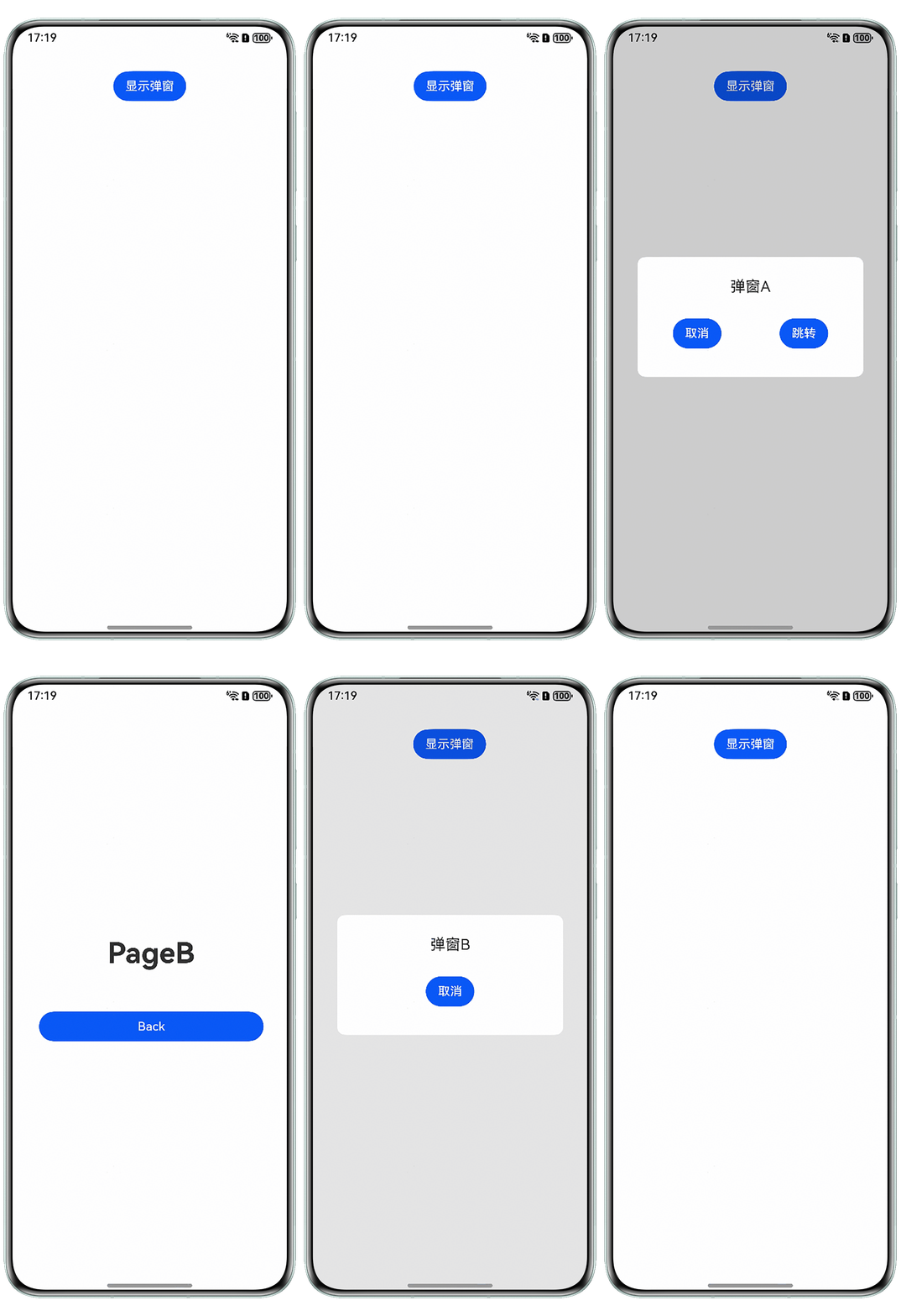
如何实现以下效果:
- 点击弹窗A跳转到新页面,弹窗B被新页面覆盖,不显示在最上方;
- 返回后弹窗A消失,弹窗B仍然显示。
解决方案
解决思路:
- 实现所需效果,弹窗A需要在跳转到新页面之前关闭,即在跳转页面方法之前使用自定义弹窗控制器的close方法,关闭弹窗A;
Button('跳转') .onClick(() => { this.controller?.close(); this.getUIContext().getRouter().pushUrl({ url: 'pages/PageB' }); }); - 弹窗B在新页面返回首页后仍然显示,不适合回到首页后再重新打开,所以考虑在跳转到新页面时把弹窗B的布局由可见设置为不可见,在返回首页时由不可见设置为可见。
@State showFlag: Visibility = Visibility.Visible; // 设置弹窗是否可见

onPageShow(): void {
  this.showFlag = Visibility.Visible;
}

onPageHide(): void {
  this.showFlag = Visibility.None;
}
完整示例代码如下:
- 首页:
// 弹窗A @CustomDialog @Component struct CustomDialogA { controller: CustomDialogController = new CustomDialogController({ builder: CustomDialogA(), autoCancel: false, }); text: string = '弹窗A'; isAutoCancel: boolean = false; textController: TextAreaController = new TextAreaController(); build() { Column() { Column() { Text(this.text) .margin({ top: 20 }) .fontSize(20); Row() { Button('取消') .onClick(() => { this.cancel(); }); Button('跳转') .onClick(() => { this.controller?.close(); this.getUIContext().getRouter().pushUrl({ url: 'pages/PageB' }); }); } .margin({ bottom: 30 }) .width('100%') .justifyContent(FlexAlign.SpaceAround); } .justifyContent(FlexAlign.SpaceBetween) .padding(8) .backgroundColor('#FFFFFF') .height(160) .margin({ bottom: 30 }) .width('80%') .borderRadius(10) .backgroundColor('rgba(255, 255, 255, 1)'); } .justifyContent(FlexAlign.Center) .width('100%') .height("100%") .onClick(() => { if (this.isAutoCancel) { this.cancel(); } }) .backgroundColor('rgba(0, 0, 0, 0.1)'); } cancel() { this.controller.close(); } } // 弹窗B @CustomDialog @Component struct CustomDialogB { text: string = '弹窗B'; @Link showFlag: Visibility; isAutoCancel: boolean = false; controller: CustomDialogController = new CustomDialogController({ builder: CustomDialogB({ showFlag: this.showFlag }), autoCancel: false, }); textController: TextAreaController = new TextAreaController(); build() { Column() { Column() { Text(this.text) .fontSize(20) .margin({ top: 20 }); Button('取消') .onClick(() => { this.cancel(); }) .margin({ bottom: 30 }); } .justifyContent(FlexAlign.SpaceBetween) .padding(8) .backgroundColor('#FFFFFF') .height(160) .margin({ bottom: 30 }) .width('80%') .borderRadius(10) .backgroundColor('rgba(255, 255, 255, 1)'); } .justifyContent(FlexAlign.Center) .width('100%') .height("100%") .onClick(() => { if (this.isAutoCancel) { this.cancel(); } }) .visibility(this.showFlag) .backgroundColor('rgba(0, 0, 0, 0.1)'); } cancel() { this.showFlag = Visibility.None; this.controller.close(); } } @Entry @Component struct Index { isAutoCancel: boolean = true; @State showFlag: Visibility = Visibility.Visible; // 设置弹窗是否可见 onPageShow(): void { this.showFlag = Visibility.Visible; } onPageHide(): void { this.showFlag = Visibility.None; } dialogControllerA: CustomDialogController = new CustomDialogController({ builder: CustomDialogA({ isAutoCancel: this.isAutoCancel }), autoCancel: this.isAutoCancel, customStyle: true, isModal: false }); dialogControllerB: CustomDialogController = new CustomDialogController({ builder: CustomDialogB({ isAutoCancel: this.isAutoCancel, showFlag: this.showFlag }), autoCancel: this.isAutoCancel, customStyle: true, isModal: false }); build() { Column() { Button('显示弹窗') .onClick(() => { this.showFlag = Visibility.Visible; this.dialogControllerB.open(); this.dialogControllerA.open(); }) .margin({ top: 30 }); }.width('100%') .height('100%'); } } - 跳转的新页面:
@Entry
@Component
struct Second {
  message: string = "PageB";

  build() {
    Row() {
      Column() {
        Text(this.message)
          .fontSize('38fp')
          .fontWeight(FontWeight.Bold);
        Blank();
        Button('Back')
          .fontSize('16fp')
          .width('296vp')
          .height('40vp')
          .onClick(() => {
            this.getUIContext().getRouter().back();
          });
      }
      .width('100%')
      .height('140vp');
    }
    .height('100%');
  }
}
实现效果如下图所示:
常见FAQ
Q:如果两个弹窗不是在@Entry修饰的组件中弹出,而是在@Component修饰的子组件中弹出,该如何实现这种效果?
A:使用@Link装饰器修饰子组件中的showFlag属性,使其与父组件中对应的数据源建立双向数据绑定。