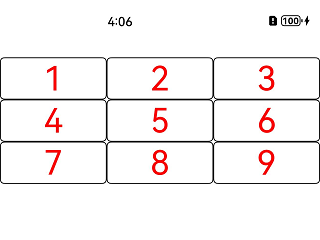
设置List组件的lanes属性,以实现交叉轴上的多列布局。示例代码如下:
// xxx.ets
@Entry
@Component
struct ListExample {
  @State arr: string[] = ['1', '2', '3', '4', '5', '6', '7', '8', '9'];

  build() {
    Column() {
      List() {
        ForEach(this.arr, (item: string) => {
          ListItem() {
            Row() {
              Text(item)
                .fontColor(Color.Red)
                .fontSize(40)
            }
          }
          .width('100%')
          .border({
            width: 1,
            color: Color.Black,
            radius: 5
          })
        })
      }
      .lanes(3)
      .alignListItem(ListItemAlign.Center)
    }
    .padding({ top: 30 })
  }
}
效果如图所示: