问题现象
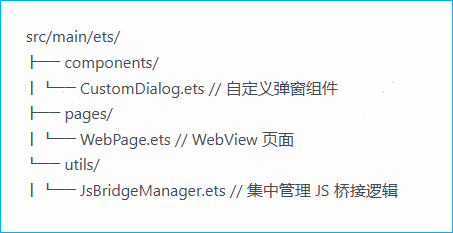
H5触发应用端自定义弹窗时,如何将参数从H5侧传递至应用弹窗,并实现WebViewController与CustomDialogController的逻辑分离,使其各自独立于不同文件?项目文件结构大致如下:
背景知识
将javaScriptProxy中的ArkTS对象注册到Web组件中,该对象将使用javaScriptProxy中指定的名称注册到网页的所有框架中,包括所有iframe,这使得JavaScript可以调用javaScriptProxy中ArkTS对象的方法。
说明:
- javaScriptProxy接口需要和deleteJavaScriptRegister接口配合使用,防止内存泄漏。
- javaScriptProxy对象的所有参数不支持更新。
- 注册javaScriptProxy对象时,同步与异步列表请至少选择一项不为空,可同时注册两类方法。
- 此接口只支持注册一个对象,若需要注册多个对象请使用registerJavaScriptProxy。
解决方案
可以通过javaScriptProxy属性将ArkTS中用于打开自定义弹窗的对象传递至Web端,Web端可通过调用该对象的方法来打开自定义弹窗,并传递相应的参数,可参考如下demo实现:
主页面加载h5页面,实例化自定义弹窗:
import { webview } from '@kit.ArkWeb';

@Entry
@Component
struct WebPage {
  titlePermission: string = '';
  msgPermission: string = '';
  webviewController: webview.WebviewController = new webview.WebviewController();
  // 实例化自定义弹窗
  dialogController: CustomDialogController = new CustomDialogController({
    builder: CustomDialogExample({
      titlePermission:this.titlePermission,
      msgPermission:this.msgPermission
    }),
    cornerRadius: 10,
    height: '100vp'
  });
  jsBridge: DetailJsBridge = new DetailJsBridge(this.webviewController,this.dialogController,(title,msg) =>{
    // 接收H5页面传递过来的参数,并给赋值给弹窗
    this.titlePermission = title;
    // 接收H5页面传递过来的参数,并给赋值给弹窗
    this.msgPermission = msg;
    // 开启弹窗
    this.dialogController.open();
  });
  build() {
    Column() {
      Web({src: $rawfile('webPage.html'), controller: this.webviewController})
        .javaScriptProxy({
          // 将jsBridge对象注册到web页面中
          object: this.jsBridge,
          // 给jsBridge对象取个别名
          name: 'jsBridgeName',
          methodList: ['openCustomDialog'],
          controller: this.webviewController
        })
        .geolocationAccess(false)
        .fileAccess(false)
    }
    .height('100%')
    .width('100%')
  }
}
自定义弹窗:
@CustomDialog
export struct CustomDialogExample {
  controller: CustomDialogController;
  titlePermission: string = '';
  msgPermission: string = '';
  build() {
    Column() {
      Text(this.titlePermission)
        .fontSize(20)
      Text(this.msgPermission)
        .fontSize(20)
    }
    .justifyContent(FlexAlign.Center)
    .height('100%')
  }
}
集中管理JS桥接逻辑代码:
export class DetailJsBridge{
  controller: webview.WebviewController;
  photoDialog?: CustomDialogController;
  callbackDialog?:(title:string,msg:string)=> void;
  constructor(controller: webview.WebviewController,dialog: CustomDialogController,
    callback?:(title:string,msg:string)=> void) {
    this.controller = controller;
    this.photoDialog = dialog;
    this.callbackDialog = callback;
  }
  // H5页面调用的方法
  openCustomDialog(title: string, msg: string ){
    // 接收H5页面传递过来的参数
    if(this.callbackDialog != null){
      this.callbackDialog(title, msg);
    }
  }
}
主页面加载的H5页面:
<!DOCTYPE html>
<html style="height: 100%;">
<head>
    <style>
        button {
            width: 500px;
            height: 100px;
            font-size: 50px;
            background-color: #0A59F7;
            color: white;
            border-radius: 60px;
            border: #0A59F7;
            margin-bottom: 50px;
        }
        .div1 {
            text-align:center;
            height: 100%;
            display: flex;
            flex-direction: column;
            justify-content: flex-end;
            align-items: center;
        }
    </style>
</head>
<body style="height: 100%;">
<div class="div1">
    <button class="inline-style-button" type="button" onclick="callArkTSMethod()">CallArkTS Method</button>
</div>
<script>
    function callArkTSMethod() {
        <!-- 使用ArkTS侧注册的对象调用方法并传递参数 -->
        jsBridgeName.openCustomDialog('权限功能说明:xxxxxxxx','使用场景和目的:xxxxxxxx')
    }
</script>
</body>
</html>