

背景知识
- 软键盘避让机制:默认情况下,系统针对输入框位置,执行安全避让策略,保证输入框不会被软键盘遮挡,包含多种避让模式。
- KeyboardAvoidMode:配置键盘弹出时页面的避让模式。
- layoutWeight:组件在父组件剩余空间的布局权重。
- expandSafeArea:控制组件扩展其安全区域。
解决方案
- 场景一:使用RESIZE键盘避让模式。
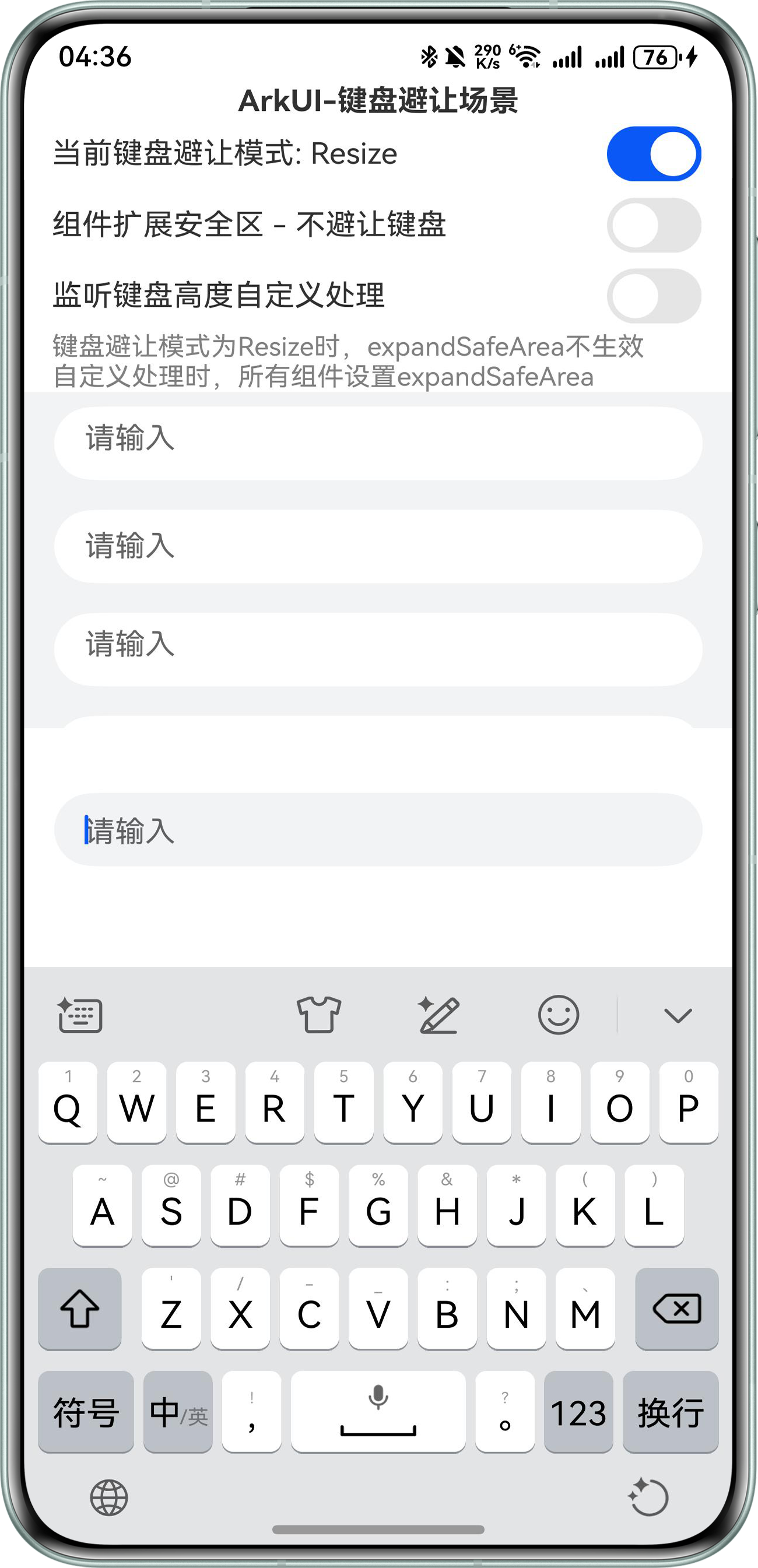
设置KeyboardAvoidMode值为RESIZE,此时页面中设置百分比宽高的组件会跟随页面压缩,直接设置宽高的组件会按设置的固定大小布局。
示例中List容器使用layoutWeight(1),layoutWeight属性作用为组件在父组件主轴方向的布局权重,即占父组件容器在主轴方向上剩余区域的多少,自适应占满父组件剩余空间。此时键盘弹出时List组件高度会被压缩,其他组件的高度不变。而在RESIZE模式下,expandSafeArea设置不生效。
效果如下:顶部自定义组件未被顶出屏幕,底部TextArea和其他组件被键盘顶起,List组件高度被压缩。
- 场景二:键盘弹出时控制组件是否避让。
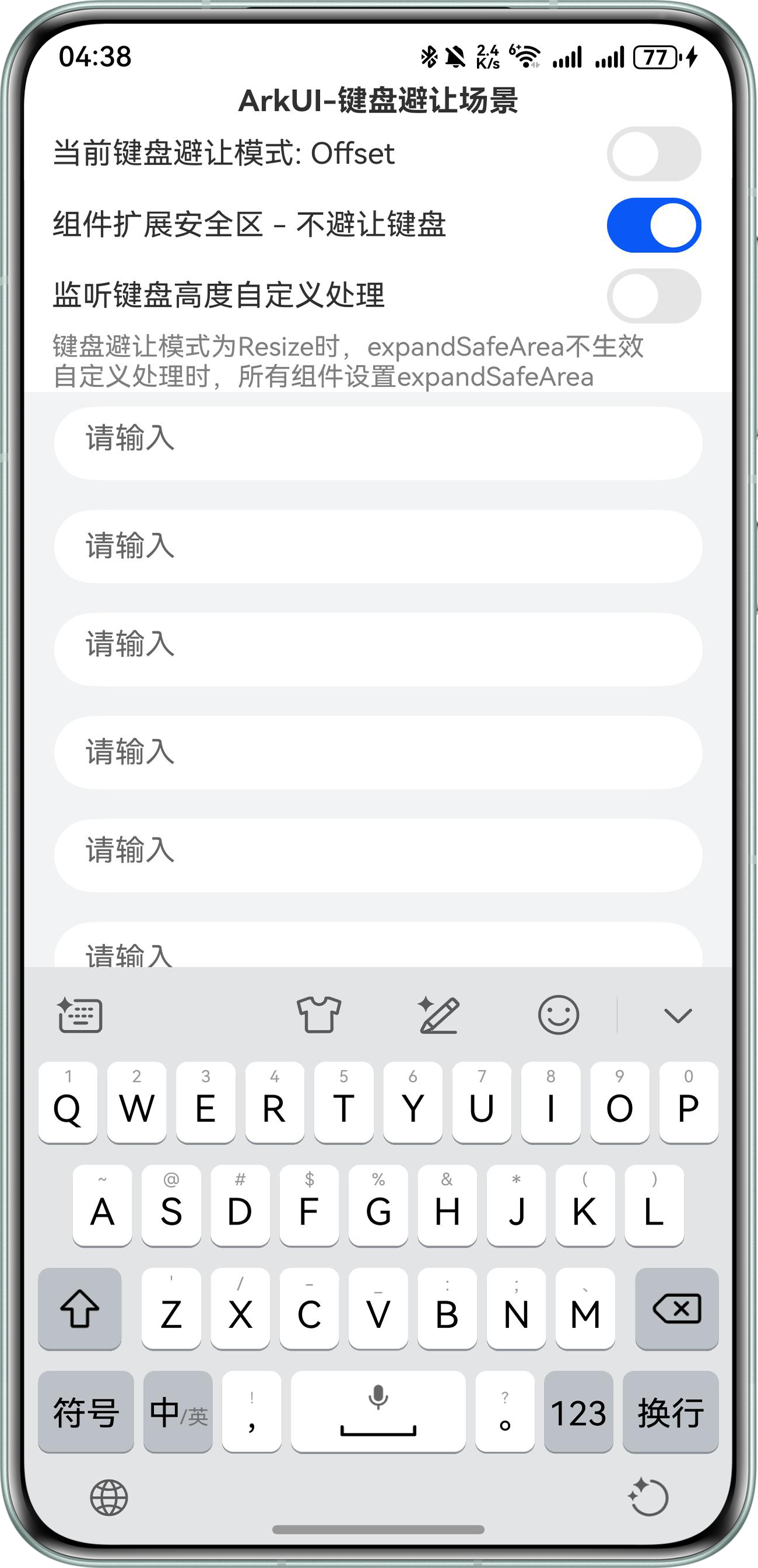
当不需要被顶起的组件被键盘顶起时,可通过expandSafeArea使该组件不避让键盘。需要注意,在KeyboardAvoidMode.RESIZE模式下,expandSafeArea属性不生效。
expandSafeArea意为扩大安全区域,type为SafeAreaType.KEYBOARD时,扩展TOP、BOTTOM区域,即该组件可以渲染到键盘的上下区域,此时该组件不避让键盘。
效果如下:
左图中,底部的TextArea未设置键盘避让,因此输入时仅该组件被顶起,其余组件未被顶起。
右图中,List设置了键盘避让,此时最下方的TextInput组件输入时,该输入组件被键盘遮挡。

- 场景三:通过监听键盘高度或安全区域高度变化,自定义处理UI布局。
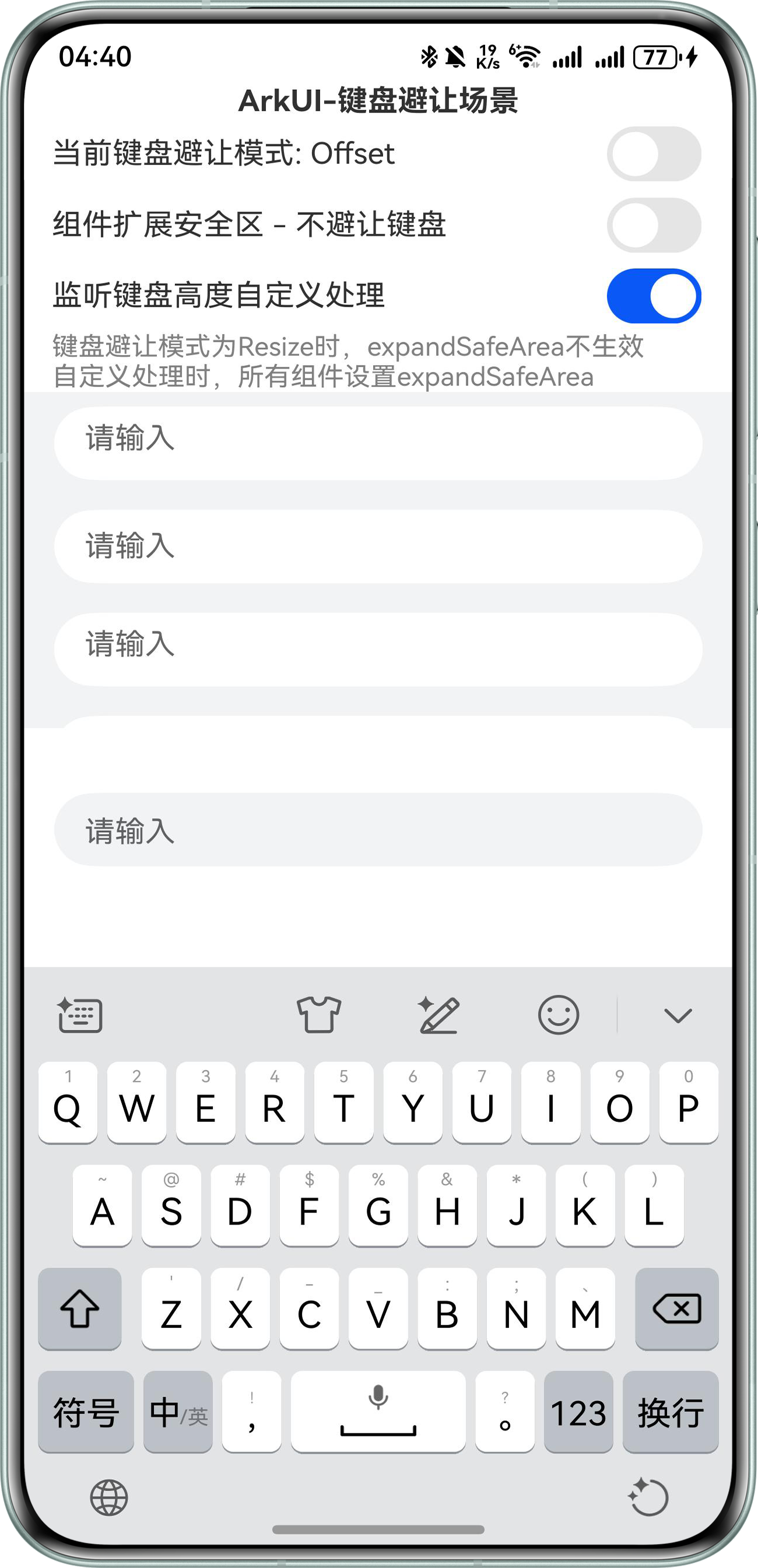
自定义处理UI布局时,注意容器组件的高度是否为固定高度,推荐使用layoutWeight属性自适应容器或组件高度。当页面释放时,注意关闭键盘事件监听。
完整示例代码如下:
import { common } from '@kit.AbilityKit';
import { KeyboardAvoidMode, window } from '@kit.ArkUI';
import display from '@ohos.display';

@Component
export struct ListSwitchItem {
  @Prop title: string;
  @Link isOn: boolean;
  onSwitchChange?: (isOn: boolean) => void;

  build() {
    Flex({ justifyContent: FlexAlign.SpaceBetween, alignItems: ItemAlign.Center }) {
      Text(this.title);
      Toggle({ type: ToggleType.Switch, isOn: false }).onChange((isOn: boolean) => {
        if (this.onSwitchChange) {
          this.onSwitchChange(isOn);
        }
      }).size({
        width: 50, height: 30
      });
    }.padding({
      left: 15, right: 15,
    });
  }
}


@Entry
@Component
struct SafeAreaKeyboardPage {
  context = this.getUIContext().getHostContext() as common.UIAbilityContext;
  private keyboardListenerWindow?: window.Window;
  @State currentKeyboardAvoidMode: boolean = false;
  @State currentExpandMode: boolean = false;
  @State isManual: boolean = false; // 手动处理各组件高度
  screenHeight: number = 0;
  @State @Watch('onKeyboardHeightChange') keyboardHeight: number = 0;
  @State listItems: string[] = [];
  @State bottomBlankHeight: number = 0;
  @State @Watch('onKeyboardFocusChange') currentFocus: number = -2;
  blueBlockBottoms: Record<string, number> = {};
  listBottom: number = 0;

  aboutToAppear(): void {
    this.setKeyboardHandler();
    for (let i = 0; i < 15; i++) {
      this.listItems.push('请输入');
    }
  }

  aboutToDisappear(): void {
    // 关闭键盘高度监听,避免内存泄露
    if (this.keyboardListenerWindow) {
      this.keyboardListenerWindow.off('keyboardHeightChange');
    }
  }

  setKeyboardHandler() {
    window.getLastWindow(this.getUIContext().getHostContext()).then(currentWindow => {
      this.keyboardListenerWindow = currentWindow;
      currentWindow.on('keyboardHeightChange', (height: number) => {
        if (this.keyboardHeight === 0 || height === 0) {
          this.keyboardHeight = this.getUIContext().px2vp(height);
        } else {
          this.onKeyboardHeightChange();
        }
      });
    });
  }

  changeKeyboardAvoidMode() {
    let target = KeyboardAvoidMode.OFFSET;
    if (!this.currentKeyboardAvoidMode) {
      target = KeyboardAvoidMode.RESIZE;
    }
    this.getUIContext().setKeyboardAvoidMode(target);
    this.currentKeyboardAvoidMode = target === KeyboardAvoidMode.RESIZE;
  }

  onKeyboardHeightChange() {
    // 手动处理各组件的高度
    if (this.bottomBlankHeight && !this.keyboardHeight) {
      this.getUIContext().animateTo({
        duration: 300,
        curve: Curve.LinearOutSlowIn,
        playMode: PlayMode.Normal
      }, () => {
        this.bottomBlankHeight = 0;
      });
    }
    if (!this.keyboardHeight) {
      return;
    }
    if (!this.isManual) {
      return;
    }
    display.getAllDisplays((err, data: Array<display.Display>) => {
      if (err.code) {
        console.error(`Failed to obtain all the display objects. Code: ${err.code}, message: ${err.message}`);
        return;
      }
      if (data.length === 0) {
        console.error('Failed to obtain any display objects');
        return;
      }
      this.screenHeight = data[0].height;
      console.info(`height = ${this.screenHeight}`);
    });
    let keyboardTopEdge = this.getUIContext().px2vp(this.screenHeight) - this.keyboardHeight;
    let animateShowParams: AnimateParam = {
      duration: 300,
      curve: Curve.LinearOutSlowIn,
      playMode: PlayMode.Normal
    };

    if (this.currentFocus === -1) {
      let bottom = this.blueBlockBottoms.below;
      let offset = bottom - keyboardTopEdge;
      this.getUIContext().animateTo(animateShowParams, () => {
        this.bottomBlankHeight = offset;
      });
      return;
    }

    if (this.currentFocus % 2) {
      let bottom = this.blueBlockBottoms.above;
      let offset = bottom - keyboardTopEdge;
      this.getUIContext().animateTo(animateShowParams, () => {
        this.bottomBlankHeight = offset;
      });
      return;
    }

    if (!(this.currentFocus % 2)) {
      // TextArea 顶出List,List高度使用LayoutWeight,因此调整Blank组件的高度就可以
      let offset = this.listBottom - keyboardTopEdge;
      this.getUIContext().animateTo(animateShowParams, () => {
        this.bottomBlankHeight = offset;
      });
      return;
    }
  }

  onKeyboardFocusChange() {
    this.setKeyboardHandler();
  }

  @Builder
  renderText(item: string, index: number) {
    Row() {
      if (index % 2) {
        TextInput({
          placeholder: item,
        })
          .layoutWeight(1)
          .margin({
            left: 16,
            right: 16,
            top: 8,
            bottom: 8,
          })
          .height(40)
          .onFocus(() => {
            this.currentFocus = index;
          })
          .backgroundColor(Color.White);
      } else {
        TextArea({
          placeholder: item,
        })
          .layoutWeight(1)
          .margin({
            left: 16,
            right: 16,
            top: 8,
            bottom: 8,
          })
          .height(40)
          .onFocus(() => {
            this.currentFocus = index;
          })
          .backgroundColor(Color.White);
      }
    };
  }

  getSafeAreaEdges(): SafeAreaEdge[] {
    if (this.currentExpandMode || this.isManual) {
      return [SafeAreaEdge.TOP, SafeAreaEdge.BOTTOM];
    }
    return [];
  }

  build() {
    Column() {
      Column() {
        Text('ArkUI-键盘避让场景')
          .fontWeight(FontWeight.Bold);
        ListSwitchItem({
          title: `当前键盘避让模式: ${!this.currentKeyboardAvoidMode ? 'Offset' : 'Resize'}`,
          isOn: this.currentKeyboardAvoidMode,
          onSwitchChange: () => {
            this.changeKeyboardAvoidMode();
          }
        });
        ListSwitchItem({
          // KeyboardAvoidMode为Resize时,expandSafeArea不生效
          title: `组件扩展安全区 - 不避让键盘`,
          isOn: this.currentExpandMode,
          onSwitchChange: (isOn: boolean) => {
            this.currentExpandMode = isOn;
          }
        });
        ListSwitchItem({
          title: `监听键盘高度自定义处理`,
          isOn: this.isManual,
          onSwitchChange: (isOn: boolean) => {
            this.isManual = isOn;
            if (!isOn) {
              this.getUIContext().getFocusController().clearFocus();
            }
          }
        });
        Text(
          `键盘避让模式为Resize时,expandSafeArea不生效\n自定义处理时,所有组件设置expandSafeArea`
        )
          .fontColor(Color.Gray)
          .fontSize(14)
          .padding({
            left: 15
          })
          .alignSelf(ItemAlign.Start)
          .textAlign(TextAlign.Start);
      }
      .expandSafeArea([SafeAreaType.KEYBOARD], this.getSafeAreaEdges());

      List() {
        ForEach(this.listItems, (item: string, index: number) => {
          ListItem() {
            this.renderText(item, index);
          };
        }, (item: string) => item);
      }
      .width('100%')
      .scrollBar(BarState.Off)
      .backgroundColor('#F1F3F5')
      .layoutWeight(1) // 父容器组件主轴方向布局比重,可以用来自动填满剩余空间,当KeyBoardAvoidMode为Resize,键盘弹出时组件会被压缩
      .onAreaChange((_oldValue: Area, newValue: Area) => {
        if (this.listBottom) {
          return;
        }
        let bottom = Number(newValue.globalPosition.y) + Number(newValue.height);
        this.listBottom = bottom;
      })
      .expandSafeArea([SafeAreaType.KEYBOARD], this.getSafeAreaEdges());

      Text()
        .backgroundColor(Color.White)
        .height(30)
        .width('100%')
        .expandSafeArea([SafeAreaType.KEYBOARD], this.getSafeAreaEdges())
        .onAreaChange((_oldValue: Area, newValue: Area) => {
          if (this.blueBlockBottoms.above) {
            return;
          }
          let bottom = Number(newValue.globalPosition.y) + Number(newValue.height);
          this.blueBlockBottoms.above = bottom;
        });

      TextArea({
        placeholder: '请输入',
      })
        .height(40)
        .margin({
          left: 16,
          right: 16,
          top: 5,
          bottom: 5,
        })
        .onFocus(() => {
          this.currentFocus = -1;
        })
        .padding({
          top: 12,
          bottom: 12
        })
        .backgroundColor('#F1F3F5')
        .expandSafeArea([SafeAreaType.KEYBOARD], this.isManual ? [SafeAreaEdge.TOP, SafeAreaEdge.BOTTOM] : []);

      Text()
        .backgroundColor(Color.White)
        .height(50)
        .width('100%')
        .expandSafeArea([SafeAreaType.KEYBOARD], this.isManual ? [SafeAreaEdge.TOP, SafeAreaEdge.BOTTOM] : [])
        .onAreaChange((_oldValue: Area, newValue: Area) => {
          if (this.blueBlockBottoms.below) {
            return;
          }
          let bottom = Number(newValue.globalPosition.y) + Number(newValue.height);
          this.blueBlockBottoms.below = bottom;
        });

      Blank() // 底部留空区域,当自行处理键盘弹出事件时生效
        .visibility(Visibility.Hidden)
        .height(this.bottomBlankHeight)
        .expandSafeArea([SafeAreaType.KEYBOARD], [SafeAreaEdge.TOP, SafeAreaEdge.BOTTOM]);
    }
    .width('100%')
    .height('100%')
    .onTouch(() => {
      // 点击非输入框区域时收起键盘
      this.currentFocus = -2;
      this.getUIContext().getFocusController().clearFocus();

    });
  }
}
总结
- KeyboardAvoidMode.RESIZE模式下,expandSafeArea设置将不起作用。
- 容器组件推荐使用百分比宽高度设置,如width('100%'),或使用layoutWeight(1)。
- 列表类容器内的子组件若使用expandSafeArea,需要进行嵌套。因此,不推荐对列表容器内的子组件使用此属性。
- 使用各种监听时,务必在退出页面前取消监听,以避免潜在的内存泄漏。
- 在自定义页面顶起高度时,可以在容器最底部使用Blank组件,并根据需要被顶起的高度结合animateto显式动画设置Blank组件的高度,以实现页面顶起效果。