背景知识
RichEditor是支持图文混排和文本交互式编辑的组件,通常用于响应用户对图文混合内容的输入操作。该组件可以通过addTextSpan方法添加文本内容,在输入法完成输入后,会触发onIMEInputComplete回调。
解决方案
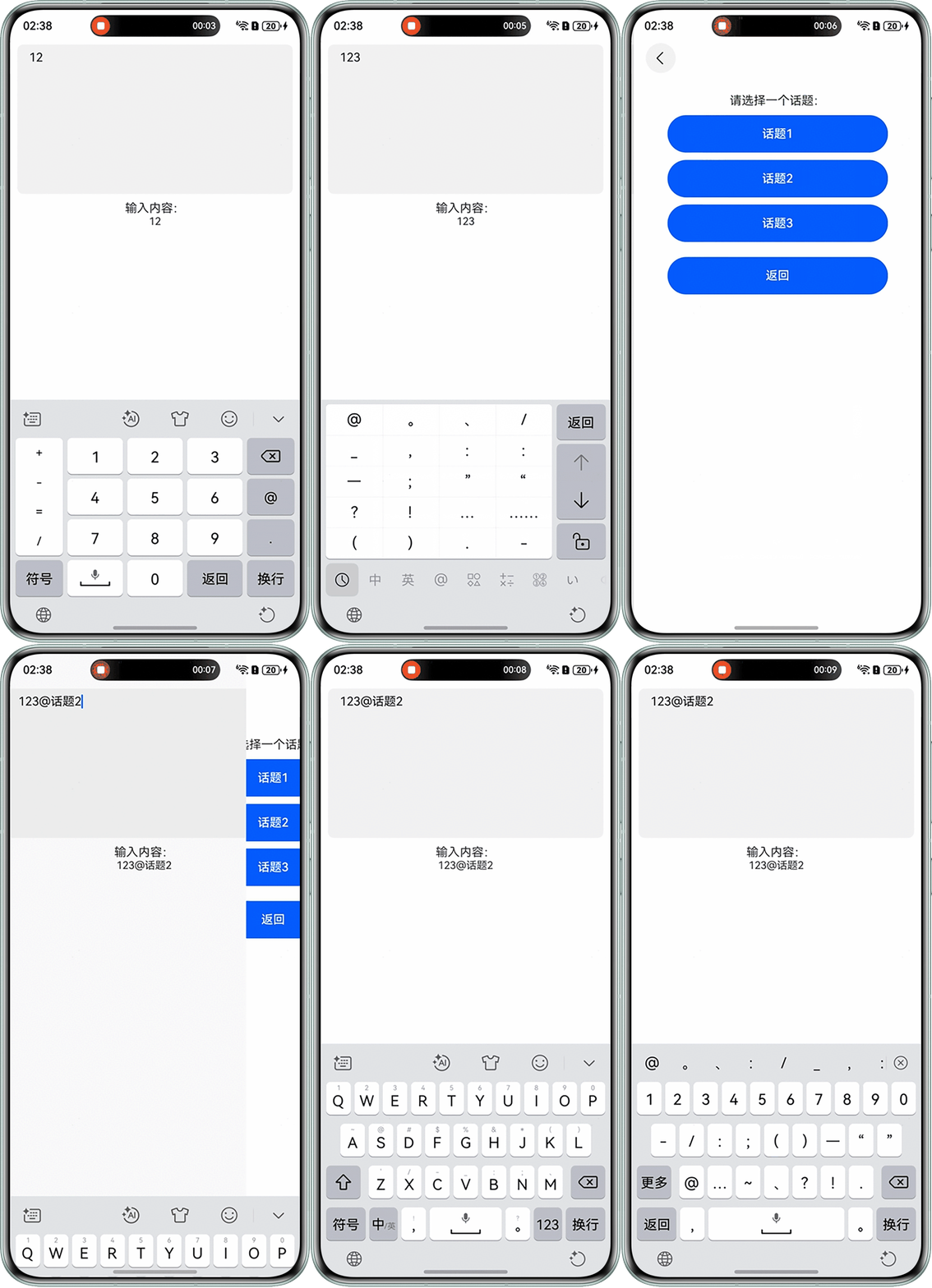
RichEditor组件通过实时文本监听机制捕获用户输入的文本流,当检测到以@或#结尾的符号时,触发导航路由跳转逻辑,引导进入话题选择界面;待完成选择后,通过跨页面回调通信将选定内容回传至原页面,并利用富文本动态插入接口将话题数据以样式化文本形式精准插入原输入位置,最终实现交互式富文本内容构建,具体步骤如下:
- 自定义方法监听输入事件;
- 检测是否输入@或#,当检测到后,通过Navigation的方式跳转到对应的话题页面,并带参数返回;
- 若光标前一个span是内容为@的textSpan,则先使用deleteSpans删除;
- 通过onIMEInputComplete回调,监听输入完成事件。
代码示例如下:
首先需要在工程配置文件module.json5中配置{"routerMap": "$profile:route_map"}。
- 在entry/src/main/resources/base/profile中新建route_map.json。
{ "routerMap": [ { "name": "pageOne", "pageSourceFile": "src/main/ets/pages/TopicSelection.ets", "buildFunction": "PageOneBuilder", "data": { "description": "this is pageOne" } } ] } - Index.ets。
// Index.ets interface result { data: String; } @Entry @Component struct RichEditorPage { @State content: string = ''; // 存储输入内容 controller: RichEditorController = new RichEditorController(); @Provide('navStack') pageInfo: NavPathStack = new NavPathStack(); // 导航栈实例 // 监听输入事件 handleInput(value: string) { this.content = value; // 更新输入内容 // 检测是否输入`@`或`#` if (value.endsWith('@') || value.endsWith('#')) { this.pageInfo.pushPath({ // 接收返回数据的回调 name: 'pageOne', onPop: (popInfo: PopInfo) => { if (popInfo.result) { let res = popInfo.result as result; this.content = this.content + res.data; this.controller.deleteSpans(); this.controller.addTextSpan(this.content); } } }); } } build() { Navigation(this.pageInfo) { Column() { // RichEditor组件 RichEditor({ controller: this.controller }) .onIMEInputComplete((value: RichEditorTextSpanResult) => { this.handleInput(value.value); // 监听输入完成事件 }) .width('100%') .height(200) .borderRadius(8) .backgroundColor('#0d000000'); // 显示输入内容 Text('输入内容:') .fontSize(16) .margin({ top: 10 }); Text(this.content) .fontSize(14) .margin({ bottom: 10 }); } .padding(10) .width('100%') .height('100%'); }; } } - TopicSelectionPage.ets。
@Builder
export function PageOneBuilder() {
  TopicSelectionPage()
}

// 话题选择页面
@Entry
@Component
struct TopicSelectionPage {
  @State topics: string[] = ['话题1', '话题2', '话题3']; // 话题列表
  @Consume('navStack') pageInfo: NavPathStack;

  onBack() {
    // 返回上级页面
    this.pageInfo.pop();
  }

  build() {
    NavDestination() {
      Column() {
        Text('请选择一个话题:')
          .fontSize(16)
          .margin({ top: 10 });
        // 显示话题列表
        ForEach(this.topics, (topic: string) => {
          Button(topic)
            .width('80%')
            .height(50)
            .margin({ top: 10 })
            .type(ButtonType.Capsule)
            .onClick(() => {
              this.pageInfo.pop({ data: topic }, true);
            });
        });

        Button('返回')
          .width('80%')
          .height(50)
          .margin({ top: 20 })
          .type(ButtonType.Capsule)
          .onClick(() => {
            this.pageInfo.pop();
          });
      }
      .padding(10)
      .width('100%')
      .height('100%');
    }
  }
}
运行效果如下: