Symptom
An error is reported when the Python dependency is installed.
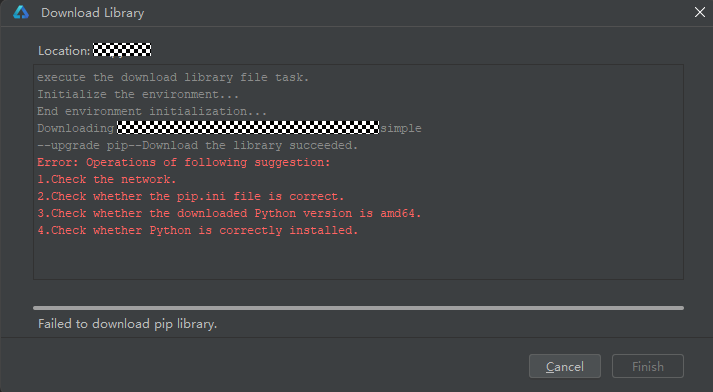
Possible Cause 1
The pip configuration is incorrect.
Solution
- Modify the pip configuration.
The pip configuration file is located at the user's root directory: ~/.pip/pip.conf (C:\Users\<UserName>\pip\pip.ini* on Windows). You can configure it as follows:
[global]
index-url = https://mirrors.huaweicloud.com/repository/pypi/simple
trusted-host = mirrors.huaweicloud.com
timeout = 120
If you need to set a proxy, refer to the following configuration. If username and password contain special characters, escape them. Change the values of proxyserver and port based on the actual proxy server. Perform the following steps:
[global]
index-url = https://mirrors.huaweicloud.com/repository/pypi/simple
proxy = http://username:password@proxyserver:port/
trusted-host = mirrors.huaweicloud.com
timeout = 120

If the password contains special characters, such as @, #, and *, the configuration may not take effect. In this case, you are advised to replace the special characters with ASCII codes and add a percent sign (%) before the ASCII codes. Refer to the following for the mapping between common symbols and ASCII codes:
- !: %21
- @: %40
- #: %23
- $: %24
- &: %26
- *: %2A
- View the current pip configuration.
pip config list
Possible Cause 2
The installation directory of Python is not deleted when Python is uninstalled on Windows.
Solution
Delete the Python installation directory.
Possible Cause 3
There is an issue with the Internet connection.
Solution
Cold start, white block detection, and UX test require network connection to download dependencies. Change the network with Internet access.
Possible Cause 4
PaddlePaddle==2.6.1 has been sunset, resulting in failed pip installation.
Solution
macOS
 //Access the Python installation directory.
cd python_dir_xxxx
//Python 3.9 installation command
./python -m pip install https://paddle-wheel.bj.bcebos.com/2.6.1/macos/macos-cpu-openblas/paddlepaddle-2.6.1-cp39-cp39-macosx_10_9_x86_64.whl
//Python 3.10 installation command
./python -m pip install https://paddle-wheel.bj.bcebos.com/2.6.1/macos/macos-cpu-openblas/paddlepaddle-2.6.1-cp310-cp310-macosx_10_9_x86_64.whl
//Python 3.11 installation command
./python -m pip install https://paddle-wheel.bj.bcebos.com/2.6.1/macos/macos-cpu-openblas/paddlepaddle-2.6.1-cp311-cp311-macosx_10_9_x86_64.whl
//Python 3.12 installation command
./python -m pip install https://paddle-wheel.bj.bcebos.com/2.6.1/macos/macos-cpu-openblas/paddlepaddle-2.6.1-cp312-cp312-macosx_10_9_x86_64.whl
Windows
//Access the Python installation directory.
cd python_dir_xxxx
./python.exe -m pip install paddlepaddle==2.6.1 -i https://www.paddlepaddle.org.cn/packages/stable/cpu/
Possible Cause 5
There is an issue with Python compatibility.
Solution
Python is incompatible with the dependencies of some specified versions. The supported versions are Python 3.9 to 3.12. Python 3.11.7 is recommended. If the latest Python version is incompatible with some dependencies, you are advised to uninstall Python and install the recommended version or update DevEco Studio.
Category | Third-Party Library | DevEco Studio 5.0.x | DevEco Studio 5.1.x | DevEco Studio 6.0.x |
Cold Start && White Block Detection | Flask | 3.0.3 | 3.0.3 | 3.0.3 |
Cold Start && White Block Detection | numpy | 1.26.4 | 1.26.4 | 1.26.4 |
Cold Start && White Block Detection | onnxruntime | 1.19.2 | 1.19.2 | 1.19.2 |
Cold Start && White Block Detection | opencv-python | 4.10.0.84 | 4.10.0.84 | 4.10.0.84 |
Cold Start && White Block Detection | pillow | 10.4.0 | 10.4.0 | 10.4.0 |
Cold Start && White Block Detection | pyclipper | 1.3.0.post6 | 1.3.0.post6 | 1.3.0.post6 |
Cold Start && White Block Detection | shapely | 2.0.6 | 2.0.6 | 2.0.6 |
Cold Start && White Block Detection | waitress | 3.0.2 | 3.0.2 | 3.0.2 |
Cold Start - Automatic | hypium | NA | 5.0.7.200 | 5.0.7.200 |
Cold Start - Automatic | xdevice | NA | 5.0.7.200 | 5.0.7.200 |
Cold Start - Automatic | xdevice-devicetest | NA | 5.0.7.200 | 5.0.7.200 |
Cold Start - Automatic | xdevice-ohos | NA | 5.0.7.200 | 5.0.7.200 |
Cold Start - Automatic | loguru | NA | 0.7.2 | 0.7.2 |
Cold Start - Automatic | numpy | NA | 1.26.4 | 1.26.4 |
Cold Start - Automatic | stable_baselines3 | NA | 2.3.2 | 2.3.2 |
Cold Start - Automatic | gym | NA | 0.26.2 | 0.26.2 |
Cold Start - Automatic | gym-notices | NA | 0.0.8 | 0.0.8 |
Cold Start - Automatic | gymnasium | NA | 0.29.1 | 0.29.1 |
Cold Start - Automatic | Shimmy | NA | 1.3.0 | 1.3.0 |
Cold Start - Automatic | opencv-python | NA | 4.10.0.84 | 4.10.0.84 |
Cold Start - Automatic | cffi | NA | 1.17.1 | 1.17.1 |
Cold Start - Automatic | pynacl | NA | 1.5.0 | 1.5.0 |
Cold Start - Automatic | torch | NA | Python version < 3.12: 2.0.0 | Python version < 3.12: 2.0.0 Python version == 3.12: 2.2.0 |
Cold Start - Automatic | torchaudio | NA | Python version < 3.12: 2.0.0 | Python version < 3.12: 2.0.0 Python version == 3.12: 2.2.0 |
Cold Start - Automatic | torchvision | NA | Python version < 3.12: 0.15.0 | Python version < 3.12: 0.15.0 Python version == 3.12: 0.17.0 |
Cold Start - Automatic | setuptools | NA | Python version < 3.12: Included with Python Python version == 3.12: 80.9.0 | Python version < 3.12: Included with Python Python version == 3.12: 80.9.0 |
Foldable Device UX Rule Detection | numpy | NA | NA | 1.26.4 |
Foldable Device UX Rule Detection | ImageHash | NA | NA | 4.3.1 |
Foldable Device UX Rule Detection | opencv-python | NA | NA | 4.10.0.84 |
Foldable Device UX Rule Detection | paddlepaddle | NA | NA | Python version < 3.12: 2.6.2 Python version == 3.12: 3.0.0 |
Foldable Device UX Rule Detection | paddleocr | NA | NA | 2.8.1 |
Foldable Device UX Rule Detection | psutil | NA | NA | 5.9.8 |
Foldable Device UX Rule Detection | Werkzeug | NA | NA | 3.1.3 |
Foldable Device UX Rule Detection | scikit-learn | NA | NA | 1.5.1 |
Foldable Device UX Rule Detection | supervision | NA | NA | 0.17.1 |