Use Cases
An app calls the checkSysIntegrityEnhanced API of Device Security Kit to obtain the enhanced system integrity check result and determine whether the device environment is secure, for example, whether the device environment has been jailbroken or the device is a non-real device.
The app can evaluate how to perform service operations based on the check result.
Constraints
-
The enhanced system integrity check capability is supported on phones, tablets, PCs/2-in-1 devices, and wearables.
-
Each app can call the API for up to 10,000 times per day and five times per minute on each device. A maximum of five concurrent calls are supported on each device.
Service Process
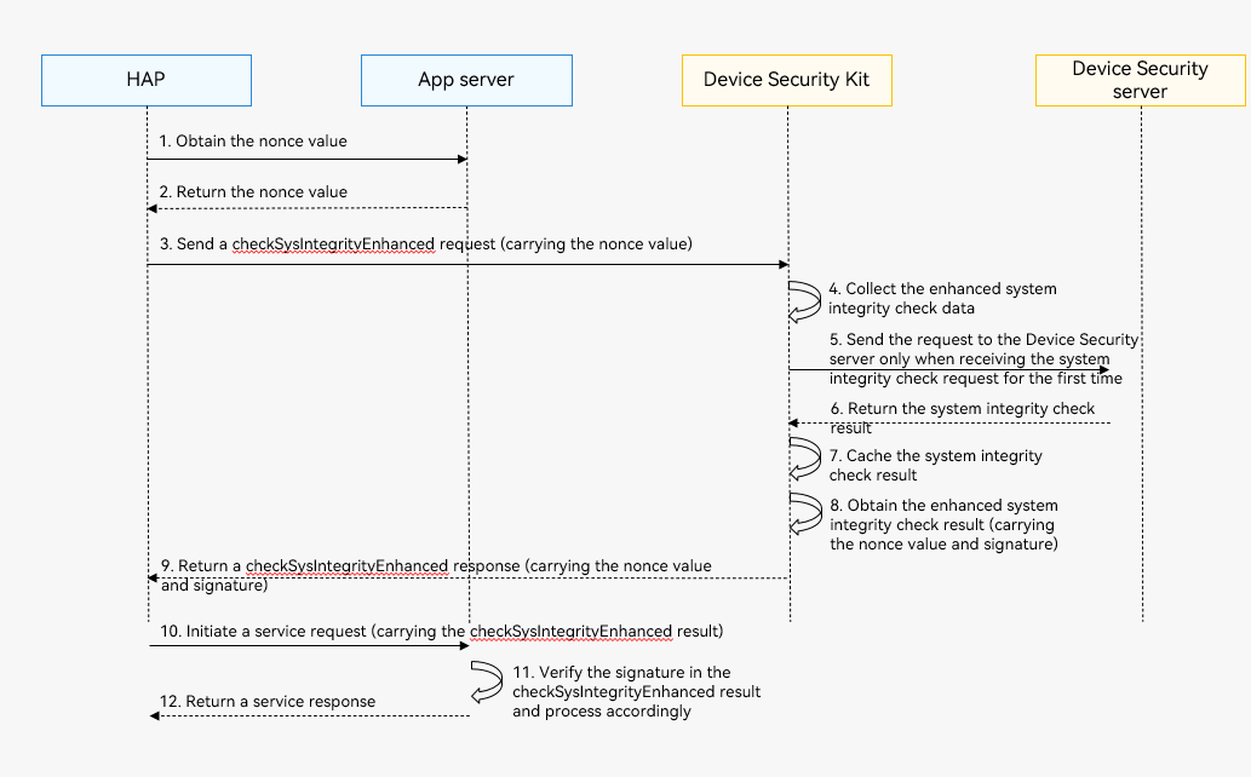
Process description:
-
Your app obtains the nonce value.
When calling the checkSysIntegrityEnhanced API, you must pass a randomly generated nonce value. which will be contained in the check result. You can check the nonce value to verify that the returned result corresponds to your request and does not encounter replay attacks.

-
A nonce value must contain 16 to 66 bytes and be encoded using Base64.
-
It is recommended that a new nonce value be randomly generated by the server for each request.
-
-
Your app calls the checkSysIntegrityEnhanced API to send an enhanced system integrity check request.
After receiving the request, Device Security Kit collects the enhanced system integrity check data, sends the check data and nonce value to the Device Security server for verification, and returns the check result to your app through the checkSysIntegrityEnhanced API.
-
When your app initiates a service request, your app server verifies the enhanced system integrity check result.
If the check result is false, you need to check the risk type in detail and determine whether to notify the user based on the risk type and your app's security requirements.

-
The current solution has combined the server and client to mitigate security risks. However, the checkSysIntegrityEnhanced API cannot mitigate all security risks.
-
The enhanced system integrity check result can be used as one of the system security proofs. You should consider relevant risks caused by possibly incorrect check results and the impacts to users. You are advised not to use the check result as the only proof to determine whether the current device is secure. It's better to take extra measures to further reduce risks.
-
To improve user experience when notifying users within the app, consider using friendly messages like:
Your device might be at risk or running in an insecure environment. Please exercise caution when using the XXX feature.
-
API Description
The following table lists the enhanced system integrity check API, which is an ArkTS API. For more information about the API, please refer to API Reference.
| API | Description |
|---|---|
| checkSysIntegrityEnhanced(req: SysIntegrityRequest): Promise<SysIntegrityResponse> | Performs enhanced system integrity check. |
Development Procedure

-
Import the Device Security Kit module and related public modules.
import { safetyDetect } from '@kit.DeviceSecurityKit'; import { BusinessError } from '@kit.BasicServicesKit'; import { hilog } from '@kit.PerformanceAnalysisKit'; -
Call the checkSysIntegrityEnhanced API to obtain the enhanced system integrity check result.

This API involves device-cloud synergy and time-consuming operations such as network connection. Therefore, do not execute this API in the UI thread, in order to avoid UI thread blocking.
const TAG = 'SafetyDetectJsTest'; // Request enhanced system integrity check and process the result. let req : safetyDetect.SysIntegrityRequest = { nonce : 'imEe1PCRcjGkBCAhOCh6ImADztOZ8ygxlWRs' // Random nonce value generated by the server. }; try { hilog.info(0x0000, TAG, 'CheckSysIntegrityEnhanced begin.'); const data: safetyDetect.SysIntegrityResponse = await safetyDetect.checkSysIntegrityEnhanced(req); hilog.info(0x0000, TAG, 'Succeeded in checkSysIntegrityEnhanced: %{public}s', data.result); // ... } catch (err) { let e: BusinessError = err as BusinessError; hilog.error(0x0000, TAG, 'CheckSysIntegrityEnhanced failed: %{public}d %{public}s', e.code, e.message); // ... } -
Verify the check result on your app server.
The enhanced check result is a JSON Web Signature (JWS) string, which consists of the following parts:
- Header
- Payload
- Signature
The three parts are encoded using Base64URL and concatenated through dots (.). You can obtain the signature by concatenating the header and payload and then signing the concatenated string using the algorithm specified in the header.
Example
eyAgICAiYW**.**.*Jxse
eyAgICAiYW**.**.*JodHxx
For more information about JWS, see JSON Web Signature.
Fields in JWS-format Header are as follows:
{
    "alg": "ES256",
    "typ":"JWS",
    "x5c": ["","",""]
}
alg: signature algorithm name. The value ES256 indicates that ECDSA is used for signature.
typ: The value is always JWS.
x5c: certificate chain used by the Device Security server for JWS signing. The certificate chain contains three levels of certificates: x5c[0] indicates the certificate for JWS signing, x5c[1] indicates the level-2 CA certificate, and x5c[2] indicates the root CA certificate.
Fields in JWS-format Payload are as follows:
{
  "hapCertificateSha256": "xxx",
  "hapBundleName": "xxx",
  "appId": "xxx",
  "basicIntegrity": false,
  "version": xxx,
  "detail": [
    "attack",
    "jailbreak",
    "emulator",
    "unlock"
  ],
  "nonce": "xxx",
  "timestamp": 1604098577327
}
nonce: nonce string passed when the checkSysIntegrityEnhanced API is called.
timestamp: timestamp generated by the server.
hapBundleName: your app package name.
hapCertificateSha256: SHA-256 digest of your app's signing certificate.
basicIntegrity: enhanced system integrity check result. The value true indicates that the system is integral, and the value false indicates there are risks.
version: version of the check service. The value is a number. The first version is 1.
appId: ID of your app.
detail: optional field. When the value of basicIntegrity is false, this field provides the cause of the risk. You can make decisions accordingly based on the risk. The options are as follows:
-
jailbreak: indicates that the device is jailbroken.
-
emulator: indicates that the device is a non-real device.
-
attack: indicates that the device is attacked.
-
unlock: indicates that the device is unlocked.
To verify the check result, perform the following steps:
- Parse the JWS-format result to obtain header, payload, and signature.
- Obtain the certificate chain from header and use Root CA certificate pair to verify it.
- Verify that the certificate chain contains three levels of certificates and the Common Name of the x5c[0] certificate is Harmony OS Device Attestation Service.
- Obtain the signature from Signature and verify it.
- Verify the values of hapBundleName and appId.
- Obtain the integrity enhanced check result from payload. If the value of basicIntegrity in the check result is false, the detail field provides the reason why the result is false. You can determine whether to notify the user based on your security requirements.

Verify the certificates and signature as instructed in the preceding steps to ensure the integrity of the check result and prevent tampering.