Response Body
| Parameter | Mandatory | Type | Description |
|---|---|---|---|
| code | Yes | String | Response code. |
| msg | Yes | String | Response code description. |
| requestId | Yes | String | Request ID. |
Response Examples
Success response example:
{
    "code": "80000000",
    "msg": "Success",
    "requestId": "157*******006"
}
Failure response example:
{
    "code": "80100003",
    "msg": "Illegal payload, badge addNum value ranges from 1 to 99",
    "requestId": "1690*******1701"
}
HTTP Response Codes
| HTTP Response Code | Description | Solution |
|---|---|---|
| 200 | Success. | - |
| 400 | Parameter error. | Check the service response code and locate the fault based on it. |
| 401 | Authentication failure. | Check the Authorization parameter in the HTTP header. |
| 404 | Service not found. | Check the request URL. |
| 500 | Internal service error. | Submit a ticket online. |
| 502 | Connection error. This typically occurs when network connectivity is unstable. | Try again later. If the fault persists, submit a ticket online. |
| 503 | Traffic control. | · Distribute the sending speed evenly. · Spread out push notification delivery to avoid peak sending times. |
Service Response Codes

Before locating faults based on service response codes, check whether the URL of the message push API (https://push-api.cloud.huawei.com/v3/[projectId]/messages:send) is correct.
-
Use the V3 push API URL. You are advised not to use the V1 or V2 push API URL. For details, please refer to Request URL Versions in Scenario-specific Messages.
-
Check the project ID in the push API URL and ensure that it is the same as the project ID of your app. If they do not match, update the project ID in the push API URL, regenerate a new JWT, obtain a new push token for your app, and then push the message again.
[h2]80000000 Success
Message
Success.
Symptom
Sent successfully.
Possible causes
Sent successfully.
Solution
None
[h2]80100000 Message Failed to Be Sent for Some Tokens
Message
Check Parameter Partial Success.
Symptom
The message failed to be sent for some tokens.
Possible causes
-
noPushTypeRight: The permission for the scenario corresponding to push-type in the request header have not been applied for.
-
noRight: The app for which the push token is generated does not belong to the project corresponding to projectId in the request URL.
-
atomicUnableSendUnsubscribedMsg: The atomic service does not support the requested message scenario.
-
tokenFormatError: The token format is incorrect.
-
countryNotSupport: The country/region is not supported.
-
tokenPlatformNotSupport: Third-party proxy tokens are not supported.
-
disableSendHuaweiMsgBecauseOfPenalty: The app is punished for violations.
-
differentImgVerifyPolicy: The value of push-type used for image risk control is different from that of push-type used for message pushing.
-
appinfoError: The app has not been created.
-
noRightToSendThisLiveNotificationEvent: The permission for the corresponding live view scenario has not been applied for.
Solution
Rectify the sending failure based on the response, which might be one of the following:
-
noPushTypeRight: Enable the permission for the scenario specified by push-type in the request header. For details about how to apply for the text-to-speech message (push-type is set to 2) permission, please refer to Applying for the Text-to-Speech Message Permission. For details about how to apply for the in-app call message (push-type is set to 10) permission, please refer to Applying for the In-App Call Message Permission.
-
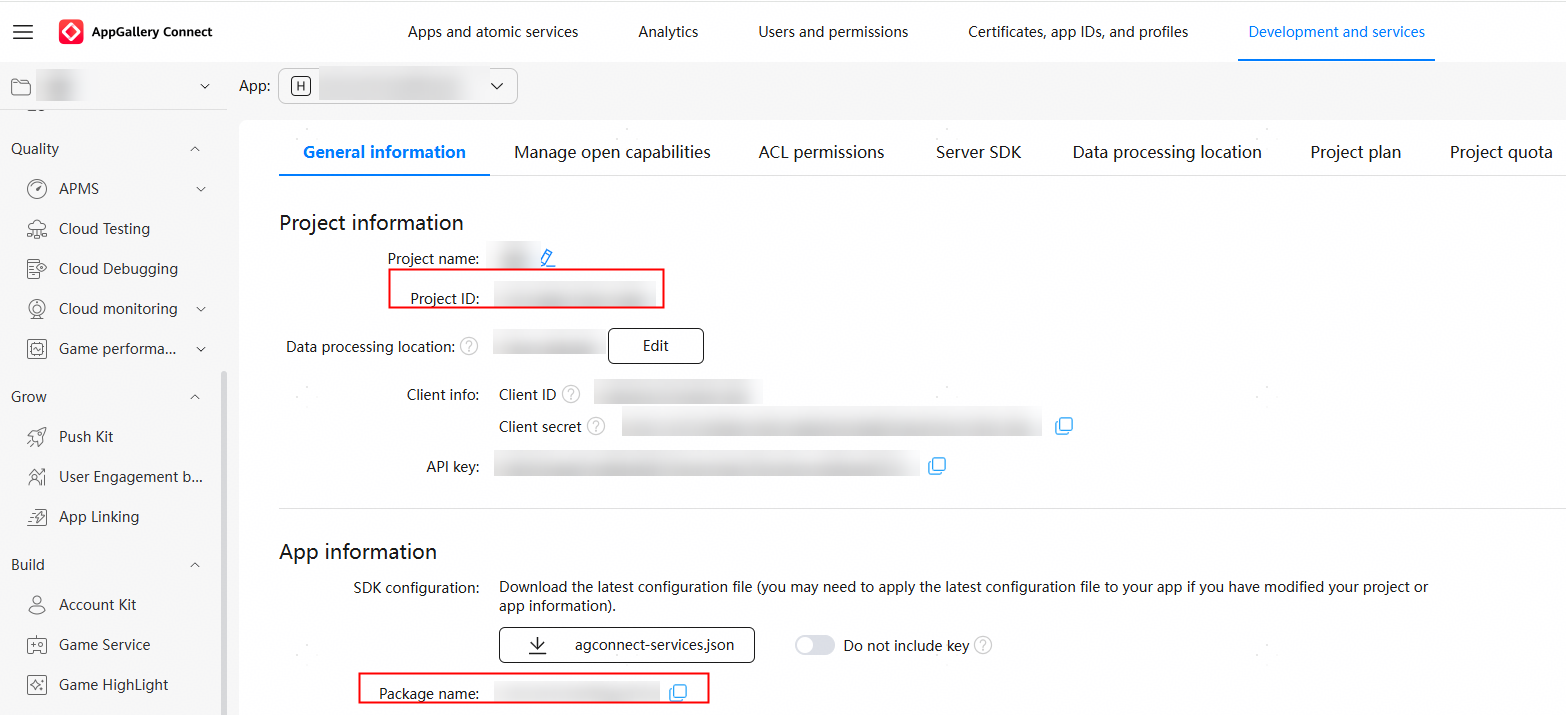
noRight: Verify that the app for which the push token is generated belongs to the project corresponding to projectId in the request URL. That is, ensure that the value of projectId in the request URL (https://push-api.cloud.huawei.com/v3/[projectId]/messages:send) is the same as the project ID of the app in AppGallery Connect.
-
atomicUnableSendUnsubscribedMsg: The atomic service can send only authorized subscription messages and widget update messages. Verify the message body content.
-
tokenFormatError: Check whether the push token format is correct. If not, apply for a new push token.
-
countryNotSupport: Submit a ticket online.
-
tokenPlatformNotSupport: Apply for a new push token.
-
disableSendHuaweiMsgBecauseOfPenalty: Check and handle violations in AppGallery Connect, and then try to send messages again.
-
differentImgVerifyPolicy: Ensure that the value of push-type used for image risk control is consistent with that of push-type used for message pushing.
-
appinfoError: Check whether the app has been created in AppGallery Connect. If the app has been created, try again later.
-
noRightToSendThisLiveNotificationEvent: Apply for the permission by referring to Applying for the Live View Kit Permission.
Response example:
{
    "code": "80100000",
    "msg": "{\"illegalTokens\":{\"tokenFormatError\":[\"MAAALgE4G98BAAAAst*******jg\"]},\"success\":1,\"failure\":1}",
    "requestId": "1690*******1701"
}
[h2]80100001 Some Request Parameters Are Invalid
Message
Check Parameter Error.
Symptom
Some request parameters are invalid.
Possible causes
Some request parameters are invalid.
Solution
Check and modify the request parameters as prompted by the response.
[h2]80100003 Incorrect Message Structure
Message
Illegal payload, {errorTips}.
Symptom
Incorrect message structure.
Possible causes
Incorrect message structure.
Solution
Check and modify the request structure as prompted by the response.
[h2]80100022 Signature Verification Not Performed for Images in the Message
Message
Anti-Spam: image not verify.
Symptom
Signature verification is not performed for images in the message.
Possible causes
Risk check is not performed for images in the message.
Solution
Verify that images in the message have passed risk check as prompted by the response.
[h2]80100024 Image Risk Control Expired
Message
Anti-Spam: verify image expire.
Symptom
The image risk control has expired.
Possible causes
An expired downloadUrl value that has passed the risk control is used to send a message.
Solution
Perform risk control verification on the delivered image again as prompted by the response.
[h2]80200001 Authentication Error
Message
Authentication Error.
Symptom
Authentication error.
Possible causes
-
The message does not contain the Authorization parameter, or the Authorization parameter is left empty.
-
The project ID used for JWT application is different from that used for sending the message.
-
The JWT in the Authorization parameter does not match the app.
-
The REST API request is not sent using the v3 request API.
-
HarmonyOS 5 and later versions no longer support OAuth 2.0-based authentication. Use JWT for authentication.
Solution
Rectify the authentication failure of the Authorization parameter in the request header as prompted by the response.
-
Verify that the message contains the Authorization parameter, and the Authorization parameter is not empty.
-
Verify that the value of projectId in the push request URL (https://push-api.cloud.huawei.com/v3/[projectId]/messages:send) is the same as the ID of the project to which your app belongs. For details, please refer to step 2 in Generating the JWT.
-
Verify that the JWT in the Authorization parameter matches the actual app. For details, please refer to Generating a JWT Based on a Service Account.
-
Use the v3 request URL (https://push-api.cloud.huawei.com/v3/[projectId]/messages:send) to send the REST API request.
-
Generate a JWT and then push the message.
[h2]80200005 JWT Expired
Message
Jwt token expired.
Symptom
The JWT has expired.
Possible causes
The JWT has expired.
Solution
Generate a new JWT as prompted by the response and then send the message. For details, please refer to Generating a JWT Based on a Service Account.
[h2]80300002 Current App Does Not Have Permission to Send Messages
Message
No permission to send message to these tmIDs.
Symptom
The current app does not have the permission to send messages.
Possible causes
-
Push Kit has not been enabled.
-
Push Kit has been enabled, but the value of projectId in the push request URL is different from the ID of the project to which the current app belongs.
Solution
-
Sign in to AppGallery Connect and ensure that Push Kit has been enabled. For details, please refer to Enabling Push Kit.
-
Verify that the value of projectId in the push request URL (https://push-api.cloud.huawei.com/v3/[projectId]/messages:send) is the same as the ID of the project to which your app belongs. For details, please refer to step 2 in Generating the JWT.
Ensure that Push Kit has been enabled for the project to which the app belongs, regenerate a JWT based on the project, and send the message again.
[h2]80300007 All Tokens Are Invalid
Message
All the tokens are invalid.
Symptom
All tokens are invalid.
Possible causes
-
noPushTypeRight: The permission for the scenario corresponding to push-type in the request header have not been applied for.
-
noRight: The app for which the push token is generated does not belong to the project corresponding to projectId in the request URL, or the push token is not re-obtained or the request URL version is not updated to V3 after the device OS is upgraded from HarmonyOS 4 or earlier (HarmonyOS for short) to HarmonyOS 5 or later (HarmonyOS NEXT for short).
-
atomicUnableSendUnsubscribedMsg: The atomic service does not support the requested message scenario.
-
tokenFormatError: The token format is incorrect.
-
countryNotSupport: The country/region is not supported.
-
tokenPlatformNotSupport: Third-party proxy tokens are not supported.
-
disableSendHuaweiMsgBecauseOfPenalty: The app is punished for violations.
-
differentImgVerifyPolicy: The value of push-type used for image risk control is different from that of push-type used for message pushing.
-
appinfoError: The app has not been created.
-
notSupportPlayVoice: When a text-to-speech message of the PLAY_VOICE category is pushed, the value of push-type in the request header is incorrect.
-
noRightToSendThisLiveNotificationEvent: The permission for the corresponding live view scenario has not been applied for.
Solution
Rectify the sending failure based on the response, which might be one of the following:
-
noPushTypeRight: Enable the permission for the scenario specified by push-type in the request header. For details about how to apply for the text-to-speech message (push-type is set to 2) permission, please refer to Applying for the Text-to-Speech Message Permission. For details about how to apply for the in-app call message (push-type is set to 10) permission, please refer to Applying for the In-App Call Message Permission.
-
noRight: Verify that the app for which the push token is generated belongs to the project corresponding to projectId in the request URL. That is, ensure that the value of projectId in the request URL (https://push-api.cloud.huawei.com/v3/[projectId]/messages:send) is the same as the project ID of the app in AppGallery Connect.
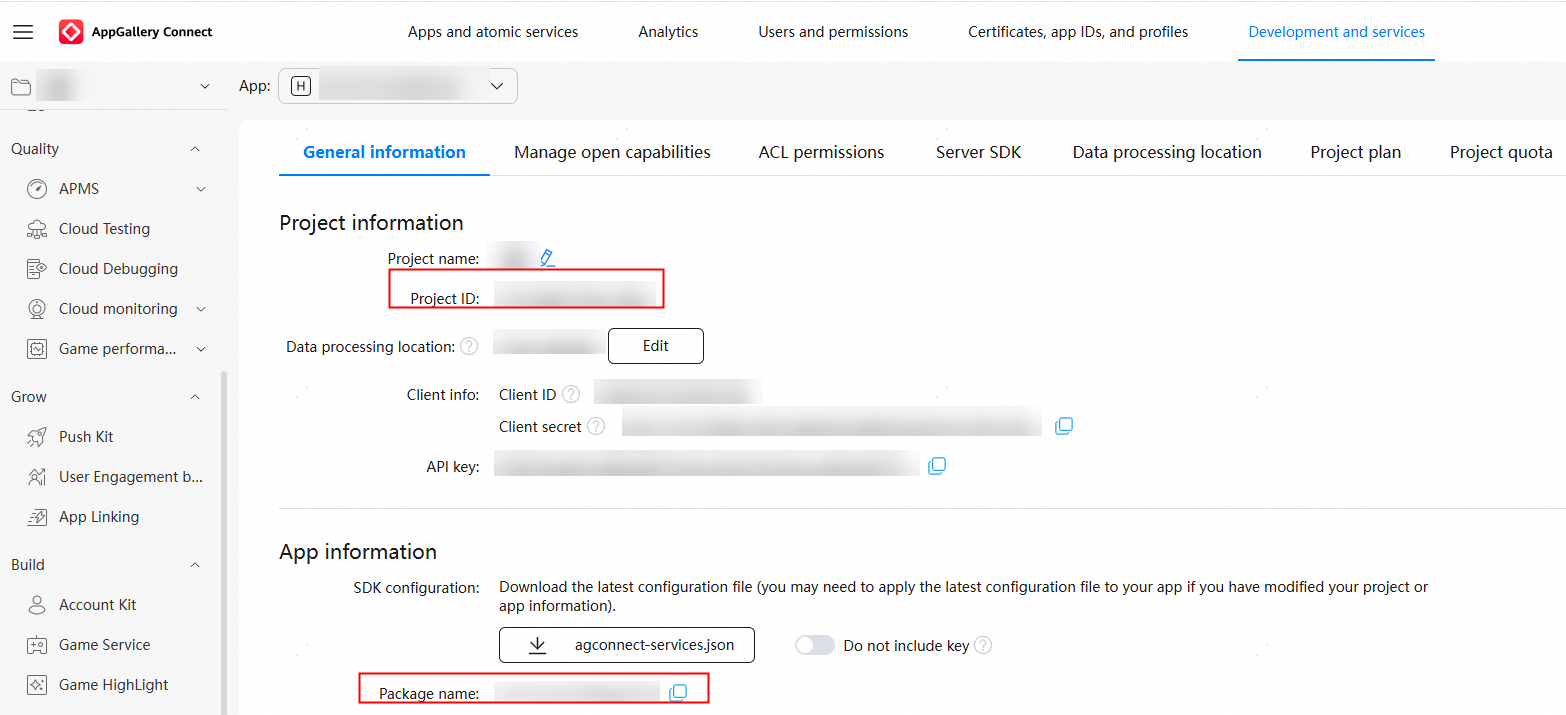
After the device OS is upgraded to HarmonyOS NEXT, regenerate the push token. (You are advised to call the getToken API upon app launch. If the push token of the device changes, report the change to your app server in a timely manner.) Then pass the request body parameters and use the V3 request URL (https://push-api.cloud.huawei.com/v3/[projectId]/messages:send) to send the REST API request.
-
atomicUnableSendUnsubscribedMsg: The atomic service can send only authorized subscription messages and widget update messages. Verify the message body content.
-
tokenFormatError: Check whether the push token format is correct. If not, apply for a new push token.
-
countryNotSupport: Submit a ticket online.
-
tokenPlatformNotSupport: Apply for a new push token.
-
disableSendHuaweiMsgBecauseOfPenalty: Check and handle violations in AppGallery Connect, and then try to send messages again.
-
differentImgVerifyPolicy: Ensure that the value of push-type used for image risk control is consistent with that of push-type used for message pushing.
-
appinfoError: Check whether the app has been created in AppGallery Connect. If the app has been created, try again later.
-
notSupportPlayVoice: If an app needs to send a message of the PLAY_VOICE category, the value of push-type in the request header must be set to 2, indicating a text-to-speech message.
-
noRightToSendThisLiveNotificationEvent: Apply for the permission by referring to Applying for the Live View Kit Permission.
Response example:
{
    "code": "80300007",
    "msg": "{\"failure\":2,\"illegalTokens\":{\"noRight\":[\"MAAALgE4G98BAAAAst*******jg\",\"MAAALgE4G98BAAAAst*******re\"]}}",
    "requestId": "1690*******1701"
}
[h2]80300008 Message Body Size Exceeds 4096 Bytes (Excluding Push Tokens)
Message
Push message size is too long.
Symptom
The message body size exceeds 4096 bytes (excluding push tokens).
Possible causes
The request message body size exceeds 4096 bytes (excluding push tokens).
Solution
Reduce the message body size and send the message again as prompted by the response.
[h2]80300010 Number of Tokens in Message Body Exceeds Default Value
Message
token count should within {0} and {1}.
Symptom
The number of tokens in the message body exceeds the default value.
Possible causes
-
Only one token can be carried each time a widget update message is sent.
-
In other scenarios, a maximum of 1000 tokens can be carried each time a message is sent.
Solution
Reduce the number of tokens each time a message is sent and send the message in different batches, as prompted by the response.
[h2]80300029 Test Message Sending Frequency Reaches Limit
Message
When send test message, the api request exceed limit.
Symptom
The test message sending frequency reaches the limit.
Possible causes
Test messages are sent too frequently.
Solution
Send test messages again later as prompted by the response.
[h2]80300030 Number of Tokens Contained in Test Message Exceeds Default Value
Message
When send test message, token count exceed limit.
Symptom
The number of tokens contained in a test message exceeds the default value.
Possible causes
-
Only one token can be carried each time a widget update test message is sent.
-
In other scenarios, a maximum of 10 tokens can be carried each time a test message is sent.
Solution
Reduce the number of tokens each time a test message is sent, as prompted by the response.
[h2]80300036 JWT Validity Period Exceeds One Day
Message
JWT expire period over threshold.
Symptom
The validity period of the JWT exceeds one day.
Possible causes
The validity period of the JWT exceeds one day.
Solution
Regenerate a JWT whose validity period is less than one day as prompted by the response and push the message again.
[h2]80300037 Message Cannot Be Sent Due to Penalties for Violations
Message
Disable send huawei msg because of penalty.
Symptom
The message cannot be sent due to penalties for violations.
Possible causes
The message cannot be sent due to penalties for violations.
Solution
Handle the violations in AppGallery Connect as prompted by the response and then send the message again.