In state management V1, $$ is recommended for implementing two-way binding for built-in components.
In state management V2, the !! syntax is recommended for unified two-way binding handling.

The !! syntax is supported since API version 12.
Overview
The !! two-way binding syntax is a syntactic sugar that facilitates two-way data binding for developers. It is used to initialize properties decorated by @Param and events decorated by @Event in child components. The @Event method name must be declared as "$" + the @Param property name. For details, see Use Scenarios.
- When !! is used, changes in the parent component are synchronized to the child component, and vice versa, achieving two-way synchronization.
- If !! is not used, changes flow only from the parent to the child, which means one-way synchronization.
[h2]Two-Way Binding Between Custom Components
-
In the Index component, construct a child Star component and use !! to enable two-way binding for the value attribute. This automatically initializes the child component's @Param value and @Event $value.
Two-way binding syntax sugar used with the @Param and @Event decorators.
Star({ value: this.value, $value: (val: number) => { this.value = val; } })The preceding syntax can be simplified as the !! syntactic sugar:
Star({ value: this.value!! }) -
Use the @Param value and @Event $value syntax to implement two-way binding of customized components.
@Entry @ComponentV2 struct Index { @Local value: number = 0; build() { Column() { Text(`${this.value}`) // Click the Button in Index to change the value. The Text components in the parent component Index and child component Star are synchronously updated. Button(`change value in parent component`).onClick(() => { this.value++; }) // Use the @Param and @Event syntax to implement two-way binding of customized components. Star({ value: this.value, $value: (val: number) => { this.value = val; } }) // ... // ··· } } } @ComponentV2 struct Star { @Param value: number = 0; @Event $value: (val: number) => void = (val: number) => {}; build() { Column() { Text(`${this.value}`) // Click the Button in the child component Star to call the `this.$value(10)` method. The Text components in the parent component Index and child component Star are synchronously updated. Button(`change value in child component`).onClick(() => { this.$value(10); }) } } } -
Use the !! syntax sugar to implement two-way binding of custom components.
@Entry
@ComponentV2
struct Index {
  @Local value: number = 0;

  build() {
    Column() {
      Text(`${this.value}`)
      // Clicking the button in Index (parent) increments the value of value, and the Text components in both Index and Star (child) are updated.
      Button(`change value in parent component`).onClick(() => {
        this.value++;
      })
      // Use the !! syntax sugar to implement two-way binding of custom components.
      Star({ value: this.value!! })
      // ...
    }
  }
}

@ComponentV2
struct Star {
  @Param value: number = 0;
  @Event $value: (val: number) => void = (val: number) => {};

  build() {
    Column() {
      Text(`${this.value}`)
      // Clicking the button in Star (child) calls this.$value(10), and the Text components in both Index and Star are updated.
      Button(`change value in child component`).onClick(() => {
        this.$value(10);
      })
    }
  }
}
Constraints
- !! does not support two-way binding across multiple layers of parent-child components.
- !! cannot be used together with @Event. Since API version 18, using !! to pass parameters to a child component's @Event method causes a compilation error.
- Using three or more exclamation marks (such as !!! and !!!!) does not enable two-way binding.
[h2]Two-Way Binding Between Built-in Component Parameters
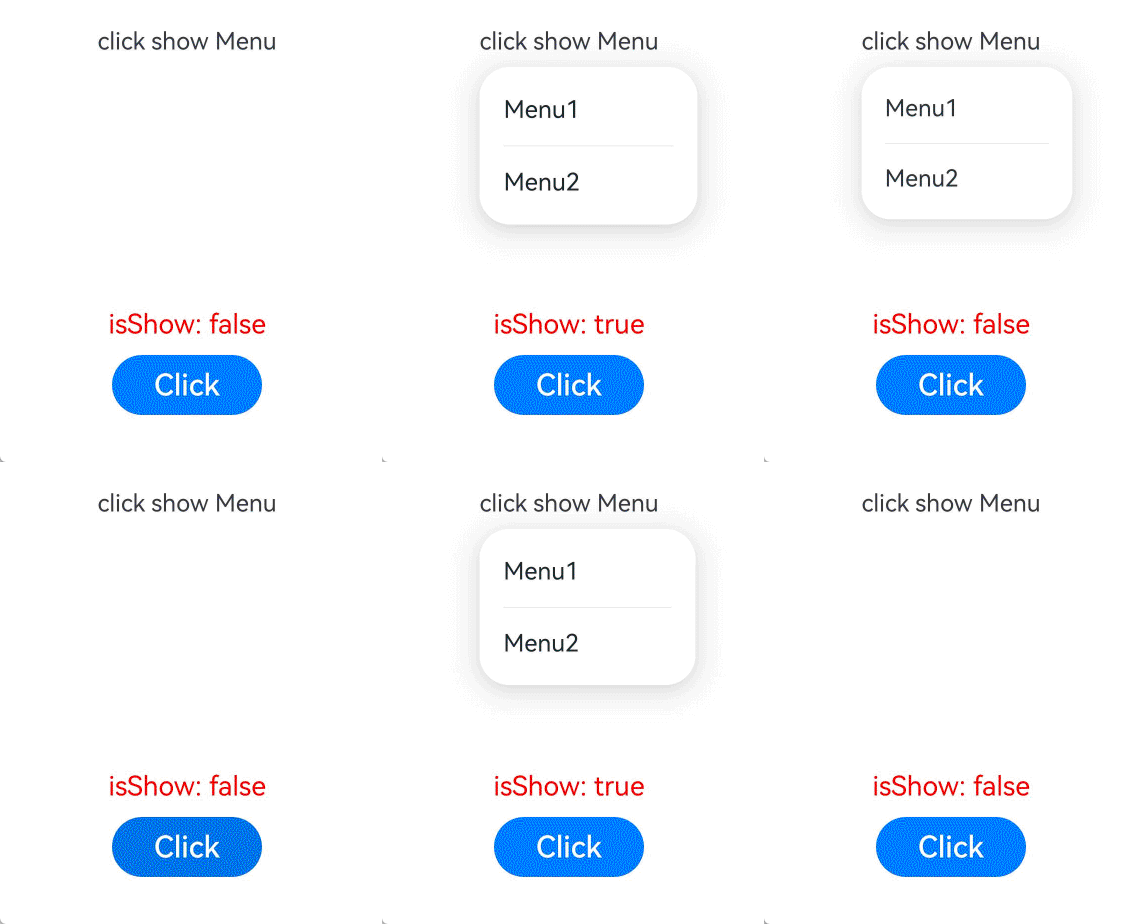
The !! operator passes a TypeScript variable by reference to a built-in component, ensuring the variable's value and the component's internal state stay in sync. To use this operator, append it to the variable name, for example, isShow!!.
The meaning of the internal state is determined by the component or attribute. For example, the isShow parameter of the bindMenu attribute.
import { hilog } from '@kit.PerformanceAnalysisKit';

const TAG: string = 'click show Menu';
const DOMAIN = 0xFF00;

@Entry
@ComponentV2
struct BindMenuInterface {
  @Local isShow: boolean = false;

  build() {
    Column() {
      Row() {
        Text('click show Menu')
          .bindMenu(this.isShow!!, // Two-way binding.
            [
              {
                value: 'Menu1',
                action: () => {
                  hilog.info(DOMAIN, TAG, 'handle Menu1 click');
                }
              },
              {
                value: 'Menu2',
                action: () => {
                  hilog.info(DOMAIN, TAG, 'handle Menu2 click');
                }
              },
            ])
      }.height('50%')

      Text('isShow: ' + this.isShow).fontSize(18).fontColor(Color.Red)
      Row() {
        Button('Click')
          .onClick(() => {
            this.isShow = true;
          })
          .width(100)
          .fontSize(20)
          .margin(10)
      }
    }.width('100%')
  }
} 
Rules of Use
-
Currently, two-way binding with !! supports variables of basic types. When such variables are decorated with state management V1 decorators such as @State, or state management V2 decorators such as @Local, changes in variable values will trigger UI updates.
Attribute Supported Parameter Initial API Version bindMenu isShow 18 bindContextMenu isShown 18 bindPopup show 18 TextInput text 18 TextArea text 18 Search value 18 BindSheet isShow 18 BindContentCover isShow 18 SideBarContainer sideBarWidth 18 Navigation navBarWidth 18 Toggle isOn 18 Checkbox select 18 CheckboxGroup selectAll 18 Radio checked 18 Rating rating 18 Slider value 18 Select selected 18 Select value 18 MenuItem selected 18