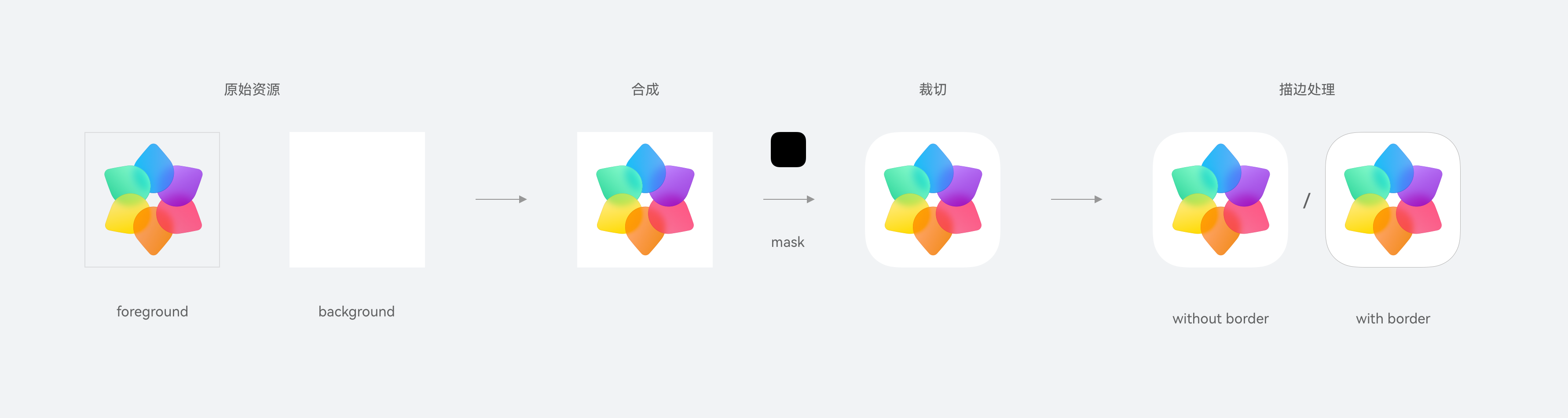
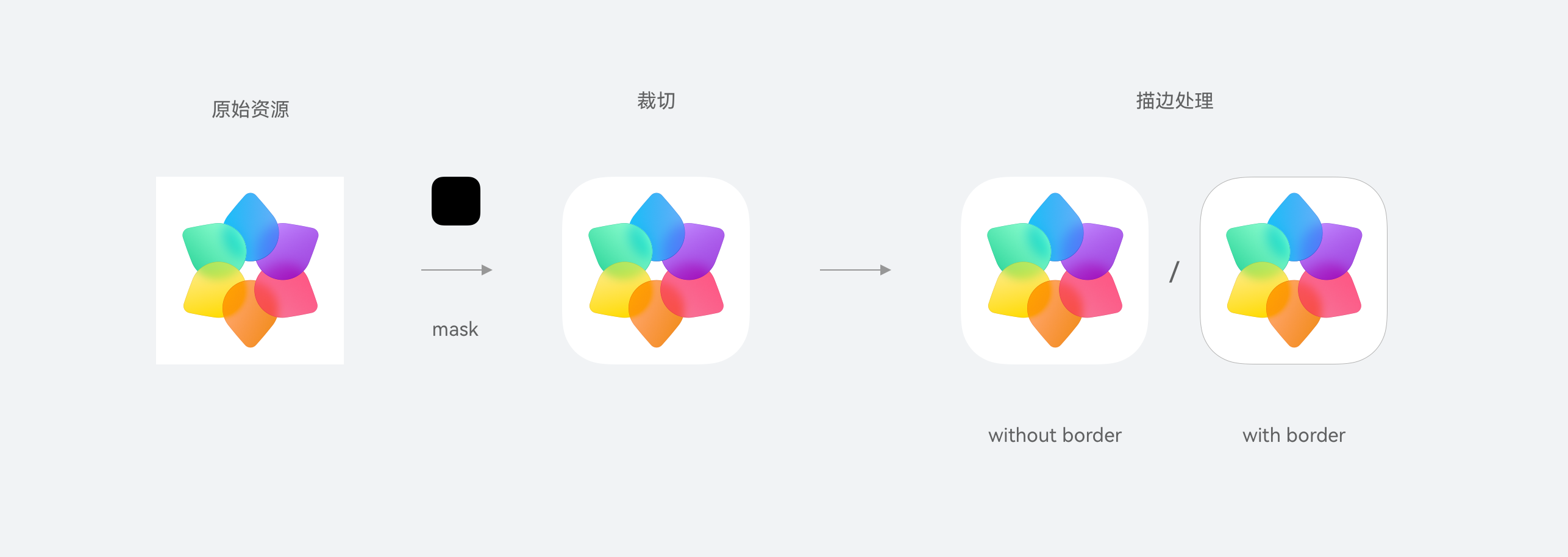
This module provides processing capabilities for both layered and single-layer icons, including combining the foreground and background images, and cropping, scaling, and stroking icons.
Start version: 5.0.0(12)
hdsDrawable.getHdsLayeredIcon
getHdsLayeredIcon(bundleName: string, layeredDrawableDescriptor: LayeredDrawableDescriptor, size: number, hasBorder?: boolean): image.PixelMap
Obtains the processed layered icon in PixelMap format. This API applies to the scenario where a single icon needs to be inserted. The layered icon object is defined in LayeredDrawableDescriptor format. You can generate the object by passing the ID or name of the symbol icon resource. The hasBorder parameter specifies whether to stroke the output icon (not supported in online themes scenarios), and the size parameter specifies the dimensions of the output icon.
LayeredDrawableDescriptor object: To identify one, open the corresponding symbol JSON file and check if its layered-image section contains a structure resembling the following:
"layered-image":
{
    "background": "$background_path",
    "foreground": "$foreground_path"
}
Atomic service API: This API can be used in atomic services since API version 5.0.0(12).
System capability: SystemCapability.UIDesign.Core
Start version: 5.0.0(12)
Parameters
| Parameter | Type | Mandatory | Description |
|---|---|---|---|
| bundleName | string | Yes | Package name of the associated app. |
| layeredDrawableDescriptor | LayeredDrawableDescriptor | Yes | Layered icon data object to be processed. |
| size | number | Yes | Side length of the square icon object that is output, including the stroke. The value is a positive number, and the unit is vp. |
| hasBorder | boolean | No | Indicates whether to stroke the icon. The options are true (yes) and false (no). The default value is false. The stroke cannot be set in the online themes scenario. |
Returns:
| Type | Description |
|---|---|
| image.PixelMap | PixelMap object that contains the processed icon data. |
Error codes:
For details about the error codes, please refer to ArkTS API Error Codes.
| Error Code | Error Message |
|---|---|
| 401 | Parameter error. The value of bundleName is incorrect. Parameter error. The value of layeredDrawableDescriptor is incorrect. Parameter error. The value of size is incorrect. Parameter error. The value of hasBorder is incorrect. Parameter error. Possible causes: 1. Mandatory parameters are left unspecified. |
Example:
import { LayeredDrawableDescriptor } from '@kit.ArkUI';
import { hdsDrawable } from '@kit.UIDesignKit';
import { image } from '@kit.ImageKit';
import { BusinessError } from '@kit.BasicServicesKit';
import { resourceManager } from '@kit.LocalizationKit';
import { common } from '@kit.AbilityKit';

let bundleName: string = 'com.example.uidesignkit';
try {
  // Obtain the context from the component and ensure that the return value of this.getUIContext().getHostContext() is UIAbilityContext.
  let resManager: resourceManager.ResourceManager = (this.getUIContext().getHostContext() as common.UIAbilityContext)?.resourceManager;
  let layeredDrawableDescriptor: LayeredDrawableDescriptor =
    (resManager.getDrawableDescriptor($r('app.media.drawable').id)) as LayeredDrawableDescriptor; // Pass created image resources.
  let processedIcon: image.PixelMap =
    hdsDrawable.getHdsLayeredIcon(bundleName, layeredDrawableDescriptor, 48, true);
} catch (err) {
  let message = (err as BusinessError).message;
  let code = (err as BusinessError).code;
  console.error(`getHdsLayeredIcon failed, code: ${code}, message: ${message}`);
} 
hdsDrawable.getHdsLayeredIconAsync
getHdsLayeredIconAsync(bundleName: string, layeredDrawableDescriptor: LayeredDrawableDescriptor, size: number, hasBorder?: boolean): Promise<image.PixelMap>
Obtains the processed layered icon. This API returns the result asynchronously through a promise.
Atomic service API: This API can be used in atomic services since API version 5.0.0(12).
System capability: SystemCapability.UIDesign.Core
Start version: 5.0.0(12)
Parameters
| Parameter | Type | Mandatory | Description |
|---|---|---|---|
| bundleName | string | Yes | Package name of the associated app. |
| layeredDrawableDescriptor | LayeredDrawableDescriptor | Yes | Layered icon data object to be processed. |
| size | number | Yes | Side length of the square icon object that is output, including the stroke. The value is a positive number, and the unit is vp. |
| hasBorder | boolean | No | Indicates whether to stroke the icon. The options are true (yes) and false (no). The default value is false. The stroke cannot be set in the online themes scenario. |
Returns:
| Type | Description |
|---|---|
| Promise<image.PixelMap> | Promise used to return the PixelMap object that contains the processed icon data. |
Error codes:
For details about the error codes, please refer to ArkTS API Error Codes.
| Error Code | Error Message |
|---|---|
| 401 | Parameter error. The value of bundleName is incorrect. Parameter error. The value of layeredDrawableDescriptor is incorrect. Parameter error. The value of size is incorrect. Parameter error. The value of hasBorder is incorrect. Parameter error. Possible causes: 1. Mandatory parameters are left unspecified. |
Example:
import { LayeredDrawableDescriptor } from '@kit.ArkUI';
import { hdsDrawable } from '@kit.UIDesignKit';
import { image } from '@kit.ImageKit';
import { BusinessError } from '@kit.BasicServicesKit';
import { resourceManager } from '@kit.LocalizationKit';
import { common } from '@kit.AbilityKit';

let bundleName: string = 'com.example.uidesignkit';
try {
  // Obtain the context from the component and ensure that the return value of this.getUIContext().getHostContext() is UIAbilityContext.
  let resManager: resourceManager.ResourceManager = (this.getUIContext().getHostContext() as common.UIAbilityContext)?.resourceManager;
  let layeredDrawableDescriptor: LayeredDrawableDescriptor =
    (resManager.getDrawableDescriptor($r('app.media.drawable').id)) as LayeredDrawableDescriptor; // Pass created image resources.

  hdsDrawable.getHdsLayeredIconAsync(bundleName, layeredDrawableDescriptor, 48, true)
    .then((data: image.PixelMap) => {
      let processedIcon: image.PixelMap = data;
    })
    .catch((err: BusinessError) => {
      console.error(`getHdsLayeredIconAsync return error, code: ${err.code}, msg: ${err.message}`);
    });
} catch (err) {
  let message = (err as BusinessError).message;
  let code = (err as BusinessError).code;
  console.error(`getHdsLayeredIconAsync failed, code: ${code}, message: ${message}`);
} 
hdsDrawable.getHdsIcon
getHdsIcon(bundleName: string, pixelMap: image.PixelMap, size: number, mask: image.PixelMap, hasBorder?: boolean): image.PixelMap
Obtains the processed single-layer icon in PixelMap format. This API applies to the scenario where a single icon needs to be inserted. The hasBorder parameter specifies whether to stroke the output icon (not supported in online themes scenarios), and the size parameter specifies the dimensions of the output icon.
Atomic service API: This API can be used in atomic services since API version 5.0.0(12).
System capability: SystemCapability.UIDesign.Core
Start version: 5.0.0(12)
Parameters
| Parameter | Type | Mandatory | Description |
|---|---|---|---|
| bundleName | string | Yes | Package name of the associated app. |
| pixelMap | image.PixelMap | Yes | Single-layer icon data object. |
| size | number | Yes | Side length of the square icon object that is output, including the stroke. The value is a positive number, and the unit is vp. |
| mask | image.PixelMap | Yes | Icon mask information, which is used for icon cropping. |
| hasBorder | boolean | No | Indicates whether to stroke the icon. The options are true (yes) and false (no). The default value is false. The stroke cannot be set in the online themes scenario. |
Returns:
| Type | Description |
|---|---|
| image.PixelMap | PixelMap object that contains the processed icon data. |
Error codes:
For details about the error codes, please refer to ArkTS API Error Codes.
| Error Code | Error Message |
|---|---|
| 401 | Parameter error. The value of bundleName is incorrect. Parameter error. The value of pixelMap is incorrect. Parameter error. The value of size is incorrect. Parameter error. The value of mask is incorrect. Parameter error. The value of hasBorder is incorrect. Parameter error. Possible causes: 1. Mandatory parameters are left unspecified. |
Example:
import { LayeredDrawableDescriptor, DrawableDescriptor } from '@kit.ArkUI';
import { hdsDrawable } from '@kit.UIDesignKit';
import { image } from '@kit.ImageKit';
import { BusinessError } from '@kit.BasicServicesKit';
import { resourceManager } from '@kit.LocalizationKit';
import { common } from '@kit.AbilityKit';

let bundleName: string = 'com.example.uidesignkit';
try {
  // Obtain the context from the component and ensure that the return value of this.getUIContext().getHostContext() is UIAbilityContext.
  let resManager: resourceManager.ResourceManager = (this.getUIContext().getHostContext() as common.UIAbilityContext)?.resourceManager;
  let layeredDrawableDescriptor: LayeredDrawableDescriptor =
    (resManager.getDrawableDescriptor($r('app.media.drawable').id)) as LayeredDrawableDescriptor; // Pass created image resources.
  let drawableDescriptor: DrawableDescriptor =
    (resManager?.getDrawableDescriptor($r('app.media.normal_icon_512').id)) as DrawableDescriptor; // Pass created image resources.
  let processedIcon: image.PixelMap = hdsDrawable.getHdsIcon(bundleName, drawableDescriptor?.getPixelMap(), 48,
    layeredDrawableDescriptor?.getMask().getPixelMap(), true);
} catch (err) {
  let message = (err as BusinessError).message;
  let code = (err as BusinessError).code;
  console.error(`getHdsIcon failed, code: ${code}, message: ${message}`);
} 
hdsDrawable.getHdsIconAsync
getHdsIconAsync(bundleName: string, pixelMap: image.PixelMap, size: number, mask: image.PixelMap, hasBorder?: boolean): Promise<image.PixelMap>
Obtains the processed single-layer icon. This API returns the result asynchronously through a promise.
Atomic service API: This API can be used in atomic services since API version 5.0.0(12).
System capability: SystemCapability.UIDesign.Core
Start version: 5.0.0(12)
Parameters
| Parameter | Type | Mandatory | Description |
|---|---|---|---|
| bundleName | string | Yes | Package name of the associated app. |
| pixelMap | image.PixelMap | Yes | Single-layer icon data object. |
| size | number | Yes | Side length of the square icon object that is output, including the stroke. The value is a positive number, and the unit is vp. |
| mask | image.PixelMap | Yes | Icon mask information, which is used for icon cropping. |
| hasBorder | boolean | No | Indicates whether to stroke the icon. The options are true (yes) and false (no). The default value is false. The stroke cannot be set in the online themes scenario. |
Returns:
| Type | Description |
|---|---|
| Promise<image.PixelMap> | Promise used to return the PixelMap object that contains the processed icon data. |
Error codes:
For details about the error codes, please refer to ArkTS API Error Codes.
| Error Code | Error Message |
|---|---|
| 401 | Parameter error. The value of bundleName is incorrect. Parameter error. The value of pixelMap is incorrect. Parameter error. The value of size is incorrect. Parameter error. The value of mask is incorrect. Parameter error. The value of hasBorder is incorrect. Parameter error. Possible causes: 1. Mandatory parameters are left unspecified. |
Example:
import { LayeredDrawableDescriptor, DrawableDescriptor } from '@kit.ArkUI';
import { hdsDrawable } from '@kit.UIDesignKit';
import { image } from '@kit.ImageKit';
import { BusinessError } from '@kit.BasicServicesKit';
import { resourceManager } from '@kit.LocalizationKit';
import { common } from '@kit.AbilityKit';

let bundleName: string = 'com.example.uidesignkit';
try {
  // Obtain the context from the component and ensure that the return value of this.getUIContext().getHostContext() is UIAbilityContext.
  let resManager: resourceManager.ResourceManager = (this.getUIContext().getHostContext() as common.UIAbilityContext)?.resourceManager;
  let layeredDrawableDescriptor: LayeredDrawableDescriptor =
    (resManager.getDrawableDescriptor($r('app.media.drawable').id)) as LayeredDrawableDescriptor; // Pass created image resources.
  let drawableDescriptor: DrawableDescriptor =
    (resManager?.getDrawableDescriptor($r('app.media.normal_icon_512').id)) as DrawableDescriptor; // Pass created image resources.

  hdsDrawable.getHdsIconAsync(bundleName, drawableDescriptor?.getPixelMap(), 48,
    layeredDrawableDescriptor?.getMask().getPixelMap(), true)
    .then((data: image.PixelMap) => {
      let processedIcon: image.PixelMap = data;
    })
    .catch((err: BusinessError) => {
      console.error(`getHdsIconAsync return error, code: ${err.code}, msg: ${err.message}`);
    });
} catch (err) {
  let message = (err as BusinessError).message;
  let code = (err as BusinessError).code;
  console.error(`getHdsIconAsync failed, code: ${code}, message: ${message}`);
} 
hdsDrawable.getHdsLayeredIcons
getHdsLayeredIcons(icons: Array<LayeredIcon>, options: Options): Promise<Array<ProcessedIcon>>
Obtains layered icons processed in batches. This API returns the result asynchronously through a promise.
Atomic service API: This API can be used in atomic services since API version 5.0.0(12).
System capability: SystemCapability.UIDesign.Core
Start version: 5.0.0(12)
Parameters
| Parameter | Type | Mandatory | Description |
|---|---|---|---|
| icons | Array<LayeredIcon> | Yes | Collection of layered icons to be processed. |
| options | Options | Yes | Options for processing layered icons. |
Returns:
| Type | Description |
|---|---|
| Promise<Array<ProcessedIcon>> | Promise used to return the collection of processed image data. |
Error codes:
For details about the error codes, please refer to ArkTS API Error Codes.
| Error Code | Error Message |
|---|---|
| 401 | Parameter error. The value of icons is incorrect. Parameter error. The value of size is incorrect. Parameter error. The value of hasBorder is incorrect. Parameter error. The value of parallelNumber is incorrect. |
| 1012600001 | Task is busy. |
Example:
import { LayeredDrawableDescriptor } from '@kit.ArkUI';
import { hdsDrawable } from '@kit.UIDesignKit';
import { BusinessError } from '@kit.BasicServicesKit';
import { resourceManager } from '@kit.LocalizationKit';
import { common } from '@kit.AbilityKit';

let bundleName: string = 'com.example.uidesignkit';
let options: hdsDrawable.Options = {
  size: 48,
  hasBorder: true,
  parallelNumber: 4
};

try {
  // Obtain the context from the component and ensure that the return value of this.getUIContext().getHostContext() is UIAbilityContext.
  let resManager: resourceManager.ResourceManager = (this.getUIContext().getHostContext() as common.UIAbilityContext)?.resourceManager;
  let layeredDrawableDescriptor: LayeredDrawableDescriptor =
    (resManager.getDrawableDescriptor($r('app.media.drawable').id)) as LayeredDrawableDescriptor; // Pass created image resources.
  let layeredIcons: Array<hdsDrawable.LayeredIcon> = [];
  for (let i = 0; i < 10; i++) {
    layeredIcons.push({
      bundleName: `${bundleName}-${i}`,
      layeredDrawableDescriptor: layeredDrawableDescriptor
    });
  }

  hdsDrawable.getHdsLayeredIcons(layeredIcons, options)
    .then((data: Array<hdsDrawable.ProcessedIcon>) => {
      console.info(`getHdsLayeredIcons data size: ${data.length}`);
      let processedIconList: Array<hdsDrawable.ProcessedIcon> = data;
    })
    .catch((err: BusinessError) => {
      console.error(`getHdsLayeredIcons error, code: ${err.code}, msg: ${err.message}`);
    });
} catch (err) {
  let message = (err as BusinessError).message;
  let code = (err as BusinessError).code;
  console.error(`getHdsLayeredIcons failed, code: ${code}, message: ${message}`);
} 
hdsDrawable.getHdsIcons
getHdsIcons(icons: Array<Icon>, mask: image.PixelMap, options: Options): Promise<Array<ProcessedIcon>>
Obtains single-layer icons processed in batches. This API returns the result asynchronously through a promise.
Atomic service API: This API can be used in atomic services since API version 5.0.0(12).
System capability: SystemCapability.UIDesign.Core
Start version: 5.0.0(12)
Parameters
| Parameter | Type | Mandatory | Description |
|---|---|---|---|
| icons | Array<Icon> | Yes | Collection of single-layer icons to be processed. |
| mask | image.PixelMap | Yes | Icon mask information, which is used for icon cropping. |
| options | Options | Yes | Options for processing single-layer icons. |
Returns:
| Type | Description |
|---|---|
| Promise<Array<ProcessedIcon>> | Promise used to return the collection of processed image data. |
Error codes:
For details about the error codes, please refer to ArkTS API Error Codes.
| Error Code | Error Message |
|---|---|
| 401 | Parameter error. The value of icons is incorrect. Parameter error. The value of mask is incorrect. Parameter error. The value of size is incorrect. Parameter error. The value of hasBorder is incorrect. Parameter error. The value of parallelNumber is incorrect. |
| 1012600001 | Task is busy. |
Example:
import { LayeredDrawableDescriptor, DrawableDescriptor } from '@kit.ArkUI';
import { hdsDrawable } from '@kit.UIDesignKit';
import { BusinessError } from '@kit.BasicServicesKit';
import { resourceManager } from '@kit.LocalizationKit';
import { common } from '@kit.AbilityKit';

let bundleName: string = 'com.example.uidesignkit';
let options: hdsDrawable.Options = {
  size: 48,
  hasBorder: true,
  parallelNumber: 4
};

try {
  // Obtain the context from the component and ensure that the return value of this.getUIContext().getHostContext() is UIAbilityContext.
  let resManager: resourceManager.ResourceManager = (this.getUIContext().getHostContext() as common.UIAbilityContext)?.resourceManager;
  let layeredDrawableDescriptor: LayeredDrawableDescriptor =
    (resManager.getDrawableDescriptor($r('app.media.drawable')
      .id)) as LayeredDrawableDescriptor; // Pass created image resources.
  let drawableDescriptor: DrawableDescriptor =
    (resManager?.getDrawableDescriptor($r('app.media.normal_icon_512').id)) as DrawableDescriptor; // Pass created image resources.
  let icons: Array<hdsDrawable.Icon> = [];
  for (let i = 0; i < 10; i++) {
    icons.push({
      bundleName: `${bundleName}-${i}`,
      pixelMap: drawableDescriptor.getPixelMap()
    });
  }

  hdsDrawable.getHdsIcons(icons, layeredDrawableDescriptor.getMask().getPixelMap(), options)
    .then((data: Array<hdsDrawable.ProcessedIcon>) => {
      console.info(`getHdsIcons data size: ${data.length}`);
      let processedIconList: Array<hdsDrawable.ProcessedIcon> = data;
    })
    .catch((err: BusinessError) => {
      console.error(`getHdsIcons error, code: ${err.code}, msg: ${err.message}`);
    });
} catch (err) {
  let message = (err as BusinessError).message;
  let code = (err as BusinessError).code;
  console.error(`getHdsIcons failed, code: ${code}, message: ${message}`);
} 
LayeredIcon
Defines the layered icon data object.
Atomic service API: This API can be used in atomic services since API version 5.0.0(12).
System capability: SystemCapability.UIDesign.Core
Start version: 5.0.0(12)
Parameters
| Name | Type | Read-Only | Optional | Description |
|---|---|---|---|---|
| bundleName | string | No | No | App package name. |
| layeredDrawableDescriptor | LayeredDrawableDescriptor | No | No | Layered icon data object to be processed. |
Options
Options for processing image data.
Atomic service API: This API can be used in atomic services since API version 5.0.0(12).
System capability: SystemCapability.UIDesign.Core
Start version: 5.0.0(12)
Parameters
| Name | Type | Read-Only | Optional | Description |
|---|---|---|---|---|
| size | number | No | No | Side length of the square icon object that is output, including the stroke. The value is a positive number, and the unit is vp. |
| hasBorder | boolean | No | Yes | Indicates whether to stroke the icon. The options are true (yes) and false (no). The default value is false. The stroke cannot be set in the online themes scenario. |
| parallelNumber | number | No | Yes | Number of concurrent tasks for processing icons in batches. The default value is 4 (recommended), and the maximum value is 10. |
ProcessedIcon
Obtains the processed icon object.
Atomic service API: This API can be used in atomic services since API version 5.0.0(12).
System capability: SystemCapability.UIDesign.Core
Start version: 5.0.0(12)
Parameters
| Name | Type | Read-Only | Optional | Description |
|---|---|---|---|---|
| bundleName | string | Yes | No | App package name. |
| pixelMap | image.PixelMap | Yes | No | PixelMap object that contains the processed icon data. |
Icon
Defines the single-layer icon data object.
Atomic service API: This API can be used in atomic services since API version 5.0.0(12).
System capability: SystemCapability.UIDesign.Core
Start version: 5.0.0(12)
Parameters
| Name | Type | Read-Only | Optional | Description |
|---|---|---|---|---|
| bundleName | string | No | No | App package name. |
| pixelMap | image.PixelMap | No | No | Single-layer icon data object. |