An ImageBitmap object stores pixel data rendered on a canvas. Since API version 11, when an application creates a worker thread, it can use postMessage to transfer the ImageBitmap instance to the worker thread for drawing, and use onmessage to receive the drawing results sent by the worker thread for display.

This component is supported since API version 8. Updates will be marked with a superscript to indicate their earliest API version.
constructor
constructor(src: string)
Creates an ImageBitmap object using an ImageSrc object.
Widget capability: This API can be used in ArkTS widgets since API version 9.
Atomic service API: This API can be used in atomic services since API version 11.
System capability: SystemCapability.ArkUI.ArkUI.Full
Parameters
| Name | Type | Mandatory | Description |
|---|---|---|---|
| src | string | Yes | Image source. Local images are supported. 1. The string format is used to load local images, for example, ImageBitmap("common/images/example.jpg"). For entry and feature modules, the start point of the image path for loading is the ets folder of the module. For HAR and shared modules, the start point is the ets folder of the entry or feature module into which they are built. For modules whose type is "har" or "shared", you are advised to use ImageSource to decode resource images into a unified PixelMap object for loading and use. 2. Supported image formats: BMP, JPG, PNG, SVG, and WEBP. NOTE - ArkTS widgets do not support the strings with the http://, datashare://, or file://data/storage. |
constructor
constructor(data: PixelMap)
Creates an ImageBitmap object using a PixelMap object.
Atomic service API: This API can be used in atomic services since API version 11.
System capability: SystemCapability.ArkUI.ArkUI.Full
Parameters
| Name | Type | Mandatory | Description |
|---|---|---|---|
| data | PixelMap | Yes | Image data source, which supports PixelMap objects. |
constructor12+
constructor(src: string, unit: LengthMetricsUnit)
Creates an ImageBitmap object using an ImageSrc object. The unit mode of the Path2D object can be configured using unit.
Widget capability: This API can be used in ArkTS widgets since API version 12.
Atomic service API: This API can be used in atomic services since API version 12.
System capability: SystemCapability.ArkUI.ArkUI.Full
Parameters
| Name | Type | Mandatory | Description |
|---|---|---|---|
| src | string | Yes | Image source. Local images are supported. 1. The string format is used to load local images, for example, ImageBitmap("common/images/example.jpg"). For entry and feature modules, the start point of the image path for loading is the ets folder of the module. For HAR and shared modules, the start point is the ets folder of the entry or feature module into which they are built. For modules whose type is "har" or "shared", you are advised to use ImageSource to decode resource images into a unified PixelMap object for loading and use. 2. Supported image formats: BMP, JPG, PNG, SVG, and WEBP. NOTE - ArkTS widgets do not support the strings with the http://, datashare://, or file://data/storage. |
| unit | LengthMetricsUnit | Yes | Unit mode of the ImageBitmap object. The value cannot be dynamically changed once set. The configuration method is the same as that of CanvasRenderingContext2D. If the value is undefined, NaN, or Infinity, the default value will be used. |
constructor12+
constructor(data: PixelMap, unit: LengthMetricsUnit)
Creates an ImageBitmap object using a PixelMap object. The unit mode of the Path2D object can be configured using unit.
Atomic service API: This API can be used in atomic services since API version 12.
System capability: SystemCapability.ArkUI.ArkUI.Full
Parameters
| Name | Type | Mandatory | Description |
|---|---|---|---|
| data | PixelMap | Yes | Image data source, which supports PixelMap objects. |
| unit | LengthMetricsUnit | Yes | Unit mode of the ImageBitmap object. The value cannot be dynamically changed once set. The configuration method is the same as that of CanvasRenderingContext2D. |
close
close(): void
Releases all graphics resources associated with this ImageBitmap object and sets its width and height to 0. For the sample code, see the code for creating an ImageBitmap object.
Widget capability: This API can be used in ArkTS widgets since API version 9.
Atomic service API: This API can be used in atomic services since API version 11.
System capability: SystemCapability.ArkUI.ArkUI.Full
Attributes
Widget capability: This API can be used in ArkTS widgets since API version 9.
Atomic service API: This API can be used in atomic services since API version 11.
System capability: SystemCapability.ArkUI.ArkUI.Full
| Name | Type | Read Only | Optional | Description |
|---|---|---|---|---|
| width | number | Yes | No | Pixel width of the ImageBitmap object. Default unit: vp |
| height | number | Yes | No | Pixel height of the ImageBitmap object. Default unit: vp |
[h2]Example 1: Loading an Image
This example demonstrates how to load a local image using the ImageBitmap object.

The resources used in this example are not located in the src > main > resource directory. Starting from DevEco Studio 6.0.0 Beta2, the resources that are located outside the resources directory are not packaged by default when a project or module is created. To package these resources, go to buildOption in the module's build-profile.json5 file > resOptions > copyCodeResource, and set enable to true. For details, see the description of copyCodeResource in resOptions.
// xxx.ets
@Entry
@Component
struct ImageExample {
  private settings: RenderingContextSettings = new RenderingContextSettings(true);
  private context: CanvasRenderingContext2D = new CanvasRenderingContext2D(this.settings);
  // Replace "common/images/example.jpg" with the image resource file you use.
  private img: ImageBitmap = new ImageBitmap("common/images/example.jpg");

  build() {
    Flex({ direction: FlexDirection.Column, alignItems: ItemAlign.Center, justifyContent: FlexAlign.Center }) {
      Canvas(this.context)
        .width('100%')
        .height('100%')
        .backgroundColor('#ffff00')
        .onReady(() => {
          this.context.drawImage(this.img, 0, 0, 500, 500, 0, 0, 400, 200)
          this.img.close()
        })
    }
    .width('100%')
    .height('100%')
  }
} 
[h2]Example 2: Creating an ImageBitmap Object
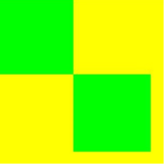
This example shows how to create an ImageBitmap object using a PixelMap object.

The DevEco Studio Previewer does not support the getPixelMap API and cannot display content drawn by PixelMap.
// xxx.ets
@Entry
@Component
struct Demo {
  private settings: RenderingContextSettings = new RenderingContextSettings(true);
  private context: CanvasRenderingContext2D = new CanvasRenderingContext2D(this.settings);

  build() {
    Flex({ direction: FlexDirection.Column, alignItems: ItemAlign.Center, justifyContent: FlexAlign.Center }) {
      Canvas(this.context)
        .width('100%')
        .height('50%')
        .backgroundColor('#ffff00')
        .onReady(() => {
          this.context.fillStyle = "#00ff00"
          this.context.fillRect(0, 0, 100, 100)
          let pixel = this.context.getPixelMap(0, 0, 100, 100)
          let image = new ImageBitmap(pixel)
          this.context.drawImage(image, 100, 100)
        })

    }
    .width('100%')
    .height('100%')
  }
} 
[h2]Example 3: Supporting Concurrent Thread Drawing
This example demonstrates how to implement concurrent thread drawing by creating a Worker thread.

The content drawn in the Worker thread cannot be previewed in DevEco Studio Previewer.
import { worker } from '@kit.ArkTS';

@Entry
@Component
struct imageBitmapExamplePage {
  private settings: RenderingContextSettings = new RenderingContextSettings(true);
  private context: CanvasRenderingContext2D = new CanvasRenderingContext2D(this.settings);
  private myWorker = new worker.ThreadWorker('entry/ets/workers/Worker.ets');
  // Replace "common/images/example.jpg" with the image resource file you use.
  private img: ImageBitmap = new ImageBitmap("common/images/example.jpg");

  build() {
    Flex({ direction: FlexDirection.Column, alignItems: ItemAlign.Center, justifyContent: FlexAlign.Center }) {
      Canvas(this.context)
        .width('100%')
        .height('100%')
        .backgroundColor('#ffff00')
        .onReady(() => {
          this.myWorker.postMessage({ myImage: this.img });
          this.myWorker.onmessage = (e): void => {
            if (e.data.myImage) {
              let image: ImageBitmap = e.data.myImage
              this.context.transferFromImageBitmap(image)
            }
          }
        })
    }
    .width('100%')
    .height('100%')
  }
}
In the worker thread, the application uses onmessage to receive the ImageBitmap object sent by the main thread through postMessage and proceeds with rendering.
import { MessageEvents, ThreadWorkerGlobalScope, worker } from '@kit.ArkTS';
import { image } from '@kit.ImageKit';

const workerPort: ThreadWorkerGlobalScope = worker.workerPort;
workerPort.onmessage = (e: MessageEvents) => {
  if (e.data.myImage) {
    let img: ImageBitmap = e.data.myImage
    let offCanvas = new OffscreenCanvas(600, 600)
    let offContext = offCanvas.getContext("2d")
    offContext.drawImage(img, 0, 0, 500, 500, 0, 0, 400, 200)
    let image = offCanvas.transferToImageBitmap()
    workerPort.postMessage({ myImage: image });
  }
}