Use Cases
Updating a live view locally depends on the app's running. To ensure that the live view can be updated and ended properly within the lifecycle, you are advised to use Push Kit to update the live view in real time.
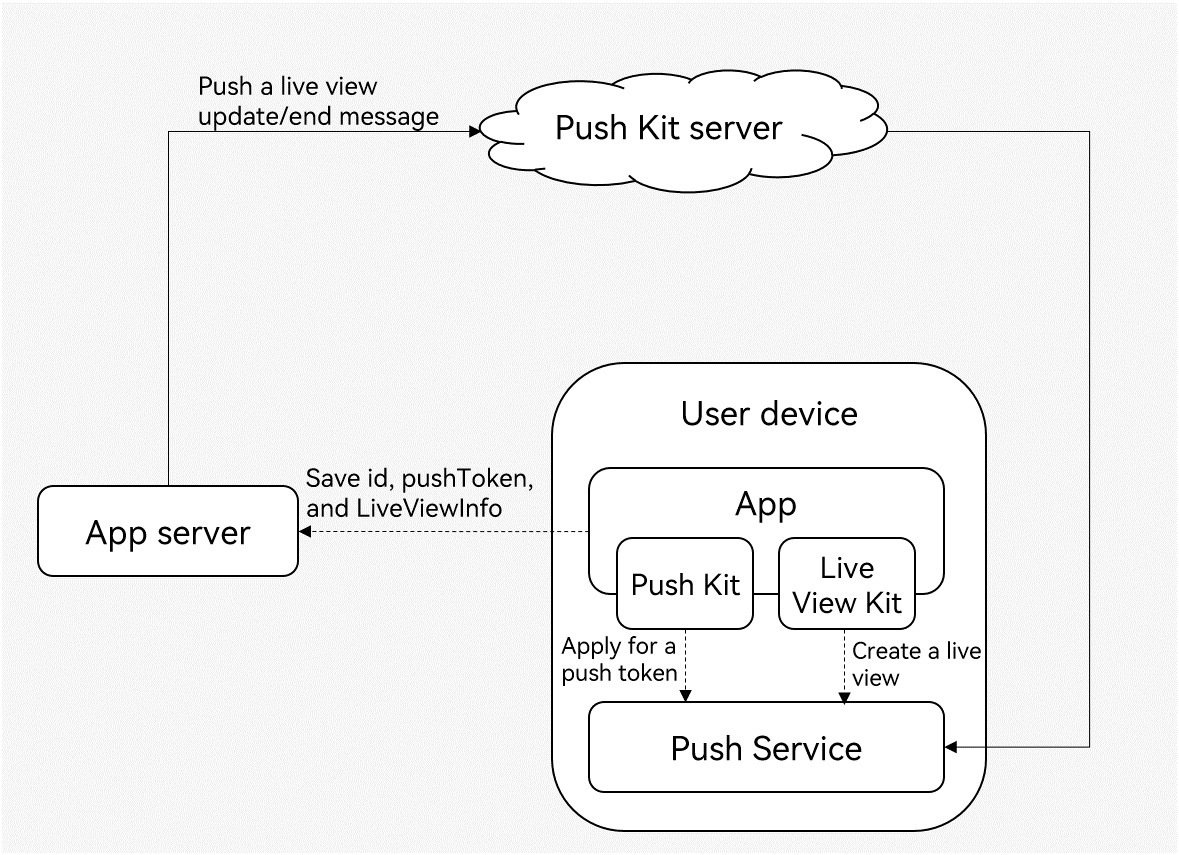
The following figure shows the process of updating a live view through Push Kit.
-
Request a push token from Push Kit.
-
Create a live view using Live View Kit. Then you need to save the live view ID, push token, live view scenarios (event), and business service status attributes to your app server.
-
When the user's order status in the service changes, Push Kit pushes update messages to update or end the live view.
For details about the development process, please refer to Pushing a Live View Message.
For details about the field mapping between Live View Kit ArkTS APIs and Push Kit REST APIs, please refer to API Parameter Mapping Between Live View Kit and Push Kit.
Support for Downloading Online Images
Starting from version 26.0.0, Live View Kit supports downloading online images through Push Kit. The restrictions are as follows:
-
The size of the online image to be downloaded cannot exceed 512 KB.
-
The supported online image formats include JPG, JPEG, PNG, BMP, and WebP.
-
Only HTTPS-based image URLs are supported, meaning only URLs starting with https:// are allowed.
-
Only positions 1 to 7 support online image download. For details, please refer to Request Body Parameters.
| Template Type | Illustration |
|---|---|
| Basic template |  |
| Progress visualization template |  |
| Emphasized text template |  |
| Left-right text template |  |
| Live scores template |  |
| Capsule template |  |