Since API version 26.0.0, the companion device authentication mode is added to the user authentication service. The user completes the authentication through the companion device.
Available APIs
For details about the parameters, return values, and error codes, see @ohos.userIAM.userAuth (User Authentication).
| API | Function |
|---|---|
| getUserAuthInstance(authParam: AuthParam, widgetParam: WidgetParam): UserAuthInstance | Obtains a UserAuthInstance instance for user authentication. When initiating companion device authentication, set authType in AuthParam to UserAuthType.COMPANION_DEVICE. |
| on(type: 'result', callback: IAuthCallback): void | Subscribes to the user authentication result. |
| off(type: 'result', callback?: IAuthCallback): void | Unsubscribes from the user authentication result. |
| start(): void | Starts user authentication. |
Seamless Authentication with Companion Devices
Before initiating authentication for an accompanying device, add the device on the primary device by going to Settings > Biometrics & screen lock > Companion devices. The process is as follows:
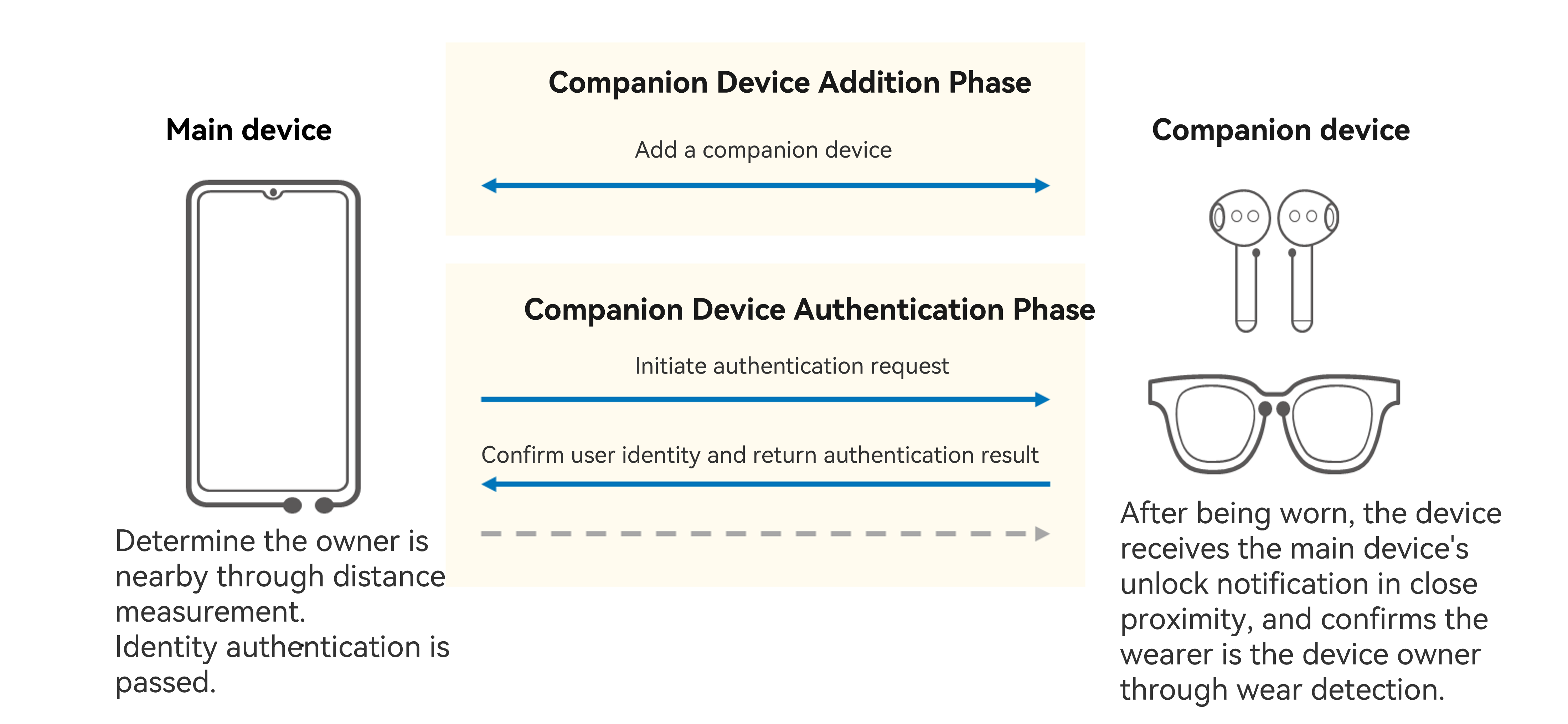
Note:
When initiating companion device authentication, set authType in AuthParam to UserAuthType.COMPANION_DEVICE. Do not set this parameter together with PIN, FACE, and FINGERPINTR.
Development Preparations
-
Request the ohos.permission.ACCESS_BIOMETRIC permission.
-
Set AuthParam (including the challenge, UserAuthType.COMPANION_DEVICE, and AuthTrustLevel), configure WidgetParam, and use getUserAuthInstance to obtain a UserAuthInstance instance.
-
Call UserAuthInstance.on('result') to subscribe to the authentication result.
-
Use UserAuthInstance.start to start authentication. The authentication result UserAuthResult is returned through IAuthCallback. If the authentication is successful, UserAuthType and token information (AuthToken) are returned.
Example
Initiate a companion device authentication request at ATL2 or higher.
companionDeviceAuthentication() {
  try {
    const randData = getRandData();
    if (!randData) {
      return;
    }
    // Set authentication parameters.
    const authParam: userAuth.AuthParam = {
      challenge: randData,
      authType: [userAuth.UserAuthType.COMPANION_DEVICE],
      authTrustLevel: userAuth.AuthTrustLevel.ATL2,
    };
    // Set the authentication page.
    const widgetParam: userAuth.WidgetParam = {
      title: resourceToString($r('app.string.title')),
    };
    // Obtain an authentication object.
    const userAuthInstance = userAuth.getUserAuthInstance(authParam, widgetParam);
    Logger.info('get userAuth instance successfully.');
    // Subscribe to the authentication result.
    userAuthInstance.on('result', {
      onResult: (result: userAuth.UserAuthResult) => {
        try {
          Logger.info('userAuthInstance callback.');
          this.result[ResultIndex.EXAMPLE_1] = (`${result.result}`);
          // Unsubscribe from the authentication result if required.
          userAuthInstance.off('result');
        } catch (error) {
          const err: BusinessError = error as BusinessError;
          Logger.error(`onResult failed, code: ${err?.code}, Message: ${err?.message}`);
        }
      }
    });
    // Start authentication.
    userAuthInstance.start();
    Logger.info('auth start successfully.');
  } catch (error) {
    const err: BusinessError = error as BusinessError;
    Logger.error(`auth failed, code is ${err?.code}, message is ${err?.message}`);
  }
}