Distinguishing the Upgrade and Clone Scenarios
You can override the onRestoreEx method in BackupExtensionAbility and use the reserved field restoreInfo to distinguish the upgrade scenario from the clone scenario. For details about how to use the onRestoreEx method, see BackupExtensionAbility API Reference.
The sample code is as follows:
import { BackupExtensionAbility, BundleVersion } from '@kit.CoreFileKit';

const TAG = `BackupExtensionAbility`;

interface ErrorInfo {
  type: string,
  errorCode: number,
  errorInfo: string
}

interface DetailInfo {
  type: string,
  detail: string
}

export default class EntryBackupAbility extends BackupExtensionAbility {
  async onBackup() {
    console.info(TAG, 'onBackup ok');
  }

  async onRestoreEx(bundleVersion: BundleVersion, restoreInfo: string): Promise<string> {
    console.info(TAG, `onRestoreEx ok ${JSON.stringify(bundleVersion)}`);
    let errorInfo: ErrorInfo = {
      type: "ErrorInfo",
      errorCode: 0,
      errorInfo: "app diy error info"
    }
    if (bundleVersion.name.startsWith("0.0.0.0")){
      // Implement application data processing after the device is upgraded from HarmonyOS 4.x to HarmonyOS NEXT.
      // If asynchronous operations are involved, perform synchronous waiting.
      console.info(TAG, `HarmonyOS to HarmonyOS NEXT scenario`);

      // If no differentiated data processing is required in the upgrade scenario and clone scenario, skip this step.
      if (this.IsOtaScenario(restoreInfo)) {
        // Implement data processing specific to the scenario where the device is upgraded from HarmonyOS 4.x to HarmonyOS NEXT. If no special handling is required, skip this step.
        console.info(TAG, `Ota Scenario`)
      } else {
        // Implement data processing specific to the scenario where the data is cloned from HarmonyOS 4.x to HarmonyOS NEXT during device upgrade. If no special handling is required, skip this step.
        console.info(TAG, `Clone Scenario`)
      }
    } else {
      // Implement data processing after migration between HarmonyOS NEXT devices. If no special handling is required, leave empty as a stub implementation.
      // If asynchronous operations are involved, perform synchronous waiting.
      console.info(TAG, `Other scenario`);
    }
    return JSON.stringify(errorInfo);
  }

  /**
   * Check whether it is an upgrade scenario.
   * @param restoreInfo Parameter to be passed in the restore process. This field is reserved.
   * @returns If it is an upgrade scenario, true is returned. Otherwise, false is returned.
   */
  IsOtaScenario(restoreInfo: string): boolean {
    let details:Array<DetailInfo> = JSON.parse(restoreInfo);
    return details.some((detailInfo) => {
      // Condition for determining whether to upgrade the device from HarmonyOS 4.x to HarmonyOS NEXT/5.0.x.
      return detailInfo.type == 'isSameDevice' && detailInfo.detail == 'true';
    });
  }
} [h2]Scenario Description
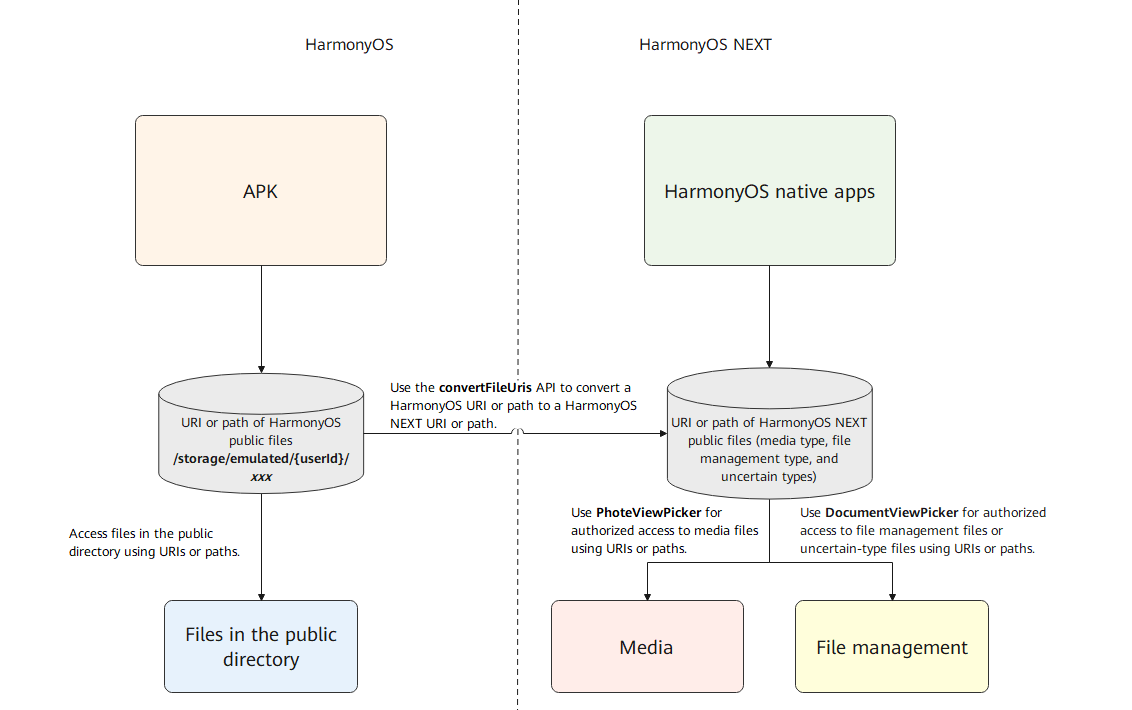
When an application runs in HarmonyOS 3.1 Release API 9 or an earlier version, you can record the URI or path of a file in the public media library for subsequent file access. After a device is upgraded from HarmonyOS to HarmonyOS NEXT, files in the public media library are migrated to the new location and directly inherited. The old URI or path recorded by the application cannot be used.
To solve this problem, the system provides the public directory file inheritance solution for data migration, which allows the application to convert the recorded URI or path of the HarmonyOS public media library file to the corresponding HarmonyOS NEXT public media library file URI or path and return the corresponding file type. When an application needs to access a file in the public media library in HarmonyOS NEXT, the converted URI or path of the HarmonyOS NEXT public media library file can be used to perform authorized access through the public media library API provided by HarmonyOS NEXT.
[h2]Code Implementation
The application calls the convertFileUris() API of Scenario Fusion Kit to convert the recorded URI or path of the HarmonyOS public media library file into a URI or path that can be accessed by HarmonyOS NEXT and obtain the corresponding file type. For details about the media file type, see Inheriting Media File Access Permissions After Device Upgrade. For other types of files, see Accessing Application Files. For details about how to use the convertFileUris() API, see File Path Conversion API.

During data migration, you can use this API to convert the URI or path of the HarmonyOS public media library file to the corresponding URI or path of the HarmonyOS NEXT public media library file and save the file URL or path for future use.