AI image recognition provides scenario-based text recognition, subject segmentation, and image search by aggregating AI capabilities such as Optical Character Recognition (OCR), subject segmentation, entity recognition, and multi-object recognition. OCR is a technology that converts text in images into machine codes using image processing and pattern recognition technologies.
Model restriction: This API can be used only in the stage model.
Since: 5.0.0(12)
Rect
Rectangle data structure.
System capability: SystemCapability.AI.VisionImageAnalyzer
Model restriction: This API can be used only in the stage model.
Since: 5.0.0(12)
| Name | Type | Read-Only | Optional | Description |
|---|---|---|---|---|
| left | number | No | Yes | Left position of a rectangle. The value ranges from the left boundary to the right boundary of an image. The unit is vp. Default value: 0 |
| top | number | No | Yes | Top position of a rectangle. The value ranges from the top boundary to the bottom boundary of an image. The unit is vp. Default value: 0 |
| right | number | No | Yes | Right position of a rectangle. The value ranges from the left boundary to the right boundary of an image. The unit is vp. Default value: 0 |
| bottom | number | No | Yes | Bottom position of a rectangle. The value ranges from the top boundary to the bottom boundary of an image. The unit is vp. Default value: 0 |
Subject
Subject recognition result.
System capability: SystemCapability.AI.VisionImageAnalyzer
Model restriction: This API can be used only in the stage model.
Since: 5.0.0(12)
| Name | Type | Read-Only | Optional | Description |
|---|---|---|---|---|
| id | number | No | No | Subject ID. Value range: [0, 6] |
| image | PixelMap | No | No | Image from which a subject is recognized. |
| boundingBox | Rect | No | No | Bounding box of a recognized subject. |
| maskData | Int32Array | No | Yes | 1D array based on the source image size, which represents the subject mask. The value ranges from 0 to 255. The value 0 indicates the background, the value 255 indicates a subject, and the values between 0 and 255 indicate the probability of a salient subject. Default value: [] Since: 5.1.0(18) NOTE The maskData parameter might contain a large amount of data. Parsing and logging it using JSON.stringify() can be time-consuming, potentially affecting the API performance. Log this parameter based on your needs. |
SelectedStatus
Enumerated values of the object selection status during image recognition.
System capability: SystemCapability.AI.VisionImageAnalyzer
Model restriction: This API can be used only in the stage model.
Since: 5.0.0(12)
| Name | Value | Description |
|---|---|---|
| SELECTED | 0 | Selected. |
| UNSELECTED | 1 | Unselected. |
ImageAnalyzerVisibility
Enumerated values of the AI image recognition control visibility.
System capability: SystemCapability.AI.VisionImageAnalyzer
Model restriction: This API can be used only in the stage model.
Since: 5.0.0(12)
| Name | Value | Description |
|---|---|---|
| SHOWN | 0 | Visible. |
| HIDDEN | 1 | Invisible. |
AIButtonStatus
Enumerated values of the AIButton status.
System capability: SystemCapability.AI.VisionImageAnalyzer
Model restriction: This API can be used only in the stage model.
Since: 5.0.0(12)
| Name | Value | Description |
|---|---|---|
| SELECTED | 0 | Selected. |
| UNSELECTED | 1 | Unselected. |
| HIDDEN | 2 | Hidden. |
ObjectSearchPanelVisibility
Enumerated values of the image search screen visibility.
System capability: SystemCapability.AI.VisionImageAnalyzer
Model restriction: This API can be used only in the stage model.
Since: 5.0.1(13)
| Name | Value | Description |
|---|---|---|
| SHOW | 0 | Visible. |
| HIDE | 1 | Invisible. |
ImageAnalyzerUIStatus
Enumerated values of the image analysis screen status.
System capability: SystemCapability.AI.VisionImageAnalyzer
Model restriction: This API can be used only in the stage model.
Since: 5.0.2(14)
| Name | Value | Description |
|---|---|---|
| INITIAL | 0 | Initial. |
| AI_BUTTON_SELECTED | 1 | AIButton selected. |
| TEXT_SELECTED | 2 | Text selected. |
| SUBJECT_SELECTED | 3 | Subject selected. |
| OBJECT_SEARCH | 4 | Visual search. |
VisionImageAnalyzerController
Visual image controller used for controlling interactions. It extends ImageAnalyzerController
System capability: SystemCapability.AI.VisionImageAnalyzer
Model restriction: This API can be used only in the stage model.
Since: 5.0.0(12)
[h2]setImageAnalyzerVisibility
setImageAnalyzerVisibility(visibility: ImageAnalyzerVisibility): void
Sets the visibility of the AI image recognition control.
System capability: SystemCapability.AI.VisionImageAnalyzer
Model restriction: This API can be used only in the stage model.
Since: 5.0.0(12)
Parameters
| Parameter | Type | Mandatory | Description |
|---|---|---|---|
| visibility | ImageAnalyzerVisibility | Yes | Visibility of the AI image recognition control. |
Example
import { visionImageAnalyzer } from '@kit.VisionKit';

@Entry
@Component
struct ImageDemo {
  private visionImageAnalyzerController: visionImageAnalyzer.VisionImageAnalyzerController =
    new visionImageAnalyzer.VisionImageAnalyzerController();
  aboutToAppear() {
    this.visionImageAnalyzerController.setImageAnalyzerVisibility(visionImageAnalyzer.ImageAnalyzerVisibility.HIDDEN);
  }
  build() {
    Stack() {
      // Set the image separately and add it to the **src/main/resources/base/media** directory.
      Image($r('app.media.img'), {
          types: [ImageAnalyzerType.TEXT, ImageAnalyzerType.SUBJECT, ImageAnalyzerType.OBJECT_LOOKUP],
          aiController: this.visionImageAnalyzerController
        })
        .width('100%')
        .height('100%')
        .enableAnalyzer(true)
        .objectFit(ImageFit.Contain)
    }.width('100%').height('100%')
  }
}
[h2]setAIButtonPosition
setAIButtonPosition(position: Rect): void
Sets the position of AIButton.
System capability: SystemCapability.AI.VisionImageAnalyzer
Model restriction: This API can be used only in the stage model.
Since: 5.0.0(12)
Parameters
| Parameter | Type | Mandatory | Description |
|---|---|---|---|
| position | Rect | Yes | Position of AIButton relative to the four sides of the AI image recognition control, in vp. By default, it is displayed in the lower right corner. If some parameters in Rect are passed, use the passed parameters preferentially for position matching. If the position parameter is abnormal, the default position will be used for display. If both the top and bottom parameters are set, only the top parameter takes effect when the setAIButtonPosition API is called. |
Example
import { visionImageAnalyzer } from '@kit.VisionKit';

@Entry
@Component
struct ImageDemo {
  private visionImageAnalyzerController: visionImageAnalyzer.VisionImageAnalyzerController =
    new visionImageAnalyzer.VisionImageAnalyzerController();
  aboutToAppear() {
    let position: visionImageAnalyzer.Rect = {
      bottom: 300
    };
    this.visionImageAnalyzerController.setAIButtonPosition(position);
    this.visionImageAnalyzerController.setAIButtonVisibility(true);
  }
  build() {
    Stack() {
      // Set the image separately and add it to the **src/main/resources/base/media** directory.
      Image($r('app.media.6'), {
        types: [ImageAnalyzerType.TEXT, ImageAnalyzerType.SUBJECT, ImageAnalyzerType.OBJECT_LOOKUP],
        aiController: this.visionImageAnalyzerController
      })
        .width('100%')
        .height('100%')
        .enableAnalyzer(true)
        .objectFit(ImageFit.Contain)
    }.width('100%').height('100%')
  }
}
The following figure shows an example. The AIButton is 300 vp away from the bottom.
[h2]setAIButtonVisibility
setAIButtonVisibility(visible: boolean): void
Sets the visibility of AIButton. When AIButton is set to visible, images are pre-analyzed. AIButton is displayed only when the images contain text and the text area occupies more than 5% of space in the image area. Enabling AIButton will trigger image pre-analysis, which causes certain power consumption. Therefore, you are advised to assess the context and enable AIButton only in scenarios where text content in images is of high importance. In this way, you can ensure an excellent image browsing experience for users while minimizing unnecessary power consumption.
System capability: SystemCapability.AI.VisionImageAnalyzer
Model restriction: This API can be used only in the stage model.
Since: 5.0.0(12)
Parameters
| Parameter | Type | Mandatory | Description |
|---|---|---|---|
| visible | boolean | Yes | Indicates whether AIButton is visible. The value true indicates yes, and the value false indicates no. The default value is false. |
Example
import { visionImageAnalyzer } from '@kit.VisionKit';

@Entry
@Component
struct ImageDemo {
  private visionImageAnalyzerController: visionImageAnalyzer.VisionImageAnalyzerController =
    new visionImageAnalyzer.VisionImageAnalyzerController();
  aboutToAppear() {
    this.visionImageAnalyzerController.setAIButtonVisibility(true);
  }
  build() {
    Stack() {
      // Set the image separately and add it to the **src/main/resources/base/media** directory.
      Image($r('app.media.img'), {
          types: [ImageAnalyzerType.TEXT, ImageAnalyzerType.SUBJECT, ImageAnalyzerType.OBJECT_LOOKUP],
          aiController: this.visionImageAnalyzerController
        })
        .width('100%')
        .height('100%')
        .enableAnalyzer(true)
        .objectFit(ImageFit.Contain)
    }.width('100%').height('100%')
  }
}
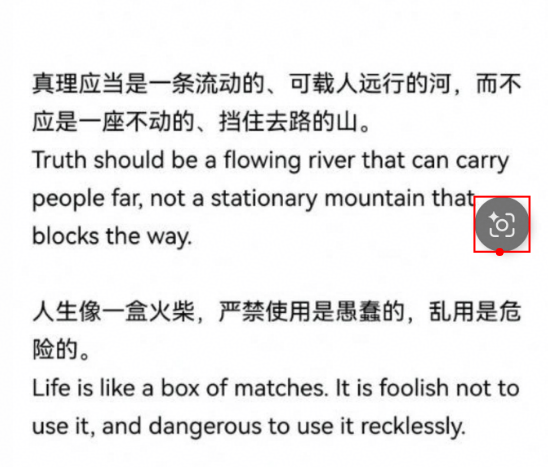
The following figure shows the AIButton when it is visible.

[h2]setCustomTextMenuItems
setCustomTextMenuItems(menus: Menu[]): void
Sets customized menu items for text analysis.
System capability: SystemCapability.AI.VisionImageAnalyzer
Model restriction: This API can be used only in the stage model.
Since: 5.0.0(12)
Parameters
| Parameter | Type | Mandatory | Description |
|---|---|---|---|
| menus | Menu[] | Yes | Customized menu items to be added for selected text. The callback contains the selected text. A maximum of three menu items can be displayed. If there are more than three menu items, the first three are displayed. |
Example
import { visionImageAnalyzer } from '@kit.VisionKit';

@Entry
@Component
struct ImageDemo {
  private visionImageAnalyzerController: visionImageAnalyzer.VisionImageAnalyzerController =
    new visionImageAnalyzer.VisionImageAnalyzerController();
  aboutToAppear() {
    this.visionImageAnalyzerController.setAIButtonVisibility(true);
    this.visionImageAnalyzerController.setCustomTextMenuItems([
      {
        value: 'menu2',
        action: (param: string | visionImageAnalyzer.Subject[]) => {
          console.info('DEMO_TAG', 'text menu clicked');
        }
      }
    ]);
  }
  build() {
    Stack() {
      // Set the image separately and add it to the **src/main/resources/base/media** directory.
      Image($r('app.media.img'), {
        types: [ImageAnalyzerType.TEXT, ImageAnalyzerType.SUBJECT, ImageAnalyzerType.OBJECT_LOOKUP],
        aiController: this.visionImageAnalyzerController
      })
        .width('100%')
        .height('100%')
        .enableAnalyzer(true)
        .objectFit(ImageFit.Contain)
    }.width('100%').height('100%')
  }
}
The following figure shows an example where a custom menu item is added to the right of the menu.

[h2]startSubjectAnalyzer
startSubjectAnalyzer(): void
Enables subject recognition. Before performing this operation, ensure that the current device supports subject recognition. You can obtain subject data through the subjectAnalysis event callback. Note: Add a timeout mechanism to prevent your app from waiting indefinitely for subject data if no subject is identified.
System capability: SystemCapability.AI.VisionImageAnalyzer
Model restriction: This API can be used only in the stage model.
Since: 5.0.0(12)
Example
import { visionImageAnalyzer } from '@kit.VisionKit';

@Entry
@Component
struct ImageDemo {
  private visionImageAnalyzerController: visionImageAnalyzer.VisionImageAnalyzerController =
    new visionImageAnalyzer.VisionImageAnalyzerController();
  aboutToAppear() {
    let supportTypes = this.visionImageAnalyzerController.getImageAnalyzerSupportTypes();
    if (supportTypes.includes(ImageAnalyzerType.SUBJECT)) {
       this.visionImageAnalyzerController.startSubjectAnalyzer();
    }
  }
  build() {
    Stack() {
      // Set the image separately and add it to the **src/main/resources/base/media** directory.
      Image($r('app.media.img'), {
        types: [ImageAnalyzerType.TEXT, ImageAnalyzerType.SUBJECT, ImageAnalyzerType.OBJECT_LOOKUP],
        aiController: this.visionImageAnalyzerController
      })
        .width('100%')
        .height('100%')
        .enableAnalyzer(true)
        .objectFit(ImageFit.Contain)
    }.width('100%').height('100%')
  }
} [h2]setSelectedSubjects
setSelectedSubjects(subjectIds: number[]): void
Sets selected subjects based on the subject ID list.
System capability: SystemCapability.AI.VisionImageAnalyzer
Model restriction: This API can be used only in the stage model.
Since: 5.0.0(12)
Parameters
| Parameter | Type | Mandatory | Description |
|---|---|---|---|
| subjectIds | number[] | Yes | ID list of subjects to be selected. The value is obtained through getSubject. Only the IDs of subjects contained in the image recognition result are valid. |
Example
import { visionImageAnalyzer } from '@kit.VisionKit';

@Entry
@Component
struct SingleImageTest2 {
  private visionImageAnalyzerController: visionImageAnalyzer.VisionImageAnalyzerController =
    new visionImageAnalyzer.VisionImageAnalyzerController();
  aboutToAppear() {
    this.visionImageAnalyzerController.on('subjectAnalysis', (subjects: visionImageAnalyzer.Subject[]) => {
      console.info('DEMO_TAG', `subjectAnalysis result: ${JSON.stringify(subjects)}`);
      if (subjects.length > 0) {
        this.visionImageAnalyzerController.setSelectedSubjects([subjects[0].id]);
      }
    });
  }
  build() {
    Stack() {
      // Set the image separately and add it to the **src/main/resources/base/media** directory.
      Image($r('app.media.img'), {
        types: [ImageAnalyzerType.TEXT, ImageAnalyzerType.SUBJECT, ImageAnalyzerType.OBJECT_LOOKUP],
        aiController: this.visionImageAnalyzerController
      })
        .width('100%')
        .height('100%')
        .enableAnalyzer(true)
        .objectFit(ImageFit.Contain)
    }.width('100%').height('100%')
  }
}
[h2]getSelectedSubjects
getSelectedSubjects(): Promise<Subject[] | null>
Obtains the selected subjects. This API uses a promise to return the result.
System capability: SystemCapability.AI.VisionImageAnalyzer
Model restriction: This API can be used only in the stage model.
Since: 5.0.0(12)
Returns
| Type | Description |
|---|---|
| Promise<Subject[] | null> | Promise used to return the currently selected subjects. |
Example
import { visionImageAnalyzer } from '@kit.VisionKit';

@Entry
@Component
struct ImageDemo {
  private visionImageAnalyzerController: visionImageAnalyzer.VisionImageAnalyzerController =
    new visionImageAnalyzer.VisionImageAnalyzerController();
  getSelectedSubjects() {
    void this.visionImageAnalyzerController.getSelectedSubjects().then((subjects: visionImageAnalyzer.Subject[] | null) => {
      console.info('DEMO_TAG', `getSelectedSubjects result: ${JSON.stringify(subjects)}`);
    })
  }
  build() {
    Stack() {
      // Set the image separately and add it to the **src/main/resources/base/media** directory.
      Image($r('app.media.img'), {
        types: [ImageAnalyzerType.TEXT, ImageAnalyzerType.SUBJECT, ImageAnalyzerType.OBJECT_LOOKUP],
        aiController: this.visionImageAnalyzerController
      })
        .width('100%')
        .height('100%')
        .enableAnalyzer(true)
        .objectFit(ImageFit.Contain)
    }.width('100%').height('100%')
  }
}
[h2]getSubject
getSubject(point: visionBase.Point): Promise<Subject | null>
Obtains a subject corresponding to a point position. This API uses a promise to return the result. Before calling this API, call startSubjectAnalyzer to enable subject recognition.
System capability: SystemCapability.AI.VisionImageAnalyzer
Model restriction: This API can be used only in the stage model.
Since: 5.0.0(12)
Parameters
| Parameter | Type | Mandatory | Description |
|---|---|---|---|
| point | visionBase.Point | Yes | Point position relative to the upper left corner of an image, in px. |
Returns
| Type | Description |
|---|---|
| Promise<Subject | null> | Promise used to return the subject where the point is located. |
Example
import { visionImageAnalyzer } from '@kit.VisionKit';
import { visionBase } from '@kit.CoreVisionKit';

@Entry
@Component
struct ImageDemo {
  private visionImageAnalyzerController: visionImageAnalyzer.VisionImageAnalyzerController = new visionImageAnalyzer.VisionImageAnalyzerController();
  getSelectedSubjects() {
    let searchPoint: visionBase.Point = { x: 100, y: 100 };
    void this.visionImageAnalyzerController.getSubject(searchPoint).then((subjects: visionImageAnalyzer.Subject | null) => {
      console.info('DEMO_TAG', `getSubject result: ${JSON.stringify(subjects)}`);
    });
  }
  build() {
    Stack() {
      // Set the image separately and add it to the **src/main/resources/base/media** directory.
      Image($r('app.media.img'), {
        types: [ImageAnalyzerType.TEXT, ImageAnalyzerType.SUBJECT, ImageAnalyzerType.OBJECT_LOOKUP],
        aiController: this.visionImageAnalyzerController
      })
        .width('100%')
        .height('100%')
        .enableAnalyzer(true)
        .objectFit(ImageFit.Contain)
    }.width('100%').height('100%')
  }
}
[h2]getSubjectsImage
getSubjectsImage(subjectIds: number[]): Promise<PixelMap | null>
Obtains an image assembled based on subjects corresponding to specified subject IDs. This API uses a promise to return the result.
System capability: SystemCapability.AI.VisionImageAnalyzer
Model restriction: This API can be used only in the stage model.
Since: 5.0.0(12)
Parameters
| Parameter | Type | Mandatory | Description |
|---|---|---|---|
| subjectIds | number[] | Yes | Subject ID list. The value is obtained through getSubject. |
Returns
| Type | Description |
|---|---|
| Promise<PixelMap | null> | Promise used to return the image assembled based on subjects corresponding to specified subject IDs. |
Example
import { visionImageAnalyzer } from '@kit.VisionKit';
import { BusinessError } from '@kit.BasicServicesKit';

@Entry
@Component
struct ImageDemo {
  private visionImageAnalyzerController: visionImageAnalyzer.VisionImageAnalyzerController =
    new visionImageAnalyzer.VisionImageAnalyzerController();
  getSubjectsImage() {
    this.visionImageAnalyzerController.on('subjectAnalysis', (subjects: visionImageAnalyzer.Subject[]) => {
      console.info('DEMO_TAG', `subjectAnalysis result: ${JSON.stringify(subjects)}`);
      if (subjects.length > 0) {
        let ids: number[] = [subjects[0].id];
        this.visionImageAnalyzerController.getSubjectsImage(ids).then((image: PixelMap | null) => {
          console.info('DEMO_TAG', 'Image data obtained successfully');
        }).catch((error: BusinessError) => {
          console.error('DEMO_TAG', `Failed to obtain image data. Code: ${error.code}, message: ${error.message}`);
        })
      }
    });
  }
  build() {
    Stack() {
      // Set the image separately and add it to the **src/main/resources/base/media** directory.
      Image($r('app.media.img'), {
        types: [ImageAnalyzerType.TEXT, ImageAnalyzerType.SUBJECT, ImageAnalyzerType.OBJECT_LOOKUP],
        aiController: this.visionImageAnalyzerController
      })
        .width('100%')
        .height('100%')
        .enableAnalyzer(true)
        .objectFit(ImageFit.Contain)
    }.width('100%').height('100%')
  }
}
[h2]getImageAnalyzerUIStatus
getImageAnalyzerUIStatus(): Promise<ImageAnalyzerUIStatus>
Obtains the current image analysis screen status. This API uses a promise to return the result.
System capability: SystemCapability.AI.VisionImageAnalyzer
Model restriction: This API can be used only in the stage model.
Since: 5.0.2(14)
Returns
| Type | Description |
|---|---|
| Promise<ImageAnalyzerUIStatus> | Promise used to return the current image analysis screen status. |
Example
import { visionImageAnalyzer } from '@kit.VisionKit';
import { BusinessError } from '@kit.BasicServicesKit';

@Entry
@Component
struct ImageDemo {
  private visionImageAnalyzerController: visionImageAnalyzer.VisionImageAnalyzerController =
    new visionImageAnalyzer.VisionImageAnalyzerController();
  aboutToAppear() {
    this.visionImageAnalyzerController.setAIButtonVisibility(true);
    this.visionImageAnalyzerController.on('objectSearchPanelVisibilityChange', (objectSearchPanelVisibility: visionImageAnalyzer.ObjectSearchPanelVisibility) => {
      this.visionImageAnalyzerController.getImageAnalyzerUIStatus().then((status: visionImageAnalyzer.ImageAnalyzerUIStatus) => {
        console.info('Image data obtained successfully: ', status);
      }).catch((error: BusinessError) => {
        console.error('DEMO_TAG', `Failed to obtain image data. Code: ${error.code}, message: ${error.message}`);
      })
    });
  }
  build() {
    Stack() {
      Image($r('app.media.img'), {
        types: [ImageAnalyzerType.TEXT, ImageAnalyzerType.SUBJECT, ImageAnalyzerType.OBJECT_LOOKUP],
        aiController: this.visionImageAnalyzerController
      })
        .width('100%')
        .height('60%')
        .enableAnalyzer(true)
        .objectFit(ImageFit.Contain)

      Button('Obtain current image analysis screen status', { stateEffect: true, type: ButtonType.Capsule })
        .width('80%')
        .height(40)
        .onClick(() => {
          this.visionImageAnalyzerController.getImageAnalyzerUIStatus()
            .then((status: visionImageAnalyzer.ImageAnalyzerUIStatus) => {
              console.info('DEMO_TAG', 'Image data obtained successfully: ', status);
            })
            .catch((error: BusinessError) => {
              console.error('DEMO_TAG', `Failed to obtain image data. Code: ${error.code}, message: ${error.message}`);
            })
        })
        .id('getImageAnalyzerUIStatus')
        .width('40%')
    }.width('100%').height('100%')
  }
}
[h2]startObjectSearch
startObjectSearch(): Promise<boolean>
Enables visual search. This API uses a promise to return the result.
System capability: SystemCapability.AI.VisionImageAnalyzer
Device behavior differences: This API has no effect on PCs/2-in-1 devices, but works properly on other devices.
Model restriction: This API can be used only in the stage model.
Since: 5.0.0(12)
Returns
| Type | Description |
|---|---|
| Promise<boolean> | Indicates whether visual search is enabled, which is returned through a promise. The value true indicates yes, and the value false indicates no. The return value is false if the API is called during text selection or subject recognition. NOTE If visual search cannot take effect when the Swiper container switches images, you need to clear the index of the currently selected image in the onAnimationStart of the image switching. Then, set the currently selected index to the current index in the onAnimationEnd method. In this way, the overlay changes with the image. |
Example
import { visionImageAnalyzer } from '@kit.VisionKit';

@Entry
@Component
struct ImageDemo {
  private visionImageAnalyzerController: visionImageAnalyzer.VisionImageAnalyzerController =
    new visionImageAnalyzer.VisionImageAnalyzerController();
  async startObjectSearch() {
    // Start the visual search screen.
    let result: boolean = await this.visionImageAnalyzerController.startObjectSearch();
    console.info('DEMO_TAG', `startObjectSearch result: ${result}`);
  }
  build() {
    Stack() {
      // Set the image separately and add it to the **src/main/resources/base/media** directory.
      Image($r('app.media.img'), {
        types: [ImageAnalyzerType.TEXT, ImageAnalyzerType.SUBJECT, ImageAnalyzerType.OBJECT_LOOKUP],
        aiController: this.visionImageAnalyzerController
      })
        .width('100%')
        .height('100%')
        .enableAnalyzer(true)
        .objectFit(ImageFit.Contain)
    }.width('100%').height('100%')
  }
}
[h2]stopObjectSearch
stopObjectSearch(): void
Disables visual search. The function cannot be disabled if the visual search interaction is in progress.
System capability: SystemCapability.AI.VisionImageAnalyzer
Device behavior differences: This API has no effect on PCs/2-in-1 devices, but works properly on other devices.
Since: 5.0.0(12)
Model restriction: This API can be used only in the stage model.
Example
import { visionImageAnalyzer } from '@kit.VisionKit';

@Entry
@Component
struct ImageDemo {
  private visionImageAnalyzerController: visionImageAnalyzer.VisionImageAnalyzerController =
    new visionImageAnalyzer.VisionImageAnalyzerController();
  stopObjectSearch() {
    this.visionImageAnalyzerController.stopObjectSearch();
  }
  build() {
    Stack() {
      // Set the image separately and add it to the **src/main/resources/base/media** directory.
      Image($r('app.media.img'), {
        types: [ImageAnalyzerType.TEXT, ImageAnalyzerType.SUBJECT, ImageAnalyzerType.OBJECT_LOOKUP],
        aiController: this.visionImageAnalyzerController
      })
        .width('100%')
        .height('100%')
        .enableAnalyzer(true)
        .objectFit(ImageFit.Contain)
    }.width('100%').height('100%')
  }
} [h2]on(type: 'aiButtonStatusChange')
on(type: 'aiButtonStatusChange', callback: Callback<AIButtonStatus>): void
Listens to the AIButton display status. This API uses an asynchronous callback to return the result.
System capability: SystemCapability.AI.VisionImageAnalyzer
Model restriction: This API can be used only in the stage model.
Since: 5.0.0(12)
Parameters
| Parameter | Type | Mandatory | Description |
|---|---|---|---|
| type | string | Yes | The value is aiButtonStatusChange, indicating that the AIButton display status is listened to. |
| callback | Callback<AIButtonStatus> | Yes | Callback used to return the AIButton display status. |
Example
import { visionImageAnalyzer } from '@kit.VisionKit';

@Entry
@Component
struct ImageDemo {
  private visionImageAnalyzerController: visionImageAnalyzer.VisionImageAnalyzerController =
    new visionImageAnalyzer.VisionImageAnalyzerController();
  aboutToAppear(): void {
    this.visionImageAnalyzerController?.setAIButtonVisibility(true);
    this.visionImageAnalyzerController.on('aiButtonStatusChange', (aiButtonState: visionImageAnalyzer.AIButtonStatus) => {
      console.info('DEMO_TAG', `aiButtonStatusChange result: ${JSON.stringify(aiButtonState)}`);
    });
  }
  build() {
    Stack() {
      // Set the image separately and add it to the **src/main/resources/base/media** directory.
      Image($r('app.media.img'), {
        types: [ImageAnalyzerType.TEXT, ImageAnalyzerType.SUBJECT, ImageAnalyzerType.OBJECT_LOOKUP],
        aiController: this.visionImageAnalyzerController
      })
        .width('100%')
        .height('100%')
        .enableAnalyzer(true)
        .objectFit(ImageFit.Contain)
    }.width('100%').height('100%')
  }
}
[h2]off(type: 'aiButtonStatusChange')
off(type: 'aiButtonStatusChange', callback?: Callback<AIButtonStatus>): void
Cancels the listening to the AIButton display status. This API uses an asynchronous callback to return the result.
System capability: SystemCapability.AI.VisionImageAnalyzer
Model restriction: This API can be used only in the stage model.
Since: 5.0.0(12)
Parameters
| Parameter | Type | Mandatory | Description |
|---|---|---|---|
| type | string | Yes | The value is aiButtonStatusChange, indicating that listening to the AIButton display status is canceled. |
| callback | Callback<AIButtonStatus> | No | Callback used to return the AIButton display status. It must be the same as the callback function passed during subscription. If this parameter is not passed, all callbacks will be unregistered. |
Example
import { visionImageAnalyzer } from '@kit.VisionKit';

@Entry
@Component
struct ImageDemo {
  private visionImageAnalyzerController: visionImageAnalyzer.VisionImageAnalyzerController =
    new visionImageAnalyzer.VisionImageAnalyzerController();
  aboutToAppear(): void {
    this.visionImageAnalyzerController?.setAIButtonVisibility(true);
    this.visionImageAnalyzerController.on('aiButtonStatusChange', (aiButtonState: visionImageAnalyzer.AIButtonStatus) => {
      console.info('DEMO_TAG', `aiButtonStatusChange result: ${JSON.stringify(aiButtonState)}`);
    });
  }
  aboutToDisappear(): void {
    this.visionImageAnalyzerController.off('aiButtonStatusChange');
  }
  build() {
    Stack() {
      // Set the image separately and add it to the **src/main/resources/base/media** directory.
      Image($r('app.media.img'), {
        types: [ImageAnalyzerType.TEXT, ImageAnalyzerType.SUBJECT, ImageAnalyzerType.OBJECT_LOOKUP],
        aiController: this.visionImageAnalyzerController
      })
        .width('100%')
        .height('100%')
        .enableAnalyzer(true)
        .objectFit(ImageFit.Contain)
    }.width('100%').height('100%')
  }
}
[h2]on(type: 'imageAnalyzerVisibilityChange')
on(type: 'imageAnalyzerVisibilityChange', callback: Callback<ImageAnalyzerVisibility>): void
Listens to the visibility of the AI image recognition control. This API uses an asynchronous callback to return the result.
System capability: SystemCapability.AI.VisionImageAnalyzer
Model restriction: This API can be used only in the stage model.
Since: 5.0.0(12)
Parameters
| Parameter | Type | Mandatory | Description |
|---|---|---|---|
| type | string | Yes | The value is imageAnalyzerVisibilityChange, indicating that the visibility of the AI image recognition control is listened to. |
| callback | Callback<ImageAnalyzerVisibility> | Yes | Callback used to return the visibility of the AI image recognition control. |
Example
import { visionImageAnalyzer } from '@kit.VisionKit';

@Entry
@Component
struct ImageDemo {
  private visionImageAnalyzerController: visionImageAnalyzer.VisionImageAnalyzerController =
    new visionImageAnalyzer.VisionImageAnalyzerController();
  aboutToAppear(): void {
    this.visionImageAnalyzerController?.setAIButtonVisibility(true);
    this.visionImageAnalyzerController.on('imageAnalyzerVisibilityChange', (visibility: visionImageAnalyzer.ImageAnalyzerVisibility) => {
      console.info('DEMO_TAG', `imageAnalyzerVisibilityChange result: ${JSON.stringify(visibility)}`);
    });
  }
  aboutToDisappear(): void {
    this.visionImageAnalyzerController.off('imageAnalyzerVisibilityChange');
  }
  build() {
    Stack() {
      // Set the image separately and add it to the **src/main/resources/base/media** directory.
      Image($r('app.media.img'), {
        types: [ImageAnalyzerType.TEXT, ImageAnalyzerType.SUBJECT, ImageAnalyzerType.OBJECT_LOOKUP],
        aiController: this.visionImageAnalyzerController
      })
        .width('100%')
        .height('100%')
        .enableAnalyzer(true)
        .objectFit(ImageFit.Contain)
    }.width('100%').height('100%')
  }
}
[h2]off(type: 'imageAnalyzerVisibilityChange')
off(type: 'imageAnalyzerVisibilityChange', callback?: Callback<ImageAnalyzerVisibility>): void
Cancels the listening to the visibility of the AI image recognition control. This API uses an asynchronous callback to return the result.
System capability: SystemCapability.AI.VisionImageAnalyzer
Model restriction: This API can be used only in the stage model.
Since: 5.0.0(12)
Parameters
| Parameter | Type | Mandatory | Description |
|---|---|---|---|
| type | string | Yes | The value is imageAnalyzerVisibilityChange, indicating that the listening to the visibility of the AI image recognition control is canceled. |
| callback | Callback<ImageAnalyzerVisibility> | No | Callback used to return the visibility of the AI image recognition control. It must be the same as the callback function passed during subscription. If this parameter is not passed, all callbacks will be unregistered. |
Example
import { visionImageAnalyzer } from '@kit.VisionKit';

@Entry
@Component
struct ImageDemo {
  private visionImageAnalyzerController: visionImageAnalyzer.VisionImageAnalyzerController =
    new visionImageAnalyzer.VisionImageAnalyzerController();
  aboutToAppear(): void {
    this.visionImageAnalyzerController?.setAIButtonVisibility(true);
    this.visionImageAnalyzerController.on('imageAnalyzerVisibilityChange', (visibility: visionImageAnalyzer.ImageAnalyzerVisibility) => {
      console.info('DEMO_TAG', `imageAnalyzerVisibilityChange result: ${JSON.stringify(visibility)}`);
    });
  }
  aboutToDisappear(): void {
    this.visionImageAnalyzerController.off('imageAnalyzerVisibilityChange');
  }
  build() {
    Stack() {
      // Set the image separately and add it to the **src/main/resources/base/media** directory.
      Image($r('app.media.img'), {
        types: [ImageAnalyzerType.TEXT, ImageAnalyzerType.SUBJECT, ImageAnalyzerType.OBJECT_LOOKUP],
        aiController: this.visionImageAnalyzerController
      })
        .width('100%')
        .height('100%')
        .enableAnalyzer(true)
        .objectFit(ImageFit.Contain)
    }.width('100%').height('100%')
  }
}
[h2]on(type: 'textAnalysis')
on(type: 'textAnalysis', callback: Callback<string>): void
Listens to the text analysis result. By default, text analysis is triggered when the image text is pressed and held for the first time. On PCs/2-in-1 devices, text analysis is triggered when an image is loaded for the first time. This API uses an asynchronous callback to return the result.
System capability: SystemCapability.AI.VisionImageAnalyzer
Model restriction: This API can be used only in the stage model.
Since: 5.0.0(12)
Parameters
| Parameter | Type | Mandatory | Description |
|---|---|---|---|
| type | string | Yes | The value is textAnalysis, indicating that the text analysis result is listened to. |
| callback | Callback<string> | Yes | Callback used to return the text analysis result. |
Example
import { visionImageAnalyzer } from '@kit.VisionKit';

@Entry
@Component
struct ImageDemo {
  private visionImageAnalyzerController: visionImageAnalyzer.VisionImageAnalyzerController =
    new visionImageAnalyzer.VisionImageAnalyzerController();
  aboutToAppear(): void {
    this.visionImageAnalyzerController.on('textAnalysis', (text: string) => {
      console.info('DEMO_TAG', `textAnalysis result: ${JSON.stringify(text)}`);
    });
  }
  aboutToDisappear(): void {
    this.visionImageAnalyzerController.off('textAnalysis');
  }
  build() {
    Stack() {
      // Set the image separately and add it to the **src/main/resources/base/media** directory.
      Image($r('app.media.img'), {
        types: [ImageAnalyzerType.TEXT, ImageAnalyzerType.SUBJECT, ImageAnalyzerType.OBJECT_LOOKUP],
        aiController: this.visionImageAnalyzerController
      })
        .width('100%')
        .height('100%')
        .enableAnalyzer(true)
        .objectFit(ImageFit.Contain)
    }.width('100%').height('100%')
  }
}
[h2]off(type: 'textAnalysis')
off(type: 'textAnalysis', callback?: Callback<string>): void
Cancels the listening to the text analysis result. This API uses an asynchronous callback to return the result.
System capability: SystemCapability.AI.VisionImageAnalyzer
Model restriction: This API can be used only in the stage model.
Since: 5.0.0(12)
Parameters
| Parameter | Type | Mandatory | Description |
|---|---|---|---|
| type | string | Yes | The value is textAnalysis, indicating that listening to the text analysis result is canceled. |
| callback | Callback<string> | No | Callback used to return the text analysis result. It must be the same as the callback function passed during subscription. If this parameter is not passed, all callbacks will be unregistered. |
Example
import { visionImageAnalyzer } from '@kit.VisionKit';

@Entry
@Component
struct ImageDemo {
  private visionImageAnalyzerController: visionImageAnalyzer.VisionImageAnalyzerController =
    new visionImageAnalyzer.VisionImageAnalyzerController();
  aboutToAppear(): void {
    this.visionImageAnalyzerController.on('textAnalysis', (text: string) => {
      console.info('DEMO_TAG', `textAnalysis result: ${JSON.stringify(text)}`);
    })
  }
  aboutToDisappear(): void {
    this.visionImageAnalyzerController.off('textAnalysis');
  }
  build() {
    Stack() {
      // Set the image separately and add it to the **src/main/resources/base/media** directory.
      Image($r('app.media.img'), {
        types: [ImageAnalyzerType.TEXT, ImageAnalyzerType.SUBJECT, ImageAnalyzerType.OBJECT_LOOKUP],
        aiController: this.visionImageAnalyzerController
      })
        .width('100%')
        .height('100%')
        .enableAnalyzer(true)
        .objectFit(ImageFit.Contain)
    }.width('100%').height('100%')
  }
}
[h2]on(type: 'selectedTextChange')
on(type: 'selectedTextChange', callback: Callback<string>): void
Listens to the text selection result. This API uses an asynchronous callback to return the result.
System capability: SystemCapability.AI.VisionImageAnalyzer
Model restriction: This API can be used only in the stage model.
Since: 5.0.0(12)
Parameters
| Parameter | Type | Mandatory | Description |
|---|---|---|---|
| type | string | Yes | The value is selectedTextChange, indicating that the text selection result is listened to. |
| callback | Callback<string> | Yes | Callback used to return the text selection result. |
Example
import { visionImageAnalyzer } from '@kit.VisionKit';

@Entry
@Component
struct ImageDemo {
  private visionImageAnalyzerController: visionImageAnalyzer.VisionImageAnalyzerController =
    new visionImageAnalyzer.VisionImageAnalyzerController();
  aboutToAppear(): void {
    this.visionImageAnalyzerController.on('selectedTextChange', (selectedText: string) => {
      console.info('DEMO_TAG', `selectedTextChange result: ${JSON.stringify(selectedText)}`);
    });
  }
  aboutToDisappear(): void {
    this.visionImageAnalyzerController.off('selectedTextChange');
  }
  build() {
    Stack() {
      // Set the image separately and add it to the **src/main/resources/base/media** directory.
      Image($r('app.media.img'), {
        types: [ImageAnalyzerType.TEXT, ImageAnalyzerType.SUBJECT, ImageAnalyzerType.OBJECT_LOOKUP],
        aiController: this.visionImageAnalyzerController
      })
        .width('100%')
        .height('100%')
        .enableAnalyzer(true)
        .objectFit(ImageFit.Contain)
    }.width('100%').height('100%')
  }
}
[h2]off(type: 'selectedTextChange')
off(type: 'selectedTextChange', callback?: Callback<string>): void
Cancels the listening to the text selection result. This API uses an asynchronous callback to return the result.
System capability: SystemCapability.AI.VisionImageAnalyzer
Model restriction: This API can be used only in the stage model.
Since: 5.0.0(12)
Parameters
| Parameter | Type | Mandatory | Description |
|---|---|---|---|
| type | string | Yes | The value is selectedTextChange, indicating that listening to the text selection result is canceled. |
| callback | Callback<string> | No | Callback used to return the text selection result. It must be the same as the callback function passed during subscription. If this parameter is not passed, all callbacks will be unregistered. |
Example
import { visionImageAnalyzer } from '@kit.VisionKit';

@Entry
@Component
struct ImageDemo {
  private visionImageAnalyzerController: visionImageAnalyzer.VisionImageAnalyzerController =
    new visionImageAnalyzer.VisionImageAnalyzerController();
  aboutToAppear(): void {
    this.visionImageAnalyzerController.on('selectedTextChange', (selectedText: string) => {
      console.info('DEMO_TAG', `selectedTextChange result: ${JSON.stringify(selectedText)}`);
    });
  }
  aboutToDisappear(): void {
    this.visionImageAnalyzerController.off('selectedTextChange');
  }
  build() {
    Stack() {
      // Set the image separately and add it to the **src/main/resources/base/media** directory.
      Image($r('app.media.img'), {
        types: [ImageAnalyzerType.TEXT, ImageAnalyzerType.SUBJECT, ImageAnalyzerType.OBJECT_LOOKUP],
        aiController: this.visionImageAnalyzerController
      })
        .width('100%')
        .height('100%')
        .enableAnalyzer(true)
        .objectFit(ImageFit.Contain)
    }.width('100%').height('100%')
  }
}
[h2]on(type: 'subjectAnalysis')
on(type: 'subjectAnalysis', callback: Callback<Subject[]>): void
Listens to the subject analysis result and returns all subject information. This API uses an asynchronous callback to return the result.
System capability: SystemCapability.AI.VisionImageAnalyzer
Model restriction: This API can be used only in the stage model.
Since: 5.0.0(12)
Parameters
| Parameter | Type | Mandatory | Description |
|---|---|---|---|
| type | string | Yes | The value is subjectAnalysis, indicating listening to the subject analysis result and returning all subject information. |
| callback | Callback<Subject[]> | Yes | Callback used to return the subject analysis result object array. |
Example
import { visionImageAnalyzer } from '@kit.VisionKit';

@Entry
@Component
struct ImageDemo {
  private visionImageAnalyzerController: visionImageAnalyzer.VisionImageAnalyzerController =
    new visionImageAnalyzer.VisionImageAnalyzerController();
  aboutToAppear(): void {
    this.visionImageAnalyzerController.on('subjectAnalysis', (subjects: visionImageAnalyzer.Subject[]) => {
      console.info('DEMO_TAG', `subjectAnalysis result: ${JSON.stringify(subjects)}`);
    });
  }
  aboutToDisappear(): void {
    this.visionImageAnalyzerController.off('subjectAnalysis');
  }
  build() {
    Stack() {
      // Set the image separately and add it to the **src/main/resources/base/media** directory.
      Image($r('app.media.img'), {
        types: [ImageAnalyzerType.TEXT, ImageAnalyzerType.SUBJECT, ImageAnalyzerType.OBJECT_LOOKUP],
        aiController: this.visionImageAnalyzerController
      })
        .width('100%')
        .height('100%')
        .enableAnalyzer(true)
        .objectFit(ImageFit.Contain)
    }.width('100%').height('100%')
  }
}
[h2]off(type: 'subjectAnalysis')
off(type: 'subjectAnalysis', callback?: Callback<Subject[]>): void
Cancels the listening to the subject analysis result. This API uses an asynchronous callback to return the result.
System capability: SystemCapability.AI.VisionImageAnalyzer
Model restriction: This API can be used only in the stage model.
Since: 5.0.0(12)
Parameters
| Parameter | Type | Mandatory | Description |
|---|---|---|---|
| type | string | Yes | The value is subjectAnalysis, indicating that listening to the subject analysis result is canceled. |
| callback | Callback<Subject[]> | No | Callback used to return the subject analysis result object array. It must be the same as the callback function passed during subscription. If this parameter is not passed, all callbacks will be unregistered. |
Example
import { visionImageAnalyzer } from '@kit.VisionKit';

@Entry
@Component
struct ImageDemo {
  private visionImageAnalyzerController: visionImageAnalyzer.VisionImageAnalyzerController =
    new visionImageAnalyzer.VisionImageAnalyzerController();
  aboutToAppear(): void {
    this.visionImageAnalyzerController.on('subjectAnalysis', (subjects: visionImageAnalyzer.Subject[]) => {
      console.info('DEMO_TAG', `subjectAnalysis result: ${JSON.stringify(subjects)}`);
    });
  }
  aboutToDisappear(): void {
    this.visionImageAnalyzerController.off('subjectAnalysis');
  }
  build() {
    Stack() {
      // Set the image separately and add it to the **src/main/resources/base/media** directory.
      Image($r('app.media.img'), {
        types: [ImageAnalyzerType.TEXT, ImageAnalyzerType.SUBJECT, ImageAnalyzerType.OBJECT_LOOKUP],
        aiController: this.visionImageAnalyzerController
      })
        .width('100%')
        .height('100%')
        .enableAnalyzer(true)
        .objectFit(ImageFit.Contain)
    }.width('100%').height('100%')
  }
}
[h2]on(type: 'selectedSubjectsChange')
on(type: 'selectedSubjectsChange', callback: Callback<Subject[]>): void
Listens to selected subjects. This API uses an asynchronous callback to return the result.
System capability: SystemCapability.AI.VisionImageAnalyzer
Model restriction: This API can be used only in the stage model.
Since: 5.0.0(12)
Parameters
| Parameter | Type | Mandatory | Description |
|---|---|---|---|
| type | string | Yes | The value is selectedSubjectsChange, indicating listening to the selected subjects. |
| callback | Callback<Subject[]> | Yes | Callback used to return the selected subject information object array. |
Example
import { visionImageAnalyzer } from '@kit.VisionKit';

@Entry
@Component
struct ImageDemo {
  private visionImageAnalyzerController: visionImageAnalyzer.VisionImageAnalyzerController =
    new visionImageAnalyzer.VisionImageAnalyzerController();
  aboutToAppear(): void {
    this.visionImageAnalyzerController.on('selectedSubjectsChange', (subjects: visionImageAnalyzer.Subject[]) => {
      console.info('DEMO_TAG', `selectedSubjectsChange result: ${JSON.stringify(subjects)}`);
    });
  }
  aboutToDisappear(): void {
    this.visionImageAnalyzerController.off('selectedSubjectsChange');
  }
  build() {
    Stack() {
      // Set the image separately and add it to the **src/main/resources/base/media** directory.
      Image($r('app.media.img'), {
        types: [ImageAnalyzerType.TEXT, ImageAnalyzerType.SUBJECT, ImageAnalyzerType.OBJECT_LOOKUP],
        aiController: this.visionImageAnalyzerController
      })
        .width('100%')
        .height('100%')
        .enableAnalyzer(true)
        .objectFit(ImageFit.Contain)
    }.width('100%').height('100%')
  }
}
[h2]off(type: 'selectedSubjectsChange')
off(type: 'selectedSubjectsChange', callback?: Callback<Subject[]>): void
Cancels the listening to selected subjects. This API uses an asynchronous callback to return the result.
System capability: SystemCapability.AI.VisionImageAnalyzer
Model restriction: This API can be used only in the stage model.
Since: 5.0.0(12)
Parameters
| Parameter | Type | Mandatory | Description |
|---|---|---|---|
| type | string | Yes | The value is selectedSubjectsChange, indicating that listening to the selected subjects is canceled. |
| callback | Callback<Subject[]> | No | Callback used to return the selected subject information object array. It must be the same as the callback function passed during subscription. If this parameter is not passed, all callbacks will be unregistered. |
Example
import { visionImageAnalyzer } from '@kit.VisionKit';

@Entry
@Component
struct ImageDemo {
  private visionImageAnalyzerController: visionImageAnalyzer.VisionImageAnalyzerController =
    new visionImageAnalyzer.VisionImageAnalyzerController();
  aboutToAppear(): void {
    this.visionImageAnalyzerController.on('selectedSubjectsChange', (subjects: visionImageAnalyzer.Subject[]) => {
      console.info('DEMO_TAG', `selectedSubjectsChange result: ${JSON.stringify(subjects)}`);
    });
  }
  aboutToDisappear(): void {
    this.visionImageAnalyzerController.off('selectedSubjectsChange');
  }
  build() {
    Stack() {
      // Set the image separately and add it to the **src/main/resources/base/media** directory.
      Image($r('app.media.img'), {
        types: [ImageAnalyzerType.TEXT, ImageAnalyzerType.SUBJECT, ImageAnalyzerType.OBJECT_LOOKUP],
        aiController: this.visionImageAnalyzerController
      })
        .width('100%')
        .height('100%')
        .enableAnalyzer(true)
        .objectFit(ImageFit.Contain)
    }.width('100%').height('100%')
  }
}
[h2]on(type: 'objectSearchPanelVisibilityChange')
on(type: 'objectSearchPanelVisibilityChange', callback: Callback<ObjectSearchPanelVisibility>): void
Listens to image search events.
System capability: SystemCapability.AI.VisionImageAnalyzer
Model restriction: This API can be used only in the stage model.
Since: 5.0.1(13)
Parameters
| Parameter | Type | Mandatory | Description |
|---|---|---|---|
| type | string | Yes | The value is objectSearchPanelVisibilityChange, indicating listening to image search events. |
| callback | Callback<ObjectSearchPanelVisibility> | Yes | Callback used to return image search event information. |
import { visionImageAnalyzer } from '@kit.VisionKit';

@Entry
@Component
struct ImageDemo {
  private visionImageAnalyzerController: visionImageAnalyzer.VisionImageAnalyzerController =
    new visionImageAnalyzer.VisionImageAnalyzerController();
  aboutToAppear(): void {
    this.visionImageAnalyzerController.on('objectSearchPanelVisibilityChange', (status: visionImageAnalyzer.ObjectSearchPanelVisibility) => {
      console.info('DEMO_TAG', `objectSearchPanelVisibilityChange result: ${JSON.stringify(status)}`);
    });
  }
  aboutToDisappear(): void {
    this.visionImageAnalyzerController.off('objectSearchPanelVisibilityChange');
  }
  build() {
    Stack() {
      // Set the image separately and add it to the **src/main/resources/base/media** directory.
      Image($r('app.media.img'), {
        types: [ImageAnalyzerType.TEXT, ImageAnalyzerType.SUBJECT, ImageAnalyzerType.OBJECT_LOOKUP],
        aiController: this.visionImageAnalyzerController
      })
        .width('100%')
        .height('100%')
        .enableAnalyzer(true)
        .objectFit(ImageFit.Contain)
    }.width('100%').height('100%')
  }
}
[h2]off(type: 'objectSearchPanelVisibilityChange')
off(type: 'objectSearchPanelVisibilityChange', callback?: Callback<ObjectSearchPanelVisibility>): void
Cancels the listening to image search events. This API uses an asynchronous callback to return the result.
System capability: SystemCapability.AI.VisionImageAnalyzer
Model restriction: This API can be used only in the stage model.
Since: 5.0.1(13)
Parameters
| Parameter | Type | Mandatory | Description |
|---|---|---|---|
| type | string | Yes | The value is objectSearchPanelVisibilityChange, indicating canceling the listening to image search events. |
| callback | Callback<ObjectSearchPanelVisibility> | No | Callback used to return image search event information. It must be the same as the callback function passed during subscription. If this parameter is not passed, all callbacks will be unregistered. |
import { visionImageAnalyzer } from '@kit.VisionKit';

@Entry
@Component
struct ImageDemo {
  private visionImageAnalyzerController: visionImageAnalyzer.VisionImageAnalyzerController =
    new visionImageAnalyzer.VisionImageAnalyzerController();
  aboutToAppear(): void {
    this.visionImageAnalyzerController.on('objectSearchPanelVisibilityChange', (status: visionImageAnalyzer.ObjectSearchPanelVisibility) => {
      console.info('DEMO_TAG', `objectSearchPanelVisibilityChange result: ${JSON.stringify(status)}`);
    });
  }
  aboutToDisappear(): void {
    this.visionImageAnalyzerController.off('objectSearchPanelVisibilityChange');
  }
  build() {
    Stack() {
      // Set the image separately and add it to the **src/main/resources/base/media** directory.
      Image($r('app.media.img'), {
        types: [ImageAnalyzerType.TEXT, ImageAnalyzerType.SUBJECT, ImageAnalyzerType.OBJECT_LOOKUP],
        aiController: this.visionImageAnalyzerController
      })
        .width('100%')
        .height('100%')
        .enableAnalyzer(true)
        .objectFit(ImageFit.Contain)
    }.width('100%').height('100%')
  }
}
[h2]on(type: 'cursorMoveInText')
on(type: 'cursorMoveInText', callback: Callback<void>): void
Listens to the event of moving the cursor into the text area in an image. This API uses an asynchronous callback to return the result.
System capability: SystemCapability.AI.VisionImageAnalyzer
Model restriction: This API can be used only in the stage model.
Since: 5.1.0(18)
Parameters
| Parameter | Type | Mandatory | Description |
|---|---|---|---|
| type | string | Yes | The value is cursorMoveInText, indicating listening to the event of moving the cursor into the text area in an image. |
| callback | Callback<void> | Yes | Callback. If the callback is empty, the cursor is moved into the text area in the image. |
import { visionImageAnalyzer } from '@kit.VisionKit';

@Entry
@Component
struct ImageDemo {
  private visionImageAnalyzerController: visionImageAnalyzer.VisionImageAnalyzerController =
    new visionImageAnalyzer.VisionImageAnalyzerController();
  aboutToAppear(): void {
    this.visionImageAnalyzerController.on('cursorMoveInText', () => {
      console.info('DEMO_TAG', `cursorMoveInText on`);
    });
  }
  aboutToDisappear(): void {
    this.visionImageAnalyzerController.off('cursorMoveInText');
  }
  build() {
    Stack() {
      // Set the image separately and add it to the **src/main/resources/base/media** directory.
      Image($r('app.media.img'), {
        types: [ImageAnalyzerType.TEXT, ImageAnalyzerType.SUBJECT, ImageAnalyzerType.OBJECT_LOOKUP],
        aiController: this.visionImageAnalyzerController
      })
        .width('100%')
        .height('100%')
        .enableAnalyzer(true)
        .objectFit(ImageFit.Contain)
    }.width('100%').height('100%')
  }
}
[h2]off(type: 'cursorMoveInText')
off(type: 'cursorMoveInText', callback?: Callback<void>): void
Cancels the listening to the event of moving the cursor into the text area in an image. This API uses an asynchronous callback to return the result.
System capability: SystemCapability.AI.VisionImageAnalyzer
Model restriction: This API can be used only in the stage model.
Since: 5.1.0(18)
Parameters
| Parameter | Type | Mandatory | Description |
|---|---|---|---|
| type | string | Yes | The value is cursorMoveInText, indicating canceling the listening to the event of moving the cursor into the text area in an image. |
| callback | Callback<void> | No | Callback. If the callback is empty, the cursor is moved into the text area in the image. It must be the same as the callback function passed during subscription. If this parameter is not passed, all callbacks will be unregistered. |
import { visionImageAnalyzer } from '@kit.VisionKit';

@Entry
@Component
struct ImageDemo {
  private visionImageAnalyzerController: visionImageAnalyzer.VisionImageAnalyzerController =
    new visionImageAnalyzer.VisionImageAnalyzerController();
  aboutToAppear(): void {
    this.visionImageAnalyzerController.on('cursorMoveInText', () => {
      console.info('DEMO_TAG', `cursorMoveInText on`);
    });
  }
  aboutToDisappear(): void {
    this.visionImageAnalyzerController.off('cursorMoveInText');
  }
  build() {
    Stack() {
      // Set the image separately and add it to the **src/main/resources/base/media** directory.
      Image($r('app.media.img'), {
        types: [ImageAnalyzerType.TEXT, ImageAnalyzerType.SUBJECT, ImageAnalyzerType.OBJECT_LOOKUP],
        aiController: this.visionImageAnalyzerController
      })
        .width('100%')
        .height('100%')
        .enableAnalyzer(true)
        .objectFit(ImageFit.Contain)
    }.width('100%').height('100%')
  }
}
[h2]on(type: 'cursorMoveOutText')
on(type: 'cursorMoveOutText', callback: Callback<void>): void
Listens to the event of moving the cursor out of the text area in an image. This API uses an asynchronous callback to return the result.
System capability: SystemCapability.AI.VisionImageAnalyzer
Model restriction: This API can be used only in the stage model.
Since: 5.1.0(18)
Parameters
| Parameter | Type | Mandatory | Description |
|---|---|---|---|
| type | string | Yes | The value is cursorMoveOutText, indicating listening to the event of moving the cursor out of the text area in an image. |
| callback | Callback<void> | Yes | Callback, which is empty. The callback indicates the event of moving the cursor out of the text area in an image. |
import { visionImageAnalyzer } from '@kit.VisionKit';

@Entry
@Component
struct ImageDemo {
  private visionImageAnalyzerController: visionImageAnalyzer.VisionImageAnalyzerController =
    new visionImageAnalyzer.VisionImageAnalyzerController();
  aboutToAppear(): void {
    this.visionImageAnalyzerController.on('cursorMoveOutText', () => {
      console.info('DEMO_TAG', `cursorMoveOutText on`);
    });
  }
  aboutToDisappear(): void {
    this.visionImageAnalyzerController.off('cursorMoveOutText');
  }
  build() {
    Stack() {
      // Set the image separately and add it to the **src/main/resources/base/media** directory.
      Image($r('app.media.img'), {
        types: [ImageAnalyzerType.TEXT, ImageAnalyzerType.SUBJECT, ImageAnalyzerType.OBJECT_LOOKUP],
        aiController: this.visionImageAnalyzerController
      })
        .width('100%')
        .height('100%')
        .enableAnalyzer(true)
        .objectFit(ImageFit.Contain)
    }.width('100%').height('100%')
  }
}
[h2]off(type: 'cursorMoveOutText')
off(type: 'cursorMoveOutText', callback?: Callback<void>): void
Cancels the listening to the event of moving the cursor out of the text area in an image. This API uses an asynchronous callback to return the result.
System capability: SystemCapability.AI.VisionImageAnalyzer
Model restriction: This API can be used only in the stage model.
Since: 5.1.0(18)
Parameters
| Parameter | Type | Mandatory | Description |
|---|---|---|---|
| type | string | Yes | The value is cursorMoveOutText, indicating canceling the listening to the event of moving the cursor out of the text area in an image. |
| callback | Callback<void> | No | Callback which is empty. It must be the same as the callback function passed during subscription. If this parameter is not passed, all callbacks will be unregistered. |
import { visionImageAnalyzer } from '@kit.VisionKit';

@Entry
@Component
struct ImageDemo {
  private visionImageAnalyzerController: visionImageAnalyzer.VisionImageAnalyzerController =
    new visionImageAnalyzer.VisionImageAnalyzerController();
  aboutToAppear(): void {
    this.visionImageAnalyzerController.on('cursorMoveOutText', () => {
      console.info('DEMO_TAG', `cursorMoveOutText on`);
    });
  }
  aboutToDisappear(): void {
    this.visionImageAnalyzerController.off('cursorMoveOutText');
  }
  build() {
    Stack() {
      // Set the image separately and add it to the **src/main/resources/base/media** directory.
      Image($r('app.media.img'), {
        types: [ImageAnalyzerType.TEXT, ImageAnalyzerType.SUBJECT, ImageAnalyzerType.OBJECT_LOOKUP],
        aiController: this.visionImageAnalyzerController
      })
        .width('100%')
        .height('100%')
        .enableAnalyzer(true)
        .objectFit(ImageFit.Contain)
    }.width('100%').height('100%')
  }
}
[h2]on(type: 'analyzerFailed')
on(type: 'analyzerFailed', callback: ErrorCallback): void
Listens to abnormal scenarios of AI image recognition. This API uses an asynchronous callback to return the result.
System capability: SystemCapability.AI.VisionImageAnalyzer
Model restriction: This API can be used only in the stage model.
Since: 5.0.0(12)
Parameters
| Parameter | Type | Mandatory | Description |
|---|---|---|---|
| type | string | Yes | The value is analyzerFailed, indicating listening to abnormal scenarios of AI image recognition. |
| callback | ErrorCallback | Yes | Callback used to return the error information in abnormal scenarios of AI image recognition. |
Error codes
For details about the error codes, please refer to Universal Error Codes and ArkTS API Error Codes.
| ID | Error Message |
|---|---|
| 401 | Parameter error. Possible causes: 1. Mandatory parameters are left unspecified. 2. Incorrect parameter types. 3.Parameter verification failed. |
| 1013700002 | The service is abnormal. |
Example
import { visionImageAnalyzer } from '@kit.VisionKit';
import { BusinessError } from '@kit.BasicServicesKit';

@Entry
@Component
struct ImageDemo {
  private visionImageAnalyzerController: visionImageAnalyzer.VisionImageAnalyzerController =
    new visionImageAnalyzer.VisionImageAnalyzerController();
  aboutToAppear(): void {
    this.visionImageAnalyzerController.on('analyzerFailed', (error: BusinessError) => {
      console.error('DEMO_TAG', `Failed to analyzer image. Code: ${error.code}, message: ${error.message}`);
    });
  }
  aboutToDisappear(): void {
    this.visionImageAnalyzerController.off('analyzerFailed');
  }
  build() {
    Stack() {
      // Set the image separately and add it to the **src/main/resources/base/media** directory.
      Image($r('app.media.img'), {
        types: [ImageAnalyzerType.TEXT, ImageAnalyzerType.SUBJECT, ImageAnalyzerType.OBJECT_LOOKUP],
        aiController: this.visionImageAnalyzerController
      })
        .width('100%')
        .height('100%')
        .enableAnalyzer(true)
        .objectFit(ImageFit.Contain)
    }.width('100%').height('100%')
  }
}
[h2]off(type: 'analyzerFailed')
off(type: 'analyzerFailed', callback?: ErrorCallback): void
Cancels the listening to abnormal scenarios of AI image recognition. This API uses an asynchronous callback to return the result.
System capability: SystemCapability.AI.VisionImageAnalyzer
Model restriction: This API can be used only in the stage model.
Since: 5.0.0(12)
Parameters
| Parameter | Type | Mandatory | Description |
|---|---|---|---|
| type | string | Yes | The value is analyzerFailed, indicating canceling the listening to abnormal scenarios of AI image recognition. |
| callback | ErrorCallback | No | Callback used to return the error information in abnormal scenarios of AI image recognition. It must be the same as the callback function passed during subscription. If this parameter is not passed, all callbacks will be unregistered. |
Error codes
For details about the error codes, please refer to Universal Error Codes and ArkTS API Error Codes.
| ID | Error Message |
|---|---|
| 401 | Parameter error. Possible causes: 1. Mandatory parameters are left unspecified. 2. Incorrect parameter types. 3.Parameter verification failed. |
| 1013700002 | The service is abnormal. |
Example
import { visionImageAnalyzer } from '@kit.VisionKit';
import { BusinessError } from '@kit.BasicServicesKit';

@Entry
@Component
struct ImageDemo {
  private visionImageAnalyzerController: visionImageAnalyzer.VisionImageAnalyzerController =
    new visionImageAnalyzer.VisionImageAnalyzerController();
  aboutToAppear(): void {
    this.visionImageAnalyzerController.on('analyzerFailed', (error: BusinessError) => {
      console.error('DEMO_TAG', `Failed to analyzer image. Code: ${error.code}, message: ${error.message}`);
    });
  }
  aboutToDisappear(): void {
    this.visionImageAnalyzerController.off('analyzerFailed');
  }
  build() {
    Stack() {
      // Set the image separately and add it to the **src/main/resources/base/media** directory.
      Image($r('app.media.img'), {
        types: [ImageAnalyzerType.TEXT, ImageAnalyzerType.SUBJECT, ImageAnalyzerType.OBJECT_LOOKUP],
        aiController: this.visionImageAnalyzerController
      })
        .width('100%')
        .height('100%')
        .enableAnalyzer(true)
        .objectFit(ImageFit.Contain)
    }.width('100%').height('100%')
  }
}