Use Cases
The AICaption control offers a captioning service for users who are unfamiliar with the audio source language or when the audio is muted. It allows them to follow along with the content through captions.
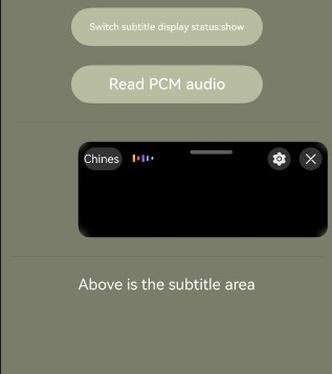
This section describes how to use the AICaption components AICaptionComponent and AICaptionController to display AI captions, as shown in the following figure.
API Description
The AI caption function is mainly provided by AICaptionComponent. For more information about the APIs, please refer to API Reference.
| API | Description |
|---|---|
| AICaptionComponent | AICaption component. |
| AICaptionOptions | AICaption initialization parameters. |
| AICaptionController | Controller of the AICaption component. It is the main function entry class of the AICaption component and is used to operate AI captions. It writes audio data and obtains audio stream information. |
Development Procedure
-
Add the AICaptionComponent class and other related classes to the /src/main/ets/pages/Index.ets file in the project root directory.
import { AICaptionComponent, AICaptionController, AICaptionOptions,AICaptionFontSize } from '@kit.SpeechKit'; -
Configure the page layout, add the AI caption component, check whether the device supports the component (this query API is supported only in versions later than 26.0.0), and set the input parameters of the AI caption component in the aboutToAppear method.
import { hilog } from '@kit.PerformanceAnalysisKit'; const TAG = 'AI_CAPTION_DEMO'; class Logger { static info(...msg: string[]) { hilog.info(0x0000, TAG, msg.join()); } static error(...msg: string[]) { hilog.error(0x0000, TAG, msg.join()); } } @Entry @Component struct Index { private captionOption ?: AICaptionOptions; private controller = new AICaptionController(); @State isSupport: boolean = false; @State isShown: boolean = false; aboutToAppear(): void { // Check whether the device supports the features (only APIs of versions later than 26.0.0 are supported). this.isSupport = this.controller.isCapabilitySupported() // AI caption initialization parameters, which are used to set the caption opacity and callback functions. this.captionOption = { initialOpacity: 1, onPrepared: () => { Logger.info('onPrepared') }, onError: (error) => { Logger.error(`onError, code: ${error.code}, msg: ${error.message}`) }, // Source language sourceLanguage: 'zh', // Target language targetLanguage: 'zh', // Font size fontSize: AICaptionFontSize.NORMAL, // Font color fontColor: Color.Black }; } build() { Column({ space: 20 }) { if (this.isSupport) { // Call the AICaptionComponent to initialize captions. AICaptionComponent({ isShown: this.isShown, controller: this.controller, options: this.captionOption }) .width('100%') .height(100) Divider() if (this.isShown) { Text('The upper part shows the captions.') .fontColor(Color.White) } } } .width('100%') .height('100%') .padding(10) .backgroundColor('#7A7D6A') } } -
Add two buttons and the callback functions of their click events to the layout.
- The callback function of the first button controls the display status of the AICaption component.
- The callback function of the second button reads the audio file in the resource directory and passes the audio data to the AICaptionComponent.
import { AudioData } from '@kit.SpeechKit';

@Entry
@Component
struct Index {

  isReading: boolean = false;

  async readPcmAudio() {
    this.isReading = true;
    let fileData: Uint8Array | undefined = undefined;
    try {
      fileData =
        await this.getUIContext()?.getHostContext()?.resourceManager.getMediaContent($r('app.media.ChineseAudio').id);
    } catch (e) {
      Logger.info(`get fileData fail , msg ${e} `)
    }
    if (fileData === undefined) {
      return;
    }
    const bufferSize = 640;
    const byteLength = fileData.byteLength;
    let offset = 0;
    Logger.info('byteLength', byteLength.toString());
    let startTime = new Date().getTime();
    while (offset < byteLength) {
      // Simulate the actual situation. Reading a file is faster than returning a stream by the recorder. Therefore, you need to wait for a period of time for synchronous transmission.
      let nextOffset = offset + bufferSize;
      if (offset >= byteLength) {
        this.isReading = false;
        return;
      }
      const arrayBuffer = fileData.buffer.slice(offset, nextOffset);
      let data = new Uint8Array(arrayBuffer);
      Logger.info('data byteLength', data.byteLength.toString());
      const audioData: AudioData = {
        data: data
      };
      Logger.info(`offset: ${offset} | byteLength: ${byteLength} | bufferSize: ${bufferSize}`);

      if (this.controller) {
        Logger.info(`writeAudio: ${audioData.data.byteLength}`);
       try {
          this.controller.writeAudio(audioData);
        } catch (e) {
          Logger.error(`writeAudio exception`);
        }
      }
      offset = offset + bufferSize;
      const waitTime = bufferSize / 32;
      await this.sleep(waitTime);
    }
    let endTime = new Date().getTime();
    this.isReading = false;
    Logger.info('playtime', JSON.stringify(endTime - startTime));
  }

  async sleep(time: number): Promise<void> {
    return new Promise(resolve => setTimeout(resolve, time));
  }

  build() {
    Column({ space: 20 }) {
     // ...
      Button('Switch caption display status:' + (this.isShown ? 'Displayed' : 'Hidden'))
        .backgroundColor('#B8BDA0')
        .width(200)
        .onClick(() => {
          this.isShown = !this.isShown;
        })
      Button('Read PCM audio')
        .backgroundColor('#B8BDA0')
        .width(200)
        .onClick(() => {
          if (!this.isReading) {
            void this.readPcmAudio();
          }
        })
     // ...
    }
  }
}
Development Example
Index.ets
import { AICaptionComponent, AICaptionOptions, AICaptionController, AudioData,AICaptionFontSize } from '@kit.SpeechKit';
import { BusinessError } from '@kit.BasicServicesKit';
import { hilog } from '@kit.PerformanceAnalysisKit';

const TAG = 'AI_CAPTION_DEMO';

class Logger {
  static info(...msg: string[]) {
    hilog.info(0x0000, TAG, msg.join());
  }

  static error(...msg: string[]) {
    hilog.error(0x0000, TAG, msg.join());
  }
}

@Entry
@Component
struct Index {
  private captionOption?: AICaptionOptions;
  private controller: AICaptionController = new AICaptionController();
  @State isSupport: boolean = false;
  @State isShown: boolean = false;
  isReading: boolean = false;

  aboutToAppear(): void {
    // Check whether the device supports the features.
    this.isSupport = this.controller.isCapabilitySupported()
    // AI caption initialization parameters, which are used to set the caption opacity and callback functions.
    this.captionOption = {
      initialOpacity: 1,
      onPrepared: () => {
        Logger.info('onPrepared')
      },
      onError: (error: BusinessError) => {
        Logger.error(`AICaption component error. Error code: ${error.code}, message: ${error.message}`);
      },
      // Source language
      sourceLanguage: 'zh',
      // Target language
      targetLanguage: 'zh',
      // Font size
      fontSize: AICaptionFontSize.NORMAL,
      // Font color
      fontColor: Color.Black
    };
  }

  async readPcmAudio() {
    this.isReading = true;
    // The **ChineseAudio.pcm** file is stored in **entry\src\main\resources\base\media**.
    let fileData: Uint8Array | undefined = undefined;
    try {
      fileData =
        await this.getUIContext()?.getHostContext()?.resourceManager.getMediaContent($r('app.media.ChineseAudio').id);
    } catch (e) {
      Logger.info(`get fileData fail , msg ${e} `);
    }
    if (fileData === undefined) {
      return;
    }
    const bufferSize = 640;
    const byteLength = fileData.byteLength;
    let offset = 0;
    Logger.info(`Pcm data total bytes: ${byteLength.toString()}`);
    let startTime = new Date().getTime();
    while (offset < byteLength) {
      // Simulate the actual situation. Reading a file is faster than returning a stream by the recorder. Therefore, you need to wait for a period of time for synchronous transmission.
      let nextOffset = offset + bufferSize;
      if (offset >= byteLength) {
        this.isReading = false;
        return;
      }
      const arrayBuffer = fileData.buffer.slice(offset, nextOffset);
      let data = new Uint8Array(arrayBuffer);
      const audioData: AudioData = {
        data: data
      };

      if (this.controller) {
        try {
          this.controller.writeAudio(audioData);
        } catch (e) {
          Logger.error(`writeAudio exception`);
        }
      }
      offset = offset + bufferSize;
      const waitTime = bufferSize / 32;
      await this.sleep(waitTime);
    }
    let endTime = new Date().getTime();
    this.isReading = false;
    Logger.info(`Audio play time: ${JSON.stringify(endTime - startTime)}`);
  }

  async sleep(time: number): Promise<void> {
    return new Promise(resolve => setTimeout(resolve, time))
  }

  build() {
    Column({ space: 20 }) {
      if (this.isSupport ) {
        Button('Switch caption display status:' + (this.isShown ? 'Displayed' : 'Hidden'))
          .backgroundColor('#B8BDA0')
          .width(200)
          .onClick(() => {
            this.isShown = !this.isShown;
          })
        Button('Read PCM audio')
          .backgroundColor('#B8BDA0')
          .width(200)
          .onClick(() => {
            if (!this.isReading) {
              void this.readPcmAudio();
            }
          })
        Divider()
        // Call the AICaptionComponent to initialize captions.
        AICaptionComponent({
          isShown: this.isShown,
          controller: this.controller,
          options: this.captionOption
        })
          .width('100%')
          .height(100)
        Divider()
        if (this.isShown) {
          Text('The upper part shows the captions.')
            .fontColor(Color.White)
        }
      }
    }
    .width('100%')
    .height('100%')
    .padding(10)
    .backgroundColor('#7A7D6A')
  }
}