The SaveButton component comes with the privilege for saving data, which allows an application to temporarily save data without any authorization.
When it is tapped, the application obtains the permission to access the mediaLibrary APIs within a short period of time. For API version 19 and earlier, the authorization duration is 10 seconds. For API version 20 and later, the authorization duration is 1 minute. You can use this component when your application needs to save images or videos to the media library.
This component allows for simpler operations than Pickers, which have to start a system application and have the user select a directory for saving the image or video.
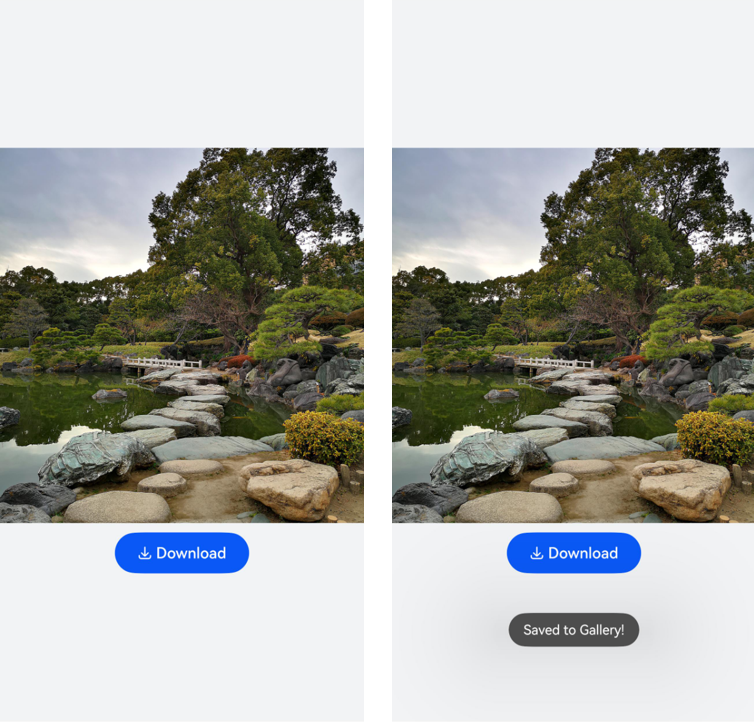
The following figure shows the effect of the SaveButton component.
Constraints
-
When a user clicks SaveButton in the application for the first time, a dialog box will be displayed to request user authorization. If the user clicks Deny, the dialog box will be closed and the application does not have the permission. When the user clicks SaveButton again, the user authorization dialog box will be displayed again. If the user clicks Allow, the dialog box will be closed and the application is granted the temporary save permission. After that, if the user clicks SaveButton again, no dialog box will be displayed.
-
The interval for calling onClick() to trigger a mediaLibrary API cannot exceed the specified time after SaveButton is tapped. For API version 19 and earlier, the authorization duration is 10 seconds. For API version 20 and later, the authorization duration is 1 minute.
-
The SaveButton component can be used only in the main window and subwindows of the application and cannot be used in UIExtension.
-
One click of the control by the user grants only one authorized call.
-
The SaveButton component must be visible and legible to users. You need to properly configure the component attributes such as the size and color to prevent authorization failures. If the authorization fails due to invalid component style, check the device error logs.
-
Request the ohos.permission.CUSTOMIZE_SAVE_BUTTON permission from AppGallery Connect if you need to customize the icon and text of the SaveButton component.

ohos.permission.CUSTOMIZE_SAVE_BUTTON is available only when the default style cannot meet service requirements. For details about how to apply for the permission, see Requesting Restricted Permissions.
How to Develop
For example, to save the image in the dialog box shown above, the application only needs to use the image saving feature for a short period of time in the foreground. In this case, you can use the SaveButton component to obtain temporary permission to save the image without requesting the related permission for the application.
-
Import the dependencies.
import { photoAccessHelper } from '@kit.MediaLibraryKit'; import { fileIo } from '@kit.CoreFileKit'; -
Set the image asset and add the SaveButton component.
SaveButton is a button-like security component consisting of an icon, text, and background. The background is mandatory, and at least one of the icon and text must be selected. You can select icons and text from the existing options or customize them using setIcon and setText. When declaring the API for creating a security component, you can determine whether to pass in parameters. If no parameter is passed, a button containing the icon, text, and background is created by default. If parameters are passed, a button is created based on the parameters, excluding the unconfigured elements.
The following example uses the default parameters. For details, see SaveButton. In addition, all security components inherit the Security Component Universal Attributes, which can be used to customize styles.
For details about saving images to the media library, see Saving Media Library Resources.
import { photoAccessHelper } from '@kit.MediaLibraryKit';
import { fileIo } from '@kit.CoreFileKit';
import { common } from '@kit.AbilityKit';
import { promptAction } from '@kit.ArkUI';
import { BusinessError } from '@kit.BasicServicesKit';

async function savePhotoToGallery(context: common.UIAbilityContext) {
  let helper = photoAccessHelper.getPhotoAccessHelper(context);
  try {
    // Call createAsset() within 1 minute after onClick is triggered to create an image file. After 1 minute has elapsed, the permission for calling createAsset is revoked.
    let uri = await helper.createAsset(photoAccessHelper.PhotoType.IMAGE, 'jpg');
    // Open the file based on its URI. The write process is not time bound.
    let file = await fileIo.open(uri, fileIo.OpenMode.READ_WRITE | fileIo.OpenMode.CREATE);
    // Replace $r('app.media.test') with the image resource file you use.
    context.resourceManager.getMediaContent($r('app.media.test').id, 0)
      .then(async value => {
        let media = value.buffer;
        // Write data to the file in the media library.
        await fileIo.write(file.fd, media);
        await fileIo.close(file.fd);
        promptAction.openToast({ message: $r('app.string.saved_in_photo') });
      });
  } catch (error) {
    const err: BusinessError = error as BusinessError;
    console.error(`Failed to save photo. Code is ${err.code}, message is ${err.message}`);
  }
}

@Entry
@Component
struct Index {
  build() {
    Row() {
      Column({ space: 10 }) {
        // Replace $r('app.media.test') with the image resource file you use.
        Image($r('app.media.test'))
          .height(400)
          .width('100%')

        SaveButton()
          .padding({top: 12, bottom: 12, left: 24, right: 24})
          .onClick((event: ClickEvent, result: SaveButtonOnClickResult) => {
            if (result === SaveButtonOnClickResult.SUCCESS) {
              const context: common.UIAbilityContext = this.getUIContext().getHostContext() as common.UIAbilityContext;
              // Obtain temporary permission to save the image without requesting the related permission for the application.
              savePhotoToGallery(context);
            } else {
              promptAction.openToast({ message: $r('app.string.set_permission_failed') });
            }
          })
      }
      .width('100%')
    }
    .height('100%')
    .backgroundColor(0xf1f3f5)
  }
}