Audio and Video Session (AVSession) Kit provides the audio and video management service, which manages the playback behavior of all audio and video applications in the system in a unified manner. You can use the kit to quickly build unified audio and video display and control capabilities.
Capability Scope
-
Unified audio and video management: Audio and video applications access AVSession and send it application data (for example, the song that is being played and the playback state). Through a controller, the user can choose another application or device for playback.
-
Background audio playback capability: After accessing AVSession, audio applications can perform background audio playback. This feature also requires applying for a continuous task.
Highlights
-
Consistent user experience
After accessing AVSession, audio and video applications can send media data (such as the song name being played and the playback state) to the system in a unified manner, enabling seamless cross-application and cross-device integration.
Through the Media Controller or AI Voice, users can conveniently switch playback between multiple applications and devices, enjoying a consistent casting experience.
-
Standardize background playback management
Through the Media Controller, the background playback of applications is visible and controllable, and audio and video applications can be controlled in a unified manner.
The system enforces strict control over background playback. For applications that have not integrated with AVSession or for applications that have integrated with AVSession but do not have a valid AVSession instance when they move to the background, their audio playback is forcibly paused. This addresses the issue of applications playing audio maliciously in the background, making it difficult for users to locate and close the offending application.
Basic Concepts
Be familiar with the following basic concepts before development:
- AVSession
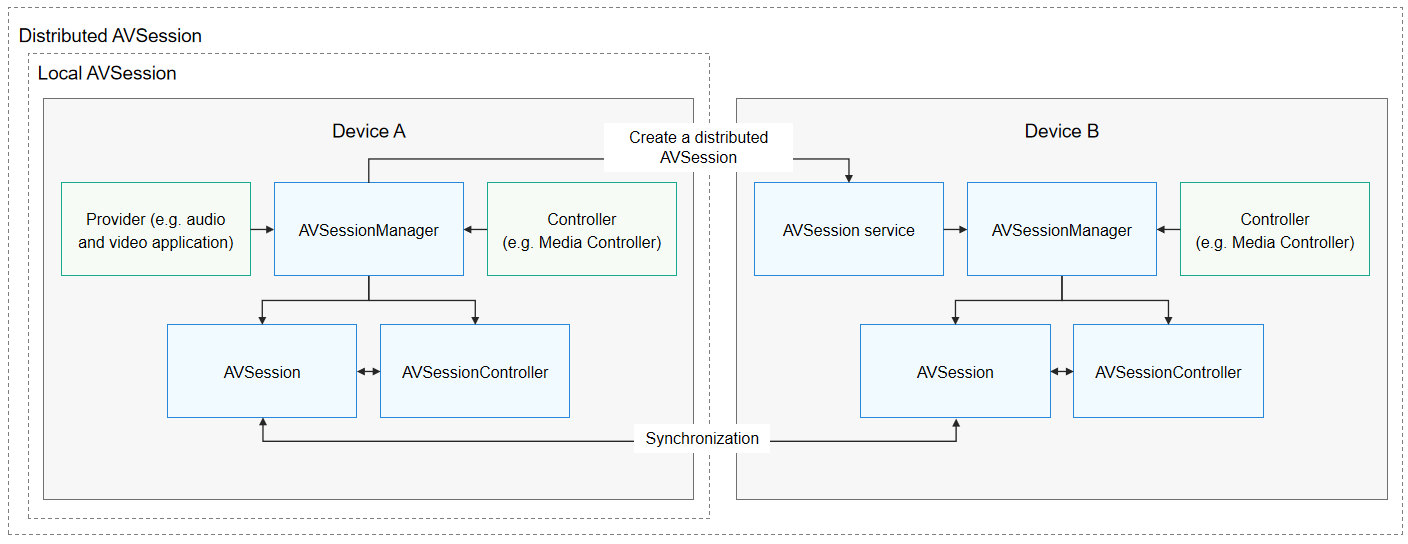
For AVSession, one end is the audio and video applications under control, and the other end is a controller (for example, Media Controller or AI Voice). AVSession provides a channel for information exchange between the applications and their controllers.
- Provider
A provider is an audio and video application that has accessed AVSession. After accessing AVSession, the audio and video application must provide playback media information to AVSession, such as the song name being played and the playback state. Meanwhile, the audio and video application must receive control commands from the controller through AVSession and respond correctly.
- Controller
A controller is an application that has accessed AVSession and has the capability to globally manage audio and video playback behaviors, such as the system Media Controller and AI Voice. For ease of understanding, the system Media Controller is used as an example of a controller in the following sections. After accessing AVSession, system applications such as the Media Controller can obtain the latest media information by listening to AVSession, and can also send control commands to audio and video applications through AVSession.
- AVSessionController
The holder of an AVSessionController object, generally the controller, can control the playback behavior of the provider, obtain the playback information of the audio and video application, and listen for changes in the playback state of the audio and video application, so as to synchronize the AVSession information between the audio and video application and the Media Controller.
-
AVSessionManager
An object that provides the capability of managing sessions. It can create an AVSession object, create an AVSessionController object, send control commands, and listen for session state changes.
AVSession Interaction Process
AVSessions are classified into local AVSessions and distributed AVSessions.
- Local AVSession
Local AVSession establishes a connection between the provider and controller in the local device, so as to implement unified playback control and media information display for audio and video applications in the system.
- Distributed AVSession
Distributed AVSession establishes a connection between the provider and controller in the cross-device scenario, so as to implement cross-device playback control and media information display for audio and video applications. For example, you can project the content played on device A to device B and perform playback control on device B.
Constraints
All audio and video applications that need to play in the background must be connected to AVSession and background task management. Otherwise, the system forcibly pauses audio playback when such an application switches to the background.
Supported Emulators
This kit supports the Emulator, but there are some differences in feature support between real devices and the Emulator:
- General differences: For details, see Differences Between the Emulator and Real Device.
- Cross-device casting is not supported.
- Only the default output (speaker) and default input (microphone) devices exist, which are mapped to the audio devices of the simulator's operating system. There is no concept of other peripherals.