Module Overview
Live View Kit is a real-time activity display service provided by HarmonyOS. It allows apps to display the real-time status of orders or services on key device screens, such as the notification panel, status bar, banner, and lock screen, helping users quickly view and process ongoing tasks.
This module provides the following basic capabilities:
-
Basic lifecycle management: It provides APIs (startLiveView, updateLiveView, and stopLiveView) for creating, updating, and ending live view notifications. Your app can call these APIs to display the real-time progress of user-followed events (such as instant food delivery and ride-hailing orders) across locations such as the AOD, lock screen, banner, notification panel, and status bar.
-
Condition-based lifecycle management: The location-based live view alert function is an advanced function supported since 6.1.0(23). This function allows developers to register a geofence. When a device enters or leaves a geofence, the creation or termination of a live view is automatically triggered, implementing the location-based live view alert service.
-
Live view information query: The getActiveLiveView, isLiveViewEnabled, and isGeofenceTriggerEnabled APIs are provided for apps to query live view information and switch status before creating or updating a live view.
-
Template management: The capability of defining live view content such as widgets, capsules, and small external screens based on templates is provided. The content can be displayed on the lock screen, notification panel, and status bar, establishing a connection between developers and users.
-
Reminder management: You can configure whether to enable ringing and vibration for live view notifications, status bar capsule animation, and banner reminder.
[h2]Basic Concepts
-
event: a key field in the LiveView object that identifies the application scenario type. This field determines the application scenario of the live view. You need to select a corresponding scenario value based on the actual service.
-
Live view ID: a key field in the LiveView object that uniquely identifies a live view. It is generated by developers and used to create, update, end, and query a live view.
-
Live view layout: Live views are displayed in two modes: widget and capsule. The widget mode is further divided into three parts: fixed area, auxiliary area, and extension area.
-
The fixed area displays the core information about real-time activities and the dynamic content that users are most concerned about. It is located on the left and in the middle of the top of the widget.
-
The auxiliary area displays secondary information about real-time activities. It is located on the right side of the fixed area on the widget. If the auxiliary area is displayed, it will occupy the width of the fixed area.
-
The extension area displays detailed information about real-time activities. It is located below the fixed and auxiliary areas on the widget. The extended area supports progress visualization, emphasized text, left and right text, live scores, and custom navigation styles.
-
A capsule is the display form of the live view in the status bar. You can tap the capsule to expand the banner widget and view details.
-
layoutType: enumerates template types of the extension area of the live view. The extension area is an important area for displaying detailed information and progress in the live view widget. Different template types are applicable to different service scenarios.
-
keepTime: controls the archiving time after the live view ends. That is, after the live view is stopped by calling stopLiveView, the live view is still displayed in the notification panel for a period of time.
[h2]Key Classes and APIs
  LiveView: live view object parameters.
    ├── id
    ├── event
    ├── Other parameters......
    └── LiveViewData: live view details.
        ├── PrimaryData: widget content.
            ├── LayoutData: extension area data.
                ├── ProgressLayout: parameters of the extension area of the progress visualization template.
                ├── FlightLayout: parameters of the extension area of the left-right text template.
                ├── ScoreLayout: parameters of the extension area of the live scores template.
                ├── PickupLayout: parameters of the extension area of the emphasized text template.
                ├── NavigationLayout: parameters of the extension area of the navigation template.
                └── CustomLayout: parameters of the extension area of the custom template.
            └── ExtensionData: auxiliary area content.
        ├── CapsuleData: live view capsule content.
            ├── TextCapsule: text capsule parameters.
            ├── TimerCapsule: timer capsule parameters.
            └── ProgressCapsule: progress capsule parameters.
        └── ExternalData: external screen template parameters.
[h2]API Combination Usage Relationship
- Process of creating, updating, and ending a local live view
  1. Perform a pre-check.
     Call **isLiveViewEnabled()** to check whether the live view switch of the app is enabled. If so, go to the next step.

  2. Create a live view.
     Call **startLiveView(liveView)** to create a live view instance.

  3. Update the live view. (This API can be called multiple times.)
     Call **updateLiveView (liveView)** to update the live view to the content in the **liveView** instance.

  4. End the live view.
Call **stopLiveView(liveView)** to end a live view instance. - Process of creating a live view triggered by a condition.
  1. Perform a pre-check.
     Call **isGeofenceTriggerEnabled()** to check whether the location-based live view alert is enabled. If it is enabled, go to the next step.

  2. Register a live view that is created when the trigger condition is met.
     Call **startLiveViewByTrigger(liveView, trigger)** to register a **liveView** instance that is created when the trigger condition is met.

  3. Wait until the condition is met.
     The device enters or leaves the specified geofence.

  4. Trigger the condition.
     The system automatically creates and displays the live view (you do not need to call an API to create it).

  5. End the live view.
The live view automatically ends after the duration specified by **liveViewManager.Trigger.displayTime**. - Process of ending a live view triggered by a condition.
  1. Perform a pre-check.
     Call **isLiveViewEnabled()** to check whether the live view switch of the app is enabled. If so, go to the next step.

  2. Create a live view.
     Call **startLiveView(liveView)** to create a live view instance.

  3. Update the live view. (This API is optional and can be called multiple times.)
     Call **updateLiveView (liveView)** to update the live view to the content in the **liveView** instance.

  4. Perform a pre-check.
     Call **isGeofenceTriggerEnabled()** to check whether the location-based live view alert is enabled. If it is enabled, go to the next step.

  5. Register a live view that is ended when the trigger condition is met.
     Call **stopLiveViewByTrigger(liveView, trigger)** to register a **liveView** instance that is ended when the trigger condition is met.

  6. Wait until the condition is met.
     The device enters or leaves the specified geofence.

  7. Trigger the condition.
     The system automatically ends the live view (you do not need to call an API to end it).
Since: 4.1.0(11)
Modules to Import
import { liveViewManager } from '@kit.LiveViewKit'; Device behavior differences: This module is supported on phones and tablets, but does not work on other devices.
liveViewManager.isLiveViewEnabled
isLiveViewEnabled(): Promise<boolean>
Checks whether the live view function is enabled for an app. This API uses a promise to return the result.
Model restriction: This API can be used only in the stage model.
System capability: SystemCapability.LiveView.LiveViewService
Device behavior differences: This API is supported on phones and tablets, but does not work on other devices.
Since: 4.1.0(11)
Returns:
| Type | Description |
| Promise<boolean> | Promise used to return whether the live view function is enabled. ● true: yes ● false: no |
Error codes:
For details about the error codes, see ArkTS API Error Codes.
Example:
import { liveViewManager } from '@kit.LiveViewKit';
import { hilog } from '@kit.PerformanceAnalysisKit';
import { BusinessError } from '@kit.BasicServicesKit';

try {
  liveViewManager.isLiveViewEnabled().then((isEnabled: boolean) => {
    hilog.info(0x0000, 'testTag', 'Succeeded in checking whether liveView is enabled, liveView is : %{public}s', isEnabled);
  }).catch((err: BusinessError) => {
    hilog.error(0x0000, 'testTag', 'Failed to check whether liveView is enabled: %{public}d %{public}s', err.code, err.message);
  });
} catch (err) {
  let e: BusinessError = err as BusinessError;
  hilog.error(0x0000, 'testTag', 'Failed to check whether liveView is enabled: %{public}d %{public}s', e.code, e.message);
}
liveViewManager.startLiveView
startLiveView(liveView: LiveView): Promise<LiveViewResult>
Creates a live view. This API uses a promise to return the result.
Model restriction: This API can be used only in the stage model.
System capability: SystemCapability.LiveView.LiveViewService
Device behavior differences: This API is supported on phones and tablets, but does not work on other devices.
Since: 4.1.0(11)
Parameters:
| Name | Type | Mandatory | Description |
| liveView | LiveView | Yes | Live view instance. |
Returns:
| Type | Description |
| Promise<LiveViewResult> | Promise used to return the live view creation result. |
Error codes:
For details about the error codes, see ArkTS API Error Codes.
| ID | Error Message |
| 401 | Parameter error. Possible causes: 1. Mandatory parameters are left unspecified; 2. Incorrect parameter types; 3. Parameter verification failed. |
| 1003500001 | Internal error. |
| 1003500002 | Marshalling or unmarshalling error. |
| 1003500003 | Failed to connect service. |
| 1003500004 | LiveView is not enabled. |
| 1003500005 | The right of liveView is not enabled. |
| 1003500006 | The liveView already exists. |
| 1003500007 | Couldn't connect to server. |
| 1003500008 | Over max number liveViews per second. |
| 1003500021 | The system failed to find the ExtensionAbility instance for the custom Live View widget template. Applicable versions: 26.0.0+ |
Example:
import { liveViewManager } from '@kit.LiveViewKit';
import { hilog } from '@kit.PerformanceAnalysisKit';
import { BusinessError } from '@kit.BasicServicesKit';
import { Want, wantAgent } from '@kit.AbilityKit';

async function startLiveView(): Promise<void> {
  try {
    // Define the live view to be created.
    let liveView: liveViewManager.LiveView = {
      id: 123,
      event: 'PICK_UP',
      sequence: 1,
      isMute: false,
      liveViewData: {
        primary: {
          title: 'Meal ready',
          content: [
            { text: 'Go to' },
            { text: 'Window 1', textColor: '#FFFF0000' }
          ],
          keepTime: 1,
          clickAction: await buildWantAgent(), // Used to construct the redirection proxy for tap actions.
          extensionData: {
            text: 'Pending pickup',
            type: liveViewManager.ExtensionType.EXTENSION_TYPE_COMMON_TEXT
          },
          layoutData: {
            layoutType: liveViewManager.LayoutType.LAYOUT_TYPE_PICKUP,
            title: 'Pickup code',
            content: '72988',
            underlineColor: '#FFFF0000',
            descPic: 'coffee.jpg'
          }
        },
        capsule: {
          type: liveViewManager.CapsuleType.CAPSULE_TYPE_TEXT,
          status: 1,
          icon: 'coffee.jpg',
          title: 'Pending pickup',
          content: 'Pickup code: 72988',
          backgroundColor: '#FF308977'
        }
      }
    };

    liveViewManager.startLiveView(liveView).then((liveViewResult: liveViewManager.LiveViewResult) => {
      hilog.info(0x0000, 'testTag', 'Succeeded in starting liveView, result: %{public}s', JSON.stringify(liveViewResult));
    }).catch((err: BusinessError) => {
      hilog.error(0x0000, 'testTag', 'Failed to start liveView: %{public}d %{public}s', err.code, err.message);
    });
  } catch (err) {
    let e: BusinessError = err as BusinessError;
    hilog.error(0x0000, 'testTag', 'Failed to start liveView: %{public}d %{public}s', e.code, e.message);
  }
}

async function buildWantAgent(): Promise<Want> {
  const wantAgentInfo: wantAgent.WantAgentInfo = {
    wants: [
      {
        bundleName: 'xxx.xxx.xxx',
        abilityName: 'EntryAbility'
      } as Want
    ],
    actionType: wantAgent.OperationType.START_ABILITIES,
    requestCode: 0,
    actionFlags: [wantAgent.WantAgentFlags.UPDATE_PRESENT_FLAG]
  };
  try {
    const agent = await wantAgent.getWantAgent(wantAgentInfo);
    return agent;
  } catch (e) {
    const err: BusinessError = e as BusinessError;
    hilog.error(0x0000, 'testTag', 'Failed to get wantAgent: %{public}s', err.message);
    throw e as Error;
  }
}
liveViewManager.updateLiveView
updateLiveView(liveView: LiveView): Promise<LiveViewResult>
Updates a live view. This API uses a promise to return the result.
Model restriction: This API can be used only in the stage model.
System capability: SystemCapability.LiveView.LiveViewService
Device behavior differences: This API is supported on phones and tablets, but does not work on other devices.
Since: 4.1.0(11)
Parameters:
| Name | Type | Mandatory | Description |
| liveView | LiveView | Yes | Live view instance. Unless otherwise specified, optional parameters in liveView will persist their previous values if not provided. |
Returns:
| Type | Description |
| Promise<LiveViewResult> | Promise used to return the live view update result. |
Error codes:
For details about the error codes, see ArkTS API Error Codes.
| ID | Error Message |
| 401 | Parameter error. Possible causes: 1. Mandatory parameters are left unspecified; 2. Incorrect parameter types; 3. Parameter verification failed. |
| 1003500001 | Internal error. |
| 1003500002 | Marshalling or unmarshalling error. |
| 1003500003 | Failed to connect service. |
| 1003500004 | LiveView is not enabled. |
| 1003500008 | Over max number liveViews per second. |
| 1003500009 | The liveView does not exist. |
| 1003500010 | The liveView has ended. |
| 1003500011 | The liveView sequence is incorrect. |
| 1003500021 | The system failed to find the ExtensionAbility instance for the custom Live View widget template. Applicable versions: 26.0.0+ |
Example:
import { liveViewManager } from '@kit.LiveViewKit';
import { hilog } from '@kit.PerformanceAnalysisKit';
import { BusinessError } from '@kit.BasicServicesKit';
import { Want, wantAgent } from '@kit.AbilityKit';

async function updateLiveView(): Promise<void> {
  try {
    // Define the live view to be updated.
    let liveView: liveViewManager.LiveView = {
      id: 123,
      event: 'PICK_UP',
      sequence: 2,
      isMute: false,
      liveViewData: {
        primary: {
          title: 'Meal ready',
          content: [
            { text: 'Go to' },
            { text: 'Window 1', textColor: '#FFFF0000' }
          ],
          keepTime: 1,
          clickAction: await buildWantAgent(), // Used to construct the redirection proxy for tap actions.
          extensionData: {
            text: 'Pending pickup',
            type: liveViewManager.ExtensionType.EXTENSION_TYPE_COMMON_TEXT
          },
          layoutData: {
            layoutType: liveViewManager.LayoutType.LAYOUT_TYPE_PICKUP,
            title: 'Pickup code',
            content: '72988',
            underlineColor: '#FFFF0000',
            descPic: 'coffee.jpg'
          }
        },
        capsule: {
          type: liveViewManager.CapsuleType.CAPSULE_TYPE_TEXT,
          status: 1,
          icon: 'coffee.jpg',
          title: 'Pending pickup',
          content: 'Pickup code: 72988',
          backgroundColor: '#FF308977'
        }
      }
    };

    liveViewManager.updateLiveView(liveView).then((liveViewResult: liveViewManager.LiveViewResult) => {
      hilog.info(0x0000, 'testTag', 'Succeeded in updating liveView, result: %{public}s', JSON.stringify(liveViewResult));
    }).catch((err: BusinessError) => {
      hilog.error(0x0000, 'testTag', 'Failed to update liveView: %{public}d %{public}s', err.code, err.message);
    });
  } catch (err) {
    let e: BusinessError = err as BusinessError;
    hilog.error(0x0000, 'testTag', 'Failed to update liveView: %{public}d %{public}s', e.code, e.message);
  }
}

async function buildWantAgent(): Promise<Want> {
  const wantAgentInfo: wantAgent.WantAgentInfo = {
    wants: [
      {
        bundleName: 'xxx.xxx.xxx',
        abilityName: 'EntryAbility'
      } as Want
    ],
    actionType: wantAgent.OperationType.START_ABILITIES,
    requestCode: 0,
    actionFlags: [wantAgent.WantAgentFlags.UPDATE_PRESENT_FLAG]
  };
  try {
    const agent = await wantAgent.getWantAgent(wantAgentInfo);
    return agent;
  } catch (e) {
    const err: BusinessError = e as BusinessError;
    hilog.error(0x0000, 'testTag', 'Failed to get wantAgent: %{public}s', err.message);
    throw e as Error;
  }
}
liveViewManager.stopLiveView
stopLiveView(liveView: LiveView): Promise<LiveViewResult>
Ends a live view. This API uses a promise to return the result.
Model restriction: This API can be used only in the stage model.
System capability: SystemCapability.LiveView.LiveViewService
Device behavior differences: This API is supported on phones and tablets, but does not work on other devices.
Since: 4.1.0(11)
Parameters:
| Name | Type | Mandatory | Description |
| liveView | LiveView | Yes | Live view instance. Unless otherwise specified, optional parameters in liveView will persist their previous values if not provided. |
Returns:
| Type | Description |
| Promise<LiveViewResult> | Promise used to return the live view ending result. |
Error codes:
For details about the error codes, see ArkTS API Error Codes.
| ID | Error Message |
| 401 | Parameter error. Possible causes: 1. Mandatory parameters are left unspecified; 2. Incorrect parameter types; 3. Parameter verification failed. |
| 1003500001 | Internal error. |
| 1003500002 | Marshalling or unmarshalling error. |
| 1003500003 | Failed to connect service. |
| 1003500004 | LiveView is not enabled. |
| 1003500008 | Over max number liveViews per second. |
| 1003500009 | The liveView does not exist. |
| 1003500010 | The liveView has ended. |
| 1003500011 | The liveView sequence is incorrect. |
| 1003500021 | The system failed to find the ExtensionAbility instance for the custom Live View widget template. Applicable versions: 26.0.0+ |
Example:
import { liveViewManager } from '@kit.LiveViewKit';
import { hilog } from '@kit.PerformanceAnalysisKit';
import { BusinessError } from '@kit.BasicServicesKit';
import { Want, wantAgent } from '@kit.AbilityKit';

async function stopLiveView(): Promise<void> {
  try {
    // Define the live view to be ended.
    let liveView: liveViewManager.LiveView = {
      id: 123,
      event: 'PICK_UP',
      sequence: 3,
      isMute: false,
      liveViewData: {
        primary: {
          title: 'Meal ready',
          content: [
            { text: 'Go to' },
            { text: 'Window 1', textColor: '#FFFF0000' }
          ],
          keepTime: 1,
          clickAction: await buildWantAgent(), // Used to construct the redirection proxy for tap actions.
          extensionData: {
            text: 'Pending pickup',
            type: liveViewManager.ExtensionType.EXTENSION_TYPE_COMMON_TEXT
          },
          layoutData: {
            layoutType: liveViewManager.LayoutType.LAYOUT_TYPE_PICKUP,
            title: 'Pickup code',
            content: '72988',
            underlineColor: '#FFFF0000',
            descPic: 'coffee.jpg'
          }
        },
        capsule: {
          type: liveViewManager.CapsuleType.CAPSULE_TYPE_TEXT,
          status: 1,
          icon: 'coffee.jpg',
          title: 'Pending pickup',
          content: 'Pickup code: 72988',
          backgroundColor: '#FF308977'
        }
      }
    };

    liveViewManager.stopLiveView(liveView).then((liveViewResult: liveViewManager.LiveViewResult) => {
      hilog.info(0x0000, 'testTag', 'Succeeded in stopping liveView, result: %{public}s', JSON.stringify(liveViewResult));
    }).catch((err: BusinessError) => {
      hilog.error(0x0000, 'testTag', 'Failed to stop liveView: %{public}d %{public}s', err.code, err.message);
    });
  } catch (err) {
    let e: BusinessError = err as BusinessError;
    hilog.error(0x0000, 'testTag', 'Failed to stop liveView: %{public}d %{public}s', e.code, e.message);
  }
}

async function buildWantAgent(): Promise<Want> {
  const wantAgentInfo: wantAgent.WantAgentInfo = {
    wants: [
      {
        bundleName: 'xxx.xxx.xxx',
        abilityName: 'EntryAbility'
      } as Want
    ],
    actionType: wantAgent.OperationType.START_ABILITIES,
    requestCode: 0,
    actionFlags: [wantAgent.WantAgentFlags.UPDATE_PRESENT_FLAG]
  };
  try {
    const agent = await wantAgent.getWantAgent(wantAgentInfo);
    return agent;
  } catch (e) {
    const err: BusinessError = e as BusinessError;
    hilog.error(0x0000, 'testTag', 'Failed to get wantAgent: %{public}s', err.message);
    throw e as Error;
  }
}
liveViewManager.getActiveLiveView
getActiveLiveView(id: number): Promise<LiveView>
Obtains an active live view. This API uses a promise to return the result.
Model restriction: This API can be used only in the stage model.
System capability: SystemCapability.LiveView.LiveViewService
Device behavior differences: This API is supported on phones and tablets, but does not work on other devices.
Since: 4.1.0(11)
Parameters:
| Name | Type | Mandatory | Description |
| id | number | Yes | Live view ID. The value range is [–2147483648, 2147483647]. |
Returns:
| Type | Description |
| Promise<LiveView> | Promise used to return active live view instances. |
Error codes:
For details about the error codes, see ArkTS API Error Codes.
| ID | Error Message |
| 401 | Parameter error. Possible causes: 1. Mandatory parameters are left unspecified; 2. Incorrect parameter types; 3. Parameter verification failed. |
| 1003500001 | Internal error. |
| 1003500002 | Marshalling or unmarshalling error. |
| 1003500003 | Failed to connect service. |
| 1003500009 | The liveView does not exist. |
Example:
import { liveViewManager } from '@kit.LiveViewKit';
import { hilog } from '@kit.PerformanceAnalysisKit';
import { BusinessError } from '@kit.BasicServicesKit';

// Define the ID of the live view to be queried.
const id = 1;
try {
  liveViewManager.getActiveLiveView(id).then((liveView: liveViewManager.LiveView) => {
    hilog.info(0x0000, 'testTag', 'Succeeded in getting active liveView, liveView is : %{public}s', JSON.stringify(liveView));
  }).catch((err: BusinessError) => {
    hilog.error(0x0000, 'testTag', 'Failed to get active liveView: %{public}d %{public}s', err.code, err.message);
  });
} catch (err) {
  let e: BusinessError = err as BusinessError;
  hilog.error(0x0000, 'testTag', 'Failed to get active liveView: %{public}d %{public}s', e.code, e.message);
}
liveViewManager.isGeofenceTriggerEnabled
isGeofenceTriggerEnabled(): Promise<boolean>
Checks whether the location-based live view alert function is enabled. This API uses a promise to return the result.
Model restriction: This API can be used only in the stage model.
System capability: SystemCapability.LiveView.LiveViewService
Device behavior differences: This API is supported on phones and tablets, but does not work on other devices.
Since: 6.1.0(23)
Returns:
| Type | Description |
| Promise<boolean> | Promise used to return whether the location-based live view alert function is enabled. ● true: yes ● false: no |
Error codes:
For details about the error codes, see ArkTS API Error Codes.
Example:
import { liveViewManager } from '@kit.LiveViewKit';
import { hilog } from '@kit.PerformanceAnalysisKit';
import { BusinessError } from '@kit.BasicServicesKit';

try {
  liveViewManager.isGeofenceTriggerEnabled().then((isEnabled: boolean) => {
    hilog.info(0x0000, 'testTag', 'Succeeded in checking whether geofence trigger is enabled, geofence trigger is : %{public}s', isEnabled);
  }).catch((err: BusinessError) => {
    hilog.error(0x0000, 'testTag', 'Failed to check whether geofence trigger is enabled: %{public}d %{public}s', err.code, err.message);
  });
} catch (err) {
  let e: BusinessError = err as BusinessError;
  hilog.error(0x0000, 'testTag', 'Failed to check whether geofence trigger is enabled: %{public}d %{public}s', e.code, e.message);
}
liveViewManager.startLiveViewByTrigger
startLiveViewByTrigger(liveView: LiveView, trigger:Trigger): Promise<LiveViewResult>
Register a live view that is created when the trigger condition is met. After startLiveViewByTrigger is called, the system records the trigger condition but does not create the live view immediately. When the condition is met, the system automatically creates the live view. This API uses a promise to return the result.
Model restriction: This API can be used only in the stage model.
System capability: SystemCapability.LiveView.LiveViewService
Device behavior differences: This API is supported on phones and tablets, but does not work on other devices.
Since: 6.1.0(23)
Parameters:
| Name | Type | Mandatory | Description |
| liveView | LiveView | Yes | Live view instance. |
| trigger | Trigger | Yes | Condition object for triggering a live view. |
Returns:
| Type | Description |
| Promise<LiveViewResult> | Promise used to return the registration result. |
Error codes:
For details about the error codes, see ArkTS API Error Codes.
| ID | Error Message |
| 401 | Parameter error. Possible causes: 1. Mandatory parameters are left unspecified; 2. Incorrect parameter types; 3. Parameter verification failed. |
| 801 | Capability not supported. The device model does not support geofencing. |
| 1003500001 | Internal error. |
| 1003500002 | Marshalling or unmarshalling error. |
| 1003500003 | Failed to connect service. |
| 1003500004 | LiveView is not enabled. |
| 1003500005 | The right of liveView is not enabled. |
| 1003500006 | The liveView already exists. |
| 1003500007 | Couldn't connect to server. |
| 1003500008 | Over max number liveViews per second. |
| 1003500017 | Over max number liveViews by trigger. |
| 1003500018 | Geofencing-based liveView is not enabled. |
| 1003500019 | The location switch is off. |
| 1003500020 | The "Awareness & suggestions" switch of the location-based service is turned off. |
| 1003500021 | The system failed to find the ExtensionAbility instance for the custom Live View widget template. Applicable versions: 26.0.0+ |
Example:
import { liveViewManager } from '@kit.LiveViewKit';
import { hilog } from '@kit.PerformanceAnalysisKit';
import { BusinessError } from '@kit.BasicServicesKit';
import { Want, wantAgent } from '@kit.AbilityKit';

async function startLiveViewByTrigger(): Promise<void> {
  try {
    // Define the live view to be created.
    let liveView: liveViewManager.LiveView = {
      id: 0, // Live view ID, which is generated by you.
      event: 'EXPRESS', // Application scenario of the live view. The value EXPRESS indicates express delivery.
      liveViewData: {
        primary: {
          title: 'Package delivered',
          content: [
            { text: 'Go to' },
            { text: ' XXX to ', textColor: '#FF0A59F7' },
            { text: 'pick up your package.' }
          ],
          keepTime: 15,
          clickAction: await buildWantAgent(), // Used to construct the redirection proxy for tap actions.
          layoutData: {
            layoutType: liveViewManager.LayoutType.LAYOUT_TYPE_PICKUP,
            title: 'Pickup code',
            content: '72988',
            underlineColor: '#FF0A59F7',
            descPic: 'express.png' // Product description image on the right of an extension area. The value is a file name in /resources/rawfile or an image.PixelMap.
          }
        },
        capsule: {
          type: liveViewManager.CapsuleType.CAPSULE_TYPE_TEXT,
          status: 1,
          icon: 'express.jpg',
          title: 'Pickup code',
          content: 'Pickup code: 72988',
          backgroundColor: '#FF308977'
        }
      }
    };
    let trigger: liveViewManager.Trigger = {
      type: liveViewManager.TriggerType.TRIGGER_TYPE_GEOFENCE,
      displayTime: 15,
      condition: {
        longitude: 116.3971356415625,
        latitude: 39.91800603311188,
        coordinateSystemType: liveViewManager.CoordinateSystemType.COORDINATE_TYPE_GCJ02,
        monitorEvent: liveViewManager.MonitorEvent.MONITOR_TYPE_ENTRY,
        radius: 2000,
        delayTime: 0
      }
    };

    liveViewManager.startLiveViewByTrigger(liveView, trigger).then((liveViewResult: liveViewManager.LiveViewResult) => {
      hilog.info(0x0000, 'testTag', 'Succeeded in starting liveView by trigger, result: %{public}s', JSON.stringify(liveViewResult));
    }).catch((err: BusinessError) => {
      hilog.error(0x0000, 'testTag', 'Failed to start liveView by trigger: %{public}d %{public}s', err.code, err.message);
    });
  } catch (err) {
    let e: BusinessError = err as BusinessError;
    hilog.error(0x0000, 'testTag', 'Failed to start liveView by trigger: %{public}d %{public}s', e.code, e.message);
  }
}

async function buildWantAgent(): Promise<Want> {
  const wantAgentInfo: wantAgent.WantAgentInfo = {
    wants: [
      {
        bundleName: 'xxx.xxx.xxx',
        abilityName: 'EntryAbility'
      } as Want
    ],
    actionType: wantAgent.OperationType.START_ABILITIES,
    requestCode: 0,
    actionFlags: [wantAgent.WantAgentFlags.UPDATE_PRESENT_FLAG]
  };
  try {
    const agent = await wantAgent.getWantAgent(wantAgentInfo);
    return agent;
  } catch (e) {
    const err: BusinessError = e as BusinessError;
    hilog.error(0x0000, 'testTag', 'Failed to get wantAgent: %{public}s', err.message);
    throw e as Error;
  }
}
liveViewManager.stopLiveViewByTrigger
stopLiveViewByTrigger(liveView: LiveView, trigger:Trigger): Promise<LiveViewResult>
Register a live view that is ended when the trigger condition is met. After stopLiveViewByTrigger is called, the system records the trigger condition but does not end the live view immediately. When the condition is met, the system automatically ends the live view. This API uses a promise to return the result.
Model restriction: This API can be used only in the stage model.
System capability: SystemCapability.LiveView.LiveViewService
Device behavior differences: This API is supported on phones and tablets, but does not work on other devices.
Since: 6.1.0(23)
Parameters:
| Name | Type | Mandatory | Description |
| liveView | LiveView | Yes | Live view instance. |
| trigger | Trigger | Yes | Condition object for triggering a live view. |
Returns:
| Type | Description |
| Promise<LiveViewResult> | Promise used to return the registration result. |
Error codes:
For details about the error codes, see ArkTS API Error Codes.
| ID | Error Message |
| 401 | Parameter error. Possible causes: 1. Mandatory parameters are left unspecified; 2. Incorrect parameter types; 3. Parameter verification failed. |
| 801 | Capability not supported. The device model does not support geofencing. |
| 1003500001 | Internal error. |
| 1003500002 | Marshalling or unmarshalling error. |
| 1003500003 | Failed to connect service. |
| 1003500004 | LiveView is not enabled. |
| 1003500008 | Over max number liveViews per second. |
| 1003500009 | The liveView does not exist. |
| 1003500010 | The liveView has ended. |
| 1003500011 | The liveView sequence is incorrect. |
| 1003500017 | Over max number liveViews by trigger. |
| 1003500018 | Geofencing-based liveView is not enabled. |
| 1003500019 | The location switch is off. |
| 1003500020 | The "Awareness & suggestions" switch of the location-based service is turned off. |
| 1003500021 | The system failed to find the ExtensionAbility instance for the custom Live View widget template. Applicable versions: 26.0.0+ |
Example:
import { liveViewManager } from '@kit.LiveViewKit';
import { hilog } from '@kit.PerformanceAnalysisKit';
import { BusinessError } from '@kit.BasicServicesKit';
import { Want, wantAgent } from '@kit.AbilityKit';

async function stopLiveViewByTrigger(): Promise<void> {
  try {
    // Define the live view to be ended.
    let liveView: liveViewManager.LiveView = {
      id: 0, // Live view ID, which is generated by you.
      event: 'EXPRESS', // Application scenario of the live view. The value EXPRESS indicates express delivery.
      liveViewData: {
        primary: {
          title: 'Package delivered',
          content: [
            { text: 'Go to' },
            { text: ' XXX to ', textColor: '#FF0A59F7' },
            { text: 'pick up your package.' }
          ],
          keepTime: 15,
          clickAction: await buildWantAgent(), // Used to construct the redirection proxy for tap actions.
          layoutData: {
            layoutType: liveViewManager.LayoutType.LAYOUT_TYPE_PICKUP,
            title: 'Pickup code',
            content: '72988',
            underlineColor: '#FF0A59F7',
            descPic: 'express.png' // Product description image on the right of an extension area. The value is a file name in /resources/rawfile or an image.PixelMap.
          }
        },
        capsule: {
          type: liveViewManager.CapsuleType.CAPSULE_TYPE_TEXT,
          status: 1,
          icon: 'express.jpg',
          title: 'Pickup code',
          content: 'Pickup code: 72988',
          backgroundColor: '#FF308977'
        }
      }
    };
    let trigger: liveViewManager.Trigger = {
      type: liveViewManager.TriggerType.TRIGGER_TYPE_GEOFENCE,
      displayTime: 15,
      condition: {
        longitude: 116.3971356415625,
        latitude: 39.91800603311188,
        coordinateSystemType: liveViewManager.CoordinateSystemType.COORDINATE_TYPE_GCJ02,
        monitorEvent: liveViewManager.MonitorEvent.MONITOR_TYPE_LEAVE,
        radius: 2000,
        delayTime: 0
      }
    };

    liveViewManager.stopLiveViewByTrigger(liveView, trigger).then((liveViewResult: liveViewManager.LiveViewResult) => {
      hilog.info(0x0000, 'testTag', 'Succeeded in stopping liveView by trigger, result: %{public}s', JSON.stringify(liveViewResult));
    }).catch((err: BusinessError) => {
      hilog.error(0x0000, 'testTag', 'Failed to stop liveView by trigger: %{public}d %{public}s', err.code, err.message);
    });
  } catch (err) {
    let e: BusinessError = err as BusinessError;
    hilog.error(0x0000, 'testTag', 'Failed to stop liveView by trigger: %{public}d %{public}s', e.code, e.message);
  }
}

async function buildWantAgent(): Promise<Want> {
  const wantAgentInfo: wantAgent.WantAgentInfo = {
    wants: [
      {
        bundleName: 'xxx.xxx.xxx',
        abilityName: 'EntryAbility'
      } as Want
    ],
    actionType: wantAgent.OperationType.START_ABILITIES,
    requestCode: 0,
    actionFlags: [wantAgent.WantAgentFlags.UPDATE_PRESENT_FLAG]
  };
  try {
    const agent = await wantAgent.getWantAgent(wantAgentInfo);
    return agent;
  } catch (e) {
    const err: BusinessError = e as BusinessError;
    hilog.error(0x0000, 'testTag', 'Failed to get wantAgent: %{public}s', err.message);
    throw e as Error;
  }
}
Trigger
Defines parameters of the condition object for triggering the creation or ending of a live view.
Model restriction: This API can be used only in the stage model.
System capability: SystemCapability.LiveView.LiveViewService
Device behavior differences: This API is supported on phones and tablets, but does not work on other devices.
Since: 6.1.0(23)
| Name | Type | Read-Only | Optional | Description |
| type | TriggerType | No | No | Condition type for triggering live view creation or ending. |
| condition | Geofence | No | No | Description of the condition for triggering the creation or ending of a live view. |
| displayTime | number | No | Yes | Display duration of a condition-triggered live view, in seconds. The value ranges from 15 to 1800, and the default value is 900. |
Geofence
Defines parameters of the geofence object.
Model restriction: This API can be used only in the stage model.
System capability: SystemCapability.LiveView.LiveViewService
Device behavior differences: This API is supported on phones and tablets, but does not work on other devices.
Since: 6.1.0(23)
| Name | Type | Read-Only | Optional | Description |
| longitude | number | No | No | Longitude of the geofence center. The value ranges from -180 to 180. |
| latitude | number | No | No | Latitude of the geofence center. The value ranges from -90 to 90. |
| coordinateSystemType | CoordinateSystemType | No | No | Coordinate system type of the geofence center. |
| radius | number | No | No | Geofence radius, in meters. The value ranges from 200 to 2000. |
| monitorEvent | MonitorEvent | No | No | Event type for triggering a geofence. |
| delayTime | number | No | Yes | Trigger delay, in seconds. To be specific, it is the continuous duration spent inside or outside the geofence before a trigger occurs. The value ranges from 0 to 300. The default value is 0. |

- The longitude and latitude cannot both be set to 0.
- When coordinateSystemType is set to COORDINATE_TYPE_GCJ02, the longitude cannot be set to –180 or 180, and the latitude cannot be set to –90 or 90.
TriggerType
Enumerates condition types for triggering live view creation or ending.
Model restriction: This API can be used only in the stage model.
System capability: SystemCapability.LiveView.LiveViewService
Device behavior differences: This API is supported on phones and tablets, but does not work on other devices.
Since: 6.1.0(23)
| Name | Value | Description |
| TRIGGER_TYPE_GEOFENCE | 1 | Geofence. |
CoordinateSystemType
Enumerates coordinate system types of the geofence center.
Model restriction: This API can be used only in the stage model.
System capability: SystemCapability.LiveView.LiveViewService
Device behavior differences: This API is supported on phones and tablets, but does not work on other devices.
Since: 6.1.0(23)
| Name | Value | Description |
| COORDINATE_TYPE_WGS84 | 1 | WGS84. |
| COORDINATE_TYPE_GCJ02 | 2 | GCJ02. |
MonitorEvent
Enumerates event types that triggering a geofence.
Model restriction: This API can be used only in the stage model.
System capability: SystemCapability.LiveView.LiveViewService
Device behavior differences: This API is supported on phones and tablets, but does not work on other devices.
Since: 6.1.0(23)
| Name | Value | Description |
| MONITOR_TYPE_ENTRY | 1 | Enter the geofence. |
| MONITOR_TYPE_LEAVE | 2 | Exit the geofence. |
LiveView
Defines live view object parameters. For details, please refer to Creating a Local Live View.
Model restriction: This API can be used only in the stage model.
System capability: SystemCapability.LiveView.LiveViewService
Device behavior differences: This API is supported on phones and tablets, but does not work on other devices.
Since: 4.1.0(11)
| Name | Type | Read-Only | Optional | Description |
| id | number | No | No | Unique ID of a live view, which is generated by you. The value range is [–2147483648, 2147483647]. If you use the Push Kit REST API to create, update, and end a live view, this parameter corresponds to the activityId field in LiveViewPayload of the Push Kit REST API. |
| event | string | No | No | Application scenario of a live view. ● TAXI: ride hailing ● DELIVERY: instant delivery (takeout and fresh food) ● FLIGHT: flight ● TRAIN: high-speed train/common train ● QUEUE: queuing ● PICK_UP: meal pickup ● SCORE: live score ● RENT: shared leasing ● TIMER: timing ● WORKOUT: workout ● NAVIGATION: navigation ● CHECK_IN: clock-in/out ● EXPRESS: express delivery ● PROGRESS: progress display ● TRADE: financial transaction To use specific scenarios, you need to apply for corresponding permissions. For details, please refer to Live View Kit Permission. |
| subEvent | string | No | Yes | Application sub-scenario of a live view. It is primarily used to track the number of live views per sub-service scenario. No additional permissions are required to use the corresponding sub-scenarios. ● Instant delivery (takeout and fresh food) (event: DELIVERY) FOOD: food; GOODS: shopping malls and supermarkets; MEDICINE: medicine purchase; BACHELOR: courier service; GROUPBUY: group buy ● Navigation scenario (event: NAVIGATION) DRIVING: driving; WALKING: walking; CYCLING: cycling; BUS: bus; METRO: metro ● Ride hailing scenario (event: TAXI) STANDARD: standard ride hailing; SPECIAL: premier ride hailing; HITCHHIKING: hitchhiking; CARPOOLING: carpooling ● Queuing scenario (event: QUEUE) RESTAURANT: restaurant queuing; HOSPITAL: hospital queuing; BANK: bank queuing; GOVERNMENT: government service center queuing; ATTRACTION: scenic spot queuing ● Shared leasing scenario (event: RENT) BICYCLE: shared bicycle; EBIKE: shared e-bike or moped; POWERBANK: shared power bank; CAR: shared car ● Workout scenario (event: WORKOUT) RUNNING: running; CYCLING: cycling; WALKING: walking ● Progress scenario (event: PROGRESS) UPLOAD: file upload; DOWNLOAD: file download; IMPORT: resource import; EXPORT: resource export; BACKUP: backup; RECOVER: recovery Since: 26.0.0 |
| sequence | number | No | Yes | Live view version number. The value range is [0, 2147483647]. In the live view update and ending scenarios, the new live view version number must be greater than the current one. Otherwise, the update or ending will fail. If no value is passed for this parameter, Live View Kit does not automatically generate a live view version number or perform live view version number verification. (When no live view version number is generated, the value of sequence in the returned result of the getActiveLiveView API is 4294967295. This is an invalid value and cannot be used for live view update.) This parameter corresponds to the version field in Push Kit. |
| isMute | boolean | No | Yes | Message notification mode. If you do not pass this parameter when creating a live view or changing the status of a live view, the silent notification mode will be used. ● true: silent notification ● false: ringtone and vibration notification |
| timer | LiveViewTimer | No | Yes | Live view timer, which refreshes every second when displayed. After a timer is configured, you can use the placeholder ${placeholder.timer} in some parameters. The system will replace the placeholder with the timer. Currently, the following parameters support the placeholder: ● liveViewData.primary.title ● liveViewData.primary.content ● liveViewData.primary.layoutData.content ● liveViewData.primary.layoutData.competitionTime Since: 5.0.0(12) |
| lifeCycleMode | LifeCycleMode | No | Yes | Live view lifecycle mode, which controls whether a live view automatically ends when the app process ends. By default, the common lifecycle is used. In this case, you need to call the API to end the live view. The live view does not automatically end when the app process ends. This parameter takes effect only when a live view is created and does not take effect in the following scenarios: ● event is NAVIGATION or WORKOUT. ● startLiveViewByTrigger is called to register a live view that is created when the trigger condition is met. NOTE Omitting lifeCycleMode has the same effect as setting it to STOP_BY_APP. Since: 26.0.0 |
| shareUrl | string | No | Yes | Webpage link for viewing the real-time activity progress. The passed value cannot be null, undefined, an empty string, or a string containing only spaces. Only HTTPS webpage links are supported, that is, webpage links starting with https://. The length must be less than 128 characters. If any of the preceding conditions are not met, shareUrl does not take effect and live view sharing is not supported. NOTE When a live view is shared to a device running HarmonyOS 7.0.0 or later, tapping the shared live view widget will direct the user straight to this link. When a live view is shared to a device running an earlier version or a non-HarmonyOS device, the user can directly tap the link in the social sharing message to view the real-time activity progress. Since: 26.0.0 |
| liveViewData | LiveViewData | No | No | Detailed live view information. |
LiveViewTimer
Defines parameters of the live view timer.
Model restriction: This API can be used only in the stage model.
System capability: SystemCapability.LiveView.LiveViewService
Device behavior differences: This API is supported on phones and tablets, but does not work on other devices.
Since: 5.0.0(12)
| Name | Type | Read-Only | Optional | Description |
| time | number | No | Yes | Initial value of a timer, in ms. The default value is 0. The value range is [0, 9223372036854775807]. The value is updated every second. |
| isCountdown | boolean | No | Yes | Indicates whether the timer is a countdown timer. The default value is false. ● true: yes ● false: no |
| isPaused | boolean | No | Yes | Indicates whether the timer is paused. The default value is false. When the timer is paused, the display remains on the captured second. ● true: yes ● false: no (default value) |
| countdownPreset | CountdownPreset | No | Yes | When the countdown reaches 0, the system automatically updates the extension area title (specified by title) and extension area content (specified by content) of a live view widget to the values of presetTitle and presetContent in countdownPreset, respectively. The preceding function takes effect only when the following condition is met: ● The value of layoutType is LAYOUT_TYPE_PICKUP, indicating an emphasized text template. ● The placeholder ${placeholder.timer} is used in liveViewData.primary.layoutData.content. Since: 6.0.0(20) |
| capsuleCountdownPreset | CountdownPreset | No | Yes | When the countdown reaches 0, the system automatically updates the primary text (specified by time) and secondary text (specified by content) of a timer live view capsule to the values of presetTitle and presetContent in capsuleCountdownPreset, respectively. The preceding function takes effect only when the following condition is met: ● The value of capsuleType is CAPSULE_TYPE_TIMER, indicating a timer live view capsule. Since: 6.0.0(20) |
CountdownPreset
Defines preset parameters of the live view timer.
Model restriction: This API can be used only in the stage model.
System capability: SystemCapability.LiveView.LiveViewService
Device behavior differences: This API is supported on phones and tablets, but does not work on other devices.
Since: 6.0.0(20)
| Name | Type | Read-Only | Optional | Description |
| presetTitle | string | No | Yes | Preset primary text used for automatically updating the title of an extension area or primary text of a live view capsule. The value cannot be null, undefined, or an empty string. The length must be less than 128 characters. |
| presetContent | string | No | Yes | Preset secondary text used for automatically updating the text of an extension area or secondary text of a live view capsule. The value cannot be null, undefined, or an empty string. The length must be less than 128 characters. |
LiveViewData
Defines detailed live view information.
Model restriction: This API can be used only in the stage model.
System capability: SystemCapability.LiveView.LiveViewService
Device behavior differences: This API is supported on phones and tablets, but does not work on other devices.
Since: 4.1.0(11)
PrimaryData
Defines widget content parameters.
Model restriction: This API can be used only in the stage model.
System capability: SystemCapability.LiveView.LiveViewService
Device behavior differences: This API is supported on phones and tablets, but does not work on other devices.
Since: 4.1.0(11)
| Name | Type | Read-Only | Optional | Description |
| title | string | No | No (for live view creation) Yes (for live view update or ending) | Title of the fixed area. The passed value cannot be null, undefined, an empty string, or a string containing only spaces. The length must be less than 1024 characters. |
| content | Array<RichText> | No | No (for live view creation) Yes (for live view update or ending) | Content of the fixed area. If an array object is passed, the value of text in the object cannot be null, undefined, an empty string, or a string containing only spaces. ● The total length of the text values of all objects in the array must be less than 1024 characters. ● If textColor is not set for an object in the array, the default text color #99000000 will be used. If textColor is set for some objects in the array, its values for all these objects must be the same. |
| keepTime | number | No | Yes | Live view archiving duration, in seconds. It specifies the length of time the notification remains in the notification panel after the live view has ended. The value range is [0, 3600]. If the input value is 0, the live view ends directly in the notification panel and is not retained for display. |
| clickAction | WantAgent | No | No (for live view creation) Yes (for live view update or ending) | Default action when a user taps a live view. Call wantAgent.getWantAgent() to construct the action. |
| extensionData | ExtensionData | No | Yes | Content in the auxiliary area. |
| layoutData | ProgressLayout | PickupLayout | FlightLayout | ScoreLayout | NavigationLayout | CustomLayout | No | No (for live view creation) Yes (for live view update or ending) | Data in the extension area. Note: Since version 5.0.0(12), the NavigationLayout type is supported. Since version 26.0.0, the CustomLayout type is supported. |
| liveViewLockScreenPicture | string | image.PixelMap | No | Yes | File name of a large image for a lock screen immersive live view, in a specified path. If an actual image is passed, when a user taps the app icon in the live view capsule, presses and holds the live view capsule content, or presses and holds the widget content on the lock screen, the large image will be displayed for an immersive effect. If no image is passed or the passed image does not exist, user taps will not trigger the immersive state. ● A value of the string type is the name of a file in /resources/rawfile. The length must be less than 256 characters. Example: For the image file icon.png stored in /resources/rawfile of the app, the value is icon.png. ● You are advised to use a 1000 × 1000 image. GIF images are not supported. Since: 5.0.0(12) |
| liveViewLockScreenAbilityName | string | No | Yes | Name of LiveViewLockScreenExtensionAbility (the extension ability of lock screen immersive live views). This parameter is valid only for live view creation. The value cannot be null and can contain a maximum of 128 characters. If this parameter and liveViewLockScreenPicture are both passed during live view creation, only this parameter takes effect. Since: 5.0.0(12) |
| liveViewLockScreenAbilityParameters | Record<string, string> | No | Yes | Custom parameters passed to LiveViewLockScreenExtensionAbility (extension ability of lock screen immersive live views). If this parameter is passed, its value cannot be null. A maximum of 50 key-value pairs are supported. After the custom parameters are passed, they can be obtained in onSessionCreate() of the ability through want.parameters. Since: 5.0.0(12) |
| backgroundType | BackgroundType | No | Yes | Background type of a live view widget. The background can be displayed only using the left-right text template (layoutType set to LAYOUT_TYPE_FLIGHT). When the passed background type is the moon-viewing flight or sunset flight and a special weather type (specified by WeatherInfo) such as rain or snow is passed, the weather background is preferentially displayed on the widget. For other non-special weather types, the moon-viewing flight or sunset flight background is preferentially displayed on the widget. Since: 6.0.0(20) |
| aliveTime | number | No | Yes | Maximum alive time of a live view, in seconds. The value range is [15, 28800]. If the passed value is less than 15, the value 15 is used. If the passed value is greater than 28800, the value 28800 is used. Since: 6.1.1(24) |
BackgroundType
Enumerates background types of a live view widget.
Model restriction: This API can be used only in the stage model.
System capability: SystemCapability.LiveView.LiveViewService
Device behavior differences: This API is supported on phones and tablets, but does not work on other devices.
Since: 6.0.0(20)
| Name | Value | Description |
| SYS_BACKGROUND_UNDEFINED | 0 | Undefined. No background is displayed on the widget. |
| SYS_BACKGROUND_FLIGHT_MOON | 100 | Moon-viewing flight. The moon-viewing background is displayed on the widget. |
| SYS_BACKGROUND_FLIGHT_SUNSET | 101 | Sunset flight. The sunset background is displayed on the widget. |
ExtensionData
Defines parameters of the auxiliary area.
API parameters corresponding to elements in the auxiliary area:
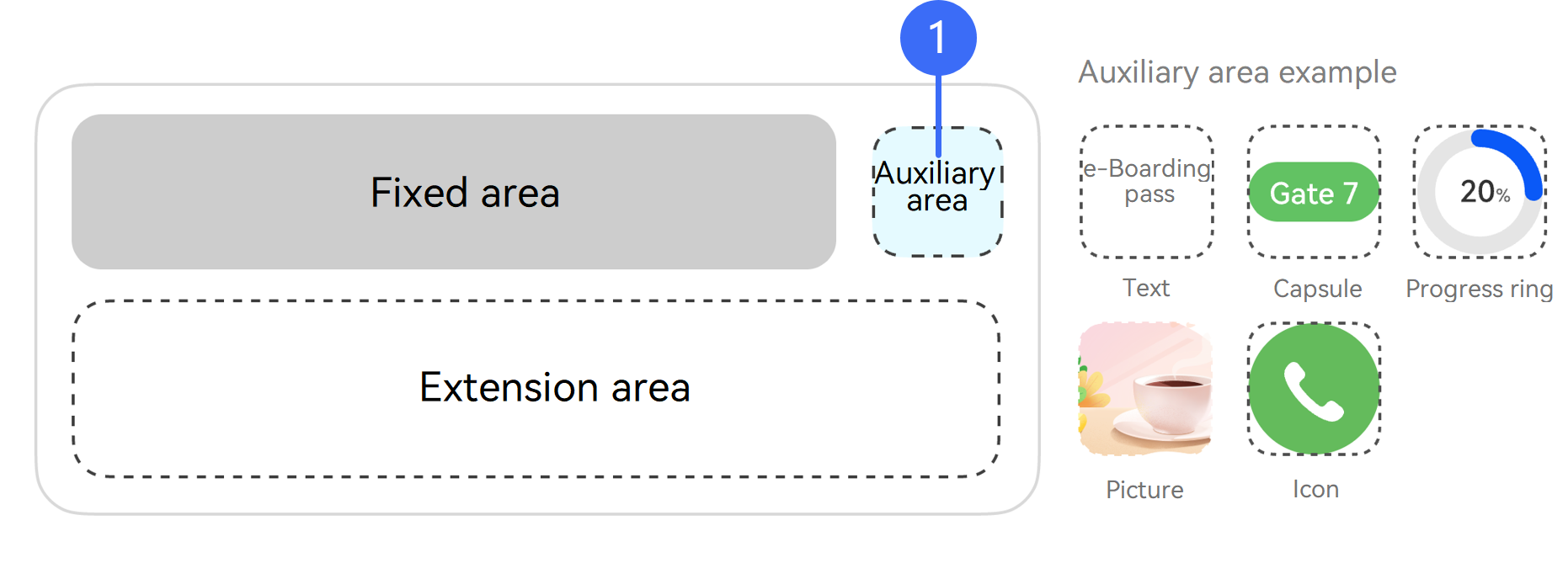
-
- Auxiliary area type of the live view widget, corresponding to the type field:
- When the auxiliary area type is ExtensionType.EXTENSION_TYPE_COMMON_TEXT, the auxiliary area displays common text. The API parameter text is used to pass the text content.
- When the auxiliary area type is ExtensionType.EXTENSION_TYPE_CAPSULE_TEXT, the auxiliary area displays live view capsule text. The API parameter text is used to pass the text content.
- When the auxiliary area type is ExtensionType.EXTENSION_TYPE_PIC, the auxiliary area displays an image. The API parameter pic is used to pass the image resource.
- When the auxiliary area type is ExtensionType.EXTENSION_TYPE_ICON, the auxiliary area displays an icon. The API parameter pic is used to pass the icon resource.
- When the auxiliary area type is ExtensionType.EXTENSION_TYPE_PROGRESS, the auxiliary area displays a progress ring. The API parameter progress is used to pass the progress percentage.
Model restriction: This API can be used only in the stage model.
System capability: SystemCapability.LiveView.LiveViewService
Device behavior differences: This API is supported on phones and tablets, but does not work on other devices.
Since: 4.1.0(11)
| Name | Type | Read-Only | Optional | Description |
| type | ExtensionType | No | Yes | Type of an auxiliary area. The default value is EXTENSION_TYPE_DEFAULT, indicating that no auxiliary area is displayed. |
| text | string | No | No (for live view creation, only when type is set to ExtensionType.EXTENSION_TYPE_COMMON_TEXT or ExtensionType.EXTENSION_TYPE_CAPSULE_TEXT) Yes (for live view update or ending) | Text information displayed in the auxiliary area. The passed value cannot be null, undefined, an empty string, or a string containing only spaces. The length must be less than 128 characters. |
| pic | string | image.PixelMap | No | No (for live view creation, only when type is set to ExtensionType.EXTENSION_TYPE_PIC or ExtensionType.EXTENSION_TYPE_ICON) Yes (for live view update or ending) | Image displayed in the auxiliary area. If this parameter is not passed during live view update or ending, the previous image will be displayed. ● When the value type is string, the value is the name of a local resource file in /resources/rawfile. The maximum length is 256 characters. Example: For the image file icon.png stored in /resources/rawfile of the app, the value is icon.png. ● When the value type is image.PixelMap, the size of the input PixelMap instance must meet the following requirements: For versions earlier than 26.0.0, the size cannot exceed 30 KB. For 26.0.0 and later versions, the size cannot exceed 192 KB. |
| clickAction | WantAgent | No | Yes | Redirection action triggered when a user taps the auxiliary area. Call wantAgent.getWantAgent() to construct the action. |
| actionType | ActionType | No | Yes | Action triggered when a user taps the auxiliary area. Since: 6.1.1(24) |
| progress | number | No | Yes | Progress percentage. The value range is [0, 100]. This parameter is mandatory for live view creation when the value of type is ExtensionType.EXTENSION_TYPE_PROGRESS. If this parameter is left empty or the format is incorrect for live view update, the auxiliary area update will fail. Since: 26.0.0 |
LayoutData
Defines the template type and public parameters of the extension area. This is used when layoutType is set to LayoutType.LAYOUT_TYPE_DEFAULT.
Model restriction: This API can be used only in the stage model.
System capability: SystemCapability.LiveView.LiveViewService
Device behavior differences: This API is supported on phones and tablets, but does not work on other devices.
Since: 4.1.0(11)
| Name | Type | Read-Only | Optional | Description |
| layoutType | LayoutType | No | No | Template type. |
| serviceButtons | Array<ServiceButton> | No | Yes | Structure array of passed associated service buttons. During associated service button update, you also need to update clickAction in ExtensionData of the auxiliary area. Since: 5.1.1(19) |
| isServiceButtonsDisplayed | boolean | No | Yes | Indicates whether to display the associated service buttons. The default value is false. ● true: yes ● false: no Since: 5.1.1(19) |
| weatherInfo | WeatherInfo | No | Yes | Passed weather information structure. The destination weather type supports only the left-right text template (that is, layoutType is set to LAYOUT_TYPE_FLIGHT). The local weather type supports only the basic template, progress visualization template, and emphasized text template (that is, layoutType is set to LAYOUT_TYPE_DEFAULT, LAYOUT_TYPE_PROGRESS, or LAYOUT_TYPE_PICKUP). When weather information is passed and the background type (specified by backgroundType) passed is the moon-viewing flight (SYS_BACKGROUND_FLIGHT_MOON) or sunset flight (SYS_BACKGROUND_FLIGHT_SUNSET), the weather background is preferentially displayed on the live view widget for a special weather type related to rain or snow, and the moon-viewing flight or sunset flight background is preferentially displayed for other non-special weather types. NOTE The destination weather effect can be displayed since version 6.0.0(20). The local weather effect can be displayed since version 6.0.2(22). |
WeatherInfo
Base class of weather information passed by the app.
Model restriction: This API can be used only in the stage model.
System capability: SystemCapability.LiveView.LiveViewService
Device behavior differences: This API is supported on phones and tablets, but does not work on other devices.
Since: 6.0.0(20)
| Name | Type | Read-Only | Optional | Description |
| weatherType | WeatherType | No | Yes | Weather type. During live view creation, if weatherType is not passed or the passed value is undefined, WeatherType.WEATHER_TYPE_UNDEFINED, or an undefined value, the weather effect is not displayed. |
| locationType | WeatherLocationType | No | Yes | Weather location type. During live view creation, if locationType is not passed or the passed value is undefined or an undefined value, the weather effect is not displayed. |
| highTemperature | number | No | Yes | Highest temperature. Only Celsius is supported. The highest temperature must be less than or equal to 58°C and greater than the lowest temperature (specified by lowTemperature). Temperature information can be displayed only in the left-right text template (that is, layoutType is set to LAYOUT_TYPE_FLIGHT). During live view creation, if this parameter is not passed or the passed value is undefined or out of range, the temperature information is not displayed. |
| lowTemperature | number | No | Yes | Lowest temperature. Only Celsius is supported. The lowest temperature must be greater than or equal to –95°C and less than the highest temperature (specified by highTemperature). Temperature information can be displayed only in the left-right text template (that is, layoutType is set to LAYOUT_TYPE_FLIGHT). During live view creation, if this parameter is not passed or the passed value is undefined or out of range, the temperature information is not displayed. |
WeatherType
Enumerates weather types. Rainy and snowy weather can be displayed with dynamic weather backgrounds on the live view widget. For other weather types (except WEATHER_TYPE_UNDEFINED), only the weather icon and temperature can be displayed on the live view widget, and dynamic weather backgrounds are not supported.
Model restriction: This API can be used only in the stage model.
System capability: SystemCapability.LiveView.LiveViewService
Device behavior differences: This API is supported on phones and tablets, but does not work on other devices.
Since: 6.0.0(20)
| Name | Value | Description |
| WEATHER_TYPE_UNDEFINED | 0 | No weather effect is displayed. |
| WEATHER_TYPE_SUNNY | 1 | Sunny. |
| WEATHER_TYPE_HAZY | 5 | Hazy. |
| WEATHER_TYPE_CLOUDY | 7 | Cloudy. |
| WEATHER_TYPE_OVERCAST | 8 | Overcast. |
| WEATHER_TYPE_FOG | 11 | Foggy. |
| WEATHER_TYPE_SHOWERS | 12 | Shower. A dynamic rain background can be displayed for this weather type on the live view widget. Note: The dynamic weather background is supported since version 6.0.2(22). |
| WEATHER_TYPE_T_STORMS | 15 | Thundershower. A dynamic rain background can be displayed for this weather type on the live view widget. Note: The dynamic weather background is supported since version 6.0.2(22). |
| WEATHER_TYPE_RAIN | 18 | Rainy. A dynamic rain background can be displayed for this weather type on the live view widget. Note: The dynamic weather background is supported since version 6.0.2(22). |
| WEATHER_TYPE_SNOW | 22 | Snowy. A dynamic snow background can be displayed for this weather type on the live view widget. Note: The dynamic weather background is supported since version 6.0.2(22). |
| WEATHER_TYPE_RAIN_AND_SNOW | 29 | Sleet. A dynamic rain background can be displayed for this weather type on the live view widget. Note: The dynamic weather background is supported since version 6.0.2(22). |
| WEATHER_TYPE_HOT | 30 | High temperature. |
| WEATHER_TYPE_COLD | 31 | Low temperature. |
| WEATHER_TYPE_WINDY | 32 | Windy. |
| WEATHER_TYPE_THUNDERSHOWER_WITH_HAIL | 45 | Hail. |
| WEATHER_TYPE_LIGHT_RAIN | 46 | Light rain. A dynamic rain background can be displayed for this weather type on the live view widget. Note: The dynamic weather background is supported since version 6.0.0(20). |
| WEATHER_TYPE_MODERATE_RAIN | 47 | Moderate rain. A dynamic rain background can be displayed for this weather type on the live view widget. Note: The dynamic weather background is supported since version 6.0.0(20). |
| WEATHER_TYPE_HEAVY_RAIN | 48 | Heavy rain. A dynamic rain background can be displayed for this weather type on the live view widget. Note: The dynamic weather background is supported since version 6.0.0(20). |
| WEATHER_TYPE_STORM | 49 | Rainstorm. A dynamic rain background can be displayed for this weather type on the live view widget. Note: The dynamic weather background is supported since version 6.0.2(22). |
| WEATHER_TYPE_SEVERE_STORM | 51 | Severe rainstorm. A dynamic rain background can be displayed for this weather type on the live view widget. Note: The dynamic weather background is supported since version 6.0.2(22). |
| WEATHER_TYPE_LIGHT_SNOW | 52 | Light snow. A dynamic snow background can be displayed for this weather type on the live view widget. Note: The dynamic weather background is supported since version 6.0.0(20). |
| WEATHER_TYPE_MODERATE_SNOW | 53 | Moderate snow. A dynamic snow background can be displayed for this weather type on the live view widget. Note: The dynamic weather background is supported since version 6.0.0(20). |
| WEATHER_TYPE_HEAVY_SNOW | 54 | Heavy snow. A dynamic snow background can be displayed for this weather type on the live view widget. Note: The dynamic weather background is supported since version 6.0.0(20). |
| WEATHER_TYPE_SNOW_STORM | 55 | Snowstorm. A dynamic snow background can be displayed for this weather type on the live view widget. Note: The dynamic weather background is supported since version 6.0.2(22). |
| WEATHER_TYPE_DUST_STORM | 56 | Sand and dust storm. |
| WEATHER_TYPE_DUST | 65 | Floating dust. |
| WEATHER_TYPE_SAND | 66 | Blowing sand. |
| WEATHER_TYPE_SAND_STORM | 67 | Severe sand and dust storm. |
WeatherLocationType
Enumerates weather location types.
Model restriction: This API can be used only in the stage model.
System capability: SystemCapability.LiveView.LiveViewService
Device behavior differences: This API is supported on phones and tablets, but does not work on other devices.
Since: 6.0.0(20)
| Name | Value | Description |
| LOCATION_TYPE_LOCAL | 1 | Local weather. It only supports the basic template, progress visualization template, and emphasized text template (that is, layoutType is set to LAYOUT_TYPE_DEFAULT, LAYOUT_TYPE_PROGRESS, or LAYOUT_TYPE_PICKUP). The weather icon will be displayed on the right of the title in the fixed area, and the temperature is not displayed. Note: The local weather effect can be displayed since version 6.0.2(22). |
| LOCATION_TYPE_DESTINATION | 2 | Destination weather. It only supports the left-right text template (that is, layoutType is set to LAYOUT_TYPE_FLIGHT). The weather icon and temperature will be displayed on the right in the extension area of the left-right text template, specifically, on the left of the right title and content. Note: The destination weather effect can be displayed since version 6.0.0(20). |
ProgressLayout
Defines extension area parameters of the progress visualization template, which inherits from LayoutData. This is used when layoutType is set to LayoutType.LAYOUT_TYPE_PROGRESS.
API parameters corresponding to widget elements:
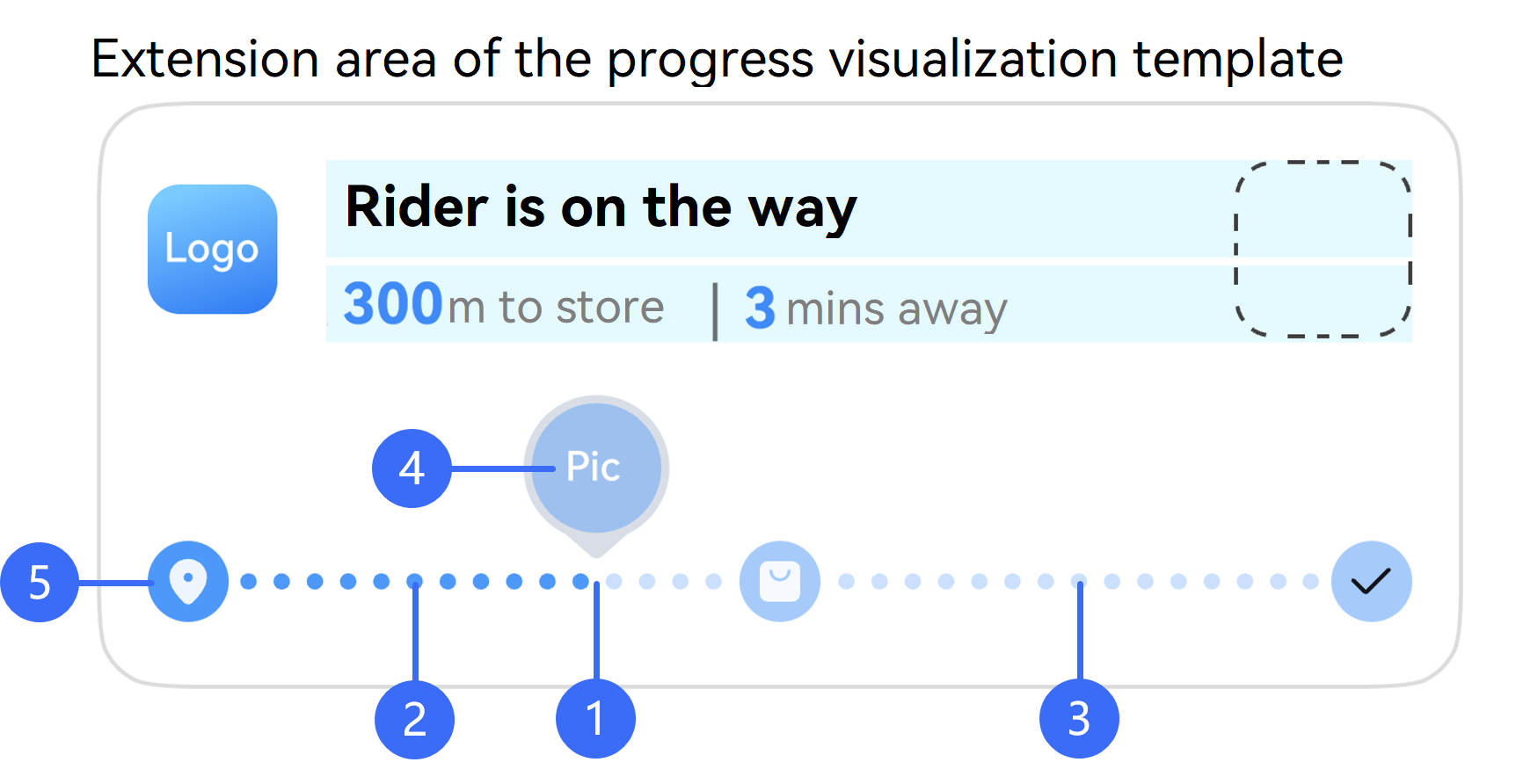
-
- Progress percentage, corresponding to the progress parameter.
-
- Color of the progress bar, corresponding to the color parameter.
-
- Background color of the progress bar, corresponding to the backgroundColor parameter.
-
- Progress indicator icon, corresponding to the indicatorIcon parameter.
-
- Progress bar node icon, corresponding to the nodeIcons parameter.
Model restriction: This API can be used only in the stage model.
System capability: SystemCapability.LiveView.LiveViewService
Device behavior differences: This API is supported on phones and tablets, but does not work on other devices.
Since: 4.1.0(11)
| Name | Type | Read-Only | Optional | Description |
| progress | number | No | No | Progress percentage, which determines the position of the indicator in a progress bar. The value range is [0, 100]. |
| color | string | No | Yes | Progress bar color. The value is in #ARGB format, with a number sign (#) and 8 hexadecimal digits. The default color is #FF317AF7. |
| backgroundColor | string | No | Yes | Progress bar background color. The value is in #ARGB format, with a number sign (#) and 8 hexadecimal digits. The default color is #19000000, and the default color in the dark mode is #19FFFFFF. |
| indicatorType | IndicatorType | No | Yes | Display type of the small indicator icon in an extension area. By default, the small icon is not displayed. |
| indicatorIcon | string | image.PixelMap | No | No (for live creation or template switching, only when the value of indicatorType is IndicatorType.INDICATOR_TYPE_UP or IndicatorType.INDICATOR_TYPE_OVERLAY) Yes (for live view update or ending) | Progress bar indicator icon. If this parameter is not passed during live view update or ending, the previous image will be displayed. ● When the value type is string, the value is the name of a local resource file in /resources/rawfile. The maximum length is 256 characters. Example: For the image file icon.png stored in /resources/rawfile of the app, the value is icon.png. ● When the value type is image.PixelMap, the size of the input PixelMap instance must meet the following requirements: For versions earlier than 26.0.0, the size cannot exceed 30 KB. For 26.0.0 and later versions, the size cannot exceed 192 KB. |
| lineType | LineType | No | Yes | Display type of the progress bar in the extension area. The default type is dotted line. |
| nodeIcons | Array<string | image.PixelMap> | No | No (for live view creation or template switching) Yes (for live view update or ending) | Icon of each node in the progress bar. The array length range is [2, 5]. If this parameter is not passed during live view update or ending, the previous images will be displayed. ● When the value type is string, the value is the name of a local resource file in /resources/rawfile. The maximum length is 256 characters. Example: For the image file icon.png stored in /resources/rawfile of the app, the value is icon.png. ● When the value type is image.PixelMap, the size of the input PixelMap instance must meet the following requirements: For versions earlier than 26.0.0, the size cannot exceed 30 KB. For 26.0.0 and later versions, the size cannot exceed 192 KB. |
PickupLayout
Defines extension area parameters of the emphasized text template, which inherits from LayoutData. This is used when layoutType is set to LayoutType.LAYOUT_TYPE_PICKUP.
API parameters corresponding to widget elements:
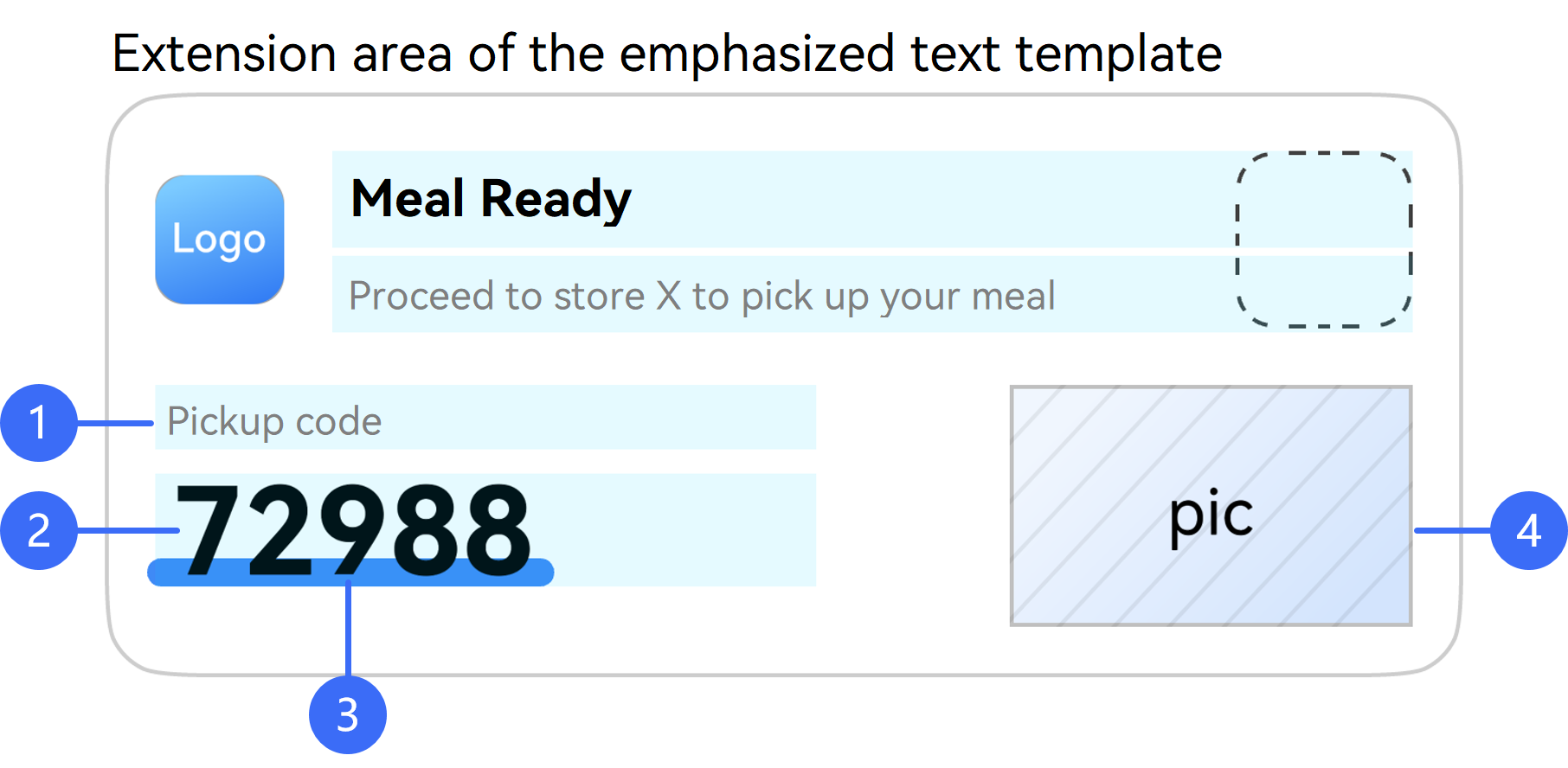
-
- Title of the extension area, corresponding to the title parameter.
-
- Content of the extension area, corresponding to the content parameter.
-
- Underline color of the extension area content, corresponding to the underlineColor parameter.
-
- Product description image on the right of the extension area, corresponding to the descPic parameter.
Model restriction: This API can be used only in the stage model.
System capability: SystemCapability.LiveView.LiveViewService
Device behavior differences: This API is supported on phones and tablets, but does not work on other devices.
Since: 4.1.0(11)
| Name | Type | Read-Only | Optional | Description |
| title | string | No | No (for live view creation or template switching) Yes (for live view update or ending) | Title of the extension area. The passed value cannot be null, undefined, an empty string, or a string containing only spaces. The length must be less than 128 characters. |
| content | string | No | No (for live view creation or template switching) Yes (for live view update or ending) | Content of the extension area. The passed value cannot be null, undefined, an empty string, or a string containing only spaces. The length must be less than 128 characters. |
| underlineColor | string | No | Yes | Underline color of the content in the extension area. The value is in #ARGB format, with a number sign (#) and 8 hexadecimal digits. By default, no underline is displayed. |
| descPic | string | image.PixelMap | No | No (for live view creation or template switching) Yes (for live view update or ending) | Product description image on the right of an extension area. If this parameter is not passed during live view update or ending, the previous image will be displayed. ● When the value type is string, the value is the name of a local resource file in /resources/rawfile. The maximum length is 256 characters. Example: For the image file icon.png stored in /resources/rawfile of the app, the value is icon.png. ● When the value type is image.PixelMap, the size of the input PixelMap instance must meet the following requirements: For versions earlier than 26.0.0, the size cannot exceed 30 KB. For 26.0.0 and later versions, the size cannot exceed 192 KB. |
FlightLayout
Defines extension area parameters of the left-right text template, which inherits from LayoutData. This is used when layoutType is set to LayoutType.LAYOUT_TYPE_FLIGHT.
API parameters corresponding to widget elements:
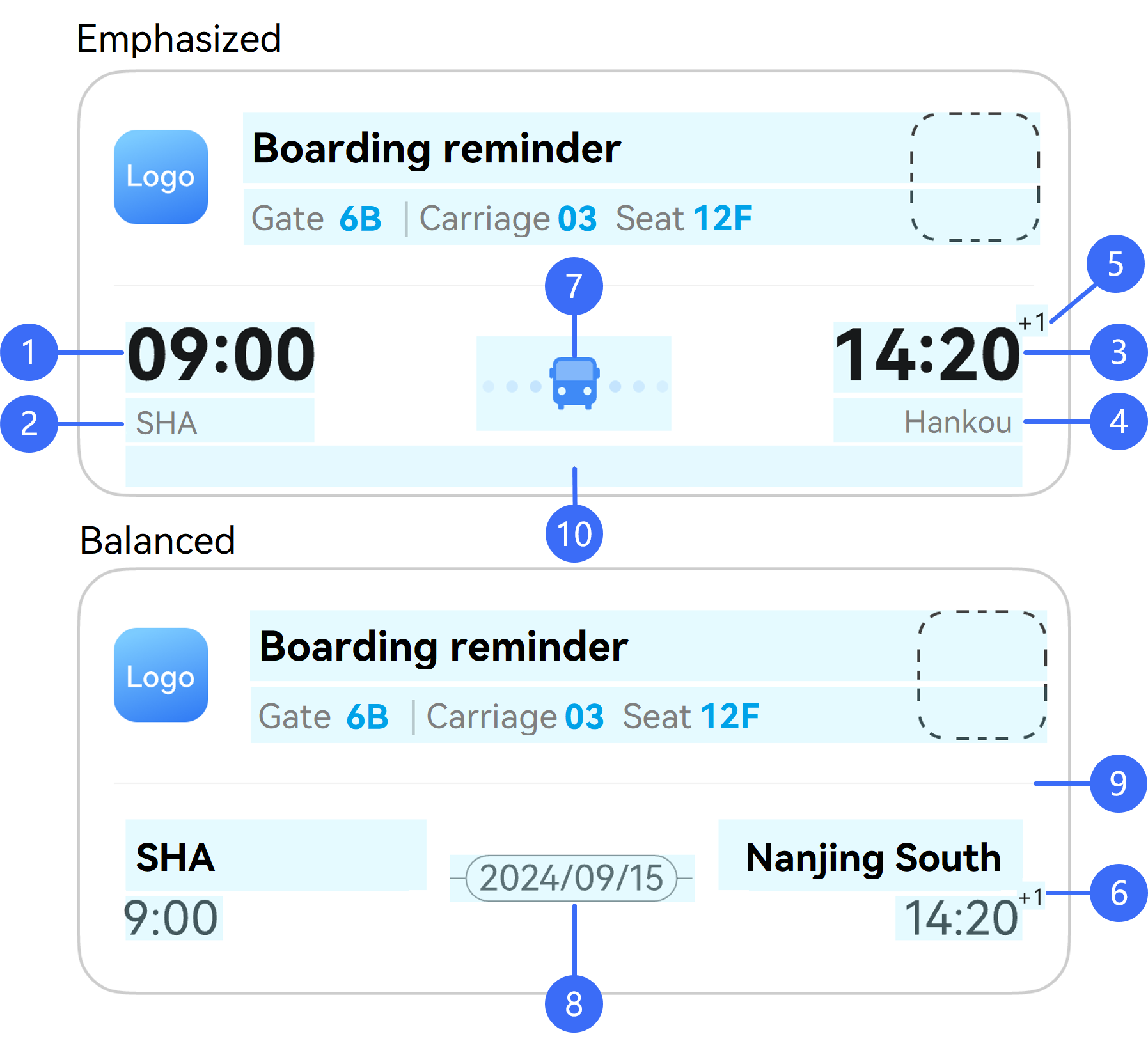
-
- Left text title, corresponding to the firstTitle parameter.
-
- Left text content, corresponding to the firstContent parameter.
-
- Right text title, corresponding to the lastTitle parameter.
-
- Right text content, corresponding to the lastContent parameter.
-
- Superscript of the right title, corresponding to the lastTitleSuperscript parameter.
-
- Superscript of right context, corresponding to the lastContentSuperscript parameter.
-
- Middle spacing icon, corresponding to the spaceIcon parameter.
-
- Middle spacing text, corresponding to the spaceText parameter.
-
- Whether to display the dividing line of the extension area, controlled by the isHorizontalLineDisplayed parameter.
-
- Content at the bottom of the extension area, corresponding to the additionalText parameter.
Model restriction: This API can be used only in the stage model.
System capability: SystemCapability.LiveView.LiveViewService
Device behavior differences: This API is supported on phones and tablets, but does not work on other devices.
Since: 4.1.0(11)
| Name | Type | Read-Only | Optional | Description |
| style | FlightLayoutStyle | No | Yes | Left-right text template style type. If this parameter is not set, the emphasized style is used by default. ● 0: emphasized ● 1: balanced Since: 5.0.2(14) |
| firstTitle | string | No | No (for live view creation or template switching) Yes (for live view update or ending) | Left title of the extension area. The passed value cannot be null, undefined, an empty string, or a string containing only spaces. The length must be less than 128 characters. |
| firstContent | string | No | No (for live view creation or template switching) Yes (for live view update or ending) | Left content of the extension area. The passed value cannot be null, undefined, an empty string, or a string containing only spaces. The length must be less than 128 characters. |
| lastTitle | string | No | No (for live view creation or template switching) Yes (for live view update or ending) | Right title of the extension area. The passed value cannot be null, undefined, an empty string, or a string containing only spaces. The length must be less than 128 characters. |
| lastContent | string | No | No (for live view creation or template switching) Yes (for live view update or ending) | Right content of the extension area. The passed value cannot be null, undefined, an empty string, or a string containing only spaces. The length must be less than 128 characters. |
| lastTitleSuperscript | string | No | Yes | Superscript of the title on the right of an extension area. The passed value cannot be null, undefined, an empty string, or a string containing only spaces. The length must be less than 128 characters. If this parameter is used to indicate that a journey spans more than one day, the passed value contains 2 characters, in +X format, where X is a digit. Example: +1 or +2 Since: 5.0.2(14) |
| lastContentSuperscript | string | No | Yes | Superscript of the content on the right of an extension area. The passed value cannot be null, undefined, an empty string, or a string containing only spaces. The length must be less than 128 characters. If this parameter is used to indicate that a journey spans more than one day, the passed value contains 2 characters, in +X format, where X is a digit. Example: +1 or +2 Since: 5.0.2(14) |
| spaceType | SpaceType | No | Yes | Display type in the middle of an extension area of the left-right text template. ● If this parameter is not passed or the value is 0, the spacing icon specified by spaceIcon is displayed. ● If the value is 1, the spacing text specified by spaceText is displayed. Since: 5.0.2(14) |
| spaceIcon | string | image.PixelMap | No | Yes (for live view creation or template switching, when spaceType is not set or is set to SpaceType.SPACE_TYPE_ICON). | Spacing icon in the middle of an extension area. If this parameter is not passed during live view update or ending, the previous image will be displayed. ● When the value type is string, the value is the name of a local resource file in /resources/rawfile. The maximum length is 256 characters. Example: For the image file icon.png stored in /resources/rawfile of the app, the value is icon.png. ● When the value type is image.PixelMap, the size of the input PixelMap instance must meet the following requirements: For versions earlier than 26.0.0, the size cannot exceed 30 KB. For 26.0.0 and later versions, the size cannot exceed 192 KB. |
| spaceText | string | No | Yes (for live view creation or template switching, when spaceType is to SpaceType.SPACE_TYPE_TEXT). | Spacing text in the middle of an extension area, which is used to display the date, for example, 10/28 Saturday or 2025/09/15. The parameter value can contain a maximum of 6 Chinese characters or 12 English characters. Excess content will be truncated. If this parameter is not passed during live view update or ending, the previous text will be displayed. Since: 5.0.2(14) |
| isHorizontalLineDisplayed | boolean | No | Yes | Indicates whether to display the dividing line of an extension area. The default value is true. ● true: yes ● false: no |
| additionalText | string | No | Yes | Content at the bottom of an extension area. The length must be less than 1024 characters. Since: 5.0.0(12) |
ScoreLayout
Defines extension area parameters of the live scores template, which inherits from LayoutData. This is used when layoutType is set to LayoutType.LAYOUT_TYPE_SCORE.
API parameters corresponding to widget elements:
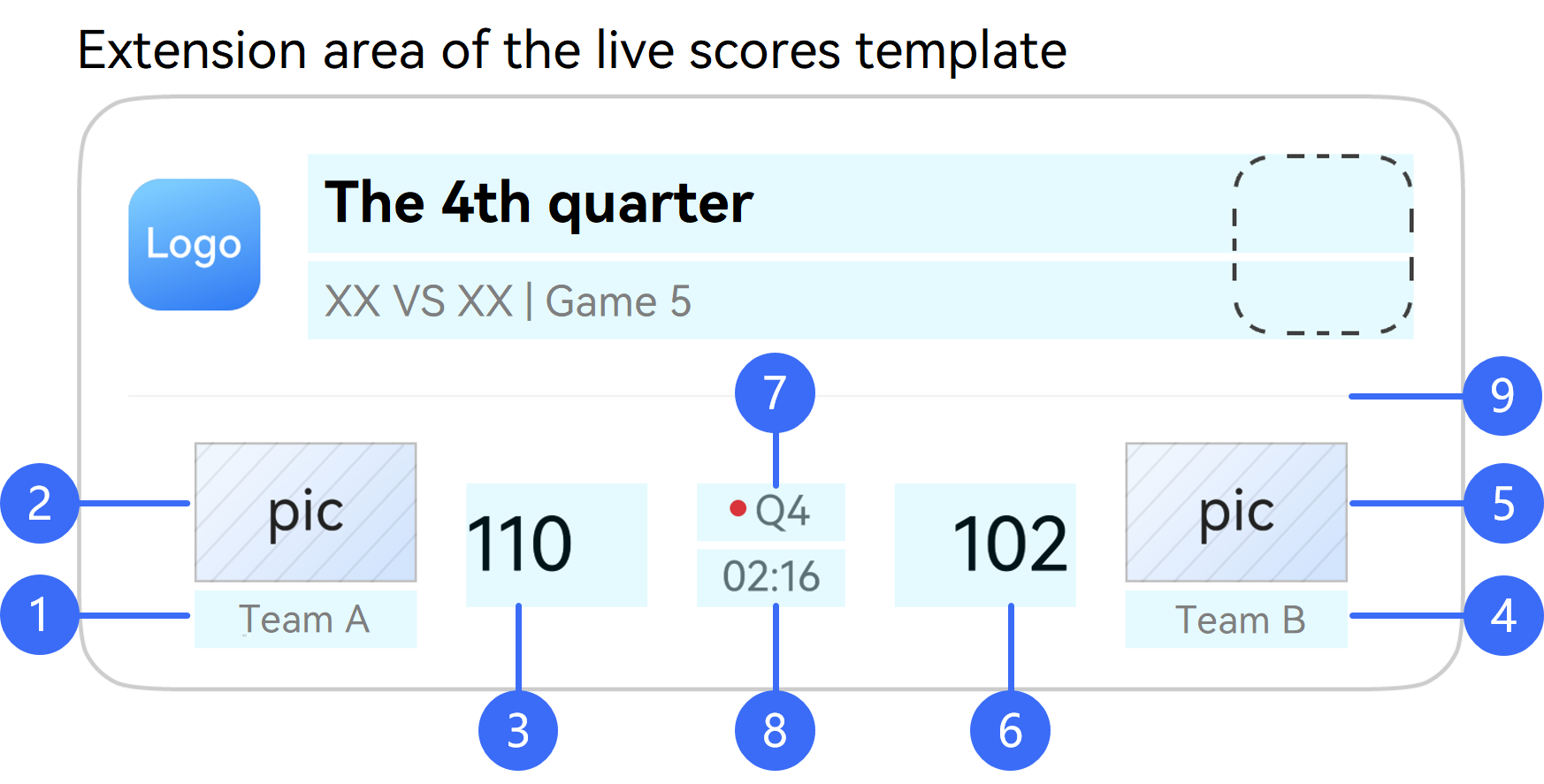
-
- Home team name on the left, corresponding to the hostName parameter.
-
- Home team icon on the left, corresponding to the hostIcon parameter.
-
- Home team score on the left, corresponding to the hostScore parameter.
-
- Away team name on the right, corresponding to the guestName parameter.
-
- Away team icon on the right, corresponding to the guestIcon parameter.
-
- Away team score on the right, corresponding to the guestScore parameter.
-
- Description in the upper middle part, corresponding to the competitionDesc parameter.
-
- Match time in the lower middle part, corresponding to the competitionTime parameter.
-
- Whether to display the dividing line of the extension area, controlled by the isHorizontalLineDisplayed parameter.
Model restriction: This API can be used only in the stage model.
System capability: SystemCapability.LiveView.LiveViewService
Device behavior differences: This API is supported on phones and tablets, but does not work on other devices.
Since: 4.1.0(11)
| Name | Type | Read-Only | Optional | Description |
| hostName | string | No | No (for live view creation or template switching) Yes (for live view update or ending) | Name on the left of the extension area. The passed value cannot be null, undefined, an empty string, or a string containing only spaces. The length must be less than 128 characters. |
| hostIcon | string | image.PixelMap | No | No (for live view creation or template switching) Yes (for live view update or ending) | Icon on the left of an extension area. If this parameter is not passed during live view update or ending, the previous image will be displayed. ● When the value type is string, the value is the name of a local resource file in /resources/rawfile. The maximum length is 256 characters. Example: For the image file icon.png stored in /resources/rawfile of the app, the value is icon.png. ● When the value type is image.PixelMap, the size of the input PixelMap instance must meet the following requirements: For versions earlier than 26.0.0, the size cannot exceed 30 KB. For 26.0.0 and later versions, the size cannot exceed 192 KB. |
| hostScore | string | No | No (for live view creation or template switching) Yes (for live view update or ending) | Score on the left of the extension area. The passed value cannot be null, undefined, an empty string, or a string containing only spaces. The length must be less than 128 characters. |
| guestName | string | No | No (for live view creation or template switching) Yes (for live view update or ending) | Name on the right of the extension area. The passed value cannot be null, undefined, an empty string, or a string containing only spaces. The length must be less than 128 characters. |
| guestIcon | string | image.PixelMap | No | No (for live view creation or template switching) Yes (for live view update or ending) | Icon on the right of an extension area. If this parameter is not passed during live view update or ending, the previous image will be displayed. ● When the value type is string, the value is the name of a local resource file in /resources/rawfile. The maximum length is 256 characters. Example: For the image file icon.png stored in /resources/rawfile of the app, the value is icon.png. ● When the value type is image.PixelMap, the size of the input PixelMap instance must meet the following requirements: For versions earlier than 26.0.0, the size cannot exceed 30 KB. For 26.0.0 and later versions, the size cannot exceed 192 KB. |
| guestScore | string | No | No (for live view creation or template switching) Yes (for live view update or ending) | Score on the right of the extension area. The passed value cannot be null, undefined, an empty string, or a string containing only spaces. The length must be less than 128 characters. |
| competitionDesc | string | Array<RichText> | No | No (for live view creation or template switching) Yes (for live view update or ending) | Description content (match description) in the upper middle part of the extension area. If an array object is passed, the value of text in the object cannot be null, undefined, an empty string, or a string containing only spaces. ● When the value type is string, the value must be a string of less than 128 characters. ● When the value type is Array<RichText>: The total length of the text values of all objects in the array must be less than 128 characters. If textColor is not set for an object in the array, the default text color #99000000 will be used. If textColor is set for some objects in the array, its values for all these objects must be the same. Note: Since version 5.0.0(12), the Array<RichText> type is supported. |
| competitionTime | string | No | No (for live view creation or template switching) Yes (for live view update or ending) | Match time in the lower middle part of the extension area. The passed value cannot be null, undefined, an empty string, or a string containing only spaces. The length must be less than 128 characters. |
| isHorizontalLineDisplayed | boolean | No | Yes | Indicates whether to display the dividing line of an extension area. The default value is true. ● true: yes ● false: no |
NavigationLayout
Defines extension area parameters of the navigation template, which inherits from LayoutData. This is used when layoutType is set to LayoutType.LAYOUT_TYPE_NAVIGATION.
API parameters corresponding to widget elements:
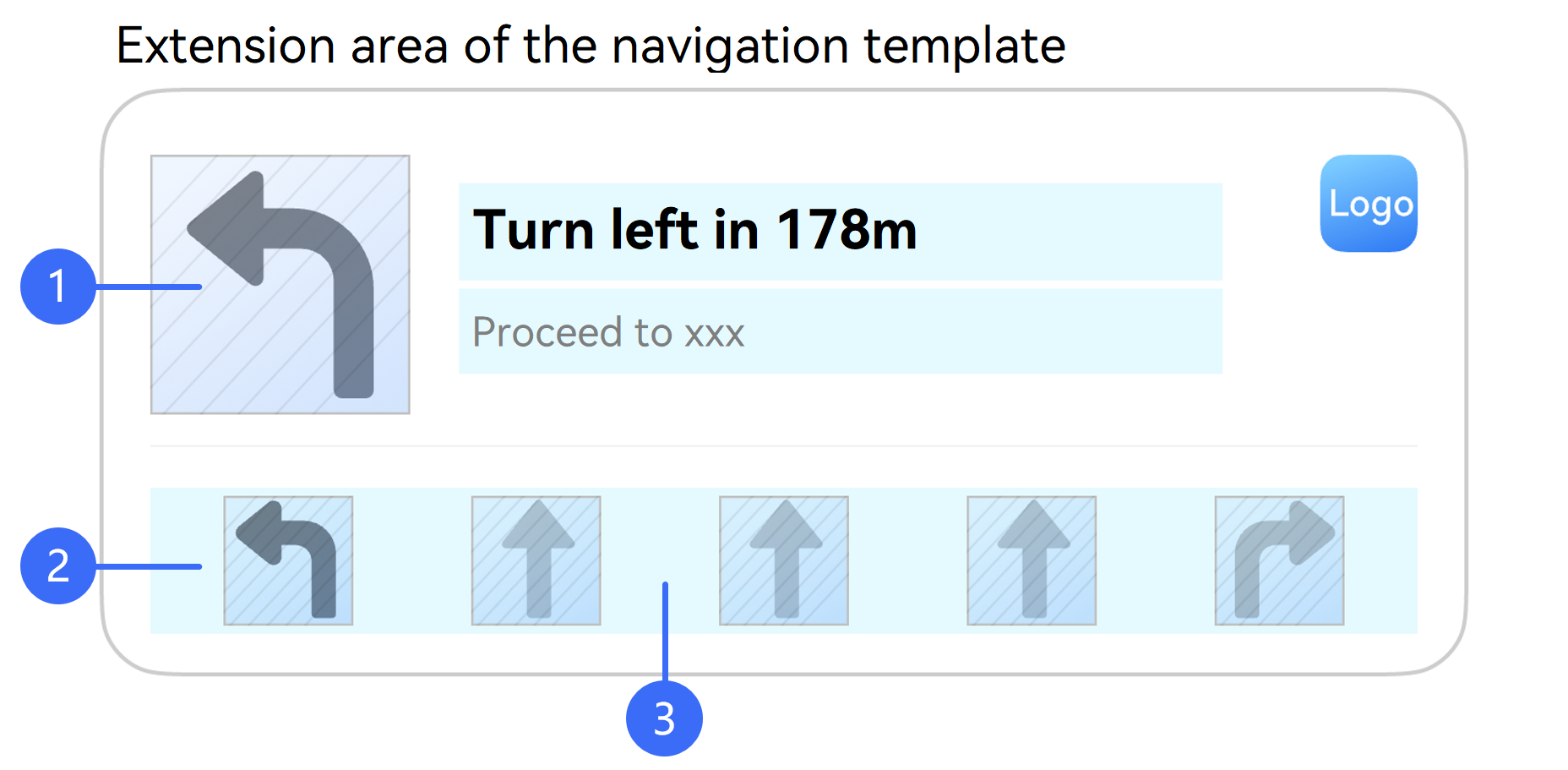
-
- Current navigation direction, corresponding to the currentNavigationIcon parameter.
-
- Images of arrows indicating navigation directions, corresponding to the navigationIcons parameter.
-
- Whether to display the arrow images indicating navigation directions in the extension area, controlled by the isNavigationIconsDisplayed parameter.
Model restriction: This API can be used only in the stage model.
System capability: SystemCapability.LiveView.LiveViewService
Device behavior differences: This API is supported on phones and tablets, but does not work on other devices.
Since: 5.0.0(12)
| Name | Type | Read-Only | Optional | Description |
| currentNavigationIcon | string | image.PixelMap | No | No (for live view creation or template switching) Yes (for live view update or ending) | Current navigation direction. ● When the value type is string, the value is the name of a local resource file in /resources/rawfile. The maximum length is 128 characters. Example: For the image file icon.png stored in /resources/rawfile of the app, the value is icon.png. If the local resource file does not exist, the live view creation will fail or the navigation template extension area will fail to be updated during live view update or ending. Note: To ensure optimal image display in both light and dark modes, the system applies color adaptation to PNG and SVG images. Images in other formats are displayed as-is and do not support color adaptation. For details, please refer to the navigation-dedicated template description in widget templates. ● When the value type is image.PixelMap, the size of the input PixelMap instance must meet the following requirements: For versions earlier than 26.0.0, the size cannot exceed 30 KB. For 26.0.0 and later versions, the size cannot exceed 192 KB. |
| navigationIcons | Array<string | image.PixelMap> | No | Yes | Images of arrows indicating navigation directions. The number of images can range from 1 to 11. If this parameter is not passed during live view creation, the extension area will not be displayed. ● When the value type is string, the value is the name of a local resource file in /resources/rawfile. The maximum length is 128 characters. Example: For the image file icon.png stored in /resources/rawfile of the app, the value is icon.png. If the local resource file does not exist, the live view creation will fail or the navigation template extension area will fail to be updated during live view update or ending. Note: To ensure optimal image display in both light and dark modes, the system applies color adaptation to PNG and SVG images. Images in other formats are displayed as-is and do not support color adaptation. For details, please refer to the navigation-dedicated template description in widget templates. ● When the value type is image.PixelMap, the size of the input PixelMap instance must meet the following requirements: For versions earlier than 26.0.0, the size cannot exceed 30 KB. For 26.0.0 and later versions, the size cannot exceed 192 KB. |
| isNavigationIconsDisplayed | boolean | No | Yes | Indicates whether to display the images of arrows indicating navigation directions. If this parameter is not set during live view update or ending, the value passed in the previous state change will be used. If this parameter is not passed in other cases, the value true is used by default. ● true: yes ● false: no Since: 5.0.3(15) |
CustomLayout
Defines extension area parameters of the custom template. This API inherits from LayoutData. This is used when layoutType is set to LayoutType.LAYOUT_TYPE_CUSTOM.
Model restriction: This API can be used only in the stage model.
System capability: SystemCapability.LiveView.LiveViewService
Device behavior differences: This API is supported on phones and tablets, but does not work on other devices.
Since: 26.0.0
| Name | Type | Read-Only | Optional | Description |
| abilityName | string | No | No | Name of the LiveViewCardExtensionAbility (extension ability of the custom extension area of the live view widget). The passed value cannot be null, undefined, an empty string, or a string containing only spaces. The length must be less than 128 characters. |
| abilityParameters | Record<string, string> | No | Yes | Custom parameters passed by LiveViewCardExtensionAbility (extension ability of the custom extension area of the live view widget). The value cannot be empty. A maximum of 50 key-value pairs are supported. After the parameter is passed, you can obtain it via param in onRender() of the LiveViewCardExtensionAbility. |
CapsuleData
Base class for defining basic attributes of the live view capsule.
API parameters corresponding to capsule elements:
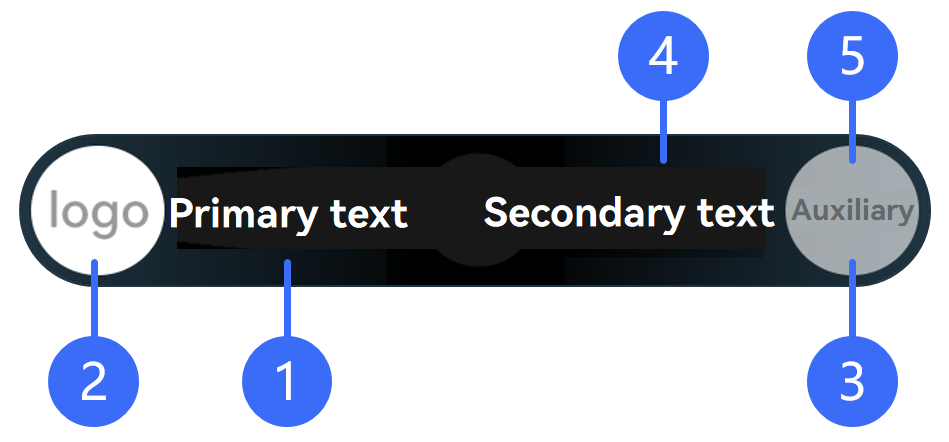
-
- Live view capsule type, corresponding to the type parameter.
-
- Live view capsule icon, corresponding to the icon parameter.
-
- Live view capsule tail icon, corresponding to the tailicon parameter.
-
- Whether to display the secondary text of the live view capsule, controlled by the isContentDisplayed parameter.
-
- Whether to display the tail icon of the live view capsule, controlled by the isTailIconDisplayed parameter.
Model restriction: This API can be used only in the stage model.
System capability: SystemCapability.LiveView.LiveViewService
Device behavior differences: This API is supported on phones and tablets, but does not work on other devices.
Since: 4.1.0(11)
| Name | Type | Read-Only | Optional | Description |
| type | CapsuleType | No | No | Live view capsule type. |
| status | number | No | No | Display status of a live view capsule. ● 1: The live view capsule is displayed. ● -1: The live view capsule display has ended. |
| icon | string | image.PixelMap | No | No (for live view creation) Yes (for live view update or ending) | Live view capsule icon. If this parameter is not passed during live view update or ending, the previous image will be displayed. ● When the value type is string, the value is the name of a local resource file in /resources/rawfile. The maximum length is 255 characters. Example: For the image file icon.png stored in /resources/rawfile of the app, the value is icon.png. ● When the value type is image.PixelMap, the size of the input PixelMap instance must meet the following requirements: For versions earlier than 26.0.0, the size cannot exceed 30 KB. For 26.0.0 and later versions, the size cannot exceed 192 KB. |
| tailIcon | string | image.PixelMap | No | Yes | Tail icon of the live view capsule. If this parameter is not passed during live view update or ending, the previous image will be displayed. ● When the value type is string, the value is the name of a local resource file in /resources/rawfile. The maximum length is 255 characters. Example: For the image file icon.png stored in /resources/rawfile of the app, the value is icon.png. ● When the value type is image.PixelMap, the size of the input PixelMap instance must meet the following requirements: For versions earlier than 26.0.0, the size cannot exceed 30 KB. For 26.0.0 and later versions, the size cannot exceed 192 KB. Since: 6.0.0(20) |
| backgroundColor | string | No | No (for live view creation) Yes (for live view update or ending) | Background color of the live view capsule. The value is in #ARGB format, with a number sign (#) and 8 hexadecimal digits. If this parameter is not set during live view update or ending, the color passed in the previous state change will be used. The following colors are not recommended: ● #FF000000 ● #FFFFFFFF ● #FFF1F3F5 |
| isContentDisplayed | boolean | No | Yes | Indicates whether to display the secondary text of the live view capsule. If this parameter is not set, the value passed during the previous live view creation or update will be used. If this parameter is not passed in other cases, the value true is used by default. ● true: yes ● false: no If isContentDisplayed and isTailIconDisplayed are both set to false, the secondary text and tail icon of the live view capsule will not be displayed. Since: 5.0.3(15) |
| isTailIconDisplayed | boolean | No | Yes | Indicates whether to display the tail icon of the live view capsule. If this parameter is not set, the value passed during the previous live view creation or update will be used. If this parameter is not passed in other cases, the value false is used by default. ● true: yes ● false: no If isContentDisplayed and isTailIconDisplayed are both set to false, the secondary text and tail icon of the live view capsule will not be displayed. Since: 6.0.0(20) |
TextCapsule
Defines text live view capsule parameters, which inherits from CapsuleData. This is used when type is set to CapsuleType.CAPSULE_TYPE_TEXT.
API parameters corresponding to capsule elements:
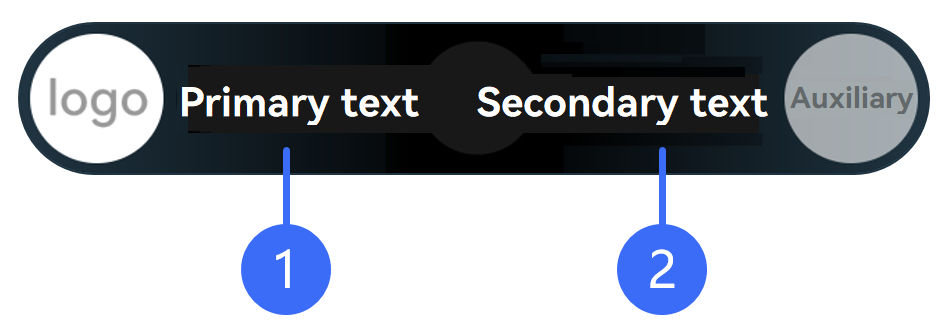
-
- Primary text of the live view capsule, corresponding to the title parameter.
-
- Secondary text of the live view capsule, corresponding to the content parameter.
Model restriction: This API can be used only in the stage model.
System capability: SystemCapability.LiveView.LiveViewService
Device behavior differences: This API is supported on phones and tablets, but does not work on other devices.
Since: 4.1.0(11)
| Name | Type | Read-Only | Optional | Description |
| title | string | No | No (for live view creation or template switching) Yes (for live view update or ending) | Primary text of the live view capsule. The length must be less than 128 characters. The passed value cannot be null, undefined, an empty string, or a string of spaces. Note: Since version 6.0.0(20), if the passed value is in the format of "Number:Number" and layoutType is set to LAYOUT_TYPE_SCORE, the system will automatically extract the images and scores on both sides of the extension area on a live view widget, update the live view capsule style, and display the team icons and scores. |
| content | string | No | Yes | Secondary text of the live view capsule. The length must be less than 128 characters. The passed value cannot be null, undefined, an empty string, or a string of spaces. |
TimerCapsule
Defines timer live view capsule parameters, which inherits from CapsuleData. This is used when type is set to CapsuleType.CAPSULE_TYPE_TIMER.
API parameters corresponding to capsule elements:
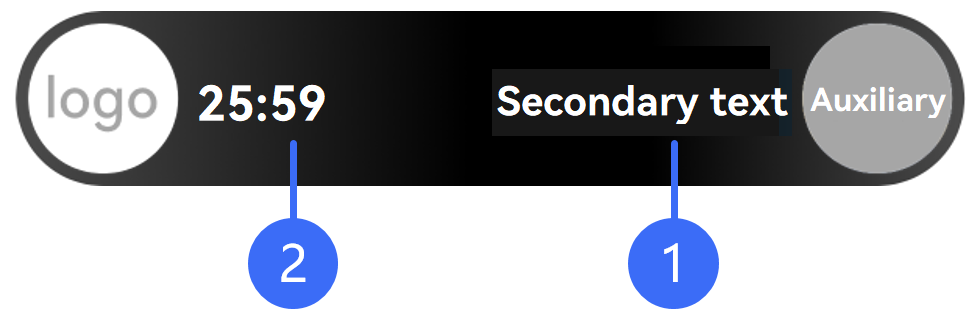
-
- Secondary text of the live view capsule, corresponding to the content parameter.
-
- Initial value of the live view capsule timer, corresponding to the time parameter. Whether the timer is counting up or down is controlled by the isCountdown parameter. Whether the timer is paused is controlled by the isPaused parameter.
Model restriction: This API can be used only in the stage model.
System capability: SystemCapability.LiveView.LiveViewService
Device behavior differences: This API is supported on phones and tablets, but does not work on other devices.
Since: 4.1.0(11)
| Name | Type | Read-Only | Optional | Description |
| content | string | No | Yes | Secondary text of the live view capsule. The length must be less than 128 characters. The passed value cannot be null, undefined, an empty string, or a string of spaces. |
| time | number | No | Yes | Initial value of the live view capsule timer, in milliseconds. The value is updated every second. The default value is 0. |
| isCountdown | boolean | No | Yes | Indicates whether a timer is a countdown timer. ● true: yes ● false: no (default value) |
| isPaused | boolean | No | Yes | Indicates whether a live view capsule timer is paused. A paused timer displays the time when it is paused. ● true: yes ● false: no (default value) |
ProgressCapsule
Defines progress live view capsule parameters, which inherits from CapsuleData. This is used when type is set to CapsuleType.CAPSULE_TYPE_PROGRESS.
API parameters corresponding to capsule elements:
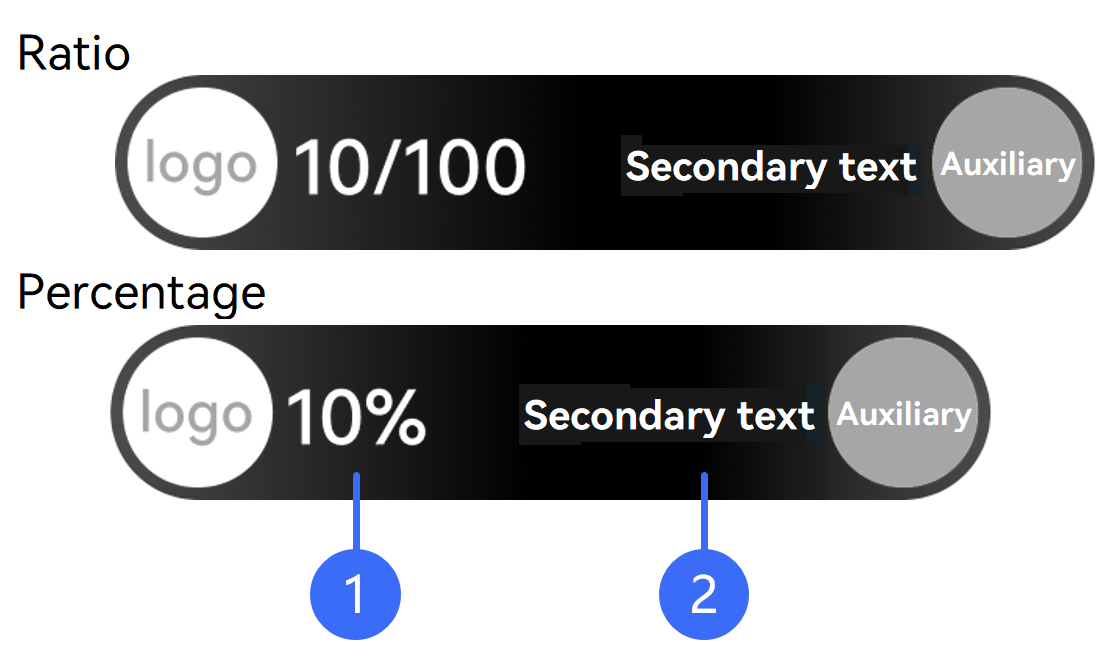
-
- The progress value is displayed as a ratio or percentage, which is controlled by the indeterminate parameter.
- If the value of indeterminate is false, the progress value is displayed as a ratio in the format of x/y (where x corresponds to the progress parameter, and y corresponds to the max parameter).
- If the value of indeterminate is true, the progress value is displayed as a percentage in the format of (x/y) × 100% (where x corresponds to the progress parameter, and y corresponds to the max parameter).
-
- Secondary text of the live view capsule, corresponding to the content parameter.
Model restriction: This API can be used only in the stage model.
System capability: SystemCapability.LiveView.LiveViewService
Device behavior differences: This API is supported on phones and tablets, but does not work on other devices.
Since: 4.1.0(11)
| Name | Type | Read-Only | Optional | Description |
| max | number | No | Yes | Maximum progress value. The default value is 1. The value range is [1, 2147483647]. |
| progress | number | No | Yes | Current progress value. The default value is 0. The value range is [0, 2147483647]. The actual progress value is calculated as progress/max. |
| indeterminate | boolean | No | Yes | Progress display type. The progress is displayed as a ratio by default. ● true: percentage ● false: ratio (default value) |
| content | string | No | Yes | Secondary text of the live view capsule. The length must be less than 128 characters. The passed value cannot be null, undefined, an empty string, or a string of spaces. Since: 6.0.0(20) |
ExternalData
Defines cover screen template parameters.
API parameters corresponding to cover screen elements:
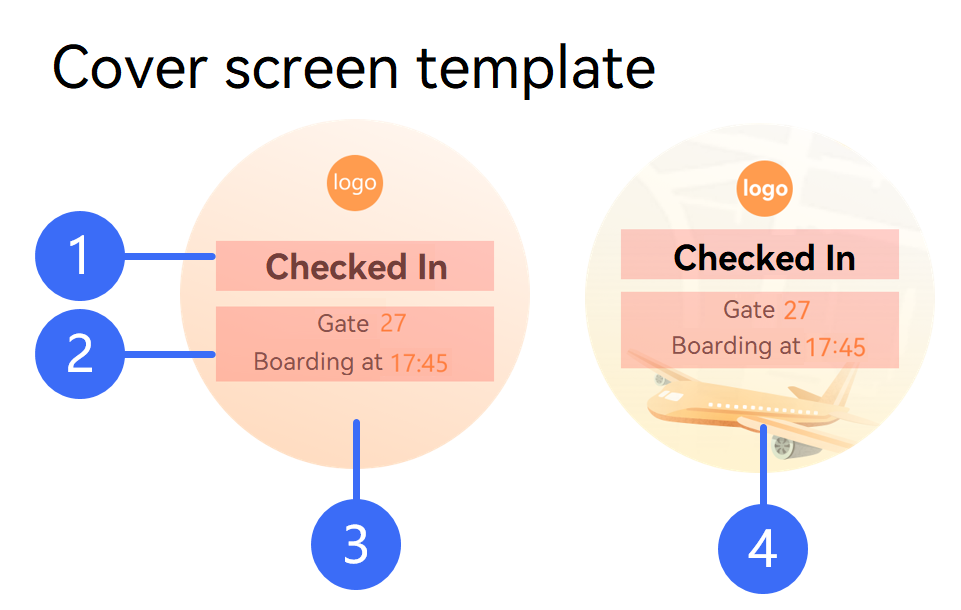
-
- Cover screen title, corresponding to the title parameter.
-
- Cover screen content, corresponding to the content parameter.
-
- Cover screen background color, corresponding to the backgroundColor parameter.
-
- Cover screen background image, corresponding to the backgroundPicture parameter.
Model restriction: This API can be used only in the stage model.
System capability: SystemCapability.LiveView.LiveViewService
Device behavior differences: This API is supported on phones and tablets, but does not work on other devices.
Since: 4.1.0(11)
| Name | Type | Read-Only | Optional | Description |
| title | string | No | No (for live view creation) Yes (for live view update or ending) | Cover screen title. The passed value cannot be null, undefined, an empty string, or a string containing only spaces. The length must be less than 128 characters. |
| content | Array<RichText> | No | No (for live view creation) Yes (for live view update or ending) | Cover screen content. An app can set the color for specific parts of the string. If an array object is passed, the value of the text field in the object cannot be null, undefined, an empty string, or a string containing only spaces. ● The total length of the text values of all objects in the array must be less than 128 characters. ● If textColor is not set for an object in the array, the default text color #99000000 will be used. If textColor is set for some objects in the array, its values for all these objects must be the same. |
| type | ExternalType | No | Yes | Cover screen background style type. The default value is the background color. Since: 5.0.0(12) |
| backgroundColor | string | No | Yes | Cover screen background color. The value is in #RGB hex format, with a number sign (#) and 6 hexadecimal digits. The default color is #F1F3F5. |
| backgroundPicture | string | image.PixelMap | No | No (for live view creation when type is set to ExternalType.BACKGROUND_PICTURE) Yes (for live view update or ending) (This parameter is valid when type is set to ExternalType.BACKGROUND_PICTURE.) | Cover screen background image. If this parameter is not passed during live view update or ending, the previous image will be displayed. ● When the value type is string, the value is the name of a local resource file in /resources/rawfile. The maximum length is 256 characters. Example: For the image file icon.png stored in /resources/rawfile of the app, the value is icon.png. ● When the value type is image.PixelMap, the size of the input PixelMap instance must meet the following requirements: For versions earlier than 26.0.0, the size cannot exceed 30 KB. For 26.0.0 and later versions, the size cannot exceed 192 KB. Since: 5.0.0(12) |
RichText
Defines rich text parameters
Model restriction: This API can be used only in the stage model.
System capability: SystemCapability.LiveView.LiveViewService
Device behavior differences: This API is supported on phones and tablets, but does not work on other devices.
Since: 4.1.0(11)
| Name | Type | Read-Only | Optional | Description |
| text | string | No | No | Text content. The length must be less than 128 characters. |
| textColor | string | No | Yes | Text color. The value is in #ARGB format, with a number sign (#) and 8 hexadecimal digits. If textColor is not set, the default text color #99000000 will be used. If textColor is set, its values for all objects in the array must be the same. |
LiveViewResult
Defines the live view result.
Model restriction: This API can be used only in the stage model.
System capability: SystemCapability.LiveView.LiveViewService
Device behavior differences: This API is supported on phones and tablets, but does not work on other devices.
Since: 4.1.0(11)
| Name | Type | Description |
| resultCode | number | Live view result code. ● 0: Success. ● 1: Failed to update/end the fixed area. ● 2: Failed to update/end the auxiliary area. ● 3: Failed to update/end the extension area. ● 4: Failed to update/end the live view capsule. ● 5: Failed to update/end the cover screen. |
| message | String | Live view result message. |
LayoutType
Enumerates extension area types.
Model restriction: This API can be used only in the stage model.
System capability: SystemCapability.LiveView.LiveViewService
Device behavior differences: This API is supported on phones and tablets, but does not work on other devices.
Since: 4.1.0(11)
| Name | Value | Description |
| LAYOUT_TYPE_DEFAULT | -1 | The extension area is not displayed. |
| LAYOUT_TYPE_PROGRESS | 3 | Visualized progress. This type is designed for scenarios requiring progress updates, such as instant delivery and ride hailing, to visualize the live activity progress. |
| LAYOUT_TYPE_PICKUP | 4 | Emphasized text. This type is designed for scenarios like food pickup and ride hailing, to display key information such as pickup codes and license plate numbers. |
| LAYOUT_TYPE_FLIGHT | 5 | Left-right text. This type is designed for train and air travel scenarios, to display trip information including the departure place, destination, and time. |
| LAYOUT_TYPE_SCORE | 7 | Event. This type is designed for sports and e-sports match scenarios, to display team scores. |
| LAYOUT_TYPE_NAVIGATION | 8 | Navigation. This type is designed for navigation scenarios, to display navigation information. Since: 5.0.0(12) |
| LAYOUT_TYPE_CUSTOM | 100 | Custom type. It is applicable to real-time activity scenarios where custom, rich content needs to be displayed in the extension area. It is permitted only when none of the existing templates are suitable. Since: 26.0.0 Note: If the API version is earlier than 26.0.0 and LayoutType is set to LAYOUT_TYPE_CUSTOM, live view creation and update will fail. In this case, you need to handle compatibility for both old and new versions. For details, please refer to ArkTS API Compatibility Check. |
ExtensionType
Enumerates auxiliary area types.
Model restriction: This API can be used only in the stage model.
System capability: SystemCapability.LiveView.LiveViewService
Device behavior differences: This API is supported on phones and tablets, but does not work on other devices.
Since: 4.1.0(11)
| Name | Value | Description |
| EXTENSION_TYPE_DEFAULT | 0 | The auxiliary area is not displayed. |
| EXTENSION_TYPE_COMMON_TEXT | 1 | The auxiliary area displays common text. |
| EXTENSION_TYPE_CAPSULE_TEXT | 2 | The auxiliary area displays the live view capsule text. |
| EXTENSION_TYPE_PIC | 3 | The auxiliary area displays an image. |
| EXTENSION_TYPE_ICON | 4 | The auxiliary area displays an icon. |
| EXTENSION_TYPE_PROGRESS | 5 | The auxiliary area displays a progress ring. Since: 26.0.0 Note: If the API version is earlier than 26.0.0 and ExtensionType is set to EXTENSION_TYPE_PROGRESS, live view creation and update will fail. In this case, you need to handle compatibility for both old and new versions. For details, please refer to ArkTS API Compatibility Check. |
ActionType
Enumerates the action types after the auxiliary area is tapped.
Model restriction: This API can be used only in the stage model.
System capability: SystemCapability.LiveView.LiveViewService
Device behavior differences: This API is supported on phones and tablets, but does not work on other devices.
Since: 6.1.1(24)
| Name | Value | Description |
| ACTION_TYPE_OPEN_APP_PAGE | 1 | Open a specified app page. |
| ACTION_TYPE_STOP_LIVEVIEW | 3 | End live view notifications. |
LifeCycleMode
Enumerates live view lifecycle modes.
Model restriction: This API can be used only in the stage model.
System capability: SystemCapability.LiveView.LiveViewService
Device behavior differences: This API is supported on phones and tablets, but does not work on other devices.
Since: 26.0.0
| Name | Value | Description |
| STOP_BY_APP | 0 | Standard lifecycle. A live view does not automatically end with the app process. You need to call the liveViewManager.stopLiveView method to end the live view. |
| AUTO_STOP_WHEN_APP_TERMINATE | 1 | A live view disappears with the app process. This mode applies to scenarios where the creation, update, and ending of a live view are all controlled by an app on the device. |
IndicatorType
Enumerates indicator types.
Model restriction: This API can be used only in the stage model.
System capability: SystemCapability.LiveView.LiveViewService
Device behavior differences: This API is supported on phones and tablets, but does not work on other devices.
Since: 4.1.0(11)
| Name | Value | Description |
| INDICATOR_TYPE_UNDISPLAYED | 0 | The small indicator icon is not displayed. |
| INDICATOR_TYPE_UP | 1 | The small indicator icon is displayed above the progress line. |
| INDICATOR_TYPE_OVERLAY | 2 | The small indicator icon is displayed on the progress line. |
LineType
Enumerates progress bar types in the extension area.
Model restriction: This API can be used only in the stage model.
System capability: SystemCapability.LiveView.LiveViewService
Device behavior differences: This API is supported on phones and tablets, but does not work on other devices.
Since: 4.1.0(11)
| Name | Value | Description |
| LINE_TYPE_DOTTED_LINE | 0 | Dotted line. |
| LINE_TYPE_NORMAL_SOLID_LINE | 1 | Solid line. |
| LINE_TYPE_THICK_SOLID_LINE | 2 | Thick solid line. |
CapsuleType
Enumerates live view capsule types.
Model restriction: This API can be used only in the stage model.
System capability: SystemCapability.LiveView.LiveViewService
Device behavior differences: This API is supported on phones and tablets, but does not work on other devices.
Since: 4.1.0(11)
| Name | Value | Description |
| CAPSULE_TYPE_TEXT | 1 | Text live view capsule. |
| CAPSULE_TYPE_TIMER | 2 | Timer live view capsule. |
| CAPSULE_TYPE_PROGRESS | 3 | Progress live view capsule. |
ExternalType
Enumerates cover screen background style types.
Model restriction: This API can be used only in the stage model.
System capability: SystemCapability.LiveView.LiveViewService
Device behavior differences: This API is supported on phones and tablets, but does not work on other devices.
Since: 5.0.0(12)
| Name | Value | Description |
| BACKGROUND_COLOR | 0 | Background color. |
| BACKGROUND_PICTURE | 1 | Background image. |
FlightLayoutStyle
Enumerates left-right text template style types.
Model restriction: This API can be used only in the stage model.
System capability: SystemCapability.LiveView.LiveViewService
Device behavior differences: This API is supported on phones and tablets, but does not work on other devices.
Since: 5.0.2(14)
| Name | Value | Description |
| STYLE_FLIGHT_EMPHASIS | 0 | Emphasized style. |
| STYLE_FLIGHT_BALANCE | 1 | Balanced style. |

The extension area supports two styles: emphasized and balanced. The only difference lies in the font sizes of the title and content in the left-right text. The balanced style features a smaller title and larger content, delivering a more harmonious look compared to the emphasized style. For details about the template design, please refer to Live View > General Widget Template > Template Types > Left-right text template.
SpaceType
Enumerates display types in the middle of an extension area of the left-right text template.
Model restriction: This API can be used only in the stage model.
System capability: SystemCapability.LiveView.LiveViewService
Device behavior differences: This API is supported on phones and tablets, but does not work on other devices.
Since: 5.0.2(14)
| Name | Value | Description |
| SPACE_TYPE_ICON | 0 | Spacing icon. |
| SPACE_TYPE_TEXT | 1 | Spacing text. |