ArkTS supports conditional rendering, allowing you to display different content based on the application state using if, else, and else if statements.

This API can be used in ArkTS widgets since API version 9.
Usage Rules
-
Supported conditional statements include if, else, and else if.
-
Conditions in if and else if statements can utilize both state variables and regular variables. (State variables trigger UI re-rendering when their values change, while regular variables do not.)
-
Conditional statements can be embedded within container components to dynamically build different child components.
-
Conditional rendering maintains the parent-child component relationship hierarchy. The conditional statements do not override the constraints that parent components impose on their children. For example, certain container components enforce restrictions on child component types or quantities. When conditional rendering is used within these containers, the same restrictions apply to components created within conditional branches. A specific example: The Grid container component only supports GridItem as direct children. When conditional statements are used within the Grid component, only GridItem components can be used in conditional branches.
-
The build function inside each conditional branch must follow the special rules for build functions. Each of such build functions must create one or more components. An empty build function that creates no components will result in a syntax error. For details about the build function specifications, see Basic Syntax Overview and Declarative UI Description.
Update Mechanism
A conditional statement updates whenever a state variable used inside the if or else if condition changes. Specifically:
-
The conditional statement re-evaluates the conditions. If the evaluation of the conditions changes, steps 2 and 3 are performed. Otherwise, no follow-up operation is required.
-
All previously constructed child components within the conditional branch are removed from the component tree.
-
The builder function of the new branch is executed, and the generated child components are added to the if parent component. If no applicable else branch exists, nothing is created.
Conditions can contain TypeScript expressions. Expressions within builder functions must not modify application state.
[h2]Basic Conditional Rendering with if
@Entry
@Component
struct IfExample {
  @State count: number = 0;

  build() {
    Column() {
      Text(`count=${this.count}`)

      if (this.count > 0) {
        Text(`count is positive`)
          .fontColor(Color.Green)
      }

      Button('increase count')
        .onClick(() => {
          this.count++;
        })

      Button('decrease count')
        .onClick(() => {
          this.count--;
        })
    }
  }
} 
Each branch of the if statement includes a build function. Each of such build functions must create one or more components. On initial render, if will execute a build function and add the generated child component to its parent component.
if updates whenever a state variable used inside the if or else if condition changes, and re-evaluates the conditions. If the evaluation of the conditions changes, it means that another branch of if needs to be built. In this case, the ArkUI framework will:
-
Remove all previously rendered components from the previous branch.
-
The builder function of the new branch is executed, and the generated child components are added to their parent component.
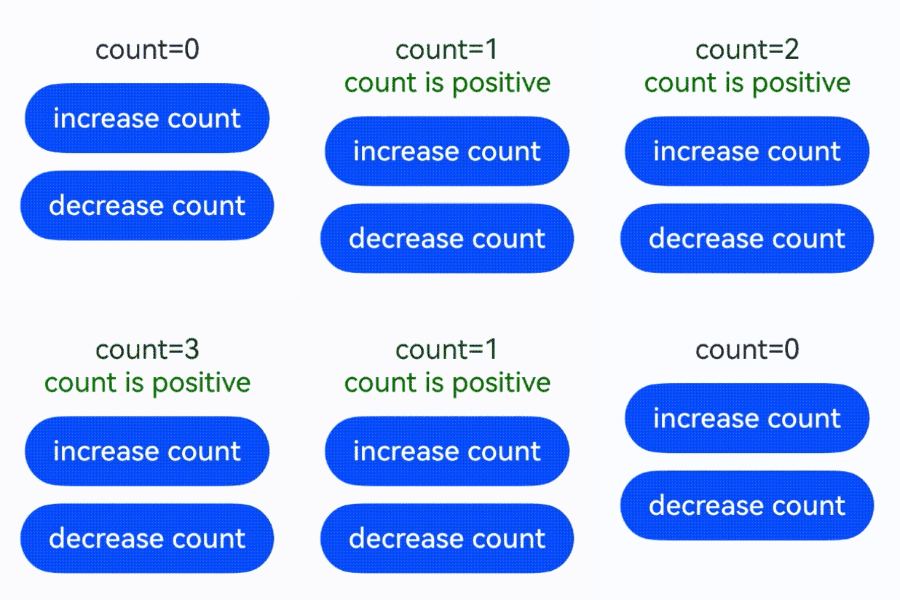
In the preceding example, when the value of count increases from 0 to 1, the condition if (this.count > 0) becomes true. The builder function of this branch is executed, creating a Text component and adding it to the parent Column component. If count subsequently changes to 0, the Text component is removed from the Column component. Because there is no else branch, no new builder function is executed.
[h2]if/ else Statements and Child Component States
This example involves an if/else statement and a child component with a @State decorated variable.
@Component
struct CounterView {
  @State counter: number = 0;
  label: string = 'unknown';

  build() {
    Column({ space: 20 }) {
      Text(`${this.label}`)
      Button(`counter ${this.counter} +1`)
        .onClick(() => {
          this.counter += 1;
        })
    }
    .margin(10)
    .padding(10)
    .border({ width: 1 })
  }
}

@Entry
@Component
struct MainView {
  @State toggle: boolean = true;

  build() {
    Column() {
      if (this.toggle) {
        CounterView({ label: 'CounterView #positive' });
      } else {
        CounterView({ label: 'CounterView #negative' });
      }
      Button(`toggle ${this.toggle}`)
        .onClick(() => {
          this.toggle = !this.toggle;
        })
    }
    .width('100%')
    .justifyContent(FlexAlign.Center)
  }
} 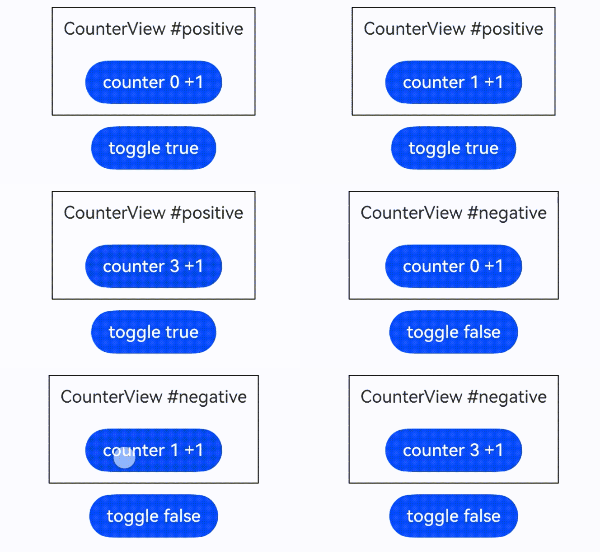
Initial rendering: creates CounterView child component with label 'CounterView #positive' and initial counter value 0.
Modification to the counter variable of CounterView: re-renders the existing CounterView component (with label 'CounterView #positive') while preserving the state variable value.
MainView.toggle change to false: updates the if statement, causing the following:
- Removal of the old CounterView instance (label: 'CounterView #positive').
- Creation of a new CounterView instance (label: 'CounterView #negative') with counter reset to 0.

CounterView(label: 'CounterView #positive') and CounterView(label: 'CounterView #negative') are two distinct instances of the same custom component. When the if branch changes, there is no update to an existing child component or no preservation of state.
The following example shows the required modifications if the value of counter needs to be preserved when the if condition changes:
@Component
struct KeepCounterView {
  @Link counter: number;
  label: string = 'unknown';

  build() {
    Column({ space: 20 }) {
      Text(`${this.label}`)
        .fontSize(20)
      Button(`counter ${this.counter} +1`)
        .onClick(() => {
          this.counter += 1;
        })
    }
    .margin(10)
    .padding(10)
    .border({ width: 1 })
  }
}

@Entry
@Component
struct KeepMainView {
  @State toggle: boolean = true;
  @State counter: number = 0;

  build() {
    Column() {
      if (this.toggle) {
        KeepCounterView({ counter: $counter, label: 'CounterView #positive' });
      } else {
        KeepCounterView({ counter: $counter, label: 'CounterView #negative' });
      }
      Button(`toggle ${this.toggle}`)
        .onClick(() => {
          this.toggle = !this.toggle;
        })
    }
    .width('100%')
    .justifyContent(FlexAlign.Center)
  }
} 
Here, the @State decorated variable counter is owned by the parent component. Therefore, it is not destroyed when the KeepCounterView component instance is destroyed. The KeepCounterView component references the state through the @Link decorator. The state must be moved from a child to its parent (or parent of parent) to avoid losing it when the conditional content (or repeated content) is destroyed.
[h2]Nested Conditional Statements
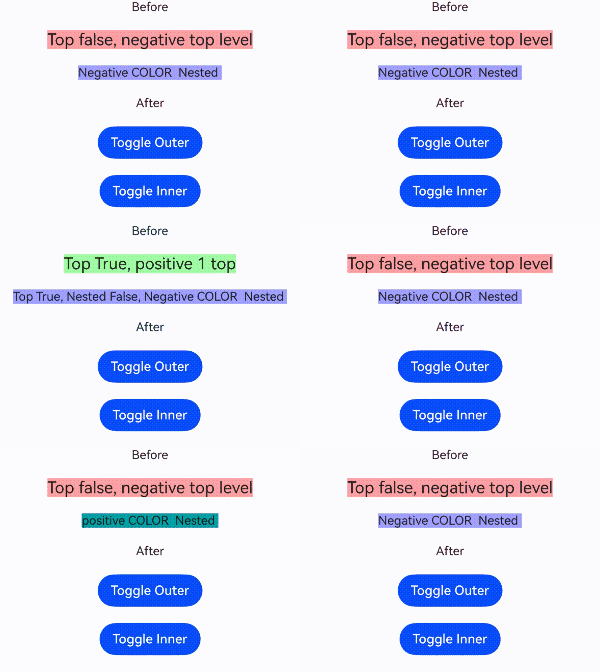
Nested conditional statements maintain the same rendering rules without affecting parent component constraints.
@Entry
@Component
struct NestedIf {
  @State toggle: boolean = false;
  @State toggleColor: boolean = false;

  build() {
    Column({ space: 20 }) {
      Text('Before')
        .fontSize(15)
      if (this.toggle) {
        Text('Top True, positive 1 top')
          .backgroundColor('#aaffaa').fontSize(20)
        // Inner if statement
        if (this.toggleColor) {
          Text('Top True, Nested True, positive COLOR  Nested ')
            .backgroundColor('#00aaaa').fontSize(15)
        } else {
          Text('Top True, Nested False, Negative COLOR  Nested ')
            .backgroundColor('#aaaaff').fontSize(15)
        }
      } else {
        Text('Top false, negative top level').fontSize(20)
          .backgroundColor('#ffaaaa')
        if (this.toggleColor) {
          Text('positive COLOR  Nested ')
            .backgroundColor('#00aaaa').fontSize(15)
        } else {
          Text('Negative COLOR  Nested ')
            .backgroundColor('#aaaaff').fontSize(15)
        }
      }
      Text('After')
        .fontSize(15)
      Button('Toggle Outer')
        .onClick(() => {
          this.toggle = !this.toggle;
        })
      Button('Toggle Inner')
        .onClick(() => {
          this.toggleColor = !this.toggleColor;
        })
    }
    .width('100%')
    .justifyContent(FlexAlign.Center)
  }
}