Overview
An app model is the abstraction of capabilities required by an app. It provides components and mechanisms required for running the app. By adhering to a unified model, you can streamline app development, making it more efficient and straightforward.
About EnterpriseAdminExtensionAbility
The EnterpriseAdminExtensionAbility component is a mandatory component of an MDM app. When developing an MDM app, you need to define an ExtensionAbility component of the EnterpriseAdminExtensionAbility type to activate the MDM app. Once activated, this component exists as an independent background process.
[h2]Process Model
The process model of an MDM app inherits from that of a regular app. Building on the regular app model, an MDM app includes an additional independent EnterpriseAdmin process. When the EnterpriseAdminExtensionAbility component of the MDM app is activated, the EnterpriseAdmin process is created. As the background process of the device administrator app, the EnterpriseAdmin process is used to receive callbacks for events such as MDM app activation and deactivation. The lifecycle of the EnterpriseAdmin process is independent of the main process and is managed by the system instead. The way the EnterpriseAdmin process lifecycle is managed varies based on how the EnterpriseAdminExtensionAbility component is activated.
Figure 1 MDM app process model

[h2]EnterpriseAdmin Process Lifecycle
After activation, the Admin component runs in an independent process and supports system state change callbacks. It resides in a process separate from the app's main process, and its startup and shutdown are managed by the EDM service. The Admin process can continue running even when the app is in the background.
Figure 2 MDM app in foreground and activated state

Figure 3 MDM app foreground process and EnterpriseAdmin process

Figure 4 EnterpriseAdmin process running when the MDM app main process is stopped

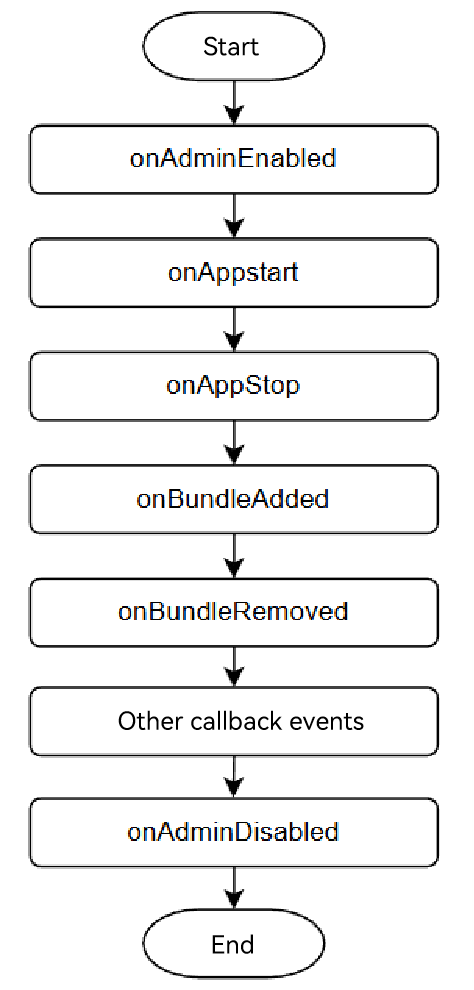
Figure 5 EnterpriseAdmin process supporting system event callbacks
-
onAdminEnabled: called when the EnterpriseAdminExtensionAbility component of the MDM app is activated.
-
onAdminDisabled: called when the EnterpriseAdminExtensionAbility component of the MDM app is deactivated.
-
onAppStart: called when an app is started. The callback contains the app bundle name and can be received only after the MANAGED_EVENT_APP_START event is registered using the adminManager.subscribeManagedEventSync API.
-
onAppStop: called when an app is stopped. The callback contains the app bundle name and can be received only after the MANAGED_EVENT_APP_STOP event is registered using the adminManager.subscribeManagedEventSync API.
-
onBundleAdded: called when an app is installed. The callback contains the app bundle name and account ID, and can be received only after the MANAGED_EVENT_BUNDLE_ADDED event is registered using the adminManager.subscribeManagedEventSync API.
-
onBundleRemoved: called when an app is uninstalled. The callback contains the app bundle name and account ID, and can be received only after the MANAGED_EVENT_BUNDLE_REMOVED event is registered using the adminManager.subscribeManagedEventSync API.
-
For more event callbacks, see ManagedEvent.
[h2]EnterpriseAdminExtensionAbility Capability Differences After Activation
The capabilities of the EnterpriseAdminExtensionAbility component vary depending on the activation API used, which can be adminManager.enableDeviceAdmin, and adminManager.startAdminProvision. For details, see the following table.
| Feature | SDA | DA | BDA |
|---|---|---|---|
| Uninstallation prevention | Users are not allowed to uninstall the app. | By default, users can uninstall the app. | Uninstallation is prohibited. |
| MDM Management API Call Permission | Supports all public management APIs | Supports all public management APIs | Supports APIs that can be called after applying for the ohos.permission.PERSONAL_MANAGE_RESTRICTIONS permission |
| Number of supported roles | Up to 1 | Up to 10 | No limit |

-
A BDA cannot coexist with other Admin roles.
-
A maximum of 10 SDAs and DAs can coexist in total. An SDA can manage other DA apps (activate/deactivate), whereas a DA can only manage the device and cannot manage other DA apps. When an MDM app is activated as an SDA, it has the capability to manage other DAs. It can activate other DA apps by calling the adminManager.enableDeviceAdmin API, or deactivate other DA apps by calling the adminManager.disableDeviceAdmin API.
Authorization Principles of Management APIs
The EnterpriseAdminExtensionAbility component of an MDM app can take effect only after being authorized by the enterprise. Specifically, the enterprise needs to call the MDM Kit API to activate this component. Before this operation, the component is only in the declared state and does not have actual capabilities. After the component is activated, any process of the MDM app can call the MDM management APIs.
[h2]API Permission Verification Mechanism
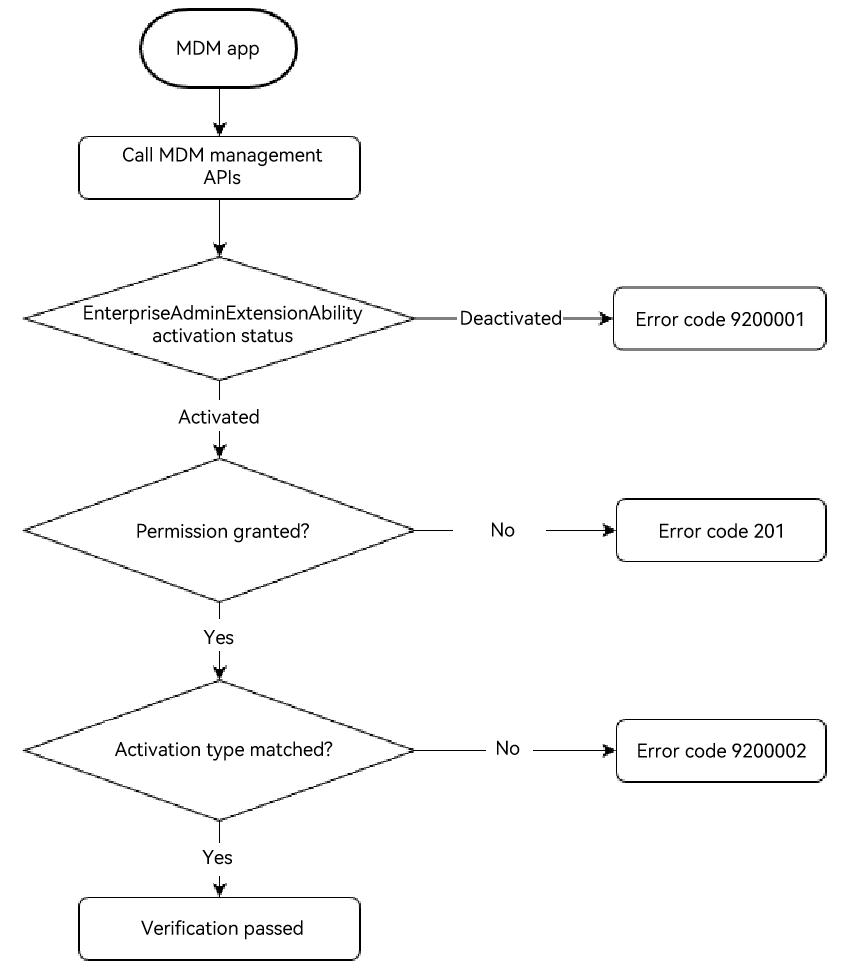
MDM management APIs verify access permissions via ACL authorization and also verify the activation status and activation type of the EnterpriseAdminExtensionAbility component. The preceding three conditions must be met when the MDM app invokes the MDM management APIs. Otherwise, the error code 9200001, 201, or 9200002 is displayed.
Figure 6 EDM verification logic