The Polygon component is used to draw a polygon.

This component is supported since API version 7. Updates will be marked with a superscript to indicate their earliest API version.
This component supports dynamic constructor parameter updates using the updateConstructorParams API of the AttributeUpdater class since API version 20.
APIs
Polygon(options?: PolygonOptions)
Widget capability: This API can be used in ArkTS widgets since API version 9.
Atomic service API: This API can be used in atomic services since API version 11.
System capability: SystemCapability.ArkUI.ArkUI.Full
Parameters
| Name | Type | Mandatory | Description |
|---|---|---|---|
| options | PolygonOptions | No | Options of the polygon. The undefined and null values are treated as invalid and will not take effect. |
PolygonOptions18+
Describes the options of the polygon.

To standardize anonymous object definitions, the element definitions here have been revised in API version 18. While historical version information is preserved for anonymous objects, there may be cases where the outer element's @since version number is higher than inner elements'. This does not affect interface usability.
Widget capability: This API can be used in ArkTS widgets since API version 18.
Atomic service API: This API can be used in atomic services since API version 18.
System capability: SystemCapability.ArkUI.ArkUI.Full
| Name | Type | Read-Only | No | Description |
|---|---|---|---|---|
| width7+ | Length | No | Yes | Width. The value must be greater than or equal to 0. Default value: 0 Default unit: vp The undefined, null, NaN, and Infinity values are invalid and treated as the default value. Widget capability: This API can be used in ArkTS widgets since API version 9. Atomic service API: This API can be used in atomic services since API version 11. |
| height7+ | Length | No | Yes | Height. The value must be greater than or equal to 0. Default value: 0 Default unit: vp The undefined, null, NaN, and Infinity values are invalid and treated as the default value. Widget capability: This API can be used in ArkTS widgets since API version 9. Atomic service API: This API can be used in atomic services since API version 11. |
[h2]points
points(value: Array<any>)
Sets the vertex coordinates of the polygon. This attribute can be dynamically set using attributeModifier. Invalid values are treated as the default value.
Widget capability: This API can be used in ArkTS widgets since API version 9.
Atomic service API: This API can be used in atomic services since API version 11.
System capability: SystemCapability.ArkUI.ArkUI.Full
Parameters
| Name | Type | Mandatory | Description |
|---|---|---|---|
| value | Array<any> | Yes | Vertex coordinates of the polygon. A two-dimensional array is passed, and each subarray indicates the [x, y] coordinates of a vertex. Default value: [] (empty array) Default unit: vp The undefined and null values are invalid and treated as the default value. |
[h2]fill
fill(value: ResourceColor)
Sets the color of the fill area. This attribute can be dynamically set using attributeModifier. Invalid values are treated as the default value. If this attribute and the universal attribute foregroundColor are both set, whichever is set later takes effect.
Widget capability: This API can be used in ArkTS widgets since API version 9.
Atomic service API: This API can be used in atomic services since API version 11.
System capability: SystemCapability.ArkUI.ArkUI.Full
Parameters
| Name | Type | Mandatory | Description |
|---|---|---|---|
| value | ResourceColor | Yes | Color of the fill area. Default value: Color.Black The undefined, null, NaN, and Infinity values are invalid and treated as the default value. |
[h2]fillOpacity
fillOpacity(value: number | string | Resource)
Sets the opacity of the fill area. This attribute can be dynamically set using attributeModifier.
Widget capability: This API can be used in ArkTS widgets since API version 9.
Atomic service API: This API can be used in atomic services since API version 11.
System capability: SystemCapability.ArkUI.ArkUI.Full
Parameters
| Name | Type | Mandatory | Description |
|---|---|---|---|
| value | number | string | Resource | Yes | Opacity of the fill area. NOTE For the number type, the value range is [0.0, 1.0]. A value less than 0.0 is treated as 0.0. A value greater than 1.0 is treated as 1.0. Any other invalid value is treated as 1.0. For the string type, the value is a character string of the number type. The value range is the same as that of the number type. For the Resource type, the value is a character string from the system resource or application resource. The value range is the same as that of the number type. Invalid value NaN is treated as 0.0, while invalid values undefined, null, and Infinity are treated as 1.0. Default value: 1.0 |
[h2]stroke
stroke(value: ResourceColor)
Sets the stroke color. This attribute can be dynamically set using attributeModifier. If this attribute is not set, the default stroke opacity is 0, meaning no stroke is displayed.
Widget capability: This API can be used in ArkTS widgets since API version 9.
Atomic service API: This API can be used in atomic services since API version 11.
System capability: SystemCapability.ArkUI.ArkUI.Full
Parameters
| Name | Type | Mandatory | Description |
|---|---|---|---|
| value | ResourceColor | Yes | Stroke color. Default value: Color.Transparent Invalid values undefined and null values are treated as the default value, and invalid values NaN and Infinity are treated as Color.Black. |
[h2]strokeDashArray
strokeDashArray(value: Array<any>)
Sets the stroke dashes. This attribute can be dynamically set using attributeModifier. The value must be greater than or equal to 0. Invalid values are treated as the default value.
Widget capability: This API can be used in ArkTS widgets since API version 9.
Atomic service API: This API can be used in atomic services since API version 11.
System capability: SystemCapability.ArkUI.ArkUI.Full
Parameters
| Name | Type | Mandatory | Description |
|---|---|---|---|
| value | Array<any> | Yes | Array defining the dash pattern for the polygon outline. Elements alternate between dash length and gap length. Default value: [] (empty array) Default unit: vp The undefined and null values are invalid and treated as the default value. NOTE Empty array: solid line Even-numbered array: Elements cycle sequentially, for example, [a, b, c, d] represents: dash a -> gap b -> dash c -> gap d -> dash a -> ... Odd-numbered array: Elements are duplicated to create an even-numbered array, for example, [a, b, c] becomes [a, b, c, a, b, c], representing: dash a -> gap b -> dash c -> gap a -> dash b -> gap c -> dash a -> ... |
[h2]strokeDashOffset
strokeDashOffset(value: number | string)
Sets the offset of the start point for drawing the stroke. This attribute can be dynamically set using attributeModifier. Invalid values are treated as the default value.
Widget capability: This API can be used in ArkTS widgets since API version 9.
Atomic service API: This API can be used in atomic services since API version 11.
System capability: SystemCapability.ArkUI.ArkUI.Full
Parameters
| Name | Type | Mandatory | Description |
|---|---|---|---|
| value | number | string | Yes | Offset of the start point for drawing the stroke. Default value: 0 Default unit: vp Invalid values undefined and null are treated as the default value. If set to NaN or Infinity, strokeDashArray has no effect. |
[h2]strokeLineCap
strokeLineCap(value: LineCapStyle)
Sets the cap style of the stroke. This attribute can be dynamically set using attributeModifier.
Widget capability: This API can be used in ArkTS widgets since API version 9.
Atomic service API: This API can be used in atomic services since API version 11.
System capability: SystemCapability.ArkUI.ArkUI.Full
Parameters
| Name | Type | Mandatory | Description |
|---|---|---|---|
| value | LineCapStyle | Yes | Cap style of the stroke. Default value: LineCapStyle.Butt The undefined, null, NaN, and Infinity values are invalid and treated as the default value. |
[h2]strokeLineJoin
strokeLineJoin(value: LineJoinStyle)
Sets the join style of the stroke. This attribute can be dynamically set using attributeModifier.
Widget capability: This API can be used in ArkTS widgets since API version 9.
Atomic service API: This API can be used in atomic services since API version 11.
System capability: SystemCapability.ArkUI.ArkUI.Full
Parameters
| Name | Type | Mandatory | Description |
|---|---|---|---|
| value | LineJoinStyle | Yes | Join style of the stroke. Default value: LineJoinStyle.Miter The undefined, null, NaN, and Infinity values are invalid and treated as the default value. |
[h2]strokeMiterLimit
strokeMiterLimit(value: number | string)
Sets the limit on the ratio of the miter length to the value of stroke width used to draw a miter join. This attribute can be dynamically set using attributeModifier. The miter length indicates the distance from the outer tip to the inner corner of the miter. The border width is the value of strokeWidth. This attribute works only when strokeLineJoin is set to LineJoinStyle.Miter.
The value must be greater than or equal to 1.0. If the value is in the [0, 1) range, the value 1.0 will be used. In other cases, the default value will be used.
Widget capability: This API can be used in ArkTS widgets since API version 9.
Atomic service API: This API can be used in atomic services since API version 11.
System capability: SystemCapability.ArkUI.ArkUI.Full
Parameters
| Name | Type | Mandatory | Description |
|---|---|---|---|
| value | number | string | Yes | Limit on the ratio of the miter length to the value of strokeWidth used to draw a miter join. Default value: 4 Invalid values undefined, null, and NaN are treated as the default value. If set to Infinity, stroke has no effect. |
[h2]strokeOpacity
strokeOpacity(value: number | string | Resource)
Sets the stroke opacity. This attribute can be dynamically set using attributeModifier. The value range is [0.0, 1.0]. If the set value is less than 0.0, 0.0 will be used. If the set value is greater than 1.0, 1.0 will be used.
Widget capability: This API can be used in ArkTS widgets since API version 9.
Atomic service API: This API can be used in atomic services since API version 11.
System capability: SystemCapability.ArkUI.ArkUI.Full
Parameters
[h2]strokeWidth
strokeWidth(value: Length)
Sets the stroke width. This attribute can be dynamically set using attributeModifier. If this attribute is of the string type, percentage values are not supported and will be treated as 1 px.
Widget capability: This API can be used in ArkTS widgets since API version 9.
Atomic service API: This API can be used in atomic services since API version 11.
System capability: SystemCapability.ArkUI.ArkUI.Full
Parameters
| Name | Type | Mandatory | Description |
|---|---|---|---|
| value | Length | Yes | Stroke width. The value must be greater than or equal to 0. Default value: 1 Default unit: vp Invalid values undefined, null, and NaN are treated as the default value, and invalid value Infinity is treated as 0. |
[h2]antiAlias
antiAlias(value: boolean)
Sets whether to enable anti-aliasing. This attribute can be dynamically set using attributeModifier.
Widget capability: This API can be used in ArkTS widgets since API version 9.
Atomic service API: This API can be used in atomic services since API version 11.
System capability: SystemCapability.ArkUI.ArkUI.Full
Parameters
| Name | Type | Mandatory | Description |
|---|---|---|---|
| value | boolean | Yes | Whether to enable anti-aliasing. true: enable anti-aliasing; false: disable anti-aliasing. Default value: true Invalid values undefined and null are treated as false. |
[h2]Example 1: Drawing a Polygon
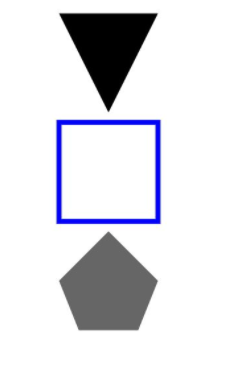
This example demonstrates how to use points, fill, fillOpacity, and stroke to draw polygons with specific coordinates, fill colors, opacity, and stroke colors.
// xxx.ets
@Entry
@Component
struct PolygonExample {
  build() {
    Column({ space: 10 }) {
      // Draw a triangle in a 100 × 100 rectangle. The start point is (0, 0), the end point is (100, 0), and the passing point is (50, 100).
      Polygon({ width: 100, height: 100 })
        .points([[0, 0], [50, 100], [100, 0]])
        .fill(Color.Green)
      // Draw a quadrilateral in a 100 × 100 rectangle. The start point is (0, 0), the end point is (100, 0), and the passing points are (0, 100) and (100, 100).
      Polygon()
        .width(100)
        .height(100)
        .points([[0, 0], [0, 100], [100, 100], [100, 0]])
        .fillOpacity(0)
        .strokeWidth(5)
        .stroke(Color.Blue)
      // Draw a pentagon in a 100 × 100 rectangle. The start point is (50, 0), the end point is (100, 50), and the passing points are (0, 50), (20, 100), and (80, 100).
      Polygon()
        .width(100)
        .height(100)
        .points([[50, 0], [0, 50], [20, 100], [80, 100], [100, 50]])
        .fill(Color.Red)
        .fillOpacity(0.6)
    }.width('100%').margin({ top: 10 })
  }
} 
[h2]Example 2: Drawing a Polygon with Different Parameter Types for Width and Height
This example demonstrates how to draw a polygon using different length types of the width and height attributes.
// xxx.ets
@Entry
@Component
struct PolygonTypeExample {
  build() {
    Column({ space: 10 }) {
      // Draw a triangle in a 100 × 100 rectangle. The start point is (0, 0), the end point is (100, 0), and the passing point is (50, 100).
      Polygon({ width: '100', height: '100' }) // Use the string type.
        .points([[0, 0], [50, 100], [100, 0]])
      // Draw a quadrilateral in a 100 × 100 rectangle. The start point is (0, 0), the end point is (100, 0), and the passing points are (0, 100) and (100, 100).
      Polygon({ width: 100, height: 100 })// Use the number type.
        .points([[0, 0], [0, 100], [100, 100], [100, 0]])
        .fillOpacity(0)
        .strokeWidth(5)
        .stroke(Color.Blue)
      // Draw a pentagon in a 100 × 100 rectangle. The start point is (50, 0), the end point is (100, 50), and the passing points are (0, 50), (20, 100), and (80, 100).
      Polygon({ width: $r('app.string.PolygonWidth'), height: $r('app.string.PolygonHeight') }) // Use the Resource type, which needs to be customized.
        .points([[50, 0], [0, 50], [20, 100], [80, 100], [100, 50]])
        .fillOpacity(0.6)
    }.width('100%').margin({ top: 10 })
  }
} 
[h2]Example 3: Dynamically Setting Attributes of the Polygon Component Using attributeModifier
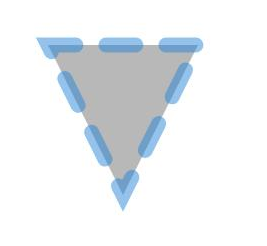
This example shows how to use attributeModifier to dynamically set the points, fill, fillOpacity, stroke, strokeDashArray, strokeDashOffset, strokeLineCap, strokeLineJoin, strokeMiterLimit, strokeOpacity, strokeWidth, and antiAlias attributes of the Polygon component.
// xxx.ets
class MyPolygonModifier implements AttributeModifier<PolygonAttribute> {
  applyNormalAttribute(instance: PolygonAttribute): void {
    // Triangle starting at (0, 0), passing through (50, 100), and ending at (100, 0). Fill color: #707070; fill opacity: 0.5; stroke color: #2787D9; stroke dash array: [20]; offset to left: 15; cap style: semi-circle; join style: miter; miter limit: 5; stroke opacity: 0.5; stroke width: 10; anti-aliasing enabled.
    instance.points([[0, 0], [50, 100], [100, 0]])
    instance.fill("#707070")
    instance.fillOpacity(0.5)
    instance.stroke("#2787D9")
    instance.strokeDashArray([20])
    instance.strokeDashOffset("15")
    instance.strokeLineCap(LineCapStyle.Round)
    instance.strokeLineJoin(LineJoinStyle.Miter)
    instance.strokeMiterLimit(5)
    instance.strokeOpacity(0.5)
    instance.strokeWidth(10)
    instance.antiAlias(true)
  }
}

@Entry
@Component
struct PolygonModifierDemo {
  @State modifier: MyPolygonModifier = new MyPolygonModifier()

  build() {
    Column() {
      Polygon()
        .width(100)
        .height(100)
        .attributeModifier(this.modifier)
        .offset({ x: 20, y: 20 })
    }
  }
}