Starting from version 6.0.0(20), the high-performance GPU sorting feature is supported.
The High Performance Shaders (HPS) feature of XEngine Kit provides the GPU sorting capability. Compared with other sorting capabilities, this capability benefits from Huawei's Maleoon GPU with integrated hardware-software optimization, resulting in superior performance.
Constraints
You can check whether the relevant extension is supported as follows:
For Vulkan, use the extension query API HMS_XEG_EnumerateDeviceExtensionProperties. If the query result contains XEG_HPS_RADIX_SORT_EXTENSION_NAME, the extension is supported. Otherwise, the extension is not supported.
API Description
The following APIs are required for high-performance GPU sorting. For details about these APIs, please refer to API Reference.
| API | Description |
|---|---|
| VKAPI_ATTR VkResult VKAPI_CALL HMS_XEG_CreateHPS (VkDevice device, const XEG_HPSCreateInfo *pCreateInfo, XEG_HPS *pHps) | Creates an XEG_HPS object. |
| VKAPI_ATTR void VKAPI_CALL HMS_XEG_DestroyHPS (XEG_HPS hps) | Destroys an XEG_HPS object. |
| VKAPI_ATTR VkResult VKAPI_CALL HMS_XEG_CmdRadixSortHPS (VkCommandBuffer commandBuffer, XEG_HPS hps, const XEG_HPSRadixSortDescription *pDescription) | Records the HPS sorting command. Before using this API, you need to call the HMS_XEG_EnumerateDeviceExtensionProperties API to check whether the XEG_HPS_RADIX_SORT_EXTENSION_NAME extension is supported. |
Service Process
-
The following uses Vulkan app rendering as an example to describe the service process of high-performance GPU sorting.
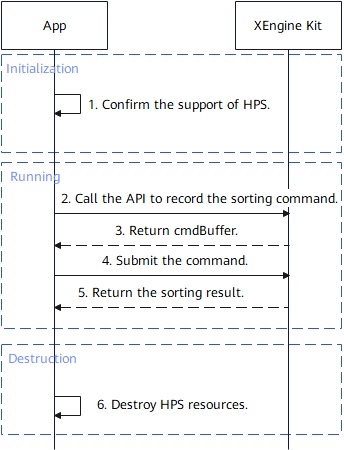
- The app calls the HMS_XEG_EnumerateDeviceExtensionProperties API to obtain the list of extension properties supported by XEngine Kit. Check whether the returned list contains XEG_HPS_RADIX_SORT_EXTENSION_NAME. If not, the current device does not support this feature, and the process ends.
- The app prepares HPS-related resources (such as keyBuffer and indexBuffer).
- The app calls the HMS_XEG_CreateHPS API to create an HPS instance.
- The app calls the HMS_XEG_CmdRadixSortHPS API to record the sorting command and submit it to the GPU queue for execution.
- When sorting is no longer needed, the app calls the HMS_XEG_DestroyHPS API to destroy the HPS instance and release all GPU resources. After the destruction, the HPS handle becomes invalid and cannot be used anymore.
Development Procedure
This section uses Vulkan app rendering as an example to describe how to develop high-performance GPU sorting.
[h2]Configuring Your Project
During HAP compilation, the native-layer .so files depend on related XEngine Kit libraries and header files provided in the NDK.
-
Including header files
#include <algorithm>
#include <vector>
#include <string>
#include <xengine/xeg_vulkan_hps.h>
#include <xengine/xeg_vulkan_extension.h>
#include <xengine/xeg_extension_defs.h>
-
Adding library dependencies to CMakeLists.txt
Add the following code to CMakeLists.txt to include the dependency on the XEngine dynamic library:
find_library(
    # Set the name of the path variable.
    xengine-lib
    # Specify the name of the NDK library that you want CMake to locate.
    xengine
)
target_link_libraries(nativerender PUBLIC
    # Other library files.
    # ...
    ${xengine-lib})
[h2]Integrating High-Performance GPU Sorting (Vulkan)
High-performance GPU sorting of XEngine Kit can be used independently. The related code is implemented at the native layer.
Before calling XEngine Kit capabilities, you need to use SysCap to check whether your target device supports the SystemCapability.Graphic.XEngine system capability.
-
Call the HMS_XEG_EnumerateDeviceExtensionProperties API to obtain the extensions supported by XEngine Kit. The high-performance GPU sorting APIs can be used only when the XEG_HPS_RADIX_SORT_EXTENSION_NAME extension is supported.
VkPhysicalDevice physicalDevice; std::vector<std::string> supportedExtensions; uint32_t propertyCount; HMS_XEG_EnumerateDeviceExtensionProperties(physicalDevice, &propertyCount, nullptr); if (propertyCount > 0) { std::vector<XEG_ExtensionProperties> properties(propertyCount); if (HMS_XEG_EnumerateDeviceExtensionProperties(physicalDevice, &propertyCount, &properties.front()) == VK_SUCCESS) { for (auto ext : properties) { supportedExtensions.push_back(ext.extensionName); } } } if (std::find(supportedExtensions.begin(), supportedExtensions.end(), XEG_HPS_RADIX_SORT_EXTENSION_NAME) == supportedExtensions.end()) { exit(1); } -
Prepare HPS-related resources.
VkDevice device;
VkCommandBuffer cmdBuffer;
VkQueue queue;
// Key to be sorted.
VkBuffer keyBuffer;
// Value corresponding to the key.
VkBuffer indexBuffer;
// Sorting amount.
VkBuffer sortCount;
-
Declare the instance handle.
XEG_HPS xegHPS { VK_NULL_HANDLE }; -
Call the HMS_XEG_CreateHPS API to instantiate the handle.
// Construct the input descriptor. XEG_HPSRadixSort sortInfo{ XEG_STRUCTURE_TYPE_HPS_RADIX_SORT, nullptr }; XEG_HPSCreateInfo info { XEG_STRUCTURE_TYPE_HPS_CREATE_INFO, &sortInfo }; // Instantiate the handle. VkResult res = HMS_XEG_CreateHPS(device, &info, &xegHPS); if (res != VK_SUCCESS) { // Handle the error. // ... } -
Construct the sorting descriptor and call the HMS_XEG_CmdRadixSortHPS API to record the sorting command.
VkCommandBufferBeginInfo cmdBufferBeginInfo {}; cmdBufferBeginInfo.sType = VK_STRUCTURE_TYPE_COMMAND_BUFFER_BEGIN_INFO; // Record the sorting command. vkBeginCommandBuffer(cmdBuffer, &cmdBufferBeginInfo); XEG_HPSRadixSortDescription sortDescription{ XEG_STRUCTURE_TYPE_HPS_RADIX_SORT_DESCRIPTION, nullptr, sortCount, keyBuffer, indexBuffer }; VkResult res = HMS_XEG_CmdRadixSortHPS(cmdBuffer, xegHPS, &sortDescription); if (res != VK_SUCCESS) { // Handle the error. // ... } vkEndCommandBuffer(cmdBuffer); -
Submit the sorting command.
// Submit the command buffer. VkResult res; { VkSubmitInfo submitInfo{}; submitInfo.sType = VK_STRUCTURE_TYPE_SUBMIT_INFO; submitInfo.waitSemaphoreCount = 0; submitInfo.signalSemaphoreCount = 0; submitInfo.pSignalSemaphores = nullptr; submitInfo.commandBufferCount = 1; submitInfo.pCommandBuffers = &cmdBuffer; submitInfo.pWaitSemaphores = nullptr; res = vkQueueSubmit(queue, 1, &submitInfo, nullptr); } // Wait until the operation is complete. vkDeviceWaitIdle(device); -
Destroy the HPS object.
if(xegHPS){
    HMS_XEG_DestroyHPS(xegHPS);
}