Supported since API version 7. Updates will be marked with a superscript to indicate their earliest API version.
Use OffscreenCanvasRenderingContext2D to draw rectangles, images, and text on an OffscreenCanvas object.
Attributes
In addition to the attributes that are supported by CanvasRenderingContext2D, the following attributes are supported.
| Attribute | Type | Description |
|---|---|---|
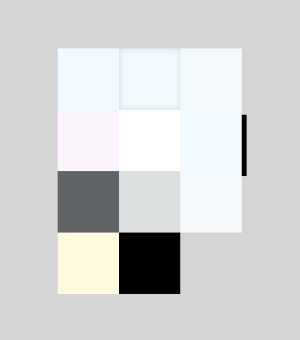
| filter | string | Image filter. Available options are as follows: - blur: applies the Gaussian blur for the image. - brightness: applies a linear multiplication to the image to make it look brighter or darker. - contrast: adjusts the image contrast. - drop-shadow: sets a shadow effect for the image. - grayscale: converts the image to a grayscale image. - hue-rotate: applies hue rotation to the image. - invert: inverts the image. - opacity: sets the image opacity. - saturate: sets the image saturation. - sepia: converts the image to sepia. |
Example:
<!-- xxx.hml -->
<div style="width: 500px; height: 500px;">
  <canvas ref="canvasId" style="width: 500px; height: 500px; padding: 80px; background-color: rgb(213, 213, 213);"></canvas>
</div>
// xxx.js
export default {
  onShow(){
    var ctx = this.$refs.canvasId.getContext('2d');
    var offscreen = new OffscreenCanvas(360, 500);
    var offCanvas2 = offscreen.getContext("2d");
    var img = new Image();
    // Replace 'common/images/flower.jpg' with the resource file you use.
    img.src = 'common/images/flower.jpg';
    offCanvas2.drawImage(img, 0, 0, 100, 100);
    offCanvas2.filter = 'blur(5px)';
    offCanvas2.drawImage(img, 100, 0, 100, 100);

    offCanvas2.filter = 'grayscale(50%)';
    offCanvas2.drawImage(img, 200, 0, 100, 100);

    offCanvas2.filter = 'hue-rotate(90deg)';
    offCanvas2.drawImage(img, 0, 100, 100, 100);

    offCanvas2.filter = 'invert(100%)';
    offCanvas2.drawImage(img, 100, 100, 100, 100);

    offCanvas2.filter = 'drop-shadow(8px 8px 10px green)';
    offCanvas2.drawImage(img, 200, 100, 100, 100);

    offCanvas2.filter = 'brightness(0.4)';
    offCanvas2.drawImage(img, 0, 200, 100, 100);

    offCanvas2.filter = 'opacity(25%)';
    offCanvas2.drawImage(img, 100, 200, 100, 100);

    offCanvas2.filter = 'saturate(30%)';
    offCanvas2.drawImage(img, 200, 200, 100, 100);

    offCanvas2.filter = 'sepia(60%)';
    offCanvas2.drawImage(img, 0, 300, 100, 100);

    offCanvas2.filter = 'contrast(200%)';
    offCanvas2.drawImage(img, 100, 300, 100, 100);
    var bitmap = offscreen.transferToImageBitmap();
    ctx.transferFromImageBitmap(bitmap);
  }
} 
Methods
In addition to the methods that are supported by CanvasRenderingContext2D, the following methods are supported.
[h2]isPointInPath
isPointInPath(path?: Path2D, x: number, y: number): boolean
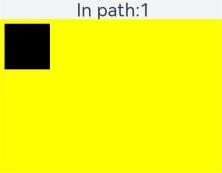
Checks whether a specified point is in the path area.
Parameters
| Name | Type | Mandatory | Description |
|---|---|---|---|
| path | Path2D | No | Path used for checking. If this parameter is not set, the current path is used. |
| x | number | Yes | X-coordinate of the point used for checking. |
| y | number | Yes | Y-coordinate of the point used for checking. |
Return value
| Type | Description |
|---|---|
| boolean | Whether a specified point is in the path area. Returns true if the point is inside the path area; returns false otherwise. |
Example
<!-- xxx.hml -->
<div class="container" style="width: 500px; height: 500px;">
    <text class="textsize">In path:{{textValue}}</text>
    <canvas ref="canvas" style="width: 500px; height: 500px; background-color: #ffff00;"></canvas>
</div>
/* xxx.css */
.container {
display: flex;
flex-direction: column;
background-color: #F1F3F5;
align-items: center;
justify-content: center;
width: 100%;
height: 100%;
}
canvas {
width: 600px;
height: 600px;
background-color: #fdfdfd;
border: none;
}
.textsize {
font-size: 40px;
} // xxx.js
export default {
data: {
textValue: false
},
onShow(){
var canvas = this.$refs.canvas.getContext('2d');
var offscreen = new OffscreenCanvas(500,500);
var offscreenCanvasCtx = offscreen.getContext("2d");
offscreenCanvasCtx.rect(10, 10, 100, 100);
offscreenCanvasCtx.fill();
this.textValue = offscreenCanvasCtx.isPointInPath(30, 70);
var bitmap = offscreen.transferToImageBitmap();
canvas.transferFromImageBitmap(bitmap);
}
} 
[h2]isPointInStroke
isPointInStroke(path?: Path2D, x: number, y: number): boolean
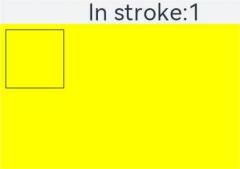
Checks whether a specified point is in the stroke area of a path.
Parameters
| Name | Type | Mandatory | Description |
|---|---|---|---|
| path | Path2D | No | Path used for checking. If this parameter is not set, the current path is used. |
| x | number | Yes | X-coordinate of the point used for checking. |
| y | number | Yes | Y-coordinate of the point used for checking. |
Return value
| Type | Description |
|---|---|
| boolean | Whether a specified point is in the stroke area of a path. Returns true if the point is in the stroke area of the path; returns false otherwise. |
Example
<!-- xxx.hml -->
<div class="container" style="width: 500px; height: 500px;">
    <text class="textsize">In stroke:{{textValue}}</text>
    <canvas ref="canvas" style="width: 500px; height: 500px; background-color: #ffff00;"></canvas>
</div>
/* xxx.css */
.container {
display: flex;
flex-direction: column;
background-color: #F1F3F5;
align-items: center;
justify-content: center;
width: 100%;
height: 100%;
}
canvas {
width: 600px;
height: 600px;
background-color: #fdfdfd;
border: none;
}
.textsize {
font-size: 40px;
} // xxx.js
export default {
data: {
textValue: false
},
onShow(){
var canvas = this.$refs.canvas.getContext('2d');
var offscreen = new OffscreenCanvas(500,500);
var offscreenCanvasCtx = offscreen.getContext("2d");
offscreenCanvasCtx.rect(10, 10, 100, 100);
offscreenCanvasCtx.stroke();
this.textValue = offscreenCanvasCtx.isPointInStroke(50, 10);
var bitmap = offscreen.transferToImageBitmap();
canvas.transferFromImageBitmap(bitmap);
}
} 
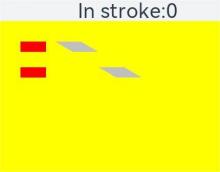
[h2]resetTransform
resetTransform(): void
Resets this transformation matrix to an identity matrix.
Example
<!-- xxx.hml -->
<div class="container" style="width: 500px; height: 500px;">
    <text class="textsize">In path:{{textValue}}</text>
    <canvas ref="canvas" style="width: 500px; height: 500px; background-color: #ffff00;"></canvas>
</div>
/* xxx.css */
.container {
display: flex;
flex-direction: column;
background-color: #F1F3F5;
align-items: center;
justify-content: center;
width: 100%;
height: 100%;
}
canvas {
width: 600px;
height: 600px;
background-color: #fdfdfd;
border: none;
}
.textsize {
font-size: 40px;
} // xxx.js
export default {
data:{
textValue:0
},
onShow(){
var canvas = this.$refs.canvas.getContext('2d');
var offscreen = new OffscreenCanvas(500,500);
var offscreenCanvasCtx = offscreen.getContext("2d");
offscreenCanvasCtx.transform(1, 0, 1.7, 1, 0, 0);
offscreenCanvasCtx.fillStyle = '#a9a9a9';
offscreenCanvasCtx.fillRect(40, 40, 50, 20);
offscreenCanvasCtx.fillRect(40, 90, 50, 20);
// Non-skewed rectangles
offscreenCanvasCtx.resetTransform();
offscreenCanvasCtx.fillStyle = '#ff0000';
offscreenCanvasCtx.fillRect(40, 40, 50, 20);
offscreenCanvasCtx.fillRect(40, 90, 50, 20);
var bitmap = offscreen.transferToImageBitmap();
canvas.transferFromImageBitmap(bitmap);
}
}