Directory Structure
The following figure shows the typical directory structure of the JavaScript module (entry/src/main/js/module) for an application with feature abilities (FA) using JavaScript APIs.
Figure 1 Directory structure
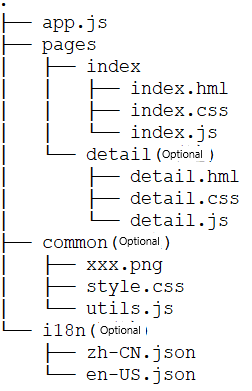
Functions of the files are as follows:
.hml files describe the page layout.
.css files describe the page style.
.js files process the interactions between pages and users.
Functions of the folders are as follows:
- The app.js file manages global JS logics and application lifecycle.
- The pages directory stores all component pages.
- The common directory stores public resource files, such as media resources and .js files.
- The i18n folder stores resources in different languages, for example, UI strings and image paths.

The i18n folder is a reserved one and cannot be renamed.
You should create the optional folders (shown in the directory structure) as needed after you create the project in DevEco Studio.
File Access Rules
Application resources can be accessed via an absolute or relative path. In this development framework, an absolute path starts with a slash (/), and a relative path starts with ./ or ../. The rules are as follows:
To reference a code file, use a relative path, for example, ../common/utils.js.
To reference a resource file, use an absolute path, for example: /common/xxx.png.
Store code files and resource files in the common directory and access the files in a required fashion.
In a .css file, use the url() function to create a URL, for example, url(/common/xxx.png).

When code file A needs to reference code file B:
If code files A and B are in the same directory, you can use either a relative or absolute path in code file B to reference resource files.
If code files A and B are in different directories, you must use an absolute path in code file B to reference resource files. The reason is that the directory of code file B changes during Webpack packaging.
Media File Formats
Table 1 Supported image formats
| Format | Supported Version | File Name Extension |
|---|---|---|
| BMP | API version 4+ | .bmp |
| JPEG | API version 4+ | .jpg |
| PNG | API version 4+ | .png |
Storage Directory
Since API version 5, the <image> component supports access to images in the private directory of an application.
| Directory Type | Prefix | Access Visibility | Description |
|---|---|---|---|
| Private directory of the application | internal://app/ | Current application only | The directory is deleted when the application is uninstalled. Access to the parent directory using ../ is prohibited. |