To provide better notification experience for users and prevent them from being disturbed by frequent messages, Push Kit offers a variety of frequency control rules. If the upper limit is reached, excess messages will be discarded. The count is reset the next day.
Possible Causes of Notification Message Frequency Control
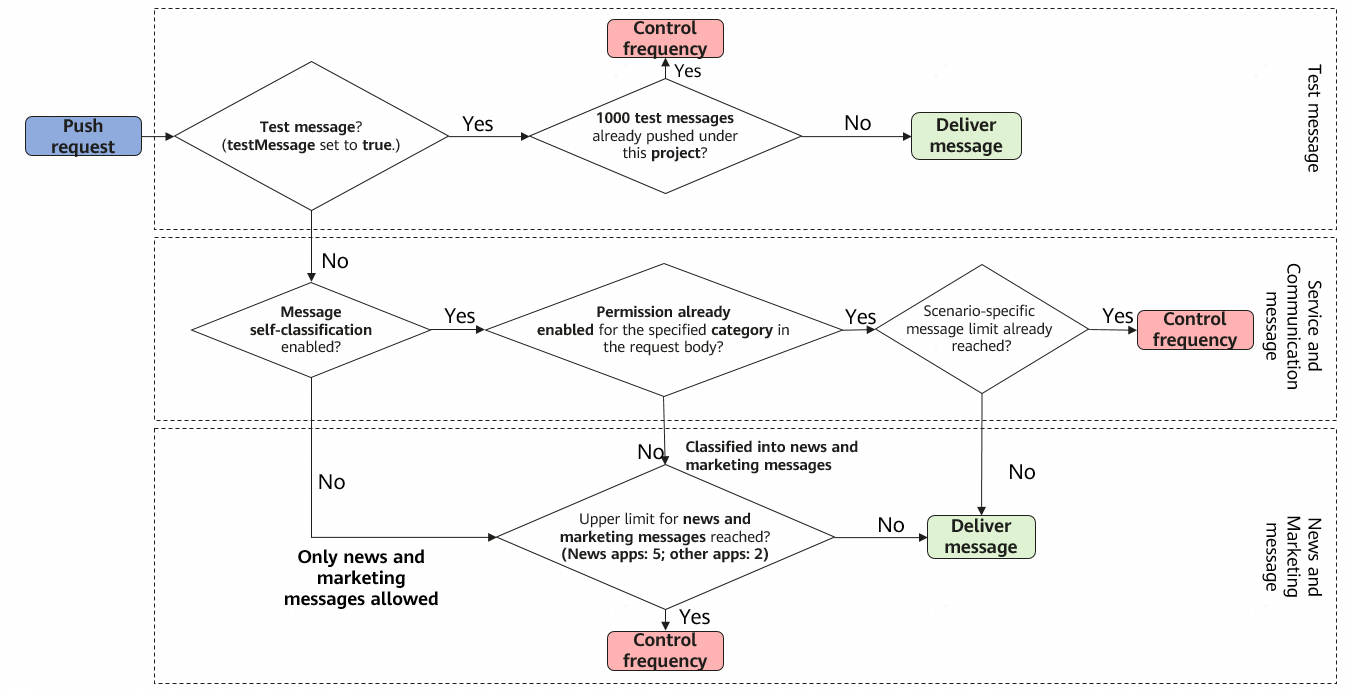
The specific rules are as follows:
During app debugging, a total of 1000 test messages (shared by all devices) can be pushed for each project per day. These messages are not subject to scenario-specific message frequency control, meaning that no distinction is made between notification or scenario-specific message types. To send test messages, you need to set testMessage to true.

If messages pushed exceed the limit (1000 messages), Push Kit will return result code 256 to your receipt server. Please note that the quantity (1000) here indicates the number of requests successfully sent by the REST API, but not necessarily the number of messages that successfully reach the devices.
Once your app is officially released, the message sending frequency will be regulated according to the service scenario and traffic. In cases where message sending is unnecessary or unreasonable, frequency limits will be applied based on Scenario-Specific Message Frequency Control. The following table lists the frequency control rules.
| Scenario | Frequency Control Rule |
|---|---|
| Notification message | If you have not applied for the message self-classification permission, messages pushed by your app are categorized as news and marketing messages by default (category set to MARKETING). According to Notification Message Frequency Control Rules, each app can push up to 2 or 5 (depending on the app category) messages to each device on a daily basis. If you need to send only news and marketing messages, you do not need to apply for the message self-classification permission. If you need to send service and communication messages, you need to apply for the permission first. |
| Widget update message | The update frequency is limited for each individual widget under an app. The number of update messages allowed for a single service widget is determined by the app category. For details about the frequency control rules, please refer to Push Updates for ArkTS Widgets. |
| Live view message | The messages of a single live view can be updated for up to 10 times every 5 minutes and 60 times every hour per device. In the ride hailing and live score scenarios, the messages of a single live view can be updated for up to 30 times every 5 minutes and 180 times every hour per device. |

The message sending frequency will be regulated according to the service scenario and traffic. In cases where message sending is unnecessary or unreasonable, frequency limits will be applied and Push Kit will return result code 102 to your receipt server.
If scenario-specific messages exceed the limits specified by frequency control rules, Push Kit will return result code 256 to your receipt server.
For details about frequency control rules, please refer to Message Frequency Control. For details about the receipt status codes, please refer to Receipt Status Codes.
How Many Push Tokens Can I Use to Send Messages Through a REST API at a Time?
A maximum of 1000 push tokens can be set in a single push. Therefore, the Push Kit server can send a maximum of 1000 messages based on the tokens at a time. If the number of messages to be sent is greater than 1000, error code 80300010 will be returned. In this case, you are advised to send these messages in batches.