Starting from API version 26.0.0, AOD Navigation Kit is available.
AOD Navigation Kit provides your app with the always-on-display (AOD) navigation capability, which ensures real-time navigation while effectively conserving device power. Key navigation information such as the track and distance is readily visible on the AOD screen, without the need for unlocking the device.
Use Cases
The AOD screen displays real-time navigation status and information, offering your app an instant, low-power solution that helps extend battery life.
Integration scenario example:
| In-app experience | AOD navigation experience |
|---|---|
 |  |
Mechanism
AOD Navigation Kit provides two integration modes for your app. You can choose the one that best suits your service needs.
Integration mode 1: app hibernation in AOD navigation
In this mode, AOD navigation consumes approximately 50% less power compared with navigation when the device is unlocked and the screen is on.
Capability constraints: During AOD navigation, access to the Internet and wearable data is not supported. Only proxy support for a fixed set of data items is available. Currently, the following data items are supported via proxy: distance, step count, step cadence, total duration, workout duration, total ascent, total descent, current speed, overall average speed, average speed during workout, current pace, and average pace.
NOTE
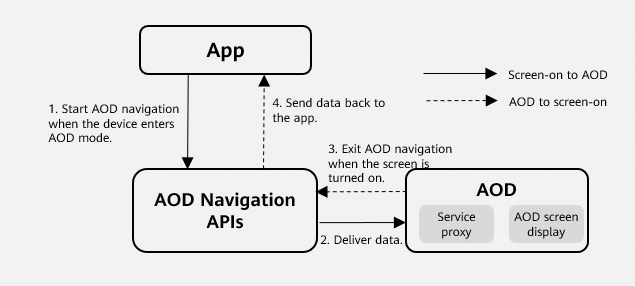
- After the device enters the AOD mode, the app needs to send the navigation data generated during the screen-on period to AOD Navigation Kit.
- After receiving the data from the app, the AOD module acts as a proxy for the app's navigation service and displays relevant data.
- When the device screen turns on, AOD navigation ends.
- AOD Navigation Kit sends the navigation data generated through the proxy during the AOD mode back to the app. The app then merges the received data.
Integration mode 2: app keep-alive in AOD navigation
- In this mode, the app remains alive during AOD navigation. AOD navigation consumes approximately 20% less power compared with navigation when the device is unlocked and the screen is on.
- There are no capability constraints. The data displayed during AOD navigation still comes from the app. Access to the Internet and wearable data (such as step count and heart rate) is also supported during AOD navigation.
NOTE
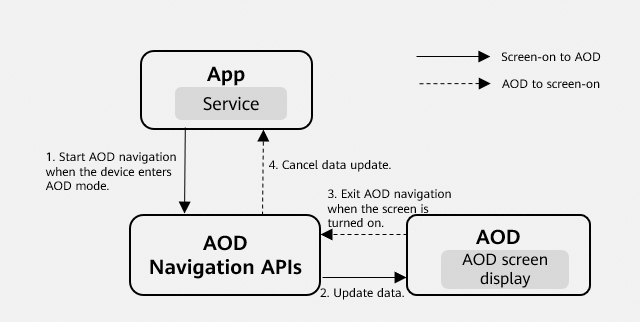
- After the device enters the AOD mode, the app needs to send the navigation data generated during the screen-on period to AOD Navigation Kit, and the data items displayed during AOD navigation is periodically updated.
- The AOD module does not act as a service proxy. It only displays the data items on the AOD screen.
- When the device screen turns on, AOD navigation ends.
- The app cancels the update of AOD navigation data.
Capabilities
Map rendering on the AOD screen: rendering offline map information, preset route lines, real-time track lines, and key navigation process information on the AOD screen
Low-power proxy computation of data items: distance, step count, total duration, workout duration, total ascent, current speed, average speed, average speed during workout, current pace, and average pace
Computation offloading for voice broadcast data items: distance, time, off-route event, GPS positioning event, total ascent, total descent, speed, and marker broadcast
Highlights
This kit provides low-power navigation proxy capabilities for apps. After integration, navigation scenarios are expected to consume 50% less power, meeting the long battery life requirements of outdoor apps' navigation services.
After integration, real-time navigation information can be displayed on the AOD screen. Users can view key information such as the navigation route, track line, distance, and elapsed time in real time without unlocking the screen, addressing the pain point of inconvenient navigation information access during outdoor activities such as hiking and mountain climbing.