The image-based barcode recognition capability can scan and recognize a barcode image from NV21 pixel-format images to retrieve information.
Use Cases
This capability can recognize 1D codes, QR codes, and multifunctional codes from NV21 pixel-format images and retrieve information such as the code type, value, position information, and expected image zoom ratio. It can be used to recognize one or multiple barcodes, such as 1D codes and payment codes, on an image.
Flowchart
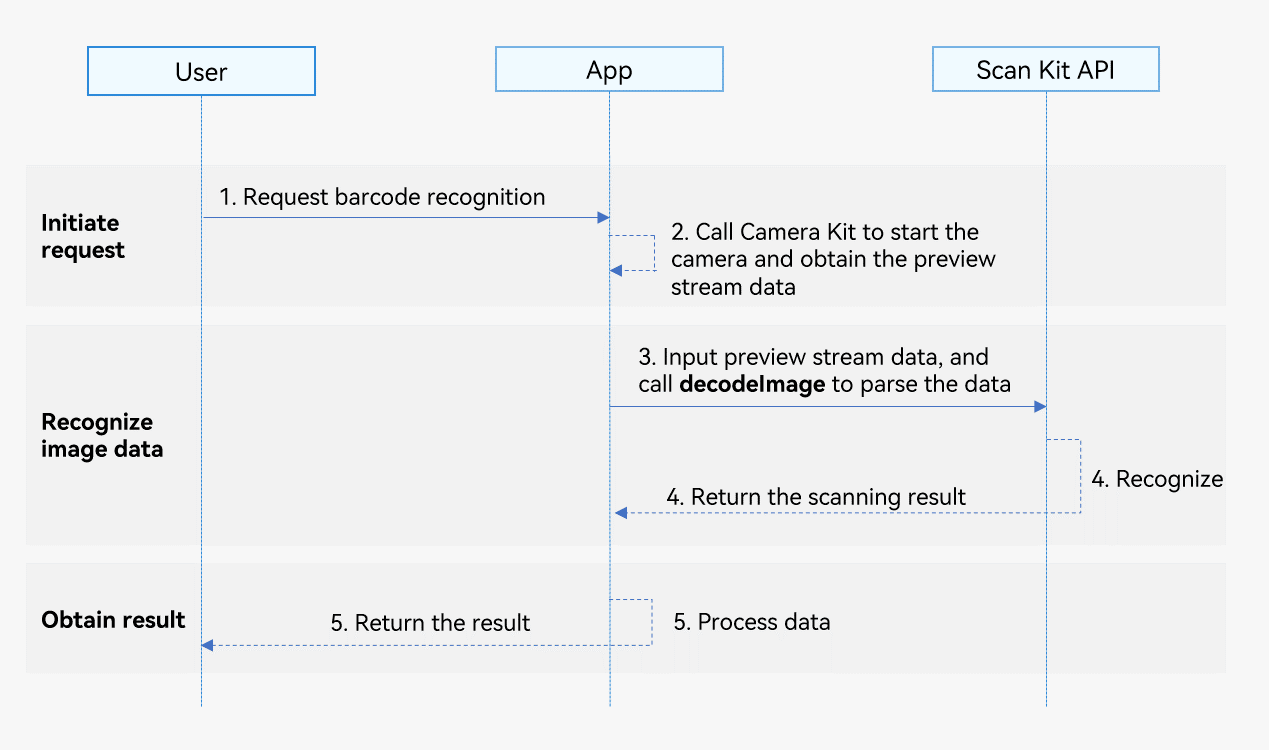
-
A user sends a barcode recognition request to your app.
-
Your app calls Camera Kit to start the camera and obtain the preview stream data.
-
Your app calls the decodeImage API of Scan Kit to recognize the barcode image.
-
Scan Kit returns the barcode recognition result.
-
Your app sends the barcode recognition result to the user.
API Description
Scan Kit provides an API for recognizing a barcode image in the passed image data and returns the recognition result using a promise. For details about the APIs, please refer to the API Reference.
| API | Description |
|---|---|
| decodeImage(image: ByteImage, options?: scanBarcode.ScanOptions): Promise<DetectResult> | Starts image-based barcode scanning. This API uses ByteImage to pass the image data and a promise to return the recognition result asynchronously. |
Development Procedure
The image-based barcode recognition capability can recognize 1D codes, QR codes, and multifunctional codes from NV21 pixel-format images and return information such as the code type, value, position information (coordinates of the upper left and lower right corners of the minimum bounding rectangle of a barcode image, and coordinates of four corner points of the QR code), and expected image zoom ratio.
To make it easier for you to integrate the capability, a detailed sample project is provided for your reference.
The following describes how to call the decodeImage API to obtain barcode image information.
-
Import the image-based barcode scanning API module and other relevant API modules. This API module provides parameters and methods for recognizing barcodes in images.
import { detectBarcode, scanBarcode, scanCore } from '@kit.ScanKit'; import { BusinessError } from '@kit.BasicServicesKit'; import { camera } from '@kit.CameraKit'; import { image } from '@kit.ImageKit'; import { hilog } from '@kit.PerformanceAnalysisKit'; -
Call Camera Kit to start the camera to implement dual-channel preview.
-
Obtain preview image data in real time through the ImageReceiver object (for details, please refer to dual-channel preview capability) and call the decodeImage API to parse the image data. Release the image data after the recognition is complete.
// Obtain imgComponent and the preview stream width and height from the ImageReceiver object. export function decodeImageBuffer(imgComponent: image.Component, width: number, height: number) { const stride: number = imgComponent.rowStride; let imgByteBuffer: ArrayBuffer = imgComponent.byteBuffer; // The width of the image data is inconsistent with the stride. if (stride !== width) { // Remove the stride data from **imgComponent.byteBuffer** to obtain a new buffer by means of copy const dstBufferSize: number = width * height * 1.5; const dstArr = new Uint8Array(dstBufferSize); for (let j = 0; j < height * 1.5; j++) { const srcBuf = new Uint8Array(imgByteBuffer, j * stride, width); dstArr.set(srcBuf, j * width); } imgByteBuffer = dstArr.buffer as ArrayBuffer; } const byteImg: detectBarcode.ByteImage = { byteBuffer: imgByteBuffer, width: width, height: height, format: detectBarcode.ImageFormat.NV21 }; const options: scanBarcode.ScanOptions = { scanTypes: [scanCore.ScanType.ALL], enableMultiMode: true, enableAlbum: false }; try { detectBarcode.decodeImage(byteImg, options).then((data: detectBarcode.DetectResult) => { hilog.info(0x0001, '[Scan Sample]', `Succeeded in getting DetectResult by promise with options, result length: ${data.scanResults.length}, zoomValue: ${data.zoomValue}`); }).catch((err: BusinessError) => { hilog.error(0x0001, '[Scan Sample]', `Failed to get DetectResult by promise with options. Code: ${err.code}, message: ${err.message}`); }); } catch (err) { hilog.error(0x0001, '[Scan Sample]', `Failed to detectBarcode. Code: ${err.code}, message: ${err.message}`); } } -
Process the data in cornerPoints returned in DetectResult as follows:
-
Since the screen's orientation differs from the camera sensor's orientation, the coordinates of the four corner points in cornerPoints need to be converted into the coordinate system that aligns with the screen's orientation. The conversion logic for the four corner points is as follows (assuming the camera preview stream resolution is 1080 x 1920 px):
- Lower right corner (x, y): (1080 - cornerPoints[0].y, cornerPoints[0].x)
- Lower left corner (x, y): (1080 - cornerPoints[1].y, cornerPoints[1].x)
- Upper left corner (x, y): (1080 - cornerPoints[2].y, cornerPoints[2].x)
- Upper right corner (x, y): (1080 - cornerPoints[3].y, cornerPoints[3].x)
-
When there's a mismatch between the camera preview stream's resolution and XComponent's dimensions, the coordinates of the four points in cornerPoints need to be converted based on the zoom ratio. For example, if the camera preview stream's resolution is 1080 x 1920 and the dimensions of XComponent are represented as width x height, the zoom ratio would be width/1080. In this case, the converted coordinates would be (x x Ratio, y x Ratio).
-