- Configure the .ohpmignore file: If certain source files or directories in your project do not need to be included in the HAR package, create a .ohpmignore file in the module directory. Add the names or paths of the files and folders you want to exclude during packaging. During the build process, DevEco Studio will automatically ignore the listed files and folders.
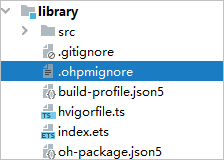
After modifying the .ohpmignore configuration, delete the module's build folder; alternatively, in DevEco Studio, choose Build > clean project, and then package the module.
- Build a closed-source HAR, which has its code obfuscated. Without sharing its source code, a closed-source HAR enables sharing of components and resources with other modules and even projects. For details, see Building in Release Mode.
- Enable code obfuscation to protect code assets: There are constraints on using code obfuscation: It is supported only in projects developed based on the stage model; takes effect when the build mode is release; requires that neither the module nor the HAR and HSP it depends on have obfuscation disabled.
To use code obfuscation, open the module-level build-profile.json5 file and configure the obfuscation settings in the obfuscation field.
- enable: whether to enable obfuscation.
- files: path of the obfuscation rule file.
The following is a configuration example:
{
  "apiType": "stageMode",
  "buildOption": {
  },
  "buildOptionSet": [
    {
      "name": "release",
      "arkOptions": {
        "obfuscation": {
          "ruleOptions": {
            "enable": true,
            "files": [
              "./obfuscation-rules.txt"
            ]
          }
        }
      }
    },
  ],
  // ...
}
For details, see Using Obfuscation for Code Hardening.