The camera preconfiguration (preconfig) feature streamlines the development of camera applications by offering preset configurations for typical use cases and resolutions, enhancing the efficiency of the development process.
Following the general development process, it is complex to develop a camera application after obtaining a camera device. Specifically, you need to call getSupportedOutputCapability of CameraManager to query the output configurations supported by the current camera in the specified mode, parse and filter the data in the obtained CameraOutputCapability to find the required Profile and VideoProfile, and use the corresponding profiles to create PreviewOutput, PhotoOutput, and VideoOutput.
To streamline this process, the system provides the preconfig API for you to quickly set camera parameters in the photo capture (PhotoSession) and video recording (VideoSession) scenarios. It is recommended that you use the preconfig feature to speed up the application development cycle if you only need to customize the camera UI without the need for advanced camera application development.
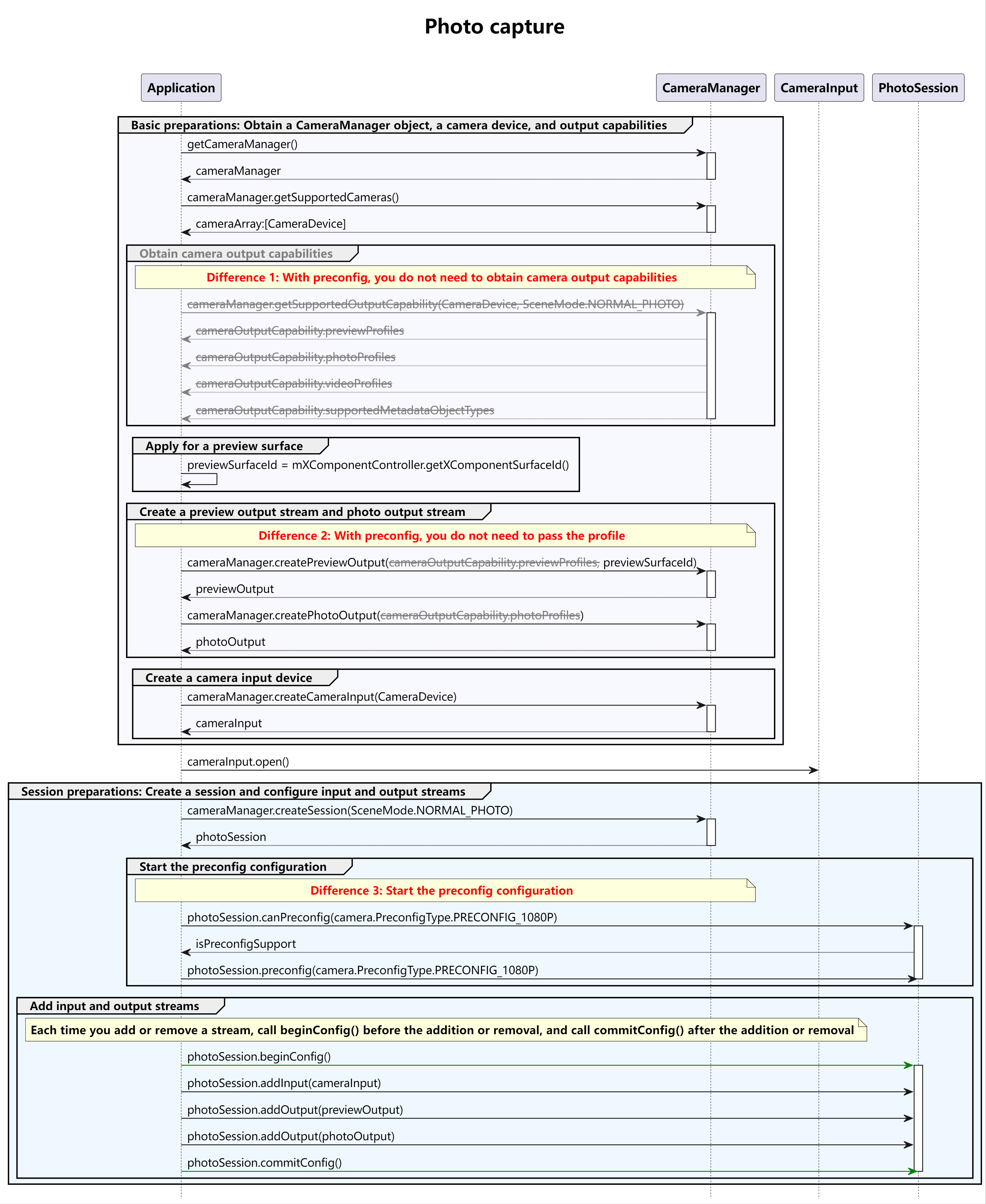
Before developing a camera application, you need to request related permissions by referring to Requesting Camera Development Permissions. This topic uses PhotoSession as an example. The differences between the preconfig development process and the general process are shown in the figure below.
Other related capabilities:
CameraPicker: allows you to start the system camera to take photos or videos, without the need to develop the camera function.
Full set of camera APIs: allows you to develop professional camera applications with custom UIs, resolution, and image effects.
Specifications
The system provides four preconfiguration types (specified by PreconfigType): PRECONFIG_720P, PRECONFIG_1080P, PRECONFIG_4K, and PRECONFIG_HIGH_QUALITY. It also provides three aspect ratio specifications (specified by PreconfigRatio): 1:1 (PRECONFIG_RATIO_1_1), 4:3 (PRECONFIG_RATIO_4_3), and 16:9 (PRECONFIG_RATIO_16_9).

The supported capabilities vary according to the device. Before using preconfig, call canPreconfig to check whether the current camera device supports a specific combination of PreconfigType and PreconfigRatio.
The resolution specifications vary according to the aspect ratio. For details, see the following table.
Preview output in normal photo mode
Preconfiguration Type (PreconfigType) PRECONFIG_RATIO_1_1 PRECONFIG_RATIO_4_3 PRECONFIG_RATIO_16_9 PRECONFIG_720P 720x720 960x720 1280x720 PRECONFIG_1080P 1080x1080 1440x1080 1920x1080 PRECONFIG_4K 1080x1080 1440x1080 1920x1080 PRECONFIG_HIGH_QUALITY 1440x1440 1920x1440 2560x1440 Photo output in normal photo mode
Preconfiguration Type (PreconfigType) PRECONFIG_RATIO_1_1 PRECONFIG_RATIO_4_3 PRECONFIG_RATIO_16_9 PRECONFIG_720P 720x720 960x720 1280x720 PRECONFIG_1080P 1080x1080 1440x1080 1920x1080 PRECONFIG_4K 2160x2160 2880x2160 3840x2160 PRECONFIG_HIGH_QUALITY Follows the maximum capability of the sensor (lens) Follows the maximum capability of the sensor (lens) Follows the maximum capability of the sensor (lens) Preview output in normal video mode
Preconfiguration Type (PreconfigType) PRECONFIG_RATIO_1_1 PRECONFIG_RATIO_4_3 PRECONFIG_RATIO_16_9 PRECONFIG_720P 720x720 960x720 1280x720 PRECONFIG_1080P 1080x1080 1440x1080 1920x1080 PRECONFIG_4K 1080x1080 1440x1080 1920x1080 PRECONFIG_HIGH_QUALITY 1080x1080 1440x1080 1920x1080 Video output in normal video mode
Preconfiguration Type (PreconfigType) PRECONFIG_RATIO_1_1 PRECONFIG_RATIO_4_3 PRECONFIG_RATIO_16_9 PRECONFIG_720P 720x720 960x720 1280x720 PRECONFIG_1080P 1080x1080 1440x1080 1920x1080 PRECONFIG_4K 2160x2160 2880x2160 3840x2160 PRECONFIG_HIGH_QUALITY 2160x2160 2880x2160 3840x2160 Photo output in normal video mode
Preconfiguration Type (PreconfigType) PRECONFIG_RATIO_1_1 PRECONFIG_RATIO_4_3 PRECONFIG_RATIO_16_9 PRECONFIG_720P Follows the maximum capability of the sensor (lens) Follows the maximum capability of the sensor (lens) Follows the maximum capability of the sensor (lens) PRECONFIG_1080P Follows the maximum capability of the sensor (lens) Follows the maximum capability of the sensor (lens) Follows the maximum capability of the sensor (lens) PRECONFIG_4K Follows the maximum capability of the sensor (lens) Follows the maximum capability of the sensor (lens) Follows the maximum capability of the sensor (lens) PRECONFIG_HIGH_QUALITY Follows the maximum capability of the sensor (lens) Follows the maximum capability of the sensor (lens) Follows the maximum capability of the sensor (lens)
How to Develop
For details about the APIs, see Camera API Reference.
Import related modules.
import { camera } from '@kit.CameraKit';
import { BusinessError } from '@kit.BasicServicesKit';
import { common } from '@kit.AbilityKit';
Create an output stream.
The following describes how to create a preview output stream and a photo output stream.
The surfaceId parameter is involved when you create a preview output stream. The XComponent provides the surface for preview streams. For details about how to obtain the surface ID, see getXcomponentSurfaceId. The XComponent capabilities are provided by the UI. For details, see the XComponent.
For details about how to create a cameraManager object, see getCameraManager.
For details about how to obtain the context, see Obtaining the Context of UIAbility.
function createCameraOutput(context: common.BaseContext, surfaceId: string) : void {
  // Create a preview output stream.
  let previewOutput: camera.PreviewOutput | undefined = undefined;
  let cameraManager = camera.getCameraManager(context);
  try {
    previewOutput = cameraManager.createPreviewOutput(surfaceId);
  } catch (error) {
    let err = error as BusinessError;
    console.error(`Failed to create the PreviewOutput instance. error code: ${err.code}`);
  }
  if (previewOutput === undefined) {
    return;
  }

  // Create a photo output stream.
  let photoOutput: camera.PhotoOutput | undefined = undefined;
  try {
    photoOutput = cameraManager.createPhotoOutput();
  } catch (error) {
    let err = error as BusinessError;
    console.error('Failed to createPhotoOutput errorCode = ' + err.code);
  }
  if (photoOutput === undefined) {
    return;
  }
}
Call createCameraInput in the CameraManager class to create an input stream.
async function createAndOpenCameraInput(cameraManager: camera.CameraManager) : Promise<void> {
  // Obtain the camera list.
  let cameraArray: Array<camera.CameraDevice> = cameraManager.getSupportedCameras();
  if (cameraArray.length <= 0) {
    console.error("cameraManager.getSupportedCameras error");
    return;
  }
  let cameraInput: camera.CameraInput | undefined = undefined;
  try {
    cameraInput = cameraManager.createCameraInput(cameraArray[0]);
  } catch (error) {
    let err = error as BusinessError;
    console.error('Failed to createCameraInput errorCode = ' + err.code);
  }
  if (cameraInput === undefined) {
    return;
  }
  // Open the camera.
  await cameraInput.open();
}
Call createSession to create a session.

Set SceneMode to NORMAL_PHOTO or NORMAL_VIDEO, corresponding to PhotoSession in the photo capture scenario and VideoSession in the video recording scenario.
function createCameraSession(cameraManager: camera.CameraManager) : void {
  // Create a session.
  let photoSession: camera.PhotoSession | undefined = undefined;
  try {
    photoSession = cameraManager.createSession(camera.SceneMode.NORMAL_PHOTO) as camera.PhotoSession;
  } catch (error) {
    let err = error as BusinessError;
    console.error('Failed to create the session instance. errorCode = ' + err.code);
  }
  if (photoSession === undefined) {
    return;
  }
}
Call canPreconfig to check whether the current camera supports a specific combination of PreconfigType and PreconfigRatio. After confirming that the combination is supported, call preconfig to start the preconfig configuration.
function GetPreconfig(photoSession: camera.PhotoSession) : void {
  // Query the preconfig capability.
  try {
    let isPreconfigSupport = photoSession.canPreconfig(camera.PreconfigType.PRECONFIG_1080P);
    if (!isPreconfigSupport) {
      console.error('PhotoSession canPreconfig check fail.');
      return;
    }
  } catch (error) {
    let err = error as BusinessError;
    console.error('Failed to call canPreconfig. errorCode = ' + err.code);
    return;
  }

  // Configure the preconfig feature.
  try {
    photoSession.preconfig(camera.PreconfigType.PRECONFIG_1080P);
  } catch (error) {
    let err = error as BusinessError;
    console.error('Failed to call preconfig. errorCode = ' + err.code);
    return;
  }
}
In normal video mode, if PreConfigType is set to PRECONFIG_HIGH_QUALITY, you must set videoCodec in the AVRecorderProfile file to VIDEO_HEVC and isHdr to true to avoid video recording failure.
Add the input and output streams to the session.

After the session calls preconfig, the session prepares the preset data. If an output stream without a profile is added to the session, the session configures the corresponding profile for the output stream. If an output stream with a profile is added to the session, the preconfigured data of the session does not take effect.
async function initCamera(photoSession: camera.PhotoSession, cameraInput: camera.CameraInput,
  previewOutput: camera.PreviewOutput, photoOutput: camera.PhotoOutput) : Promise<void> {
  // Start configuration for the session.
  try {
    photoSession.beginConfig();
  } catch (error) {
    let err = error as BusinessError;
    console.error('Failed to beginConfig. errorCode = ' + err.code);
  }

  // Add the camera input stream to the session.
  try {
    photoSession.addInput(cameraInput);
  } catch (error) {
    let err = error as BusinessError;
    console.error('Failed to addInput. errorCode = ' + err.code);
  }

  // Add the preview output stream to the session.
  try {
    photoSession.addOutput(previewOutput);
  } catch (error) {
    let err = error as BusinessError;
    console.error('Failed to addOutput(previewOutput). errorCode = ' + err.code);
  }

  // Add the photo output stream to the session.
  try {
    photoSession.addOutput(photoOutput);
  } catch (error) {
    let err = error as BusinessError;
    console.error('Failed to addOutput(photoOutput). errorCode = ' + err.code);
  }
  // Commit the session configuration.
  await photoSession.commitConfig();
}
Start the session.
async function startCamera(photoSession: camera.PhotoSession) : Promise<void> {
  // Start the session.
  await photoSession.start().then(() => {
    console.info('Promise returned to indicate the session start success.');
  });
}
Sample Code
For details about how to obtain the context, see Obtaining the Context of UIAbility.
import { camera } from '@kit.CameraKit';
import { image } from '@kit.ImageKit';
import { BusinessError } from '@kit.BasicServicesKit';
import { fileIo as fs } from '@kit.CoreFileKit';
import { photoAccessHelper } from '@kit.MediaLibraryKit';

async function savePicture(buffer: ArrayBuffer, img: image.Image, context: Context): Promise<void> {
  let accessHelper: photoAccessHelper.PhotoAccessHelper = photoAccessHelper.getPhotoAccessHelper(context);
  let options: photoAccessHelper.CreateOptions = {
    title: Date.now().toString()
  };
  let photoUri: string = await accessHelper.createAsset(photoAccessHelper.PhotoType.IMAGE, 'jpg', options);
  let file: fs.File = fs.openSync(photoUri, fs.OpenMode.READ_WRITE | fs.OpenMode.CREATE);
  fs.writeSync(file.fd, buffer);
  fs.closeSync(file);
  await img.release();
}

function setPhotoOutputCb(photoOutput: camera.PhotoOutput, context: Context): void {
  // After the callback is set, call capture() of photoOutput to transfer the photo buffer back to the callback.
  photoOutput.on('photoAvailable', (errCode: BusinessError, photo: camera.Photo): void => {
    console.info('getPhoto start');
    console.info(`err: ${JSON.stringify(errCode)}`);
    if (errCode || photo === undefined) {
      console.error('getPhoto failed');
      return;
    }
    let imageObj = photo.main;
    imageObj.getComponent(image.ComponentType.JPEG, (errCode: BusinessError, component: image.Component): void => {
      console.info('getComponent start');
      if (errCode || component === undefined) {
        console.error('getComponent failed');
        return;
      }
      let buffer: ArrayBuffer;
      if (component.byteBuffer) {
        buffer = component.byteBuffer;
      } else {
        console.error('byteBuffer is null');
        return;
      }
      savePicture(buffer, imageObj, context);
    });
  });
}

async function cameraShootingCase(context: Context, surfaceId: string): Promise<void> {
  // Create a CameraManager object.
  let cameraManager: camera.CameraManager = camera.getCameraManager(context);
  if (!cameraManager) {
    console.error("camera.getCameraManager error");
    return;
  }
  // Listen for camera status changes.
  cameraManager.on('cameraStatus', (err: BusinessError, cameraStatusInfo: camera.CameraStatusInfo) => {
    if (err !== undefined && err.code !== 0) {
      console.error('cameraStatus with errorCode = ' + err.code);
      return;
    }
    console.info(`camera : ${cameraStatusInfo.camera.cameraId}`);
    console.info(`status: ${cameraStatusInfo.status}`);
  });

  // Obtain the camera list.
  let cameraArray: Array<camera.CameraDevice> = cameraManager.getSupportedCameras();
  if (cameraArray.length <= 0) {
    console.error("cameraManager.getSupportedCameras error");
    return;
  }

  for (let index = 0; index < cameraArray.length; index++) {
    console.info('cameraId : ' + cameraArray[index].cameraId); // Obtain the camera ID.
    console.info('cameraPosition : ' + cameraArray[index].cameraPosition); // Obtain the camera position.
    console.info('cameraType : ' + cameraArray[index].cameraType); // Obtain the camera type.
    console.info('connectionType : ' + cameraArray[index].connectionType); // Obtain the camera connection type.
  }

  // Create a camera input stream.
  let cameraInput: camera.CameraInput | undefined = undefined;
  try {
    cameraInput = cameraManager.createCameraInput(cameraArray[0]);
  } catch (error) {
    let err = error as BusinessError;
    console.error('Failed to createCameraInput errorCode = ' + err.code);
  }
  if (cameraInput === undefined) {
    return;
  }

  // Listen for cameraInput errors.
  let cameraDevice: camera.CameraDevice = cameraArray[0];
  cameraInput.on('error', cameraDevice, (error: BusinessError) => {
    console.error(`Camera input error code: ${error.code}`);
  })

  // Open the camera.
  await cameraInput.open();

  // Obtain the supported modes.
  let sceneModes: Array<camera.SceneMode> = cameraManager.getSupportedSceneModes(cameraArray[0]);
  let isSupportPhotoMode: boolean = sceneModes.indexOf(camera.SceneMode.NORMAL_PHOTO) >= 0;
  if (!isSupportPhotoMode) {
    console.error('photo mode not support');
    return;
  }

  // Create a session.
  let photoSession: camera.PhotoSession | undefined = undefined;
  try {
    photoSession = cameraManager.createSession(camera.SceneMode.NORMAL_PHOTO) as camera.PhotoSession;
  } catch (error) {
    let err = error as BusinessError;
    console.error('Failed to create the session instance. errorCode = ' + err.code);
  }
  if (photoSession === undefined) {
    return;
  }

  // Listen for session errors.
  photoSession.on('error', (error: BusinessError) => {
    console.error(`Capture session error code: ${error.code}`);
  });

  // Query the preconfig capability.
  try {
    let isPreconfigSupport = photoSession.canPreconfig(camera.PreconfigType.PRECONFIG_1080P);
    if (!isPreconfigSupport) {
      console.error('PhotoSession canPreconfig check fail.');
      return;
    }
  } catch (error) {
    let err = error as BusinessError;
    console.error('Failed to call canPreconfig. errorCode = ' + err.code);
    return;
  }

  // Configure the preconfig feature.
  try {
    photoSession.preconfig(camera.PreconfigType.PRECONFIG_1080P);
  } catch (error) {
    let err = error as BusinessError;
    console.error('Failed to call preconfig. errorCode = ' + err.code);
    return;
  }

  // Create a preview output stream. For details about the surfaceId parameter, see the XComponent. The preview stream uses the surface provided by the XComponent.
  let previewOutput: camera.PreviewOutput | undefined = undefined;
  try {
    previewOutput = cameraManager.createPreviewOutput(surfaceId);
  } catch (error) {
    let err = error as BusinessError;
    console.error(`Failed to create the PreviewOutput instance. error code: ${err.code}`);
  }
  if (previewOutput === undefined) {
    return;
  }
 // Listen for preview output errors.
  previewOutput.on('error', (error: BusinessError) => {
    console.error(`Preview output error code: ${error.code}`);
  });

  // Create a photo output stream.
  let photoOutput: camera.PhotoOutput | undefined = undefined;
  try {
    photoOutput = cameraManager.createPhotoOutput();
  } catch (error) {
    let err = error as BusinessError;
    console.error('Failed to createPhotoOutput errorCode = ' + err.code);
  }
  if (photoOutput === undefined) {
    return;
  }

  //Call the preceding callback to save the image.
  setPhotoOutputCb(photoOutput, context);

  // Start configuration for the session.
  try {
    photoSession.beginConfig();
  } catch (error) {
    let err = error as BusinessError;
    console.error('Failed to beginConfig. errorCode = ' + err.code);
  }

  // Add the camera input stream to the session.
  try {
    photoSession.addInput(cameraInput);
  } catch (error) {
    let err = error as BusinessError;
    console.error('Failed to addInput. errorCode = ' + err.code);
  }

  // Add the preview output stream to the session.
  try {
    photoSession.addOutput(previewOutput);
  } catch (error) {
    let err = error as BusinessError;
    console.error('Failed to addOutput(previewOutput). errorCode = ' + err.code);
  }

  // Add the photo output stream to the session.
  try {
    photoSession.addOutput(photoOutput);
  } catch (error) {
    let err = error as BusinessError;
    console.error('Failed to addOutput(photoOutput). errorCode = ' + err.code);
  }

  // Commit the session configuration.
  await photoSession.commitConfig();

  // Start the session.
  await photoSession.start().then(() => {
    console.info('Promise returned to indicate the session start success.');
  });
  // Check whether the camera has flash.
  let flashStatus: boolean = false;
  try {
    flashStatus = photoSession.hasFlash();
  } catch (error) {
    let err = error as BusinessError;
    console.error('Failed to hasFlash. errorCode = ' + err.code);
  }
  console.info('Returned with the flash light support status:' + flashStatus);

  if (flashStatus) {
    // Check whether the auto flash mode is supported.
    let flashModeStatus: boolean = false;
    try {
      let status: boolean = photoSession.isFlashModeSupported(camera.FlashMode.FLASH_MODE_AUTO);
      flashModeStatus = status;
    } catch (error) {
      let err = error as BusinessError;
      console.error('Failed to check whether the flash mode is supported. errorCode = ' + err.code);
    }
    if(flashModeStatus) {
      // Set the flash mode to auto.
      try {
        photoSession.setFlashMode(camera.FlashMode.FLASH_MODE_AUTO);
      } catch (error) {
        let err = error as BusinessError;
        console.error('Failed to set the flash mode. errorCode = ' + err.code);
      }
    }
  }

  // Check whether the continuous auto focus is supported.
  let focusModeStatus: boolean = false;
  try {
    let status: boolean = photoSession.isFocusModeSupported(camera.FocusMode.FOCUS_MODE_CONTINUOUS_AUTO);
    focusModeStatus = status;
  } catch (error) {
    let err = error as BusinessError;
    console.error('Failed to check whether the focus mode is supported. errorCode = ' + err.code);
  }

  if (focusModeStatus) {
    // Set the focus mode to continuous auto focus.
    try {
      photoSession.setFocusMode(camera.FocusMode.FOCUS_MODE_CONTINUOUS_AUTO);
    } catch (error) {
      let err = error as BusinessError;
      console.error('Failed to set the focus mode. errorCode = ' + err.code);
    }
  }

  // Obtain the zoom ratio range supported by the camera.
  let zoomRatioRange: Array<number> = [];
  try {
    zoomRatioRange = photoSession.getZoomRatioRange();
  } catch (error) {
    let err = error as BusinessError;
    console.error('Failed to get the zoom ratio range. errorCode = ' + err.code);
  }
  if (zoomRatioRange.length <= 0) {
    return;
  }
  // Set a zoom ratio.
  try {
    photoSession.setZoomRatio(zoomRatioRange[0]);
  } catch (error) {
    let err = error as BusinessError;
    console.error('Failed to set the zoom ratio value. errorCode = ' + err.code);
  }
  let photoCaptureSetting: camera.PhotoCaptureSetting = {
    quality: camera.QualityLevel.QUALITY_LEVEL_HIGH, // Set the photo quality to high.
    rotation: camera.ImageRotation.ROTATION_0 // Set the rotation angle of the photo to 0.
  }
  // Use the current photo capture settings to take photos. This API must be called to take photos.
  photoOutput.capture(photoCaptureSetting, (err: BusinessError) => {
    if (err) {
      console.error(`Failed to capture the photo ${err.message}`);
      return;
    }
    console.info('Callback invoked to indicate the photo capture request success.');
  });

  // After the photo capture is complete, call the following APIs to close the camera and release the session. Do not release the session before the photo capture is complete.
  // Stop the session.
  await photoSession.stop();

  // Release the camera input stream.
  await cameraInput.close();

  // Release the preview output stream.
  await previewOutput.release();

  // Release the photo output stream.
  await photoOutput.release();

  // Release the session.
  await photoSession.release();

  // Set the session to null.
  photoSession = undefined;
}