In complex text layout scenarios, when the standard text components provided by the system cannot meet specific visual or interaction requirements, you can use the underlying text drawing capability provided by ArkGraphics 2D to directly control the canvas and text style to implement refined control over the text appearance and layout. This capability applies to scenarios that require highly customized text rendering effects, such as artistic fonts, complex rich text orchestration, or special dynamic text effects.
As a core component of the graphics system, the font engine is responsible for converting character codes into visual glyphs and accurately calculating the layout and position of each glyph, providing underlying support for custom text drawing. Through the text measurement API, you can obtain the accurate size of the text, which is the basis for precise layout (such as center display).
[h2]When to Use
Text shaping is a key capability provided by the font engine. It allows you to directly obtain the underlying glyph information (such as advance and direction measurement information) of the text without going through the default text layout process. This enables you to implement completely customized layout logic, drawing operations, and line break policies based on the raw data.
This capability applies to the following scenarios:
-
Custom rich text rendering: implements image-text mixed layout and multi-style text display in social media, news clients, and similar applications.
-
Cross-platform consistent layout requirements: ensures consistent visual display of text across different platforms and devices.
-
Refined layout management: implements artistic layout and dynamic text layout, which are difficult to achieve with standard system text components.
[h2]Available APIs
The following table describes the commonly used APIs for text shaping. For details about the APIs, see @ohos.graphics.text (Text Module), TextBlob, and drawTextBlob.
| API | Description |
|---|---|
| buildLineTypeset(): LineTypeset | Builds a line typesetter. |
| createLine(startIndex: number, count: number): TextLine | Generates a text line object based on the specified layout range. |
| getGlyphRuns(): Array<Run> | Obtains the array of glyph runs in the text line. |
| getGlyphs(): Array<number> | Obtains the glyph sequence number of each character in the glyph run. |
| getFont(): drawing.Font | Obtains the font property object of the run. |
| getAdvances(range: Range): Array<common2D.Point> | Obtains the glyph advance array for each glyph within the specified range of the run. |
| static makeFromRunBuffer(pos: Array<TextBlobRunBuffer>, font: Font, bounds?: common2D.Rect): TextBlob | Creates a TextBlob object based on the RunBuffer information. |
| drawTextBlob(blob: TextBlob, x: number, y: number): void | Draws a text blob. If the font used to construct the blob does not support the characters to be drawn, the characters cannot be drawn. |
[h2]How to Develop
Starting from API version 18, text shaping results can be obtained. API version 20 and later add support for obtaining text layout direction and text glyph advance. The key code is as follows.
-
Import the required modules.
import { text } from '@kit.ArkGraphics2D' import { drawing } from '@kit.ArkGraphics2D' import { common2D } from '@kit.ArkGraphics2D' -
Create a paragraph style and use ParagraphBuilder to generate a paragraph instance.
let myTextStyle: text.TextStyle = { // Text size. fontSize: 60 }; let myParagraphStyle: text.ParagraphStyle = { textStyle: myTextStyle, }; let fontCollection = text.FontCollection.getGlobalInstance(); let paragraphBuilder = new text.ParagraphBuilder(myParagraphStyle, fontCollection); -
Add text content.
paragraphBuilder.addText('Hello World'); -
Create a line object and obtain the shaping results of all text in the line. Use the createLine() method to create a single-line object, and use the getGlyphRuns() method of the line object to obtain text runs with the same style.
// Generate a line.
let lineTypeSet: text.LineTypeset = paragraphBuilder.buildLineTypeset()
let textLine: text.TextLine = lineTypeSet.createLine(0, 11);

// Obtain the text shaping results.
let runs: text.Run[] = textLine.getGlyphRuns();
-
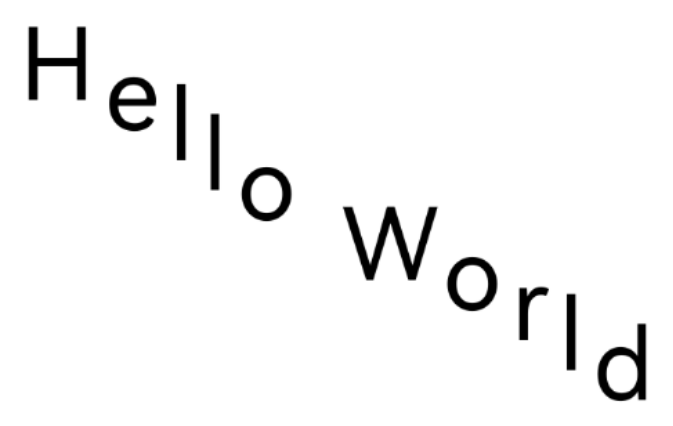
This step is the custom drawing phase in the text shaping process. Call the getGlyphs() method to obtain the glyph sequence number of each character in the text, and then call the getFont() method to obtain the font object. Together, these uniquely identify the specific graphic information of each glyph. Starting from API version 20, the newly added getAdvances() method can return an array containing the glyph width of each glyph in the range. Based on these accurate measurement data, you can calculate and define the drawing position of each glyph, enabling complex text layout effects such as custom character spacing, vertical offset, or special typesetting.
let x: number = 0;
let y: number = 0;
for (let index = 0; index < runs.length; index++) {
  const run = runs[index];
  // Draw glyphs.
  let glyphs: number[] = run.getGlyphs();
  let font: drawing.Font = run.getFont();
  let advances: common2D.Point[] = run.getAdvances({ start: 0, end: 0 });

  // Create a glyph buffer and draw glyphs independently using the drawing API.
  let runBuffer: drawing.TextBlobRunBuffer[] = [];
  for (let i = 0; i < glyphs.length; i++) {
    runBuffer.push({ glyph: glyphs[i], positionX: x, positionY: y });
    x += advances[i].x + 10;
    y += advances[i].y + 30;
  }
  let textBlob: drawing.TextBlob = drawing.TextBlob.makeFromRunBuffer(runBuffer, font, null);
  // Draw a series of consecutive glyphs with the same properties.
  canvas.drawTextBlob(textBlob, 20, 100);
}
Effect demonstration: