This topic describes how to obtain the casting device information after the system image casting to implement casting in extended screen mode and dual-screen collaboration.
Working Principles
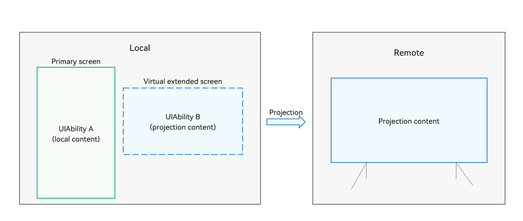
Virtual extended screen
It is set up during the system casting startup based on the resolution of the to-be-projected video stream negotiated by both devices. The resolution can be 1080p or higher. By default, the content of the main screen is mirrored. When a UIAbility is drawn on the virtual extended screen, the content of the virtual extended screen is projected.
UIAbility A (local content)
Content displayed on the local primary screen. Assume that UIAbility A and UIAbility B belong to the same application. UIAbility A can control UIAbility B to implement dual-screen collaboration.
UIAbility B (projected content)
Content drawn on the virtual extended screen. UIAbility B should be displayed in full screen to ensure user experience of remote casting. For security purposes, when UIAbility B is started, the system checks whether UIAbility B belongs to the same application as the active UIAbility running on the foreground. If not, UIAbility B is not allowed to start on the virtual extended screen.
Restrictions
Carry out the development only when the following conditions are met:
Device restrictions
Local device: mobile phone running HarmonyOS NEXT Developer Beta1 or later
Remote device: a device that supports the Cast+ or Miracast protocol (recommended: HUAWEI Vision HarmonyOS 2.0 or later)
Usage restrictions
The system has to initiate wireless or wired casting before obtaining an extended screen for casting.
Available APIs
Read the API reference to obtain the detailed API description.
| API | Description |
|---|---|
| getAllCastDisplays(): Promise<Array<CastDisplayInfo>>; | Obtains all devices that support extended screen casting in the current system. |
| on(type: 'castDisplayChange', callback: Callback<CastDisplayInfo>): void; | Subscribes to cast display change events in the case of extended screen casting. |
| off(type: 'castDisplayChange', callback?: Callback<CastDisplayInfo>): void; | Unsubscribes from cast display change events in the case of extended screen casting. |
How to Develop
UIAbility A creates an AVSession, obtains an available device that supports extended screen casting, and registers a listener.

The obtained CastDisplayInfo contains the screen ID, name, state, resolution, width, and height. The screen ID is the same as the Display ID. For details, see Obtaining Device Information.
import { AbilityConstant, UIAbility, Want } from '@kit.AbilityKit';
import { avSession } from '@kit.AVSessionKit'; // Import the AVSession module.
import { BusinessError } from '@kit.BasicServicesKit';

export default class AbilityA extends UIAbility{
  private session: avSession.AVSession | undefined = undefined;
  private extCastDisplayInfo: avSession.CastDisplayInfo | undefined = undefined;
  // Register a callback to listen for cast device changes.
  private onCastDisplayChangedCallback = (castDisplayInfo: avSession.CastDisplayInfo) => {
    // Add an extended screen and access it.
    if (this.extCastDisplayInfo === undefined && castDisplayInfo.state === avSession.CastDisplayState.STATE_ON) {
      console.info('Succeeded in opening the cast display');
      this.extCastDisplayInfo = castDisplayInfo;
      this.startExternalDisplay();
    } else if (this.extCastDisplayInfo?.id == castDisplayInfo.id) {
      this.extCastDisplayInfo = castDisplayInfo;
      // When the extended screen is unavailable, exit the extended screen.
      if (castDisplayInfo.state === avSession.CastDisplayState.STATE_OFF){
        console.info('Succeeded in closing the cast display');
        this.stopExternalDisplay();
        this.extCastDisplayInfo = undefined;
      }
    }
  };

  // Create an AVSession, obtain an available device that supports extended screen casting, and register a listener.
  initAVSession(context: Context) {
    avSession.createAVSession(context, 'CastDisplay', 'video').then((session: avSession.AVSession) => {
      this.session = session;
      this.session?.on('castDisplayChange', this.onCastDisplayChangedCallback);

      // Obtain the available devices that support extended screen casting in the current system.
      session.getAllCastDisplays().then((infoArr: avSession.CastDisplayInfo[]) => {
        // If there are multiple extended screens, you can select one of them.
        if (infoArr.length > 0) {
          this.extCastDisplayInfo = infoArr[0];
          this.startExternalDisplay();
        }
      }).catch((err: BusinessError<void>) => {
        console.error(`Failed to get all CastDisplay. Code: ${err.code}, message: ${err.message}`);
      });
    });
  }

  async onCreate(want: Want, launchParam: AbilityConstant.LaunchParam): Promise<void> {
    super.onCreate(want, launchParam);
    this.initAVSession(this.context);
  }

  onDestroy() {
    this.stopExternalDisplay();
    // Deregister the listener.
    this.session?.off('castDisplayChange');
  }
}
Build the extended screen startup and exit capabilities in UIAbility A.
// Start UIAbility B on the extended screen.
  startExternalDisplay() {
    if (this.extCastDisplayInfo !== undefined &&
      this.extCastDisplayInfo.id !== 0 &&
      this.extCastDisplayInfo.state === avSession.CastDisplayState.STATE_ON) {
      let id = this.extCastDisplayInfo?.id;
      console.info(`Succeeded in starting ability and the id of display is ${id}`);
      this.context.startAbility({
        bundleName: 'com.example.myapplication',// Bundle name of the application.
        abilityName: 'AbilityB'
      }, {
        displayId: id // Extended screen ID.
      });
      AppStorage.setOrCreate('CastDisplayState', 1);
    }
  }

  // Stop using the extended screen.
  stopExternalDisplay() {
    AppStorage.setOrCreate('CastDisplayState', 0);
    // Update the content displayed on the current UI.
  }
Draw the content of UIAbility B on the extended screen, and respond to exit events.
import { UIAbility } from '@kit.AbilityKit';
import { window } from '@kit.ArkUI';
import { BusinessError } from '@kit.BasicServicesKit';

export default class AbilityB extends UIAbility {
  onWindowStageCreate(windowStage: window.WindowStage): void {
    // Main window is created, set main page for this ability
    windowStage.getMainWindowSync().setWindowLayoutFullScreen(true);// Set the layout to full screen.
    windowStage.loadContent('pages/CastPage', (err: BusinessError) => {
      if (err.code) {
        console.error(`Failed to load the content. Code: ${err.code}, message: ${err.message}`);
        return;
      }
      console.info('Succeeded in loading the content. ');
    });
  }
}
import { BusinessError } from '@kit.BasicServicesKit'; import { common } from '@kit.AbilityKit'; @Entry @Component struct CastPage { // After a CastDisplayState change is detected, destroy the page when the device is disconnected. @StorageLink('CastDisplayState') @Watch('onDestroyExtend') private displayState: number = 1; private onDestroyExtend() { if (this.displayState === 1) return; let context = (getContext(this) as common.UIAbilityContext) context.terminateSelf().then(() => { console.info('CastPage finished'); }).catch((err: BusinessError) => { console.error(`Failed to destroying CastPage. Code: ${err.code}, message: ${err.message}`); }); } //... }