Overview
In scenarios that require high file processing performance, accessing files on the Native side is more efficient and responsive than operating files on the ArkTS side. For details, see Accessing Application Files (ArkTS). For example, processing large files, complex file operations, and low latency scenarios such as real-time communication. The file access operations on the native side can be classified into the following types based on the file location:
- Read and write files in an application sandbox based on the sandbox path.
- Read and write files in the user directory by using the file Picker based on the file descriptor (FD).
The following dives into the implementations in detail.
Accessing Application Sandbox Files
The application sandbox (for details, see Application Sandbox) is an isolation mechanism for security protection to prevent data from being accessed through malicious paths. The application sandbox directory limits the files visible to an application. The files in a sandbox can be accessed based on the sandbox path. There are two ways for obtaining the sandbox path on the native side:
- Solution 1: The ArkTS side obtains the sandbox path (for details, see Obtaining Application File Paths) and transfers the path to the Native side for file access.
- Solution 2: The Native directly concatenates the sandbox path (for details, see Mappings Between Application Sandbox Paths and Physical Paths) to access the file.
[h2]Accessing a Sandbox File Based on the Path Passed from ArkTS
Implementation
For example, access a file in a sandbox directory and write data to it on the native side. To implement this, you need to define the file operation methods in C++ and then call the C++ methods from ArkTS.
On the native side, define a method to receive the sandbox path and write data to the file.
Call Node-API to pass the sandbox path and the content to be written to the native side.
napi_get_value_string_utf8(env, argv[0], pathBuf, sizeof(pathBuf), &pathSize);
napi_get_value_string_utf8(env, argv[1], contentsBuf, sizeof(contentsBuf), &contentsSize);
Open the file of the specified path.
FILE *fp;
fp = fopen(pathBuf, "w");
Write the file using a C++ function.
// Write a file using the file operation function of the C standard library.
fprintf(fp, "%s", contentsBuf);
The complete code is as follows:
// entry/src/main/cpp/FileAccessMethods.cpp
static napi_value TransferSandboxPath(napi_env env, napi_callback_info info) {
    size_t argc = 2;
    napi_value argv[2] = {nullptr};
    napi_get_cb_info(env, info, &argc, argv, nullptr, nullptr);
    // Convert the sandbox path and the contents of the text to be written into C-side variables through the Node-API interface.
    size_t pathSize, contentsSize;
    char pathBuf[BUFFER_SIZE], contentsBuf[BUFFER_SIZE];
    napi_get_value_string_utf8(env, argv[0], pathBuf, sizeof(pathBuf), &pathSize);
    napi_get_value_string_utf8(env, argv[1], contentsBuf, sizeof(contentsBuf), &contentsSize);
    // Open the file through the specified path.
    snprintf(pathBuf, sizeof(pathBuf), "%s/TransferSandboxPath.txt", pathBuf);
    FILE *fp;
    fp = fopen(pathBuf, "w");
    if (fp == nullptr) {
        OH_LOG_Print(LOG_APP, LOG_ERROR, DOMAIN, TAG, "Open file error!");
        return nullptr;
    }
    OH_LOG_Print(LOG_APP, LOG_INFO, DOMAIN, TAG, "Open file successfully!");
    // Write a file using the file operation function of the C standard library.
    fprintf(fp, "%s", contentsBuf);
    fclose(fp);
    return nullptr;
}
Bind and map the C++ API to the ArkTS API. For details, see Implementing Native APIs). In addition, provide the API method in the index.d.ts file for the ArkTS side to invoke.
export const transferSandboxPath: (path: string, contents: string) => void;
Call the C++ methods from ArkTS.
Import the native .so library.
import FileAccess from 'libfile_access.so';
Obtain the sandbox path from ArkTS.
private sandboxFilesDir: string = this.getUIContext().getHostContext()!.filesDir;
Pass the sandbox path and the content to be written to the native side.
FileAccess.transferSandboxPath(this.sandboxFilesDir, content);
The solution for accessing and operating application sandbox files on the native side using the sandbox paths provided by ArkTS is implemented.
[h2]Accessing a Sandbox File Based on the Path Concatenated on the Native Side
Implementation
For example, access a file in a sandbox directory and write data to it on the native side. To implement this, you need to define the file operation methods in C++ and then call the C++ methods from ArkTS.
On the native side, define a method to concatenate the sandbox path and write data to the file.
Combine the sandbox path based on the actual file location. For details, see Mappings Between Application Sandbox Paths and Physical Paths.
char pathBuf[READ_SIZE] = {0};
strncpy(pathBuf,FILE_PATH,READ_SIZE);
Call Node-API to pass the data to be written to the native side.
napi_get_value_string_utf8(env, argv[0], contentsBuf, sizeof(contentsBuf), &contentsSize);
Open the file of the specified path.
// Open the file through the specified path.
FILE *fp;
fp = fopen(pathBuf, "w");
Write the file using a C++ function.
// Write a file using the file operation function of the C standard library.
fprintf(fp, "%s", contentsBuf);
The complete code is as follows:
static napi_value SplicePath(napi_env env, napi_callback_info info) {
    size_t argc = 1;
    napi_value argv[1] = {nullptr};
    napi_get_cb_info(env, info, &argc, argv, nullptr, nullptr);
    // Splice the sandbox path according to the actual file location.
    size_t contentsSize;
    char pathBuf[READ_SIZE] = {0};
    strncpy(pathBuf,FILE_PATH,READ_SIZE);
    // Convert the contents of the text to be written into C-side variables through the Node-API interface.
    char contentsBuf[BUFFER_SIZE];
    napi_get_value_string_utf8(env, argv[0], contentsBuf, sizeof(contentsBuf), &contentsSize);
    // Open the file through the specified path.
    FILE *fp;
    fp = fopen(pathBuf, "w");
    if (fp == nullptr) {
        OH_LOG_Print(LOG_APP, LOG_ERROR, DOMAIN, TAG, "Open file error!");
        return nullptr;
    }
    OH_LOG_Print(LOG_APP, LOG_INFO, DOMAIN, TAG, "Open file successfully!");
    // Write a file using the file operation function of the C standard library.
    fprintf(fp, "%s", contentsBuf);
    fclose(fp);
    return nullptr;
}
Bind and map the C++ API to the ArkTS API. For details, see Implementing Native APIs. In addition, provide the API method in the index.d.ts file.
export const splicePath: (contents: string) => void;
Call the C++ methods from ArkTS.
Import the native .so library.
import FileAccess from 'libfile_access.so';
Call the following method from ArkTS to write the file.
FileAccess.splicePath(content);
The solution for accessing and operating application sandbox files on the native side by concatenating sandbox paths is implemented.
Accessing User Directory Files
User files are stored in the public directory of the system. For details, see User File Overview. Operations on user files must be authorized by users in advance or performed by users. This capability can be implemented through the preset file chooser (FilePicker) (see Selecting Documents). Currently, there are three types of operations: create, write, and read. The picker can be used directly to create a file (see save). For the Native side, there are two scenarios:
- Write data to a user file.
- Read data from a user file.
[h2]Writing Data to a User File
Scenario
Use the file Picker on ArkTS to create a file in a user directory, and pass the FD to the native side. On the native side, open the file based on the FD and write data to the file.
Implementation
The implementation consists of two parts: defining the file operation methods on the native side and calling the native methods from ArkTS.
On the native side, define a method to receive the FD and write data to the file. Note that the header file unistd.h must be referenced if FDs are used to operate files.
Call Node-API to pass the FD and content to be written to the native side.
// Convert the incoming file descriptor and the contents to be written into the file into C-side variables.
napi_get_value_uint32(env, argv[0], &fd);
napi_get_value_string_utf8(env, argv[1], contentsBuf, sizeof(contentsBuf), &contentsSize);
Write the file using a C++ function.
// Write a file using the file operation function of the C standard library.
size_t buffSize = write(fd, contentsBuf, contentsSize);
Check whether the operation is successful based on the return value of the write() function.
std::string res;
// According to the return value of the write function, judge whether the operation returns the result successfully.
napi_value contents;
if (buffSize == -1) {
    res = "Write File Failed!";
    OH_LOG_Print(LOG_APP, LOG_ERROR, DOMAIN, TAG, "%s", res.c_str());
} else {
    res = "Write File Successfully!!!";
    OH_LOG_Print(LOG_APP, LOG_INFO, DOMAIN, TAG, "%s", res.c_str());
}
napi_create_string_utf8(env, res.c_str(), sizeof(res), &contents);
return contents;
The complete code is as follows:
static napi_value WriteFileUsingPickerFd(napi_env env, napi_callback_info info) {
    size_t argc = 2;
    napi_value argv[2] = {nullptr};
    napi_get_cb_info(env, info, &argc, argv, nullptr, nullptr);

    unsigned int fd = -1;
    size_t contentsSize;
    char contentsBuf[BUFFER_SIZE];
    // Convert the incoming file descriptor and the contents to be written into the file into C-side variables.
    napi_get_value_uint32(env, argv[0], &fd);
    napi_get_value_string_utf8(env, argv[1], contentsBuf, sizeof(contentsBuf), &contentsSize);
    ftruncate(fd, 0);
    // Write a file using the file operation function of the C standard library.
    size_t buffSize = write(fd, contentsBuf, contentsSize);
    std::string res;
    // According to the return value of the write function, judge whether the operation returns the result successfully.
    napi_value contents;
    if (buffSize == -1) {
        res = "Write File Failed!";
        OH_LOG_Print(LOG_APP, LOG_ERROR, DOMAIN, TAG, "%s", res.c_str());
    } else {
        res = "Write File Successfully!!!";
        OH_LOG_Print(LOG_APP, LOG_INFO, DOMAIN, TAG, "%s", res.c_str());
    }
    napi_create_string_utf8(env, res.c_str(), sizeof(res), &contents);
    return contents;
}
Bind and map the C++ API to the ArkTS API. For details, see Implementing Native APIs. In addition, provide the API method in the index.d.ts file.
export const writeFileUsingPickerFd: (fd: number, contents: string) => string;
Call the C++ methods from ArkTS.
Import the native .so library.
import FileAccess from 'libfile_access.so';
Start the Picker on the ArkTS side, select the file, and pass the FD to the native API.
async function WriteFileByPicker(contents: string): Promise<string> {
  // Configure picker Selection Information
  const documentSelectOptions = new picker.DocumentSelectOptions();
  documentSelectOptions.maxSelectNumber = 1;
  documentSelectOptions.fileSuffixFilters = ['.txt'];

  let uris: Array<string> = [];
  const documentViewPicker = new picker.DocumentViewPicker();
  // Pull up the picker selection file
  return await documentViewPicker.select(documentSelectOptions).then((documentSelectResult: Array<string>) => {
    uris = documentSelectResult;
    let uri: string = uris[0];
    let path: string = new fileUri.FileUri(uri).path;
    Logger.info(`Open The File path is [${uri}]`);
    let file = fs.openSync(path, fs.OpenMode.WRITE_ONLY);
    // Call the native method to write a file
    let res = FileAccess.writeFileUsingPickerFd(file.fd, contents);
    fs.closeSync(file.fd);
    return res;
  }).catch((error: BusinessError) => {
    Logger.error(`Open The file failed, error code is [${error.code}], error message is [${error.message}]`);
    return 'Write Failed by Picker';
  })
}
The solution for accessing and writing a user file on the native side based on an FD passed from ArkTS using a Picker is implemented.
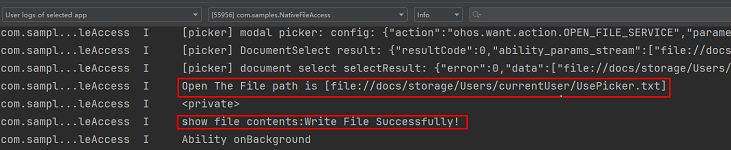
Effect Display
[h2]Reading Data from a User Directory
Scenario
Use the file Picker on ArkTS to select a file and pass the FD to the native side. On the native side, open the file based on the FD and read data from the file.
Implementation
The implementation consists of two parts: defining the file operation methods on the native side and calling the native methods from ArkTS.
Part 1: Define a method on the Native side to receive the file descriptor and read data from the file. Note that the header file unistd.h needs to be referenced when the file descriptor is used to operate the file.
Call Node-API to pass the FD to the native side.
// Convert the incoming file descriptor into a C-side variable.
napi_get_value_uint32(env, argv[0], &fd);
Read the file using a C++ function.
// Use the file operation function of the C standard library to read the file.
char buff[READ_SIZE];
size_t buffSize = read(fd, buff, sizeof(buff));
Check whether the file is successfully read and return the file content.
// Judge whether the reading is successful or not and return the file content.
napi_value contents;
if (buffSize == -1) {
    OH_LOG_Print(LOG_APP, LOG_ERROR, DOMAIN, TAG, "Read File Failed!!!");
} else {
    OH_LOG_Print(LOG_APP, LOG_INFO, DOMAIN, TAG, "Read File Successfully!!!");
    napi_create_string_utf8(env, buff, buffSize, &contents);
}
return contents;
The complete code is as follows:
// entry/src/main/cpp/FileAccessMethods.cpp
static napi_value ReadFileUsingPickerFd(napi_env env, napi_callback_info info) {
    size_t argc = 1;
    napi_value argv[1] = {nullptr};
    napi_get_cb_info(env, info, &argc, argv, nullptr, nullptr);

    unsigned int fd = -1;
    // Convert the incoming file descriptor into a C-side variable.
    napi_get_value_uint32(env, argv[0], &fd);
    // Use the file operation function of the C standard library to read the file.
    char buff[READ_SIZE];
    size_t buffSize = read(fd, buff, sizeof(buff));
    // Judge whether the reading is successful or not and return the file content.
    napi_value contents;
    if (buffSize == -1) {
        OH_LOG_Print(LOG_APP, LOG_ERROR, DOMAIN, TAG, "Read File Failed!!!");
    } else {
        OH_LOG_Print(LOG_APP, LOG_INFO, DOMAIN, TAG, "Read File Successfully!!!");
        napi_create_string_utf8(env, buff, buffSize, &contents);
    }
    return contents;
}
Bind and map the C++ API to the ArkTS API. For details, see Implementing Native APIs. In addition, provide the API method in the index.d.ts file.
export const readFileUsingPickerFd: (fd: number) => string;
Call the C++ methods from ArkTS.
Import the native .so library.
import FileAccess from 'libfile_access.so';
Start the Picker on the ArkTS side, select the file, and pass the FD to the native API.
async function ReadFileByPicker(): Promise<string> {
  // Configure picker Selection Information
  const documentSelectOptions = new picker.DocumentSelectOptions();
  documentSelectOptions.maxSelectNumber = 1;
  documentSelectOptions.fileSuffixFilters = ['.txt'];
  // Pull up the picker selection file
  let uris: Array<string> = [];
  const documentViewPicker = new picker.DocumentViewPicker();
  return await documentViewPicker.select(documentSelectOptions).then((documentSelectResult: Array<string>) => {
    uris = documentSelectResult;
    let uri: string = uris[0];
    let path: string = new fileUri.FileUri(uri).path;
    Logger.info(`The Opened File path is [${uri}]`);
    let file = fs.openSync(path, fs.OpenMode.READ_ONLY);
    // Call the native method to read the file.
    let res = FileAccess.readFileUsingPickerFd(file.fd);
    fs.closeSync(file.fd);
    return res;
  }).catch((error: BusinessError) => {
    Logger.error(`Open The file failed, error code is [${error.code}], error message is [${error.message}]`);
    return 'Read Failed by Picker!';
  })
}
The solution for accessing and reading a user file on the native side based on an FD passed from ArkTS using a Picker is implemented.