The mouse event is used to listen for mouse interactions such as clicking and moving on a component. It can obtain event information such as mouse buttons, actions, coordinates, and historical points, and is applicable to scenarios that require handling mouse interactions, drawing trajectories, gesture recognition, or optimizing input response experience. When a single mouse action triggers multiple events, the event order is fixed, and mouse events bubble by default.

-
The initial APIs of this module are supported since API version 8. Newly added APIs will be marked with a superscript to indicate their initial version.
-
Mouse events can currently be triggered by an external mouse or a touchpad.
onMouse
onMouse(event: (event: MouseEvent) => void): T
Triggered when the current component is clicked by a mouse button, when the mouse hovers or moves over the component, or when the same mouse operation is triggered through a touchpad.
Atomic service API: This API can be used in atomic services since API version 11.
System capability: SystemCapability.ArkUI.ArkUI.Full
Parameters
| Name | Type | Mandatory | Description |
|---|---|---|---|
| event | (event: MouseEvent) => void | Yes | Timestamp, mouse button, action, and mouse position in the global coordinates and relative to the current component when the event is triggered. |
Return value
| Type | Description |
|---|---|
| T | Current component. |
[h2]Attributes
System capability: SystemCapability.ArkUI.ArkUI.Full
| Name | Type | Read-Only | Optional | Description |
|---|---|---|---|---|
| x | number | No | No | X coordinate of the mouse position in the component coordinate system with the event-responsive component as the reference. Unit: vp Atomic service API: This API can be used in atomic services since API version 11. |
| y | number | No | No | Y coordinate of the mouse position in the component coordinate system with the event-responsive component as the reference. Unit: vp Atomic service API: This API can be used in atomic services since API version 11. |
| button | MouseButton | No | No | Mouse button. Atomic service API: This API can be used in atomic services since API version 11. |
| action | MouseAction | No | No | Mouse action. Atomic service API: This API can be used in atomic services since API version 11. |
| stopPropagation | () => void | No | No | Used to block event bubbling. It applies to the scenario where the current component has handled the mouse event and needs to prevent the event from being further propagated to the parent component. Atomic service API: This API can be used in atomic services since API version 11. |
| windowX10+ | number | No | No | X coordinate of the mouse position in the current app window coordinate system. Unit: vp Atomic service API: This API can be used in atomic services since API version 11. Model restriction: This API can be used only in the stage model. |
| windowY10+ | number | No | No | Y coordinate of the mouse position in the current app window coordinate system. Unit: vp Atomic service API: This API can be used in atomic services since API version 11. Model restriction: This API can be used only in the stage model. |
| displayX10+ | number | No | No | X coordinate of the mouse position in the current app screen coordinate system. Unit: vp Atomic service API: This API can be used in atomic services since API version 11. Model restriction: This API can be used only in the stage model. |
| displayY10+ | number | No | No | Y coordinate of the mouse position in the current app screen coordinate system. Unit: vp Atomic service API: This API can be used in atomic services since API version 11. Model restriction: This API can be used only in the stage model. |
| screenX(deprecated) | number | No | No | X coordinate of the mouse position in the current app window coordinate system. Unit: vp Note: This API is supported since API version 8 and deprecated since API version 10. You are advised to use windowX instead. |
| screenY(deprecated) | number | No | No | Y coordinate of the mouse position in the current app window coordinate system. Unit: vp Note: This API is supported since API version 8 and deprecated since API version 10. You are advised to use windowY instead. |
| rawDeltaX15+ | number | No | Yes | Movement increment of the mouse device along the X-axis in the two-dimensional plane. Its value is the raw movement data of the mouse hardware, expressed in the distance unit of mouse movement in the physical world. The reported value is determined by the hardware itself, not the physical/logical pixels of the screen. Atomic service API: This API can be used in atomic services since API version 15. Note: Before API version 26.0.0, the return value of rawDeltaX is not the raw movement data of the mouse hardware, but the raw data reduced by a factor of X, where X is the display size ratio of the system. Since API version 26.0.0, the return value of rawDeltaX is the raw movement data of the mouse hardware. Model restriction: This API can be used only in the stage model. |
| rawDeltaY15+ | number | No | Yes | Movement increment of the mouse device along the Y-axis in the two-dimensional plane. Its value is the raw movement data of the mouse hardware, expressed in the distance unit of mouse movement in the physical world. The reported value is determined by the hardware itself, not the physical/logical pixels of the screen. Atomic service API: This API can be used in atomic services since API version 15. Note: Before API version 26.0.0, the return value of rawDeltaY is not the raw movement data of the mouse hardware, but the raw data reduced by a factor of X, where X is the display size ratio of the system. Since API version 26.0.0, the return value of rawDeltaY is the raw movement data of the mouse hardware. Model restriction: This API can be used only in the stage model. |
| pressedButtons15+ | MouseButton[] | No | Yes | Set of mouse buttons currently pressed. Atomic service API: This API can be used in atomic services since API version 15. Model restriction: This API can be used only in the stage model. |
| globalDisplayX20+ | number | No | Yes | X coordinate of the mouse position in the global coordinate system. Unit: vp Value range: (-∞, +∞) Atomic service API: This API can be used in atomic services since API version 20. Model restriction: This API can be used only in the stage model. |
| globalDisplayY20+ | number | No | Yes | Y coordinate of the mouse position in the global coordinate system. Unit: vp Value range: (-∞, +∞) Atomic service API: This API can be used in atomic services since API version 20. Model restriction: This API can be used only in the stage model. |
| eventHandleId24+ | number | No | Yes | Unique identifier used for event processing. Value range: [0, +∞) Note: This field is used when distributing events through the postInputEventWithStrategy API. Each time an event is distributed, the field increases by 100000. Distributing events multiple times with the same eventHandleId will cause abnormal event responses. This field needs to be assigned only when constructing an event; in other cases, you do not need to handle it. Atomic service API: This API can be used in atomic services since API version 24. Model restriction: This API can be used only in the stage model. |
[h2]getCurrentLocalPosition
getCurrentLocalPosition?(): Coordinate2D
Obtains the coordinates of the mouse position relative to the top-left corner of the current component's real-time position. This is applicable to scenarios where the mouse position relative to the component coordinates needs to be obtained in real time when the component position changes dynamically.
Since: 26.0.0
Model restriction: This API can be used only in the stage model.
Atomic service API: This API can be used in atomic services since API version 26.0.0.
System capability: SystemCapability.ArkUI.ArkUI.Full
Return value
| Type | Description |
|---|---|
| Coordinate2D | Coordinates of the mouse position relative to the top-left corner of the current component's real-time position. |
[h2]getHistoricalPoints
getHistoricalPoints?(): Array<MouseHistoricalPoint>
Obtains all historical point information of the current frame. Historical points can be used to achieve smoother drawing effects. Currently, this is supported only when triggered by an external mouse.
This API can be called only in MouseEvent to obtain information about the historical points of the current frame when onMouse is triggered. Different devices report mouse events at different frequencies per frame. Usually, only one mouse event is reported per frame. If the number of MouseEvent objects received in the current frame is greater than 1, the last point of the frame is returned through onMouse, and the remaining points are treated as historical points.
Since: 26.0.0
Model restriction: This API can be used only in the stage model.
Atomic service API: This API can be used in atomic services since API version 26.0.0.
System capability: SystemCapability.ArkUI.ArkUI.Full
Return value
| Type | Description |
|---|---|
| Array<MouseHistoricalPoint> | Array of all historical point information of the current frame. |
MouseHistoricalPoint
Provides information about historical points of a mouse event.
Historical points are arranged in chronological order. The first historical point obtained is the information of the earliest event, and the last one is the information of the latest event. The number of historical points depends on the configuration of the system event queue and the hardware performance. Historical points are mainly used in the following scenarios:
-
Smooth drawing: Historical points can be used to achieve smoother drawing effects, especially when the mouse moves quickly.
-
Gesture recognition: Various mouse gestures can be recognized by analyzing the trajectory of historical points.
-
Performance optimization: Multiple historical points are processed in one event callback to reduce the event processing frequency and improve performance.
-
Trajectory analysis: The mouse movement trajectory is analyzed for drawing apps or gesture control.
-
Data analysis: The timestamp in historical points can be used to calculate the mouse movement speed.
Since: 26.0.0
Model restriction: This API can be used only in the stage model.
Atomic service API: This API can be used in atomic services since API version 26.0.0.
System capability: SystemCapability.ArkUI.ArkUI.Full
| Name | Type | Read-Only | Optional | Description |
|---|---|---|---|---|
| x | number | No | No | X coordinate of the mouse pointer relative to the upper left corner of the component that responds to the event. Unit: vp |
| y | number | No | No | Y coordinate of the mouse pointer relative to the upper left corner of the component that responds to the event. Unit: vp |
| displayX | number | No | No | X coordinate of the mouse pointer relative to the upper left corner of the current app screen. Unit: vp |
| displayY | number | No | No | Y coordinate of the mouse pointer relative to the upper left corner of the current app screen. Unit: vp |
| windowX | number | No | No | X coordinate of the mouse pointer relative to the upper left corner of the app window. Unit: vp |
| windowY | number | No | No | Y coordinate of the mouse pointer relative to the upper left corner of the app window. Unit: vp |
| globalDisplayX | number | No | No | X coordinate of the mouse position in the global coordinate system. Unit: vp |
| globalDisplayY | number | No | No | Y coordinate of the mouse position in the global coordinate system. Unit: vp |
| timestamp | number | No | No | Timestamp of the mouse event. Unit: ns |
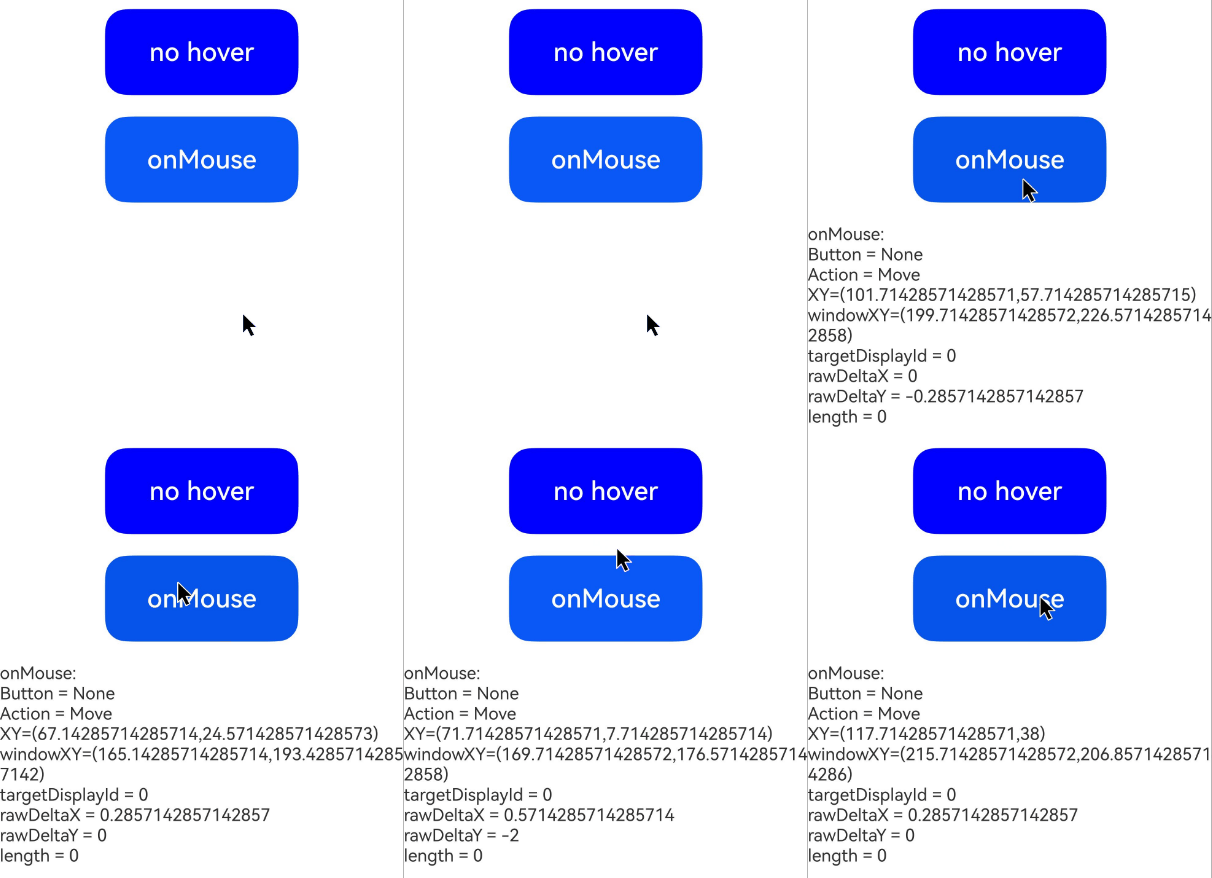
[h2]Example 1: Obtaining Mouse Event Parameters
This example uses a button to set a mouse event. Clicking the button triggers the onMouse event to obtain the mouse event parameters. Since API version 15, you can obtain parameters such as targetDisplayId, rawDeltaX, rawDeltaY, and pressedButtons of the mouse event MouseEvent.
For mouse wheel handling, see Axis Event Examples.
// xxx.ets
@Entry
@Component
struct MouseEventExample {
  @State hoverText: string = 'no hover';
  @State mouseText: string = '';
  @State action: string = '';
  @State mouseBtn: string = '';
  @State color: Color = Color.Blue;

  build() {
    Column({ space: 20 }) {
      Button(this.hoverText)
        .width(180)
        .height(80)
        .backgroundColor(this.color)
        .fontSize(24)
        .onHover((isHover: boolean) => {
          // Dynamically change the text content and background color of the button based on whether the mouse is hovering over it through the onHover event.
          if (isHover) {
            this.hoverText = 'hover';
            this.color = Color.Pink;
          } else {
            this.hoverText = 'no hover';
            this.color = Color.Blue;
          }
        })
      Button('onMouse')
        .width(180).height(80)
        .fontSize(24)
        // Listen for mouse events through onMouse, and parse and concatenate information such as keys, actions, and coordinates for display.
        .onMouse((event: MouseEvent): void => {
          if (event) {
            // Determine the type of the mouse button triggered.
            switch (event.button) {
              case MouseButton.None:
                this.mouseBtn = 'None';
                break;
              case MouseButton.Left:
                this.mouseBtn = 'Left';
                break;
              case MouseButton.Right:
                this.mouseBtn = 'Right';
                break;
              case MouseButton.Back:
                this.mouseBtn = 'Back';
                break;
              case MouseButton.Forward:
                this.mouseBtn = 'Forward';
                break;
              case MouseButton.Middle:
                this.mouseBtn = 'Middle';
                break;
            }
            // Determine the type of the mouse action triggered.
            switch (event.action) {
              case MouseAction.Press:
                this.action = 'Press';
                break;
              case MouseAction.Move:
                this.action = 'Move';
                break;
              case MouseAction.Release:
                this.action = 'Release';
                break;
              case MouseAction.ENTER_WINDOW:
                this.action = 'ENTER_WINDOW';
                break;
              case MouseAction.LEAVE_WINDOW:
                this.action = 'LEAVE_WINDOW';
                break;
            }
            // Concatenate the full mouse event information and display it.
            this.mouseText = 'onMouse:\nButton = ' + this.mouseBtn +
              '\nAction = ' + this.action + '\nXY=(' + event.x + ',' + event.y + ')' +
              '\nwindowXY=(' + event.windowX + ',' + event.windowY + ')' +
              '\ntargetDisplayId = ' + event.targetDisplayId +
              '\nrawDeltaX = ' + event.rawDeltaX +
              '\nrawDeltaY = ' + event.rawDeltaY +
              '\nlength = ' + event.pressedButtons?.length;
          }
        })
      Text(this.mouseText)
    }.padding({ top: 30 }).width('100%')
  }
}
Diagram
When the mouse is clicked:
[h2]Example 2: Obtaining Historical Points of the Current Frame
This example uses the getHistoricalPoints API to obtain the historical points when resampling is triggered, which can be used to implement smoother drawing and other operations.
The getHistoricalPoints API is supported since API version 26.0.0.
@Entry
@Component
struct HistoricalPointsExample {
  historicalPointsInfo: string = '';

  build() {
    Column() {
      Button('Obtain historical points on mouse movement')
        .width(180)
        .height(80)
        .onMouse((event: MouseEvent) => {
          if (event.action === MouseAction.Move) {
            // Call the getHistoricalPoints API to obtain the historical point information of the current frame.
            const historicalPoints = event.getHistoricalPoints?.();
            if (historicalPoints) {
              this.historicalPointsInfo = `Number of historical points: ${historicalPoints.length}`;
              historicalPoints.forEach((point: MouseHistoricalPoint, index: number) => {
                this.historicalPointsInfo += `\nPoint ${index}: `
                  + `x = ${point.x}, y = ${point.y}, windowX = ${point.windowX}, windowY = ${point.windowY}, `
                  + `displayX = ${point.displayX}, displayY = ${point.displayY}, `
                  + `globalDisplayX = ${point.globalDisplayX}, globalDisplayY = ${point.globalDisplayY}, `
                  + `timestamp = ${point.timestamp}`;
              });
              console.info(this.historicalPointsInfo);
            }
          }
        })
    }.padding({ top: 30 })
    .width('100%')
    .height('100%')
  }
}
[h2]Example 3: Obtaining the Real-Time Position of a Component
This example uses the getCurrentLocalPosition method to get the coordinates of the mouse position relative to the upper-left corner of the current component's real-time position.
The getCurrentLocalPosition API is supported since API version 26.0.0.
// xxx.ets
@Entry
@Component
struct GetCurrentLocalPositionExample {
  @State positionText: string = '';
  @State textOffsetY: number = 0;

  build() {
    Column() {
      Button('Obtain the coordinates of the mouse position relative to the upper-left corner of the current component's real-time position.').translate({ y: this.textOffsetY })
        .onMouse((event: MouseEvent) => {
          if (event) {
            // After moving the component, obtain the coordinates of the mouse relative to the upper-left corner of the component's real-time position with a delay.
            this.textOffsetY = -200;
            setTimeout(() => {
              let localPos: Coordinate2D | undefined = event.getCurrentLocalPosition?.();
              this.positionText = `Coordinates relative to the upper left corner of the current component's real-time position:\n  x: ${localPos?.x}\n  y: ${localPos?.y}`;
            }, 2000);
          }
        })

      Text(this.positionText)
    }.width('100%')
  }
}
Diagram
When the mouse event is triggered: