Screen capture enables you to collect screen data for scenarios like screen recording, meeting sharing, and live streaming. By calling the C APIs of the AVScreenCapture module, you can collect audio and video data from both internal and external sources. The AVScreenCapture module works with the Window and Graphics modules to complete video capture.
Starting from API version 22, the following capabilities are introduced to screen capture on PCs/2-in-1 devices:
- Capture while the screen is off but not locked: This requires the ohos.permission.TIMEOUT_SCREENOFF_DISABLE_LOCK permission. For details about the permission configuration, see Declaring Permissions.
- Capture without privacy protection pop-ups: This requires the ohos.permission.CUSTOM_SCREEN_RECORDING permission. For details about the permission configuration, see Requesting Restricted Permissions.
Workflow Overview
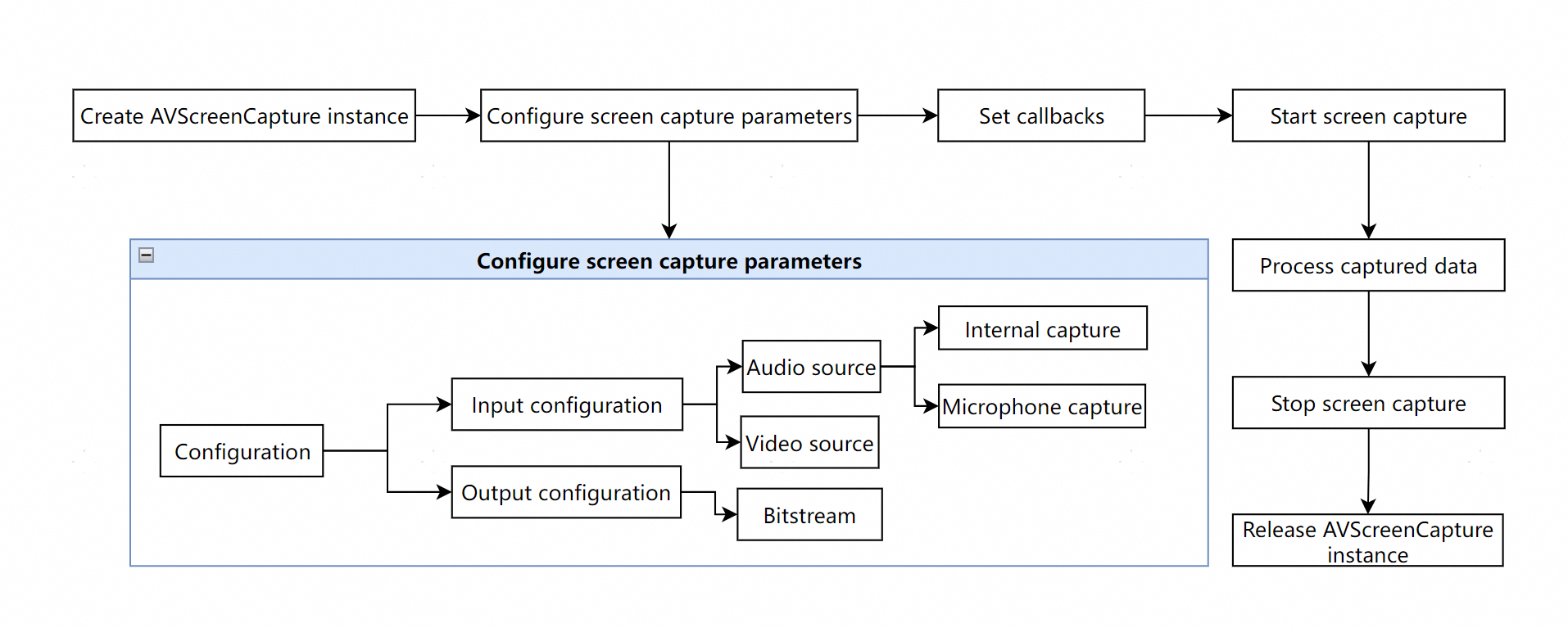
Basic screen capture involves creating an AVScreenCapture instance, configuring audio and video parameters, setting callbacks, starting and stopping capture, processing results, and releasing resources.
On this basis, you can implement advanced configurations for specific scenarios like video recording or live streaming. For details, see Using AVScreenCapture in Custom Scenarios.
The following figure shows the basic workflow.
The captured screen content can be output in the following forms:
-
As files: The captured content can be saved as a file, which can be played or shared.
-
As streams: The stream can be processed based on the scenario. For example, the stream can be transferred to other modules for desktop sharing or live video streaming.
Constraints
-
When using AVScreenCapture, you must be aware of its state transitions. APIs should only be called in the appropriate states, as calling them in an incorrect state will cause errors. You should check the state before attempting transitions to avoid exceptions.
-
When screen capture starts, a privacy protection pop-up is displayed, containing the Hide private content option. If this option is selected, private information (such as banner notifications, the control panel, or call screen) will be masked. The specific private information may vary by product. The actual capture result shall apply.
-
When the displayed content does not change, the system does not output new video frames.
Privacy protection pop-up:

[h2]Importing Dependencies
Link the dynamic libraries in the CMake script.
target_link_libraries(entry PUBLIC libnative_avscreen_capture.so libnative_buffer.so libnative_media_core.so libnative_display_manager.so)
Add the header files.
#include "hilog/log.h"
#include "napi/native_api.h"
#include <window_manager/oh_display_info.h>
#include <window_manager/oh_display_manager.h>
#include <multimedia/player_framework/native_avscreen_capture.h>
#include <multimedia/player_framework/native_avscreen_capture_base.h>
#include <multimedia/player_framework/native_avscreen_capture_errors.h>
#include <multimedia/player_framework/native_avbuffer.h>
#include <native_buffer/native_buffer.h>
#include <vector>
[h2]Creating an AVScreenCapture Instance
Instantiate the object by creating an OH_AVScreenCapture instance by calling OH_AVScreenCapture_Create.
g_avCapture = OH_AVScreenCapture_Create();
[h2]Configuring Audio Capture Parameters
After creating the AVScreenCapture instance, configure the required audio parameters OH_AudioInfo, including internal audio information, microphone audio information OH_AudioCaptureInfo, and output specifications OH_AudioEncInfo.
If microphone audio capture needs to be configured, do as follows:
- Configure the ohos.permission.MICROPHONE permission. For details, see Requesting User Authorization.
- Apply for a continuous task. For details, see Continuous Task.
When you save the captured content to a file, only internal capture is enabled by default. The microphone can be dynamically enabled or disabled during capture. Once enabled, both internal and external (microphone) audio can be recorded simultaneously.
Internal audio information must be configured. Microphone audio information can be set as needed based on the actual scenario.
// Microphone capture information. If both internal and microphone audio are set, their parameters must be consistent.
OH_AudioCaptureInfo micCapInfo = {.audioSampleRate = 48000, .audioChannels = 2, .audioSource = OH_MIC};
// Internal audio capture information, which is mandatory. If both internal and microphone audio are set, their parameters must be consistent.
OH_AudioCaptureInfo innerCapInfo = {.audioSampleRate = 48000, .audioChannels = 2, .audioSource = OH_ALL_PLAYBACK};
//Configure audio output specifications for screen capture. audioBitrate ensures that the bit rate of the output file matches the expected bit rate and has no strong correlation with audioSampleRate.
// To ensure audio quality, the audio bitrate is set to 128000. If the screen recording content is primarily voice without music or game sound effects, the bitrate can be reduced to 96000 or 48000.
OH_AudioEncInfo audioEncInfo = {
    .audioBitrate = 128000,
    .audioCodecformat = OH_AAC_LC
};
OH_AudioInfo audioInfo = {
    .micCapInfo = micCapInfo,
    .innerCapInfo = innerCapInfo,
    .audioEncInfo = audioEncInfo
};
// You can set the microphone switch separately.
bool isMic = true;
OH_AVScreenCapture_SetMicrophoneEnabled(g_avCapture, isMic);
[h2]Configuring Video Capture Parameters
The video capture information OH_VideoInfo includes the input specifications OH_VideoCaptureInfo and output specifications OH_VideoEncInfo. When configuring the screen capture width and height, set the correct video width and height.
// Obtain screen information.
uint64_t displayId = 0;
NativeDisplayManager_ErrorCode ret = OH_NativeDisplayManager_GetDefaultDisplayId(&displayId);

NativeDisplayManager_DisplayInfo* displayInfo = nullptr;
ret = OH_NativeDisplayManager_CreateDisplayById(displayId, &displayInfo);
if (ret != DISPLAY_MANAGER_OK || !displayInfo) {
    return;
}
int32_t screenWidth = displayInfo->width;
int32_t screenHeight = displayInfo->height;
OH_NativeDisplayManager_DestroyDisplay(displayInfo);
displayInfo = nullptr;
// Input specifications for screen capture.
OH_VideoCaptureInfo videoCapInfo = {
    .videoFrameWidth = screenWidth,
    .videoFrameHeight = screenHeight,
    .videoSource = OH_VIDEO_SOURCE_SURFACE_RGBA
};
// Output specifications for screen capture.
OH_VideoEncInfo videoEncInfo = {
    .videoCodec = OH_H264,
    .videoBitrate = 2000000,
    .videoFrameRate = 30
};

OH_VideoInfo videoInfo = {
    .videoCapInfo = videoCapInfo,
    .videoEncInfo = videoEncInfo
};
[h2]Initializing the AVScreenCapture Instance Configuration
The AVScreenCapture instance configuration OH_AVScreenCaptureConfig includes the capture data format OH_VideoInfo, audio and video capture parameters OH_AudioInfo, and screen capture mode OH_CaptureMode, which can be OH_CAPTURE_HOME_SCREEN, OH_CAPTURE_SPECIFIED_SCREEN, or OH_CAPTURE_SPECIFIED_WINDOW.
After configuration, call OH_AVScreenCapture_Init to apply the settings to the OH_AVScreenCapture instance.

Different screen capture modes can be selected based on the capture scenario. For details, see Screen Capture Mode Description. On PCs/2-in-1 devices, different capture modes exhibit different popup behaviors. For details, see Popup Mode Description.
// Initialize the screen capture parameters and pass an OH_AVScreenCaptureConfig struct.
config = {
    .captureMode = OH_CAPTURE_HOME_SCREEN, // Set the screen capture mode.
    .dataType = OH_ORIGINAL_STREAM, // Screen capture data type: original stream or file.
    .audioInfo = audioInfo,
    .videoInfo = videoInfo
};
// Call the OH_AVScreenCapture_Init method in the StartScreenCapture_01() function to apply the configuration to OH_AVScreenCapture.
[h2]Setting Callbacks for Data Updates, State Changes, and Error Reporting
Callback functions are primarily used to listen for events during screen capture, such as errors, audio/video stream generation, and capture state changes. For details, see the error callback OH_AVScreenCaptureOnError, state callback OH_AVScreenCapture_SetStateCallback, and data callback OH_AVScreenCapture_SetDataCallback.
// Set callbacks.
// OnError(), a callback function invoked when an error occurs.
void OnError(OH_AVScreenCapture *capture, int32_t errorCode, void *userData)
{
    (void)capture;
    OH_LOG_ERROR(LOG_APP, "==ScreenCaptureSample== ScreenCapture OnError errorCode is %{public}d", errorCode);
    (void)userData;
}

// OnStateChange(), a callback function invoked when the state changes.
void OnStateChange(struct OH_AVScreenCapture *capture, OH_AVScreenCaptureStateCode stateCode, void *userData)
{
    if (stateCode == OH_SCREEN_CAPTURE_STATE_STARTED) {
        OH_LOG_INFO(LOG_APP, "==ScreenCaptureSample== ScreenCapture OnStateChange started");
        // Handle the state change.
        // Optional: Configure the screen capture rotation.
        int32_t ret = OH_AVScreenCapture_SetCanvasRotation(capture, true);
        // Optional: Modify the canvas resolution.
        ret = OH_AVScreenCapture_ResizeCanvas(g_avCapture, CANVAS_RESIZE_WIDTH, CANVAS_RESIZE_HEIGHT);
        // Optional: Set whether to show the cursor.
        ret = OH_AVScreenCapture_ShowCursor(g_avCapture, true);
        // Optional: Set the maximum video frame rate.
        ret = OH_AVScreenCapture_SetMaxVideoFrameRate(g_avCapture, CAPTURE_VIDEO_FRAME_RATE);
    }
    if (stateCode == OH_SCREEN_CAPTURE_STATE_INTERRUPTED_BY_OTHER) {
        // Handle the state change.
    }
    (void)userData;
}

// Obtain and process the OnBufferAvailable() callback function of the original audio and video stream data.
void HandleVideoBuffer(OH_AVBuffer *buffer)
{
    OH_NativeBuffer *nativebuffer = OH_AVBuffer_GetNativeBuffer(buffer);
    if (nativebuffer == nullptr) {
        return;
    }
    int bufferLen = OH_AVBuffer_GetCapacity(buffer);
    OH_AVCodecBufferAttr info;
    int32_t ret = OH_AVBuffer_GetBufferAttr(buffer, &info);
    OH_LOG_INFO(LOG_APP, "==ScreenCaptureSample== ScreenCapture size %{public}d", info.size);
    OH_LOG_INFO(LOG_APP, "==ScreenCaptureSample== ScreenCapture bufferLen %{public}d", bufferLen);

    OH_NativeBuffer_Config config;
    OH_NativeBuffer_GetConfig(nativebuffer, &config);
    OH_LOG_INFO(LOG_APP, "==ScreenCaptureSample== ScreenCapture height %{public}d width %{public}d",
        config.height, config.width);
    uint8_t *buf = OH_AVBuffer_GetAddr(buffer);
    if (buf == nullptr) {
        return;
    }
    size_t written = fwrite(buf, 1, bufferLen, g_vFile);
    if (written != bufferLen) {
        OH_LOG_ERROR(LOG_APP, "fwrite failed");
    }
    OH_NativeBuffer_Unreference(nativebuffer);
    buffer = nullptr;
    OH_LOG_INFO(LOG_APP, "==ScreenCaptureSample== ScreenCapture OnBufferAvailable Video");
}

void HandleAudioBuffer(OH_AVBuffer *buffer, FILE *file, const char *logMsg)
{
    int bufferLen = OH_AVBuffer_GetCapacity(buffer);
    uint8_t *buf = OH_AVBuffer_GetAddr(buffer);
    if (buf == nullptr) {
        return;
    }
    OH_LOG_INFO(LOG_APP, "==ScreenCaptureSample== ScreenCapture OnBufferAvailable inner audio");
    size_t written = fwrite(buf, 1, bufferLen, g_innerFile);
    if (written != bufferLen) {
        OH_LOG_ERROR(LOG_APP, "fwrite failed");
    }
}

void OnBufferAvailable(OH_AVScreenCapture *capture, OH_AVBuffer *buffer, OH_AVScreenCaptureBufferType bufferType,
                       int64_t timestamp, void *userData)
{
    if (!g_isRunning) {
        return;
    }
    OH_LOG_INFO(LOG_APP, "==ScreenCaptureSample== ScreenCapture OnBufferAvailable bufferType is %{public}d",
        bufferType);
    if (bufferType == OH_SCREEN_CAPTURE_BUFFERTYPE_VIDEO) {
        // Handle the video buffer.
        HandleVideoBuffer(buffer);
    } else if (bufferType == OH_SCREEN_CAPTURE_BUFFERTYPE_AUDIO_INNER) {
        // Handle the internal recording buffer.
        HandleAudioBuffer(buffer, g_innerFile, "ScreenCapture OnBufferAvailable inner audio");
    } else if (bufferType == OH_SCREEN_CAPTURE_BUFFERTYPE_AUDIO_MIC) {
        // Handle the microphone buffer.
        HandleAudioBuffer(buffer, g_micFile, "ScreenCapture OnBufferAvailable mic audio");
    }
    return;
}
// Set the callback function OnDisplaySelected() for obtaining the screen capture display ID.
void OnDisplaySelected(struct OH_AVScreenCapture *capture, uint64_t displayId, void *userData)
{
    (void)capture;
    OH_LOG_INFO(LOG_APP, "==ScreenCaptureSample== OnDisplaySelected displayId is %{public}uld", displayId);
    (void)userData;
}

void SetCallback(struct OH_AVScreenCapture *capture)
{
    OH_AVScreenCapture_SetErrorCallback(capture, OnError, nullptr);
    OH_AVScreenCapture_SetStateCallback(capture, OnStateChange, nullptr);
    OH_AVScreenCapture_SetDataCallback(capture, OnBufferAvailable, nullptr);
    OH_AVScreenCapture_SetDisplayCallback(capture, OnDisplaySelected, nullptr);
}
[h2]Starting Screen Capture
After screen capture is started by calling OH_AVScreenCapture_StartScreenCapture, the system begins capturing the raw stream. Use the OH_AVScreenCapture_OnBufferAvailable callback to listen for stream generation and the OH_AVScreenCapture_OnStateChange callback to listen for state changes.
Within the callbacks, you can call OH_AVScreenCapture_AcquireAudioBuffer to obtain the audio stream and OH_AVScreenCapture_AcquireVideoBuffer to obtain the video stream.
result = OH_AVScreenCapture_StartScreenCapture(g_avCapture);
[h2]Processing Captured Data
Depending on the audio and video capture parameters, different data streams are generated, including video streams, internal audio streams, and microphone audio streams. You can process these according to your scenario, such as routing the streams to other modules for desktop sharing or live video streaming.
// Obtain and process the original audio and video stream data in the OnBufferAvailable() callback function.
void HandleVideoBuffer(OH_AVBuffer *buffer)
{
    OH_NativeBuffer *nativebuffer = OH_AVBuffer_GetNativeBuffer(buffer);
    if (nativebuffer == nullptr) {
        return;
    }
    int bufferLen = OH_AVBuffer_GetCapacity(buffer);
    OH_AVCodecBufferAttr info;
    int32_t ret = OH_AVBuffer_GetBufferAttr(buffer, &info);
    OH_LOG_INFO(LOG_APP, "==ScreenCaptureSample== ScreenCapture size %{public}d", info.size);
    OH_LOG_INFO(LOG_APP, "==ScreenCaptureSample== ScreenCapture bufferLen %{public}d", bufferLen);

    OH_NativeBuffer_Config config;
    OH_NativeBuffer_GetConfig(nativebuffer, &config);
    OH_LOG_INFO(LOG_APP, "==ScreenCaptureSample== ScreenCapture height %{public}d width %{public}d",
        config.height, config.width);
    uint8_t *buf = OH_AVBuffer_GetAddr(buffer);
    if (buf == nullptr) {
        return;
    }
    size_t written = fwrite(buf, 1, bufferLen, g_vFile);
    if (written != bufferLen) {
        OH_LOG_ERROR(LOG_APP, "fwrite failed");
    }
    OH_NativeBuffer_Unreference(nativebuffer);
    buffer = nullptr;
    OH_LOG_INFO(LOG_APP, "==ScreenCaptureSample== ScreenCapture OnBufferAvailable Video");
}

void HandleAudioBuffer(OH_AVBuffer *buffer, FILE *file, const char *logMsg)
{
    int bufferLen = OH_AVBuffer_GetCapacity(buffer);
    uint8_t *buf = OH_AVBuffer_GetAddr(buffer);
    if (buf == nullptr) {
        return;
    }
    OH_LOG_INFO(LOG_APP, "==ScreenCaptureSample== ScreenCapture OnBufferAvailable inner audio");
    size_t written = fwrite(buf, 1, bufferLen, g_innerFile);
    if (written != bufferLen) {
        OH_LOG_ERROR(LOG_APP, "fwrite failed");
    }
}

void OnBufferAvailable(OH_AVScreenCapture *capture, OH_AVBuffer *buffer, OH_AVScreenCaptureBufferType bufferType,
                       int64_t timestamp, void *userData)
{
    if (!g_isRunning) {
        return;
    }
    OH_LOG_INFO(LOG_APP, "==ScreenCaptureSample== ScreenCapture OnBufferAvailable bufferType is %{public}d",
        bufferType);
    if (bufferType == OH_SCREEN_CAPTURE_BUFFERTYPE_VIDEO) {
        // Process the video buffer.
        HandleVideoBuffer(buffer);
    } else if (bufferType == OH_SCREEN_CAPTURE_BUFFERTYPE_AUDIO_INNER) {
        // Process the internal recording buffer.
        HandleAudioBuffer(buffer, g_innerFile, "ScreenCapture OnBufferAvailable inner audio");
    } else if (bufferType == OH_SCREEN_CAPTURE_BUFFERTYPE_AUDIO_MIC) {
        // Process the microphone buffer.
        HandleAudioBuffer(buffer, g_micFile, "ScreenCapture OnBufferAvailable mic audio");
    }
    return;
}
[h2]Stopping Screen Capture
Call OH_AVScreenCapture_StopScreenCapture to stop screen capture or sharing and release the microphone.
result = OH_AVScreenCapture_StopScreenCapture(g_avCapture);
[h2]Releasing Resources
Call OH_AVScreenCapture_Release to release the created OH_AVScreenCapture instance. This must be done after screen capture is stopped.
result = OH_AVScreenCapture_Release(g_avCapture);
if (result != AV_SCREEN_CAPTURE_ERR_BASE) {
    OH_LOG_ERROR(LOG_APP, "StopScreenCapture OH_AVScreenCapture_Release: %{public}d", result);
}
OH_LOG_INFO(LOG_APP, "OH_AVScreenCapture_Release success");
g_avCapture = nullptr;
Screen Capture Mode Description
The system provides three screen capture modes: Capturing a Specified Screen, Capturing the Main Screen, and Capturing a Specified Window. Different capture modes are set through OH_CaptureMode.
The screen capture mode uses the screen ID (displayId) and window ID (missionIds). For acquisition methods, see OH_NativeDisplayManager_CreateAllDisplays and getWindowProperties, respectively.
[h2]Capturing a Specified Screen
This is the OH_CAPTURE_SPECIFIED_SCREEN mode.
In this mode, the screen capture app captures the content of a specified screen. The screen corresponding to the videoCapInfo.displayId parameter is selected by default. If the screen corresponding to the passed displayId does not exist, no selection is made.
uint64_t displayId = 0;
NativeDisplayManager_ErrorCode ret = OH_NativeDisplayManager_GetDefaultDisplayId(&displayId);

NativeDisplayManager_DisplayInfo* displayInfo = nullptr;
ret = OH_NativeDisplayManager_CreateDisplayById(displayId, &displayInfo);
if (ret != DISPLAY_MANAGER_OK || !displayInfo) {
    return;
}
// Configure the screen capture width and height in config based on the device resolution.
config.videoInfo.videoCapInfo.videoFrameWidth = displayInfo->width;
config.videoInfo.videoCapInfo.videoFrameHeight = displayInfo->height;
OH_NativeDisplayManager_DestroyDisplay(displayInfo);
displayInfo = nullptr;
// Set the screen capture mode to OH_CAPTURE_SPECIFIED_SCREEN and pass the screen ID.
config.captureMode = OH_CAPTURE_SPECIFIED_SCREEN;
config.videoInfo.videoCapInfo.displayId = 0;
The following figure shows the effect.
[h2]Capturing the Main Screen
This is the OH_CAPTURE_HOME_SCREEN mode.
In this mode, the screen capture app captures the content of the device's home screen. After screen capture starts, the configured videoCapInfo.displayId parameter does not take effect, and the home screen's displayId is used by default.
uint64_t displayId = 0;
NativeDisplayManager_ErrorCode ret = OH_NativeDisplayManager_GetDefaultDisplayId(&displayId);

NativeDisplayManager_DisplayInfo* displayInfo = nullptr;
ret = OH_NativeDisplayManager_CreateDisplayById(displayId, &displayInfo);
if (ret != DISPLAY_MANAGER_OK || !displayInfo) {
    return;
}
// Configure the width and height for screen capture in config based on the device resolution.
config.videoInfo.videoCapInfo.videoFrameWidth = displayInfo->width;
config.videoInfo.videoCapInfo.videoFrameHeight = displayInfo->height;
OH_NativeDisplayManager_DestroyDisplay(displayInfo);
displayInfo = nullptr;
// Set the screen capture mode to OH_CAPTURE_HOME_SCREEN.
config.captureMode = OH_CAPTURE_HOME_SCREEN;
[h2]Capturing a Specified Window
This is the OH_CAPTURE_SPECIFIED_WINDOW mode.
Configure the screen capture height and width values based on the device resolution and pass the screen ID.
To capture a specified window, set the target window ID. In this scenario, after screen capture starts, the system selects the specified window by default.
uint64_t displayId = 0;
NativeDisplayManager_ErrorCode ret = OH_NativeDisplayManager_GetDefaultDisplayId(&displayId);

NativeDisplayManager_DisplayInfo* displayInfo = nullptr;
ret = OH_NativeDisplayManager_CreateDisplayById(displayId, &displayInfo);
if (ret != DISPLAY_MANAGER_OK || !displayInfo) {
    return;
}
// Configure the screen capture width and height in config based on the device resolution.
config.videoInfo.videoCapInfo.videoFrameWidth = displayInfo->width;
config.videoInfo.videoCapInfo.videoFrameHeight = displayInfo->height;
OH_NativeDisplayManager_DestroyDisplay(displayInfo);
displayInfo = nullptr;
// Set the screen capture mode to OH_CAPTURE_SPECIFIED_WINDOW and pass in the screen ID.
config.captureMode = OH_CAPTURE_SPECIFIED_WINDOW;
config.videoInfo.videoCapInfo.displayId = 0;

// (Optional) If there is a desired window to capture, pass in a single window ID.
g_missionIds = {61}; // Indicates that the Picker defaults to selecting window 61.
config.videoInfo.videoCapInfo.missionIDs = g_missionIds.data();
config.videoInfo.videoCapInfo.missionIDsLen = static_cast<int32_t>(g_missionIds.size());

// Execute "g_missionIds.clear()" after the configuration parameters are set.
To capture multiple windows simultaneously, pass the list of window IDs to be captured.
uint64_t displayId = 0;
NativeDisplayManager_ErrorCode ret = OH_NativeDisplayManager_GetDefaultDisplayId(&displayId);

NativeDisplayManager_DisplayInfo* displayInfo = nullptr;
ret = OH_NativeDisplayManager_CreateDisplayById(displayId, &displayInfo);
if (ret != DISPLAY_MANAGER_OK || !displayInfo) {
    return;
}
// Configure the width and height of the screen recording in config based on the device resolution.
config.videoInfo.videoCapInfo.videoFrameWidth = displayInfo->width;
config.videoInfo.videoCapInfo.videoFrameHeight = displayInfo->height;
OH_NativeDisplayManager_DestroyDisplay(displayInfo);
displayInfo = nullptr;
// Set the screen recording mode to OH_CAPTURE_SPECIFIED_WINDOW and pass in the screen ID.
config.captureMode = OH_CAPTURE_SPECIFIED_WINDOW;
config.videoInfo.videoCapInfo.displayId = 0;

// Pass in multiple window IDs.
g_missionIds2 = {60, 61}; // Indicates that windows 60 and 61 are expected to be recorded simultaneously.
config.videoInfo.videoCapInfo.missionIDs = g_missionIds2.data();
config.videoInfo.videoCapInfo.missionIDsLen = static_cast<int32_t>(g_missionIds2.size());

// Execute "g_missionIds2.clear()" after the configuration parameters are complete.
Popup Mode Description
Starting from API version 23, PCs/2-in-1 devices, phones, and tablet devices support controlling whether the shared content selection popup is uniformly displayed through OH_AVScreenCapture_StrategyForPickerPopUp.
OH_AVScreenCapture_StrategyForPickerPopUp is set to true
Indicates that the picker is uniformly displayed after screen capture starts on the device, without specifying a capture mode.
// Create a CaptureStrategy object.
OH_AVScreenCapture_CaptureStrategy* strategy = OH_AVScreenCapture_CreateCaptureStrategy();

// Configure whether to display the screen capture picker.
// true: display the picker after screen capture starts.
OH_AVScreenCapture_StrategyForPickerPopUp(strategy, true);

// Apply the CaptureStrategy to the AVScreenCapture instance.
OH_AVScreenCapture_SetCaptureStrategy(capture, strategy);

// Release the CaptureStrategy object.
OH_AVScreenCapture_ReleaseCaptureStrategy(strategy);
OH_AVScreenCapture_StrategyForPickerPopUp is set to false
Indicates that the picker is not displayed after screen capture starts on the device. Only the privacy protection popup is displayed, without specifying a capture mode.
// Create a CaptureStrategy object.
OH_AVScreenCapture_CaptureStrategy* strategy = OH_AVScreenCapture_CreateCaptureStrategy();

// Set whether to display the screen capture Picker.
// The value false means the Picker is not displayed after screen recording starts.
OH_AVScreenCapture_StrategyForPickerPopUp(strategy, false);

// Set the CaptureStrategy to the AVScreenCapture instance.
OH_AVScreenCapture_SetCaptureStrategy(capture, strategy);

// Release the CaptureStrategy object.
OH_AVScreenCapture_ReleaseCaptureStrategy(strategy);
OH_AVScreenCapture_StrategyForPickerPopUp is set to the default value
For PCs/2-in-1 devices, phones, and tablet devices, the screen capture popup behavior differs.
-
On PCs/2-in-1 devices, different popup behaviors occur depending on the capture mode.
- Capturing a Specified Screen (OH_CAPTURE_SPECIFIED_SCREEN): After screen capture starts, the shared content selection popup is displayed, and the screen corresponding to the displayId parameter is selected by default.
- Capturing the Home Screen (OH_CAPTURE_HOME_SCREEN): After screen capture starts, the shared content selection popup is not displayed. Only the privacy protection popup is displayed. The displayId parameter does not take effect, and the home screen ID is used by default.
- Capturing a Specified Window (OH_CAPTURE_SPECIFIED_WINDOW): When a single window ID is passed, the shared content selection popup is displayed and the specified window is selected by default. When multiple window IDs are passed, the shared content selection popup is not displayed, and only the privacy protection popup is displayed.
-
On phones and tablet devices, the picker is not displayed in any capture mode. Only the privacy protection popup is displayed.
Additional Resources
-
API reference: For details, see native_avscreen_capture.h.
-
Sample project: This sample demonstrates screen capture using the AVScreenCapture component APIs. For details, see Screen Capture.