This module is a basic module for HarmonyOS message push, providing core capabilities such as push token management, in-app message push by app account, and message reception.
- Push token management
A push token is allocated by Push Kit to uniquely identify an app on each device. Once a push token is obtained, your app must report it to the app server. Push Cloud will then use this token carried in the message body to deliver the message to the target app on the target device. The following figure shows the message push process.
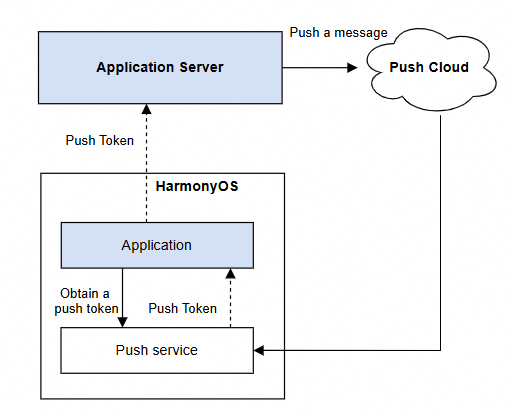
Delayed push token updates to the app server may affect push message delivery.
Generally, a push token changes only in the following scenarios:
-
A user uninstalls the app and then installs it again.
-
A user restores the device to factory settings.
-
The app calls the deleteToken API in explicit mode and then calls the getToken API again.
-
The app calls the deleteAAID API in explicit mode and then calls the getToken API again.
-
A device leaves a country or region. The updated token can be returned through the callback of the pushService.on('tokenUpdate') API.
You need to establish and maintain mapping between devices, app instances, and push tokens. HarmonyOS also provides the open device identifier (ODID), which remains identical for apps from the same developer running on the same device. You are advised to use the ODID as the device identifier and the AAID as the app instance identifier.
- In-app message push by app account
A push token is a unique identifier for a device-app instance and is independent of in-app accounts. When a push token is used to push messages, exceptions may occur if the app has multiple accounts. For example, if account A is signed in within the app and then switched to account B, account B can still receive the messages pushed to account A. To solve this problem, Push Kit provides the capability of pushing messages by app account. Currently, HUAWEI IDs and accounts of an app's own account system are supported.
You can call the bindAppProfileId API to bind an in-app account to a push token, and specify the push token and target account (see profileId) when pushing a message. Push Kit will check whether the current sign-in account in the app is the same as the target account. The message will be displayed only when the two accounts match.
Alternatively, you can solve the problem in the following way: Call the deleteToken API to delete the push token when a user signs out of their account within the app. This prevents message delivery failures caused by delayed token updates. When a user signs in or switches accounts within the app, call the getToken API to request a new push token. The new push token must be reported to the app server in a timely manner.
- Message reception
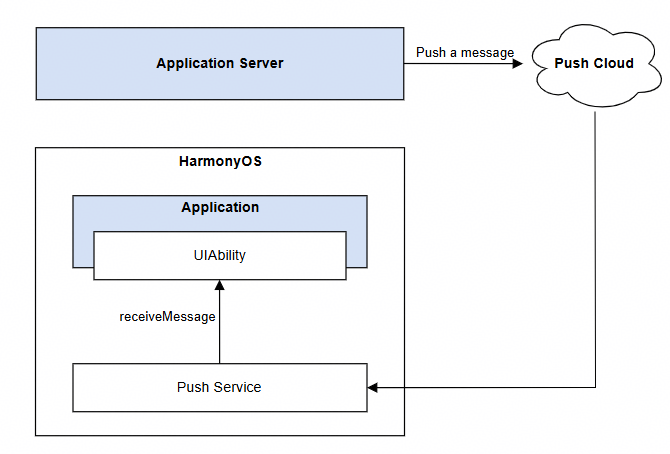
When the app server calls the REST API to push the following types of messages, the app itself needs to complete service processing when receiving the message content.
| Message Type | Constraint | Description |
|---|---|---|
| Notification message | App in the foreground | When pushing such messages, you need to add the foregroundShow field to the message body and set it to false. |
| Text-to-speech message | App in the foreground | When pushing text-to-speech messages, the app needs to process the message content first and then display a notification. Take order and logistics text-to-speech messages as an example: Once the app receives such a message, it can broadcast the order price via voice while showing the related notification on the Notification Panel of the device. |
| In-app call message | N/A | When the called party switches the app to the background or exits the app, the calling party can no longer establish a connection with the called party. An in-app call message sent by Push Kit can proactively wake up the called party's app process for it to receive the call message. Once the app is launched, an audio and video call channel can be established between the calling and called parties. |
| Background message | N/A | Background messages are suitable for scenarios where content updates are not frequent. They operate discreetly, without displaying notifications, playing ringtones, or changing the badge number on the app icon. You can create a pushmessage.db database and a t_push_message table. This allows message data to be written directly into the app's local database upon message reception, without needing to wake up the app. When the user opens the app again, it can quickly obtain related message information from the local database. For example, a calendar app can leverage background messages to deliver schedule information, achieving silent background updates. |
The following figure shows the message receiving process.
Model restriction: This API can be used only in the stage model.
Atomic service API: This API can be used in atomic services since version 5.0.0(12).
System capability: SystemCapability.Push.PushService
Since: 4.0.0(10)
pushService.getToken
getToken(callback: AsyncCallback<string>): void
Obtains a push token. This API uses an asynchronous callback to return the result. You are advised to call this API when the app is launched and report the obtained push token to the app server in a timely manner.
Model restriction: This API can be used only in the stage model.
Atomic service API: This API can be used in atomic services since version 5.0.0(12).
System capability: SystemCapability.Push.PushService
Since: 4.0.0(10)
Parameters:
| Name | Type | Mandatory | Description |
|---|---|---|---|
| callback | AsyncCallback<string> | Yes | Callback used to return the result. If the operation is successful, a 112-character token is obtained and err is undefined. Otherwise, an error object is returned. The length may vary. You are advised to reserve a length greater than 112 characters. |
Error codes:
For details about the error codes, please refer to Universal Error Codes and ArkTS API Error Codes.
| ID | Error Message |
|---|---|
| 401 | Parameter error. Possible causes: 1. Mandatory parameters are left unspecified; 2. Incorrect parameter types. |
| 1000900001 | System internal error. |
| 1000900008 | Failed to connect to the push service. |
| 1000900009 | Internal error of the push service. |
| 1000900010 | Illegal application identity. |
| 1000900011 | The network is unavailable. |
| 1000900012 | Push rights are not activated. |
| 1000900013 | Cross-location application is not allowed to obtain the token. |
| 1000900014 | The device does not support getting token. |
Example:
import { AbilityConstant, UIAbility, Want } from '@kit.AbilityKit';
import { pushService } from '@kit.PushKit';
import { hilog } from '@kit.PerformanceAnalysisKit';
import { BusinessError } from '@kit.BasicServicesKit';

const LOG_DOMAIN = 0x0000;
const LOG_TAG = 'EntryAbility';

export default class EntryAbility extends UIAbility {

  private tokenRetryCount = 0;

  private readonly MAX_TOKEN_RETRY_COUNT = 3;

  private readonly RETRY_INTERVAL = 1000; // Retry interval: 1s

  private readonly RETRY_ERROR_CODES = [
    1000900001,
    1000900008,
    1000900009,
    1000900011
  ];

  onCreate(want: Want, launchParam: AbilityConstant.LaunchParam): void {
    super.onCreate(want, launchParam);

    this.getToken();
  }

  /**
   * Obtain the push token.
   */
  private getToken(): void {
    try {
      pushService.getToken((err: BusinessError, token: string) => {
        if (err) {
          hilog.error(LOG_DOMAIN, LOG_TAG, 'Failed to get push token: %{public}d %{public}s', err.code, err.message);
          // Retry.
          this.handleTokenRetry(err.code);
        }else {
        hilog.info(LOG_DOMAIN, LOG_TAG, 'Succeeded in getting push token');
          this.reportToServer(token); // Report the push token to the app server.
        }
      });
    } catch (err) {
      const e = err as BusinessError;
      hilog.error(LOG_DOMAIN, LOG_TAG, 'Get push token occur err: %{public}d %{public}s', e.code, e.message);
    }
  }

  /**
   * Retry logic.
   * You can call this API based on your service needs.
   * @param errorCode Error code.
   */
  private handleTokenRetry(errorCode: number): void {
    if (this.tokenRetryCount < this.MAX_TOKEN_RETRY_COUNT && this.RETRY_ERROR_CODES.includes(errorCode)) {
      this.tokenRetryCount++;
      hilog.warn(LOG_DOMAIN, LOG_TAG, 'getToken retry count %{public}d', this.tokenRetryCount);

      // Retry after 1s.
      setTimeout(() => {
        this.getToken();
      }, this.RETRY_INTERVAL);
    }
  }

  /**
   * Report the token to the app server.
   */
  private reportToServer(token: string): void {
    // Implement the service logic of the app.
  }
}
pushService.getToken
getToken(): Promise<string>
Obtains a push token. This API uses a promise to return the result. You are advised to call this API when the app is launched and report the obtained push token to the app server in a timely manner.
Model restriction: This API can be used only in the stage model.
Atomic service API: This API can be used in atomic services since version 5.0.0(12).
System capability: SystemCapability.Push.PushService
Since: 4.0.0(10)
Returns:
| Type | Description |
|---|---|
| Promise<string> | Promise used to return the 112-character token. The length may vary. You are advised to reserve a length greater than 112 characters. |
Error codes:
For details about the error codes, please refer to ArkTS API Error Codes.
| ID | Error Message |
|---|---|
| 1000900001 | System internal error. |
| 1000900008 | Failed to connect to the push service. |
| 1000900009 | Internal error of the push service. |
| 1000900010 | Illegal application identity. |
| 1000900011 | The network is unavailable. |
| 1000900012 | Push rights are not activated. |
| 1000900013 | Cross-location application is not allowed to obtain the token. |
| 1000900014 | The device does not support getting token. |
Example:
import { AbilityConstant, Want, UIAbility } from '@kit.AbilityKit';
import { BusinessError } from '@kit.BasicServicesKit';
import { hilog } from '@kit.PerformanceAnalysisKit';
import { pushService } from '@kit.PushKit';

const LOG_DOMAIN = 0x0000;
const LOG_TAG = 'EntryAbility';

export default class EntryAbility extends UIAbility {
  private tokenRetryCount = 0;

  private readonly MAX_RETRY_COUNT = 3;

  private readonly RETRY_INTERVAL = 1000; // Retry interval: 1s

  private readonly RETRY_ERROR_CODES = [
    1000900001,
    1000900008,
    1000900009,
    1000900011
  ];

  onCreate(want: Want, launchParam: AbilityConstant.LaunchParam): void {
    super.onCreate(want, launchParam);

    this.getToken();
  }

  /**
   * Obtain the push token.
   */
  private getToken(): void {
    try {
      pushService.getToken()
        .then((token: string) => {
          hilog.info(LOG_DOMAIN, LOG_TAG, 'Succeeded in getting push token');
          this.reportToServer(token); // Report the push token to the app server.
        })
        .catch((err: BusinessError) => {
          hilog.error(LOG_DOMAIN, LOG_TAG, 'Failed to get push token: %{public}d %{public}s', err.code, err.message);
          this.handleTokenRetry(err.code); // Retry logic.
        });
    } catch (err) {
      const e = err as BusinessError;
      hilog.error(LOG_DOMAIN, LOG_TAG, 'Get push token occur err: %{public}d %{public}s', e.code, e.message);
    }
  }

  /**
   * Retry logic.
   * You can call this API based on your service needs.
   * @param errorCode Error code.
   */
  private handleTokenRetry(errorCode: number): void {
    if (this.tokenRetryCount < this.MAX_RETRY_COUNT && this.RETRY_ERROR_CODES.includes(errorCode)) {
      this.tokenRetryCount++;
      hilog.warn(LOG_DOMAIN, LOG_TAG, 'getToken retry count %{public}d', this.tokenRetryCount);

      // Retry after a delay to avoid frequent API calls.
      setTimeout(() => {
        this.getToken();
      }, this.RETRY_INTERVAL);
    }
  }

  /**
   * Report the push token to the app server.
   */
  private reportToServer(token: string): void {
    // Implement the service logic of the app.
  }
}
pushService.deleteToken
deleteToken(callback: AsyncCallback<void>): void
Deletes a push token. This API uses an asynchronous callback to return the result. You are advised to call this API to delete a push token only during scenarios such as account switching in a social app or user sign-out in a financial app. Avoid proactively calling this API unless absolutely necessary.
Model restriction: This API can be used only in the stage model.
Atomic service API: This API can be used in atomic services since version 5.0.0(12).
System capability: SystemCapability.Push.PushService
Since: 4.0.0(10)
Parameters:
| Name | Type | Mandatory | Description |
|---|---|---|---|
| callback | AsyncCallback<void> | Yes | Callback used to return the result. If the operation is successful, err is undefined. Otherwise, err is an error object. |
Error codes:
For details about the error codes, please refer to Universal Error Codes and ArkTS API Error Codes.
| ID | Error Message |
|---|---|
| 401 | Parameter error. Possible causes: 1. Mandatory parameters are left unspecified; 2. Incorrect parameter types. |
| 1000900001 | System internal error. |
| 1000900008 | Failed to connect to the push service. |
| 1000900009 | Internal error of the push service. |
| 1000900010 | Illegal application identity. |
| 1000900011 | The network is unavailable. |
Example:
import{ UIAbility }from '@kit.AbilityKit';
import { BusinessError } from '@kit.BasicServicesKit';
import { hilog } from '@kit.PerformanceAnalysisKit';
import { pushService } from '@kit.PushKit';

const LOG_DOMAIN = 0x0000;
const LOG_TAG = 'EntryAbility';

export default class EntryAbility extends UIAbility {
  /**
   * Do not delete the push token unless necessary. You are advised to call the deletion API in the following scenarios:
   * The user rejects the app agreement and privacy statement: When a user rejects the app agreement and privacy statement, the app can proactively delete the push token to ensure that the user no longer receives any push messages.
   * The user signs out or deregisters the account: When a user signs out or deregisters the account, you may need to delete the push token associated with the device to ensure user privacy and prevent subsequent message push.
   * The app provides a message push switch: If the app provides a message push switch, you can call the API for deleting the token to stop receiving push messages when the user disables the switch.
   * Test or debugging requirements: During the development and testing phase, you may need to clear the token to verify the process of obtaining a new token.
   */
  private deleteToken(): void {
    try {
      pushService.deleteToken((err: BusinessError) => {
        if (err) {
          hilog.error(LOG_DOMAIN, LOG_TAG, 'Failed to delete push token: %{public}d %{public}s', err.code, err.message);
      } else {
        hilog.info(LOG_DOMAIN, LOG_TAG, 'Succeeded in deleting push token.');
      }
    });
  } catch (err) {
    let e: BusinessError = err as BusinessError;
    hilog.error(LOG_DOMAIN, LOG_TAG, 'Delete push token occur err: %{public}d %{public}s', e.code, e.message);
    }
  }
}
pushService.deleteToken
deleteToken(): Promise<void>
Deletes a push token. This API uses a promise to return the result. You are advised to call this API to delete a push token only during scenarios such as account switching in a social app or user sign-out in a financial app. Avoid proactively calling this API unless absolutely necessary.
Model restriction: This API can be used only in the stage model.
Atomic service API: This API can be used in atomic services since version 5.0.0(12).
System capability: SystemCapability.Push.PushService
Since: 4.0.0(10)
Returns:
| Type | Description |
|---|---|
| Promise<void> | Promise that returns no value. |
Error codes:
For details about the error codes, please refer to ArkTS API Error Codes.
| ID | Error Message |
|---|---|
| 1000900001 | System internal error. |
| 1000900008 | Failed to connect to the push service. |
| 1000900009 | Internal error of the push service. |
| 1000900010 | Illegal application identity. |
| 1000900011 | The network is unavailable. |
Example:
import { UIAbility } from '@kit.AbilityKit';
import { BusinessError } from '@kit.BasicServicesKit';
import { hilog } from '@kit.PerformanceAnalysisKit';
import { pushService } from '@kit.PushKit';

const LOG_DOMAIN = 0x0000;
const LOG_TAG = 'EntryAbility';

export default class EntryAbility extends UIAbility {
  /**
   * Do not delete the push token unless necessary. You are advised to call the deletion API in the following scenarios:
   * 1. The user rejects the app agreement and privacy statement: When a user rejects the app agreement and privacy statement, the app can proactively delete the push token to ensure that the user no longer receives any push messages.
   * 2. The user signs out or deregisters the account: When a user signs out or deregisters the account, you may need to delete the push token associated with the device to ensure user privacy and prevent subsequent message push.
   * 3. The app provides a message push switch: If the app provides a message push switch, you can call the API for deleting the token to stop receiving push messages when the user disables the switch.
   * 4. Test or debugging requirements: During the development and testing phase, you may need to clear the token to verify the process of obtaining a new token.
   */
  private deleteToken(): void {
    try {
      pushService.deleteToken()
        .then(() => {
          hilog.info(LOG_DOMAIN, LOG_TAG, 'Succeeded in deleting push token.');
        })
        .catch((err: BusinessError) => {
          hilog.error(LOG_DOMAIN, LOG_TAG, 'Failed to delete push token: %{public}d %{public}s', err.code, err.message);
        });
    } catch (err) {
      let e: BusinessError = err as BusinessError;
      hilog.error(LOG_DOMAIN, LOG_TAG, 'Delete push token occur err: %{public}d %{public}s', e.code, e.message);
    }
  }
}
pushService.bindAppProfileId
bindAppProfileId(appProfileType: pushCommon.AppProfileType, appProfileId: string, callback: AsyncCallback<void>): void
Binds the anonymous identifier of an app account. This API uses an asynchronous callback to return the result. This API establishes the binding between the currently signed-in account and push token during app sign-in or account switching. Push Kit uses this identifier to send targeted messages.
Model restriction: This API can be used only in the stage model.
System capability: SystemCapability.Push.PushService
Since: 4.0.0(10)
Parameters:
| Name | Type | Mandatory | Description |
|---|---|---|---|
| appProfileType | pushCommon.AppProfileType | Yes | Bound account type, which can be HUAWEI ID or an account in the app's own account system. |
| appProfileId | string | Yes | Anonymous identifier of an account. The value cannot be an empty string. You are not advised to use a real account ID as appProfileId. Generate an anonymous identifier that can uniquely map to the account ID. There is no restriction on the generation algorithm. The value can contain a maximum of 64 characters. If the length exceeds the limit, an error will be reported when the REST API is called. |
| callback | AsyncCallback<void> | Yes | Callback used to return the result. If the operation is successful, err is undefined. Otherwise, err is an error object. |
Error codes:
For details about the error codes, please refer to Universal Error Codes and ArkTS API Error Codes.
| ID | Error Message |
|---|---|
| 401 | Parameter error. Possible causes: 1. Mandatory parameters are left unspecified; 2. Incorrect parameter types; 3. Parameter verification failed. |
| 1000900001 | System internal error. |
| 1000900008 | Failed to connect to the push service. |
| 1000900009 | Internal error of the push service. |
| 1000900010 | Illegal application identity. |
| 1000900015 | The number of bound profile-app relationships exceeds the maximum. |
| 1000900016 | The os distributed account is not logged in. |
Example:
import { AbilityConstant, UIAbility, Want } from '@kit.AbilityKit';
import { BusinessError } from '@kit.BasicServicesKit';
import { hilog } from '@kit.PerformanceAnalysisKit';
import { pushService, pushCommon } from '@kit.PushKit';
import { buffer, util } from '@kit.ArkTS';

const LOG_DOMAIN = 0x0000;
const LOG_TAG = 'EntryAbility';
const accountId: string = '1***9';

export default class EntryAbility extends UIAbility {
  onCreate(want: Want, launchParam: AbilityConstant.LaunchParam): void {
    super.onCreate(want, launchParam);
    this.bindAppProfileId();
  }

  /**
   * Generate an anonymous identifier (profile ID) for an app account. The identifier cannot be an empty string and can contain a maximum of 64 characters.
   * You are not advised to use a real account ID as appProfileId. Generate an anonymous identifier that can uniquely map to the account ID. There is no restriction on the generation algorithm.
   */
  private generateProfileIdByAccountId(accountId: string): string {
    const arr: Uint8Array = new Uint8Array(buffer.from(accountId, 'utf-8').buffer);
    const base64 = new util.Base64Helper();
    return base64.encodeToStringSync(arr);
  }
  /**
   * Bind the anonymous identifier.
   */
  private bindAppProfileId(): void {
    const profileId: string = this.generateProfileIdByAccountId(accountId);
    try {
      pushService.bindAppProfileId(pushCommon.AppProfileType.PROFILE_TYPE_APPLICATION_ACCOUNT, profileId,
        (err: BusinessError) => {
          if (err) {
            hilog.error(LOG_DOMAIN, LOG_TAG, 'Failed to bind app profile id: %{public}d %{public}s', err.code, err.message);
          }else {
            hilog.info(LOG_DOMAIN, LOG_TAG, 'Succeeded in binding app profile id.');
          }
        });
    } catch (err) {
      const e = err as BusinessError;
      hilog.error(LOG_DOMAIN, LOG_TAG, 'Bind app profile id occur err: %{public}d %{public}s', e.code, e.message);
    }
  }
}
pushService.bindAppProfileId
bindAppProfileId(appProfileType: pushCommon.AppProfileType, appProfileId: string): Promise<void>
Binds the anonymous identifier of an app account. This API uses a promise to return the result. This API establishes the binding between the currently signed-in account and push token during app sign-in or account switching. Push Kit uses this identifier to send targeted messages.
Model restriction: This API can be used only in the stage model.
System capability: SystemCapability.Push.PushService
Since: 4.0.0(10)
Parameters:
| Name | Type | Mandatory | Description |
|---|---|---|---|
| appProfileType | pushCommon.AppProfileType | Yes | Bound account type, which can be HUAWEI ID or an account in the app's own account system. |
| appProfileId | string | Yes | Anonymous identifier of an account. The value cannot be an empty string. You are not advised to use a real account ID as appProfileId. Generate an anonymous identifier that can uniquely map to the account ID. There is no restriction on the generation algorithm. The value can contain a maximum of 64 characters. If the length exceeds the limit, an error will be reported when the REST API is called. |
Returns:
| Type | Description |
|---|---|
| Promise<void> | Promise that returns no value. |
Error codes:
For details about the error codes, please refer to Universal Error Codes and ArkTS API Error Codes.
| ID | Error Message |
|---|---|
| 401 | Parameter error. Possible causes: 1. Mandatory parameters are left unspecified; 2. Incorrect parameter types; 3. Parameter verification failed. |
| 1000900001 | System internal error. |
| 1000900008 | Failed to connect to the push service. |
| 1000900009 | Internal error of the push service. |
| 1000900010 | Illegal application identity. |
| 1000900015 | The number of bound profile-app relationships exceeds the maximum. |
| 1000900016 | The os distributed account is not logged in. |
Example:
import { AbilityConstant, UIAbility, Want } from '@kit.AbilityKit';
import { BusinessError } from '@kit.BasicServicesKit';
import { hilog } from '@kit.PerformanceAnalysisKit';
import { pushService, pushCommon } from '@kit.PushKit';
import { buffer, util } from '@kit.ArkTS';

const LOG_DOMAIN = 0x0000;
const LOG_TAG = 'EntryAbility';
const accountId: string = '1***9';

export default class EntryAbility extends UIAbility {
  onCreate(want: Want, launchParam: AbilityConstant.LaunchParam): void {
    super.onCreate(want, launchParam);
    this.bindAppProfileId();
  }
  /**
   * Generate an anonymous identifier (profile ID) for an app account. The identifier cannot be an empty string and can contain a maximum of 64 characters.
   * You are not advised to use a real account ID as appProfileId. Generate an anonymous identifier that can uniquely map to the account ID. There is no restriction on the generation algorithm.
   */
  private generateProfileIdByAccountId(accountId: string): string {
    const arr: Uint8Array = new Uint8Array(buffer.from(accountId, 'utf-8').buffer);
    const base64 = new util.Base64Helper();
    return base64.encodeToStringSync(arr);
  }

  /**
   * Bind the anonymous identifier.
   */
  private bindAppProfileId(): void {
    const profileId: string = this.generateProfileIdByAccountId(accountId);
    try {
      pushService.bindAppProfileId(pushCommon.AppProfileType.PROFILE_TYPE_APPLICATION_ACCOUNT, profileId
      ).then(() => {
        hilog.info(LOG_DOMAIN, LOG_TAG, 'Succeeded in binding app profile id.');
      }).catch((err: BusinessError) => {
        hilog.error(LOG_DOMAIN, LOG_TAG, 'Failed to bind app profile id: %{public}d %{public}s', err.code, err.message);
      });
    } catch (err) {
      const e = err as BusinessError;
      hilog.error(LOG_DOMAIN, LOG_TAG, 'Bind app profile id occur err: %{public}d %{public}s', e.code, e.message);
    }
  }
}
pushService.unbindAppProfileId
unbindAppProfileId(appProfileId: string, callback: AsyncCallback<void>): void
Unbinds the anonymous identifier of an app account. This API uses an asynchronous callback to return the result. It unbinds an account from a push token when the account signs out of the app.
Model restriction: This API can be used only in the stage model.
System capability: SystemCapability.Push.PushService
Since: 4.0.0(10)
Parameters:
| Name | Type | Mandatory | Description |
|---|---|---|---|
| appProfileId | string | Yes | Anonymous identifier of an account. Set this parameter to the value of appProfileId specified in the bindAppProfileId() call. The value can contain a maximum of 64 characters. If the length exceeds the limit, an error will be reported when the REST API is called. |
| callback | AsyncCallback<void> | Yes | Callback used to return the result. If the operation is successful, err is undefined. Otherwise, err is an error object. |
Error codes:
For details about the error codes, please refer to Universal Error Codes and ArkTS API Error Codes.
| ID | Error Message |
|---|---|
| 401 | Parameter error. Possible causes: 1. Mandatory parameters are left unspecified; 2. Incorrect parameter types; 3. Parameter verification failed. |
| 1000900001 | System internal error. |
| 1000900008 | Failed to connect to the push service. |
| 1000900009 | Internal error of the push service. |
| 1000900010 | Illegal application identity. |
Example:
import { AbilityConstant, UIAbility, Want } from '@kit.AbilityKit';
import { BusinessError } from '@kit.BasicServicesKit';
import { hilog } from '@kit.PerformanceAnalysisKit';
import { pushService, pushCommon } from '@kit.PushKit';

const LOG_DOMAIN = 0x0000;
const LOG_TAG = 'EntryAbility';
const profileId: string = '1***9';

export default class EntryAbility extends UIAbility {
  onCreate(want: Want, launchParam: AbilityConstant.LaunchParam): void {
    super.onCreate(want, launchParam);
    this.unbindAppProfileId();
  }

  /**
   * Unbind the anonymous identifier.
   */
  private unbindAppProfileId(): void {
    try {
      pushService.unbindAppProfileId(profileId,
        (err: BusinessError) => {
          if (err) {
            hilog.error(LOG_DOMAIN, LOG_TAG, 'Failed to unbind app profile id: %{public}d %{public}s', err.code, err.message);
            return;
          }
          hilog.info(LOG_DOMAIN, LOG_TAG, 'Succeeded in unbinding app profile id.');
        }
      );
    } catch (err) {
      const e: BusinessError = err as BusinessError;
      hilog.error(LOG_DOMAIN, LOG_TAG, 'Unbind app profile id occur err: %{public}d %{public}s', e.code, e.message);
    }
  }
}
pushService.unbindAppProfileId
unbindAppProfileId(appProfileId: string): Promise<void>
Unbinds the anonymous identifier of an app account. This API uses a promise to return the result. It unbinds an account from a push token when the account signs out of the app.
Model restriction: This API can be used only in the stage model.
System capability: SystemCapability.Push.PushService
Since: 4.0.0(10)
Parameters:
| Name | Type | Mandatory | Description |
|---|---|---|---|
| appProfileId | string | Yes | Anonymous identifier of an account. Set this parameter to the value of appProfileId specified in the bindAppProfileId() call. The value can contain a maximum of 64 characters. If the length exceeds the limit, an error will be reported when the REST API is called. |
Returns:
| Type | Description |
|---|---|
| Promise<void> | Promise that returns no value. |
Error codes:
For details about the error codes, please refer to Universal Error Codes and ArkTS API Error Codes.
| ID | Error Message |
|---|---|
| 401 | Parameter error. Possible causes: 1. Mandatory parameters are left unspecified; 2. Incorrect parameter types; 3. Parameter verification failed. |
| 1000900001 | System internal error. |
| 1000900008 | Failed to connect to the push service. |
| 1000900009 | Internal error of the push service. |
| 1000900010 | Illegal application identity. |
Example:
import { AbilityConstant, UIAbility, Want } from '@kit.AbilityKit';
import { BusinessError } from '@kit.BasicServicesKit';
import { hilog } from '@kit.PerformanceAnalysisKit';
import { pushService, pushCommon } from '@kit.PushKit';

const LOG_DOMAIN = 0x0000;
const LOG_TAG = 'EntryAbility';
const profileId: string = '1***9';

export default class EntryAbility extends UIAbility {
  onCreate(want: Want, launchParam: AbilityConstant.LaunchParam): void {
    super.onCreate(want, launchParam);
    this.unbindAppProfileId();
  }

  /**
   * Unbind the anonymous identifier.
   */
  private unbindAppProfileId(): void {
    try {
      pushService.unbindAppProfileId(profileId).then(() => {
        hilog.info(LOG_DOMAIN, LOG_TAG, 'Succeeded in unbinding app profile id.');
      }).catch((err: BusinessError) => {
        hilog.error(LOG_DOMAIN, LOG_TAG, 'Failed to unbind app profile id: %{public}d %{public}s', err.code, err.message);
      });
    } catch (err) {
      const e: BusinessError = err as BusinessError;
      hilog.error(LOG_DOMAIN, LOG_TAG, 'Unbind app profile id occur err: %{public}d %{public}s', e.code, e.message);
    }
  }
}
pushService.PushType
type PushType = 'DEFAULT' | 'IM' | 'VoIP' | 'BACKGROUND' | 'EMERGENCY'
Scenario-specific message types. The options are listed in the following table.
Model restriction: This API can be used only in the stage model.
System capability: SystemCapability.Push.PushService
Since: 5.0.2(14)
| Type | Description |
|---|---|
| 'DEFAULT' | Notification message. |
| 'IM' | Text-to-speech message. |
| 'VoIP' | In-app call message. |
| 'BACKGROUND' | Background message. |
| 'EMERGENCY' | Emergency event message. |
pushService.receiveMessage
receiveMessage(pushType: PushType, ability: Ability, onMessage: Callback<pushCommon.PushPayload>): void
Receives scenario-specific messages from Push Kit.
Model restriction: This API can be used only in the stage model.
System capability: SystemCapability.Push.PushService
Since: 4.0.0(10)
Parameters:
| Name | Type | Mandatory | Description |
|---|---|---|---|
| pushType | PushType | Yes | Scenario-specific message type. Note: · EMERGENCY in pushService.PushType: This option is provided since version 5.0.0(12). It is used only for special scenarios such as earthquake disasters. · DEFAULT in pushService.PushType: This option is provided since version 5.0.2(14). For details about the sample code, please refer to step 3 in Processing Notification Messages When the App is Running in the Foreground. · IM: For details about the sample code, please refer to step 3 in Development Procedure. · VoIP: For details about the sample code, please refer to step 2 in Development Procedure · BACKGROUND: For details about the sample code, please refer to step 5 in Development Procedure |
| ability | Ability | Yes | UIAbility. |
| onMessage | Callback<pushCommon.PushPayload> | Yes | Callback used to return the scenario-specific message data. |
Error codes:
For details about the error codes, please refer to Universal Error Codes and ArkTS API Error Codes.
| ID | Error Message |
|---|---|
| 401 | Parameter error. Possible causes: 1. Mandatory parameters are left unspecified; 2. Incorrect parameter types; 3. Parameter verification failed. |
| 1000900001 | System internal error. |
| 1000900005 | Messages of the same push type cannot be received repeatedly. |
Example:
import { UIAbility } from '@kit.AbilityKit';
import { pushService, pushCommon } from '@kit.PushKit';
import { hilog } from '@kit.PerformanceAnalysisKit';
import { BusinessError } from '@kit.BasicServicesKit';

const LOG_DOMAIN = 0x0000;
const LOG_TAG = 'PushMessageAbility';

// You do not need to add a UIAbility. You can call the API in the onCreate method of the original UIAbility. Here, PushMessageAbility is used as an example.
export default class PushMessageAbility extends UIAbility {
  // The onCreate() API returns the result synchronously and does not support asynchronous callback.
  // The receiveMessage() method cannot be called after an asynchronous method, as this may affect message reception.
  onCreate(): void {
    this.receiveDefaultMessage();
    this.receiveImMessage();
    this.receiveVoipMessage();
    this.receiveBackgroundMessage();
  }

  /**
   * Receive a default message.
   */
  private receiveDefaultMessage(): void {
    try {
      // Register a default scenario-specific message.
      pushService.receiveMessage('DEFAULT', this, (data: pushCommon.PushPayload) => {
        // Process the message. You are advised to add a try-catch block for the callback.
        try {
          hilog.info(LOG_DOMAIN, LOG_TAG, 'Receive default message : %{public}s', JSON.stringify(data));
        } catch (e) {
          const errRes: BusinessError = e as BusinessError;
          hilog.error(LOG_DOMAIN, LOG_TAG, 'Failed to process data: %{public}d %{public}s', errRes.code, errRes.message);
        }
      });
    } catch (err) {
      const e: BusinessError = err as BusinessError;
      hilog.error(LOG_DOMAIN, LOG_TAG, 'Receive message occur err: %{public}d %{public}s', e.code, e.message);
    }
  }

  /**
   * Receive an IM message.
   */
  private receiveImMessage(): void {
    try {
      // Register an IM scenario-specific message.
      pushService.receiveMessage('IM', this, (data: pushCommon.PushPayload) => {
        // Process the message. You are advised to add a try-catch block for the callback.
        try {
          hilog.info(LOG_DOMAIN, LOG_TAG, 'Receive IM message : %{public}s', JSON.stringify(data));
        } catch (e) {
          const errRes: BusinessError = e as BusinessError;
          hilog.error(LOG_DOMAIN, LOG_TAG, 'Failed to process data: %{public}d %{public}s', errRes.code, errRes.message);
        }
      });
    } catch (err) {
      const e: BusinessError = err as BusinessError;
      hilog.error(LOG_DOMAIN, LOG_TAG, 'Receive message occur err: %{public}d %{public}s', e.code, e.message);
    }
  }

  /**
   * Receive a VoIP message.
   */
  private receiveVoipMessage(): void {
    try {
      // Register a VoIP scenario-specific message.
      pushService.receiveMessage('VoIP', this, (data: pushCommon.PushPayload) => {
        // Process the message. You are advised to add a try-catch block for the callback.
        try {
          hilog.info(LOG_DOMAIN, LOG_TAG, 'Receive VoIP message : %{public}s', JSON.stringify(data));
        } catch (e) {
          const errRes: BusinessError = e as BusinessError;
          hilog.error(LOG_DOMAIN, LOG_TAG, 'Failed to process data: %{public}d %{public}s', errRes.code, errRes.message);
        }
      });
    } catch (err) {
      const e: BusinessError = err as BusinessError;
      hilog.error(LOG_DOMAIN, LOG_TAG, 'Receive message occur err: %{public}d %{public}s', e.code, e.message);
    }
  }

  /**
   * Receive a background message.
   */
  private receiveBackgroundMessage(): void {
    try {
      // Register the BACKGROUND scenario-specific message.
      pushService.receiveMessage('BACKGROUND', this, (data: pushCommon.PushPayload) => {
        // Process the message. You are advised to add a try-catch block for the callback.
        try {
          hilog.info(LOG_DOMAIN, LOG_TAG, 'Receive background message : %{public}s', JSON.stringify(data));
        } catch (e) {
          const errRes: BusinessError = e as BusinessError;
          hilog.error(LOG_DOMAIN, LOG_TAG, 'Failed to process data: %{public}d %{public}s', errRes.code, errRes.message);
        }
      });
    } catch (err) {
      const e: BusinessError = err as BusinessError;
      hilog.error(LOG_DOMAIN, LOG_TAG, 'Receive message occur err: %{public}d %{public}s', e.code, e.message);
    }
  }
}
pushService.on('tokenUpdate')
on(type: 'tokenUpdate', ability: Ability, callback: Callback<string>): void
Registers push token update events. When a device is taken to another country or region outside the Chinese mainland, Push Kit updates its push token automatically and returns the new push token through an asynchronous callback. This will start the main process of the app. If your app does not implement this API, it will be unable to detect push token updates in real time. Instead, the update will only be retrieved the next time the app launches and proactively requests the token.
Model restriction: This API can be used only in the stage model.
System capability: SystemCapability.Push.PushService
Since: 5.1.0(18)
Parameters:
| Name | Type | Mandatory | Description |
|---|---|---|---|
| type | string | Yes | Event type. The value is fixed at 'tokenUpdate', indicating the token update event. |
| ability | Ability | Yes | UIAbility, an app component that provides the UI. |
| callback | Callback<string> | Yes | Callback used to return the token update data. The token length is 112 characters. |
Error codes:
For details about the error codes, please refer to Universal Error Codes and ArkTS API Error Codes.
| ID | Error Message |
|---|---|
| 401 | Parameter error. Possible causes: 1. Mandatory parameters are left unspecified; 2. Incorrect parameter types; 3. Parameter verification failed. |
| 1000900001 | System internal error. |
Example:
import { UIAbility, Want, AbilityConstant } from '@kit.AbilityKit';
import { pushService } from '@kit.PushKit';
import { hilog } from '@kit.PerformanceAnalysisKit';
import { BusinessError } from '@kit.BasicServicesKit';

const LOG_DOMAIN = 0x0000;
const LOG_TAG = 'PushMessageAbility';

// You do not need to add a UIAbility. You can call the API in the onCreate method of the original UIAbility. Here, PushMessageAbility is used as an example.
export default class PushMessageAbility extends UIAbility {
  onCreate(want: Want, launchParam: AbilityConstant.LaunchParam): void {
    super.onCreate(want, launchParam);
    this.registerTokenUpdate();
  }

  /**
   * Register a push token update callback.
   */
  private registerTokenUpdate(): void {
    const callBack = (token: string) => {
      try {
        hilog.info(LOG_DOMAIN, LOG_TAG, 'update token');
        this.reportToServer(token);
      } catch (e) {
        const err: BusinessError = e as BusinessError;
        hilog.error(LOG_DOMAIN, LOG_TAG, 'Failed to update token: %{public}d %{public}s', err.code, err.message);
      }
    };

    try {
      pushService.on('tokenUpdate', this, callBack);
      hilog.info(LOG_DOMAIN, LOG_TAG, 'Succeeded in registering token update');
    } catch (e) {
      const err: BusinessError = e as BusinessError;
      hilog.error(LOG_DOMAIN, LOG_TAG, 'Register token update occur err: %{public}d %{public}s', err.code, err.message);
    }
  }

  /**
   * Report the push token to the app server.
   * @param token Push token.
   */
  private reportToServer(token: string): void {
    // Configure the request to report the push token to the app server.
    hilog.info(LOG_DOMAIN, LOG_TAG, 'Report token to server');
  }
}
pushService.off('tokenUpdate')
off(type: 'tokenUpdate', callback?: Callback<string>): void
Deregisters token update events. This API uses an asynchronous callback to return the result.
Model restriction: This API can be used only in the stage model.
System capability: SystemCapability.Push.PushService
Since: 5.1.0(18)
Parameters:
| Name | Type | Mandatory | Description |
|---|---|---|---|
| type | string | Yes | Event type. The value is fixed at 'tokenUpdate', indicating the token update event. |
| callback | Callback<string> | No | Callback for deregistering the tokenUpdate event listener. Note: If no callback is passed during the deregistration, all callbacks registered for the tokenUpdate event will be unregistered. |
Error codes:
For details about the error codes, please refer to Universal Error Codes and ArkTS API Error Codes.
| ID | Error Message |
|---|---|
| 401 | Parameter error. Possible causes: 1. Mandatory parameters are left unspecified; 2. Incorrect parameter types; 3. Parameter verification failed. |
| 1000900001 | System internal error. |
Example:
import { UIAbility } from '@kit.AbilityKit';
import { pushService } from '@kit.PushKit';
import { hilog } from '@kit.PerformanceAnalysisKit';
import { BusinessError } from '@kit.BasicServicesKit';

const LOG_DOMAIN = 0x0000;
const LOG_TAG = 'PushMessageAbility';

export default class PushMessageAbility extends UIAbility {
  /**
   * Deregister the push token update callback.
   * You can call this API based on your service needs. After the deregistration, the app will no longer receive the callback when the push token is updated.
   */
  private unregisterTokenUpdate(): void {
    try {
      pushService.off('tokenUpdate');
      hilog.info(LOG_DOMAIN, LOG_TAG, 'Succeeded in unregistering the token update callback.');
    } catch (e) {
      let err: BusinessError = e as BusinessError;
      hilog.error(LOG_DOMAIN, LOG_TAG, 'Failed to unregister the token update callback: %{public}d %{public}s',err.code, err.message);
    }
  }
}
pushService.on('distributedMessageReceive')
on(type: 'distributedMessageReceive', callee: Callee, callback: DistributedMessageCallback): void
Registers a listener for distributed message receiving events. This API uses an asynchronous callback to return the result. Your app needs to register the listener in the onCreate() method of UIAbility. Each app can register the listener only once. The action of this UIAbility is action.ohos.push.distribute.listener.

If the call to the scenario-based message API (pushService.receiveMessage) and registration of distributed message events are performed within the same UIAbility, define both action.ohos.push.distribute.listener and action.ohos.push.listener in the same actions array. Otherwise, define them separately in their corresponding actions arrays.
Model restriction: This API can be used only in the stage model.
System capability: SystemCapability.Push.PushService
Since: 6.0.0(20)
Parameters:
| Name | Type | Mandatory | Description |
|---|---|---|---|
| type | string | Yes | Event type. The value is fixed at 'distributedMessageReceive', indicating the distributed message receiving event. |
| callee | Callee | Yes | Callback for caller notification registration and deregistration on the common component server. The value can be obtained from UIAbility. |
| callback | DistributedMessageCallback | Yes | Callback function for registering the listener for distributed message receiving events. This callback is executed asynchronously upon receiving a distributed message. |
Error codes:
For details about the error codes, please refer to ArkTS API Error Codes.
| ID | Error Message |
|---|---|
| 1000900001 | System internal error. |
| 1000900031 | The same type of callback can be registered only once. |
Example:
import { UIAbility } from '@kit.AbilityKit';
import { pushService, pushCommon } from '@kit.PushKit';
import { hilog } from '@kit.PerformanceAnalysisKit';
import { BusinessError } from '@kit.BasicServicesKit';

const LOG_DOMAIN = 0x0000;
const LOG_TAG = 'PushMessageAbility';
export default class PushMessageAbility extends UIAbility {

  private callback: pushService.DistributedMessageCallback = async (data:  pushCommon.PushPayload) => {
    let resultCode = pushService.ResultCode.SUCCESS;
    try {
      // Process service logic, for example, publish data to wearables.
      hilog.info(LOG_DOMAIN, LOG_TAG, 'Distribute message: %{public}s', JSON.stringify(data));
    } catch (e) {
      resultCode = pushService.ResultCode.FAILED;
      let errRes: BusinessError = e as BusinessError;
      hilog.error(LOG_DOMAIN, LOG_TAG, 'Receive distribute data occur err: %{public}d %{public}s', errRes.code, errRes.message);
    }
    // Return the execution result after the processing is complete.
    return { resultCode };
  };

  onCreate(): void {
    try {
      // Register a distributedMessageReceive event listener.
      pushService.on('distributedMessageReceive', this.callee, this.callback);
    } catch (err) {
      let e: BusinessError = err as BusinessError;
      hilog.error(LOG_DOMAIN, LOG_TAG, 'Register on error: %{public}d %{public}s', e.code, e.message);
    }
  }
}
pushService.off('distributedMessageReceive')
off(type: 'distributedMessageReceive', callback?: DistributedMessageCallback): void
Deregisters the listener for distributed message receiving events. This API uses an asynchronous callback to return the result.
Model restriction: This API can be used only in the stage model.
System capability: SystemCapability.Push.PushService
Since: 6.0.0(20)
Parameters:
| Name | Type | Mandatory | Description |
|---|---|---|---|
| type | string | Yes | Event type. The value is fixed at 'distributedMessageReceive', indicating the distributed message receiving event. |
| callback | DistributedMessageCallback | No | Callback for deregistering the distributedMessageReceive event listener. After the deregistration, the app can no longer receive distributed messages through this callback. Note: If no callback is passed during the deregistration, all callbacks registered for the distributedMessageReceive event will be unregistered. |
Error codes:
For details about the error codes, please refer to ArkTS API Error Codes.
| ID | Error Message |
|---|---|
| 1000900001 | System internal error. |
Example:
import { UIAbility } from '@kit.AbilityKit';
import { pushService } from '@kit.PushKit';
import { hilog } from '@kit.PerformanceAnalysisKit';
import { BusinessError } from '@kit.BasicServicesKit';

const LOG_DOMAIN = 0x0000;
const LOG_TAG = 'PushMessageAbility';

export default class PushMessageAbility extends UIAbility {
  /**
   * Deregister the distributedMessageReceive event listener.
   * You can call this API based on your service needs.
   */
  private unregisterdistributed(): void {
    try {
      pushService.off('distributedMessageReceive');
      hilog.info(LOG_DOMAIN, LOG_TAG, 'Succeeded in unregistering the distributed message receive callback.');
    } catch (e) {
      let err: BusinessError = e as BusinessError;
      hilog.error(LOG_DOMAIN, LOG_TAG, 'Failed to unregister the distributed message receive callback: %{public}d %{public}s',err.code, err.message);
    }
  }
}
DistributedMessageCallback
type DistributedMessageCallback = (PushPayload: pushCommon.PushPayload) => Promise<DistributedMessageResult>
Callback function used for distributed message receiving events.
Model restriction: This API can be used only in the stage model.
System capability: SystemCapability.Push.PushService
Since: 6.0.0(20)
Parameters:
| Name | Type | Mandatory | Description |
|---|---|---|---|
| PushPayload | pushCommon.PushPayload | Yes | Parameters of distributed message data. |
Returns:
| Type | Description |
|---|---|
| Promise<DistributedMessageResult> | Promise used to return the DistributedMessageResult object. For details, please refer to DistributedMessageResult. |
DistributedMessageResult
Callback type used in distributedMessageReceive.
Model restriction: This API can be used only in the stage model.
System capability: SystemCapability.Push.PushService
Since: 6.0.0(20)
Parameters:
| Name | Type | Read-Only | Optional | Description |
|---|---|---|---|---|
| resultCode | ResultCode | No | No | Execution result of the callback function. For details about the enumeration values, please refer to ResultCode. |
ResultCode
Enumerates the execution results of the DistributedMessageCallback callback function.
Model restriction: This API can be used only in the stage model.
System capability: SystemCapability.Push.PushService
Since: 6.0.0(20)
| Name | Value | Description |
|---|---|---|
| SUCCESS | 0 | Execution succeeds. |
| FAILED | 1 | Execution fails. |