Scenario Design
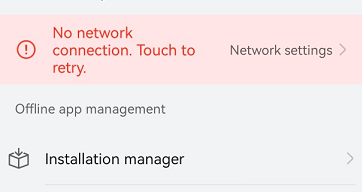
For the operation errors (for example, network connection failure) or other warning information, you should use highlighted color to draw the user's attention and provide error messages and improvement methods in real time.
Development Examples
The following is an example of broadcasting a network disconnection.
@Entry
@Component
export struct Rule_2_1_9 {
  title: string = 'Rule 2.1.9'

  build() {
    NavDestination() {
      Column() {
        Flex({
          direction: FlexDirection.Column,
          alignItems: ItemAlign.Center,
          justifyContent: FlexAlign.Center,
        }) {
          Row() {
            Text('Connection state').fontSize(30)
          }
          Row() {
            Radio({ value: 'Radio1', group: 'radioGroup' }).checked(true)
              .radioStyle({
                checkedBackgroundColor: Color.Red
              })
              .height(50)
              .width(50)
              .onChange((isChecked: boolean) => {
                console.log('Radio1 status is ' + isChecked)
              })
            Text('Connection interrupted').fontColor(Color.Red)
          }.width('80%')
          .accessibilityGroup(true) // Group the Radio and Text components as a single accessibility object.
        }
        .width('100%')
        .height('100%')
        .backgroundColor(Color.White)
      }
    }.title(this.title)
  }
}