When developing HarmonyOS applications and atomic services (referred to as "applications" hereafter for simplicity), you can use the HarmonyOS SDK included in the development kit to implement your service logic by calling its APIs. End users download applications from the HUAWEI AppGallery and install them onto the system (ROM) of their devices. The system then runs the applications to present their features to users.
In this process, the runtime behavior of your application across different devices in the live network is determined by the HarmonyOS SDK version used for development, the API version of the device ROM (accessible on HarmonyOS devices via Settings > Device name > About > API version), and the API/SDK version compatibility information defined within the application (such as the SDK version used for compilation, the target SDK version, and the minimum SDK version). For details, see Key Information Affecting Application Compatibility.
Among these, the API version is the decisive factor for application compatibility. It serves as critical information that bridges the development and runtime phases, linking HarmonyOS capability providers with you.
API Version Description
Since API version 26.0.0, the API version number has been adjusted as follows:
- Since API version 26.0.0, the API version number has been unified to the Semantic Versioning (SemVer) format (X.Y.Z), replacing the previous format.
- X: Major version number, which contains a large number of new features and important changes. The changes may include API modifications, and you need to modify your developed applications for adaptation.
- Y: Minor version number, which contains new features. In principle, backward compatibility is maintained. However, incompatible changes may be introduced due to major security risks or key experience issues. Detailed change descriptions will be provided in the version description.
- Z: Release version number, which contains bug fixes and minor improvements. Backward compatibility is maintained.
- In versions earlier than 26.0.0, the API version number is in the X.Y.Z(N) format, where:
- X: Major version number, which ranges from 1 to 99 and indicates a major API version update.
- Y: Minor version number, which ranges from 0 to 99 and indicates a minor API version update.
- Z: Release version number, which ranges from 0 to 99 and indicates a minor API update.
- N: OpenHarmony base API level, which ranges from 1 to 99.
Application compatibility is primarily managed through this API version information. The following figure illustrates the key role of the API version throughout the lifecycle:
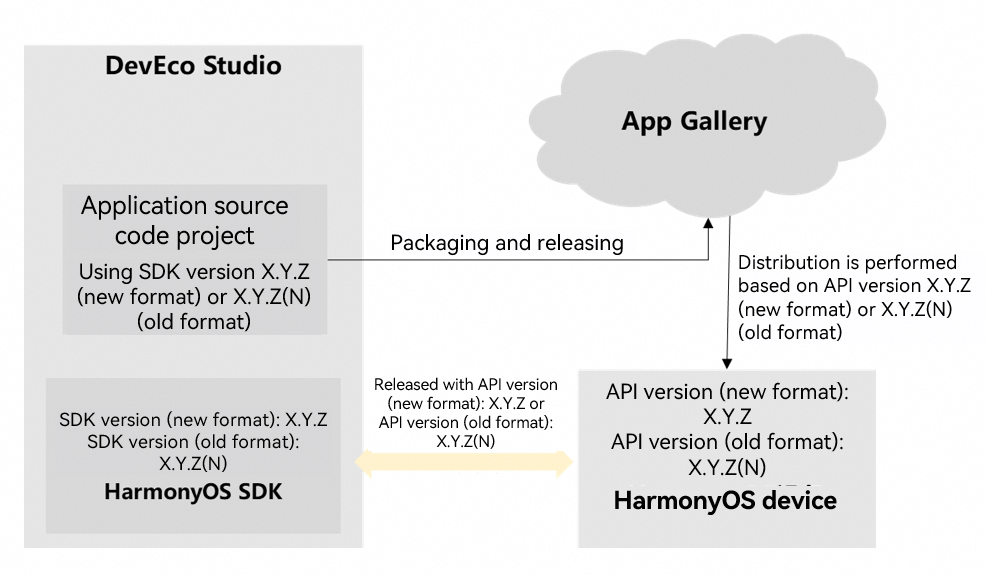

The SDK version and API version described in this document are essentially the same version number, sharing an identical value format, and are used in conjunction. The SDK version refers to the set of APIs and tools provided for your use. The API version refers to the highest set of API capabilities supported by the device.
Compatibility Principles Between Applications and Device Systems
- Applications built with an earlier HarmonyOS SDK version can, by default, be distributed through the HUAWEI AppGallery to devices running later HarmonyOS versions and will function normally.
Exception: As APIs evolve, their behavior might change due to experience optimization or security enhancements, potentially impacting released applications. Such changes are detailed in the version release notes. Please pay close attention to these notes when upgrading the API version.
- Applications built with a later HarmonyOS SDK version that use new APIs can run on earlier HarmonyOS devices if compatibility checks are performed for new APIs, though with degraded functionality.
[h2]Examples

The API version number format has been adjusted since 26.0.0 (for details, see the version number format adjustment description). This adjustment does not affect the basic logic for determining API compatibility. Therefore, the old version number format is still used in the examples provided in this document.
The relationship between the latest API versions is as follows:
26.0.0 > 6.1.1(24) > 6.1.0(23) > 6.0.2(22) > 6.0.1(21) > 6.0.0(20) > 5.1.1(19) > 5.1.0(18) > 5.0.5(17)
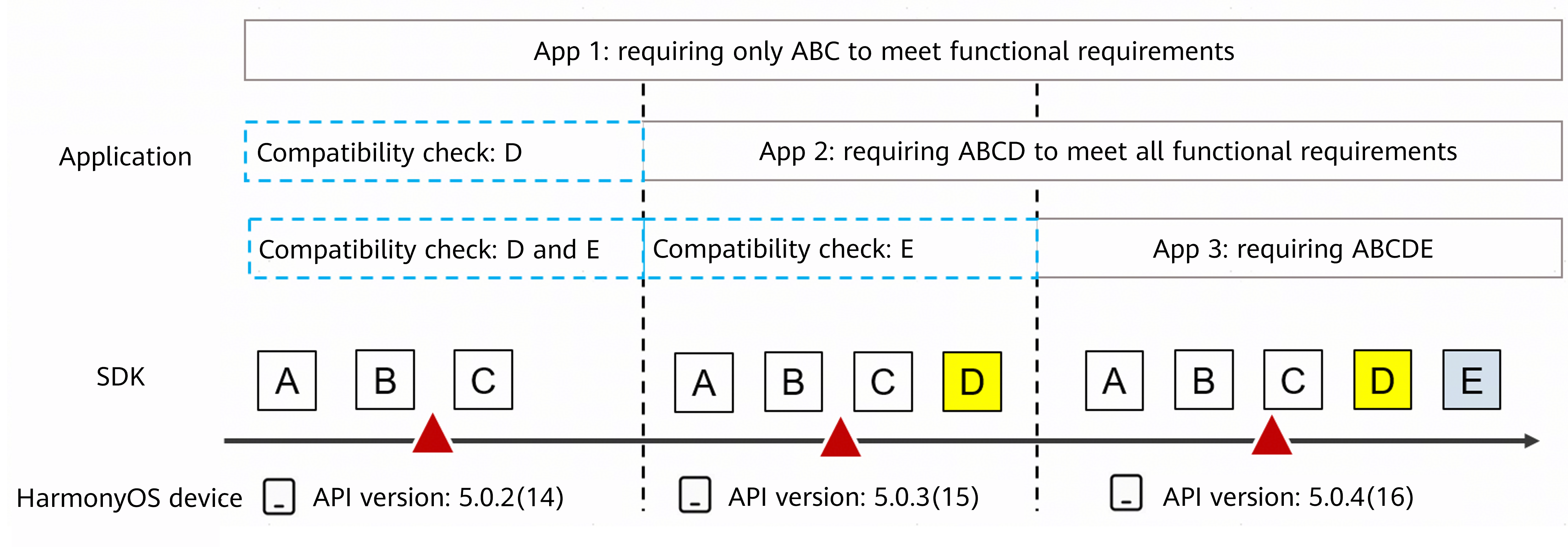
App 1: built with SDK version 5.0.2(14). It can run normally on HarmonyOS devices with API versions 5.0.3(15) and 5.0.4(16) by default.
App 2: built with SDK version 5.0.3(15) and using a new API D. It can run normally on HarmonyOS devices with API version 5.0.4(16) by default. However, to run normally on HarmonyOS devices with API version 5.0.2(14), you must implement compatibility conditional checks for API D.
App 3: built with SDK version 5.0.4(16) and using new APIs D and E. It can run normally on HarmonyOS devices with API version 5.0.4(16) by default. To run normally on HarmonyOS devices with API version 5.0.2(14), you must implement conditional checks for both API D and E. To run on HarmonyOS devices with API version 5.0.3(15), you must implement compatibility conditional checks for API E.
This section aims to explain the principles of application compatibility and the factors that affect it, helping you correctly configure application compatibility parameters or identify potential compatibility risks to deliver a high-quality user experience.