Overview
In modern software development, multithreaded or multiprocess concurrent processing is commonplace. In a multithreaded environment, tasks executed by different threads may have different levels of importance and urgency. Under high load, system resources such as CPU time become particularly valuable. If a critical thread, such as a UI rendering thread, is frequently preempted by non-critical threads and therefore cannot obtain sufficient continuous execution time and resource guarantees, issues such as frame drops and latency may occur, severely affecting user experience.
Solution
Under heavy load, the system allocates an appropriate number of time slices to each task based on its importance to ensure that critical tasks receive sufficient resources. More important tasks can be allocated more time slices. Therefore, you can identify a key thread in an app and provide a relatively high QoS level for the key thread in terms of the task urgency to prevent the thread from being interrupted by another thread, thereby ensuring smooth running of the app and better user experience.
[h2]QoS
QoS Development introduces the basic concepts and principles of QoS, the applicable scenarios and load characteristics of different QoS levels, and the usage of related APIs.
At the operating system level, a QoS level is a technology used to distinguish thread priorities and service quality. The system typically identifies the main thread automatically and assigns it a QoS level higher than those available to app developers when the app is in the foreground and has focus, ensuring that the main thread is scheduled with higher priority.
Similar to the thread priorities provided by taskpool.Priority on the ArkTS side, QoS priority levels are also mapped to kernel priorities. However, QoS provides more levels and supports stronger adaptive scheduling strategies. They are two different scheduling mechanisms.
The QoS provided by the Function Flow Runtime Kit includes five priority levels, from ffrt_qos_inherit (-1) to ffrt_qos_user_initiated (3), and uses the same underlying logic as the current QoS APIs. The difference is that the QoS APIs currently used for development are directly available to app threads, whereas FFRT QoS is used to configure task priorities. For a comparison between the thread-based and task-based programming models, see Function Flow Runtime Kit Overview.
Example Scenarios
The following figure compares the time required for two critical threads configured with different QoS levels to complete the same computational task under high load. As shown by the results, the thread configured with a higher QoS level takes less time to complete the computation under high load.
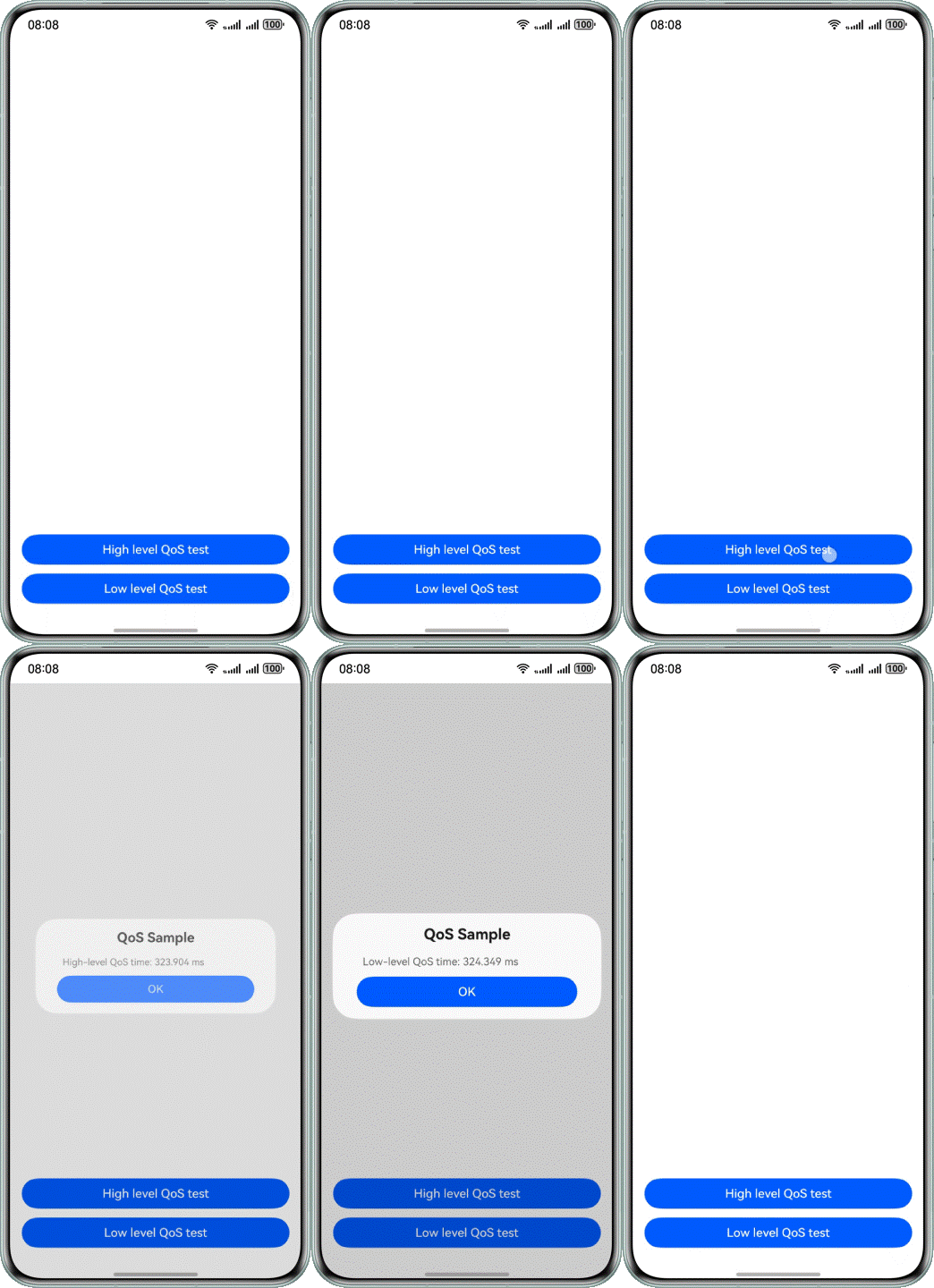
The procedure is as follows:
- Implement the task to be completed by the load thread.
// the Load task
void AddLoads(int n) {
    if (!n) {
        OH_LOG_Print(LOG_APP, LOG_ERROR, LOG_PRINT_DOMAIN, "QoS", "invalid input.");
        return;
    }

    // set QoS level
    int ret = OH_QoS_SetThreadQoS(QoS_Level::QOS_BACKGROUND);
    if (ret) {
        OH_LOG_Print(LOG_APP, LOG_ERROR, LOG_PRINT_DOMAIN, "QoS", "set load thread QoS level failed.");
        return;
    }

    // bind cpu
    cpu_set_t mask;
    CPU_SET(*g_affinity, &mask);
    if (sched_setaffinity(0, sizeof(mask), &mask) != 0) {
        OH_LOG_Print(LOG_APP, LOG_ERROR, LOG_PRINT_DOMAIN, "QoS", "bind load thread failed");
        return;
    }
    // Perform load calculation
    for (int i = 0; i < BOUND; i++) {
        for (int j = 0; j < BOUND; j++) {
            int x = (i + j) - n;
            printf("%d", x);
        }
    }
    // reset load flag
    g_addLoad = false;
} - Implement the Fibonacci calculation tasks to be performed by the high- and low-QoS computation threads (key threads). First, call OH_QoS_SetThreadQoS to set the QoS level of the current thread, and then call DoFib() to perform the Fibonacci calculation.
// Perform Fibonacci sequence calculations
long long DoFib(double n) {
    if (n == ONE) {
        return ONE;
    }
    if (n == TWO) {
        return TWO;
    }
    return DoFib(n - ONE) + DoFib(n - TWO);
}

void SetQoS(QoS_Level level) {
    // set QoS level
    int ret = OH_QoS_SetThreadQoS(level);
    if (!ret) {
        OH_LOG_Print(LOG_APP, LOG_INFO, LOG_PRINT_DOMAIN, "QoS", "set qos level success.");
        // query qos level
        QoS_Level queryLevel = QOS_DEFAULT;
        ret = OH_QoS_GetThreadQoS(&queryLevel);
        if (!ret) {
            OH_LOG_Print(LOG_APP, LOG_INFO, LOG_PRINT_DOMAIN, "QoS", "the qos level of current thread : %{public}d",
                         queryLevel);
        } else {
            OH_LOG_Print(LOG_APP, LOG_ERROR, LOG_PRINT_DOMAIN, "QoS", "get qos level failed.");
            return;
        }
    } else {
        OH_LOG_Print(LOG_APP, LOG_ERROR, LOG_PRINT_DOMAIN, "QoS", "get level qos failed!");
        return;
    }

    // bind cpu
    cpu_set_t mask;
    CPU_SET(*g_affinity, &mask);
    if (sched_setaffinity(0, sizeof(mask), &mask) != 0) {
        OH_LOG_Print(LOG_APP, LOG_ERROR, LOG_PRINT_DOMAIN, "QoS", "bind qos thread failed");
        return;
    }
    auto startTime = std::chrono::system_clock::now();
    // Execute computational tasks
    long long res = DoFib(DEPTH);
    auto endTime = std::chrono::system_clock::now();
    g_durationTime = std::chrono::duration<double, std::milli>(endTime - startTime).count();
    OH_LOG_Print(LOG_APP, LOG_INFO, LOG_PRINT_DOMAIN, "QoS", "calculate res is: %{public}llu", res);

    // Reset QoS level
    ret = OH_QoS_ResetThreadQoS();
    if (!ret) {
        OH_LOG_Print(LOG_APP, LOG_INFO, LOG_PRINT_DOMAIN, "QoS", "reset qos level success.");
    } else {
        OH_LOG_Print(LOG_APP, LOG_ERROR, LOG_PRINT_DOMAIN, "QoS", "reset qos level failed!");
        return;
    }

    // after reset QoS, query QoS again will fail
    QoS_Level queryLevelTwo;
    ret = OH_QoS_GetThreadQoS(&queryLevelTwo);
    if (!ret) {
        OH_LOG_Print(LOG_APP, LOG_INFO, LOG_PRINT_DOMAIN, "QoS", "the qos level after: %{public}d", queryLevelTwo);
        return;
    } else {
        OH_LOG_Print(LOG_APP, LOG_ERROR, LOG_PRINT_DOMAIN, "QoS", "query qos level failed after reset.");
        return;
    }
} - Set the computation thread (key thread) to a low QoS level and a high QoS level in separate tests, and compare the time taken to perform the same Fibonacci calculation under the same high-load conditions.
Configuring a low QoS level for the computation thread
static napi_value lowQoSCalculate(napi_env env, napi_callback_info info) {
    g_durationTime = 0;
    // Simulate system load
    if (!g_addLoad) {
        std::vector<std::thread> loadThreads;
        for (int i = 0; i < TASKS; i++) {
            // Activate threads to execute load tasks
            loadThreads.emplace_back(std::thread(AddLoads, TASKS));
            loadThreads[i].detach();
        }
        g_addLoad = true;
    }

    // set QOS_BACKGROUND level
    QoS_Level level = QoS_Level::QOS_BACKGROUND;
    std::thread task(SetQoS, level);
    task.join();

    // Return calculation time
    napi_value res;
    napi_create_double(env, g_durationTime, &res);
    return res;
}
The following figure shows the computation thread (thread ID: 39260) with a low QoS level.
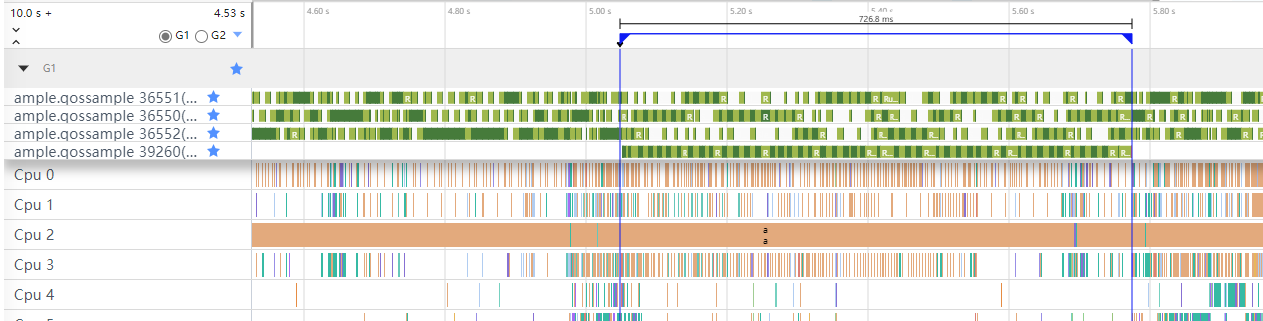
As shown in the figure, it takes 726.8 ms for the thread to complete the computation task.
Configuring a high QoS level for the computation thread
static napi_value highQoSCalculate(napi_env env, napi_callback_info info) {
    g_durationTime = 0;
    // Simulate system load
    if (!g_addLoad) {
        std::vector<std::thread> loadThreads;
        for (int i = 0; i < TASKS; i++) {
            // Activate threads to execute load tasks
            loadThreads.emplace_back(std::thread(AddLoads, TASKS));
            loadThreads[i].detach();
        }
        g_addLoad = true;
    }
    // set QOS_USER_INTERACTIVE level
    QoS_Level level = QoS_Level::QOS_USER_INTERACTIVE;
    std::thread task(SetQoS, level);
    task.join();

    // Return calculation time
    napi_value res;
    napi_create_double(env, g_durationTime, &res);
    return res;
}
The following figure shows the computation thread (thread ID: 39204) with a high QoS level.
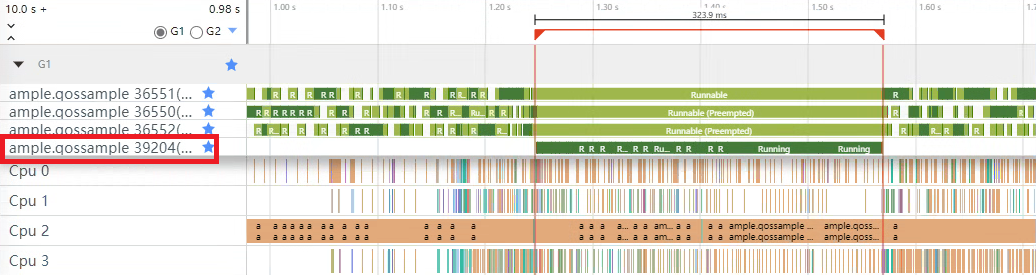
As shown in the figure, it takes 323.9 ms for the computation thread to complete the computation task.

This sample is valid only in the heavy-load scenarios.
In low-load scenarios, system resources are abundant, and most threads can obtain sufficient CPU time. Therefore, thread priority settings have little impact on execution efficiency.
Summary
| Solution | Number of Fibonacci Sequence Items | Computation Time |
|---|---|---|
| QOS_BACKGROUND (low QoS level) | 34 | 726.8 ms |
| QOS_USER_INTERACTIVE (high QoS level) | 34 | 323.9 ms |
The preceding comparison shows that under high load, a thread with a higher QoS level can complete computation tasks faster. In practice, properly setting thread QoS levels and assigning a relatively high QoS level to key threads can effectively reduce interruptions to key threads, thereby ensuring app stability and responsiveness.

System resources are limited. Setting a high QoS level for all threads in an app may cause resource contention. In addition, threads with higher QoS levels are allocated more resources than those with lower QoS levels. Excessively increasing thread QoS levels may cause other threads to starve, affecting the stability of the entire system. Therefore, thread QoS levels should be set based on specific app scenarios and requirements.