Bind different types of gesture events to components and set response methods for them.

The initial APIs of this module are supported since API version 7. Newly added APIs will be marked with a superscript to indicate their earliest API version.
You can use the gesture, priorityGesture, and parallelGesture attributes to bind gesture recognition to a component. When a gesture is recognized, the event callback is invoked to notify the component. A region in which a gesture can be recognized may be specified by the touch target. The gesture, priorityGesture, and parallelGesture APIs currently do not support switching gesture bindings using the ternary operator (condition ? expression1 : expression2).
gesture
gesture(gesture: GestureType, mask?: GestureMask): T
Gesture to bind.

Atomic service API: This API can be used in atomic services since API version 11.
System capability: SystemCapability.ArkUI.ArkUI.Full
Parameters
| Name | Type | Mandatory | Description |
|---|---|---|---|
| gesture | GestureType | Yes | Type of the gesture to bind. |
| mask | GestureMask | No | Mask for gesture events. Default value: GestureMask.Normal. |
Return value
| Type | Description |
|---|---|
| T | Current component. |
priorityGesture
priorityGesture(gesture: GestureType, mask?: GestureMask): T
Gesture to preferentially recognize.
By default, the child component preferentially recognizes the gesture specified by gesture, and the parent component preferentially recognizes the gesture specified by priorityGesture (if set).
For long press gestures, the component with the shortest minimum hold-down time responds first, ignoring the priorityGesture settings.

Atomic service API: This API can be used in atomic services since API version 11.
System capability: SystemCapability.ArkUI.ArkUI.Full
Parameters
| Name | Type | Mandatory | Description |
|---|---|---|---|
| gesture | GestureType | Yes | Gesture object to bind. |
| mask | GestureMask | No | Mask for gesture events. Default value: GestureMask.Normal. |
Return value
| Type | Description |
|---|---|
| T | Current component. |
parallelGesture
parallelGesture(gesture: GestureType, mask?: GestureMask): T
Gesture that can be recognized at once by the component and its child component. The gesture event is not a bubbling event. When parallelGesture is set for a component, both it and its child component can respond to the same gesture events, thereby implementing a quasi-bubbling effect.

Atomic service API: This API can be used in atomic services since API version 11.
System capability: SystemCapability.ArkUI.ArkUI.Full
Parameters
| Name | Type | Mandatory | Description |
|---|---|---|---|
| gesture | GestureType | Yes | Gesture object to bind. |
| mask | GestureMask | No | Mask for gesture events. Default value: GestureMask.Normal. |
Return value
| Type | Description |
|---|---|
| T | Current component. |
SourceType8+
Enumerates the input source device types.
System capability: SystemCapability.ArkUI.ArkUI.Full
| Name | Value | Description |
|---|---|---|
| Unknown | - | Unknown input source. Atomic service API: This API can be used in atomic services since API version 11. |
| Mouse | - | Mouse. Atomic service API: This API can be used in atomic services since API version 11. |
| TouchScreen | - | Touchscreen. Atomic service API: This API can be used in atomic services since API version 11. |
| KEY22+ | 4 | Key. Atomic service API: This API can be used in atomic services since API version 22. |
| JOYSTICK22+ | 5 | Joystick. Atomic service API: This API can be used in atomic services since API version 22. |
SourceTool9+
Enumerates the input source tool types.
System capability: SystemCapability.ArkUI.ArkUI.Full
| Name | Value | Description |
|---|---|---|
| Unknown | 0 | Unknown input source. Atomic service API: This API can be used in atomic services since API version 11. |
| Finger | 1 | Finger. Atomic service API: This API can be used in atomic services since API version 11. |
| Pen | 2 | Stylus. Atomic service API: This API can be used in atomic services since API version 11. |
| MOUSE12+ | 7 | Mouse device. Atomic service API: This API can be used in atomic services since API version 12. |
| TOUCHPAD12+ | 9 | Touchpad. Single-finger input on the touchpad is treated as a mouse input operation. Atomic service API: This API can be used in atomic services since API version 12. |
| JOYSTICK12+ | 10 | Joystick. Atomic service API: This API can be used in atomic services since API version 12. |
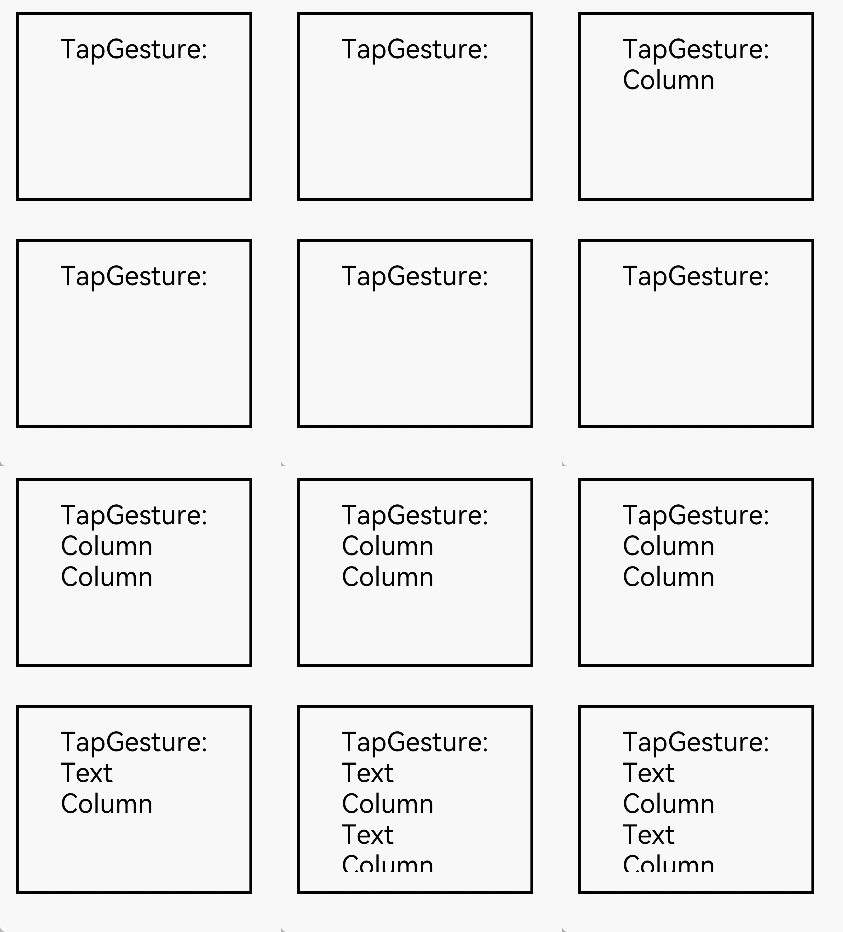
[h2]Example 1: Implementing Parent Component Prioritization and Simultaneous Gesture Triggering
This example demonstrates how to configure priorityGesture and parallelGesture to set up gesture recognition where the parent component has priority in recognizing gestures, and both parent and child components can trigger gestures simultaneously.
// xxx.ets
@Entry
@Component
struct GestureSettingsExample {
  @State priorityTestValue: string = ''
  @State parallelTestValue: string = ''

  build() {
    Column() {
      Column() {
        Text('TapGesture:' + this.priorityTestValue).fontSize(28)
          .gesture(
            TapGesture()
              .onAction((event: GestureEvent) => {
                this.priorityTestValue += '\nText'
              }))
      }
      .height(200)
      .width(250)
      .padding(20)
      .margin(20)
      .border({ width: 3 })
      // When priorityGesture is set, the tap gesture on the Column component is prioritized over the tap gesture on the child Text component.
      .priorityGesture(
        TapGesture()
          .onAction((event: GestureEvent) => {
            this.priorityTestValue += '\nColumn'
          }), GestureMask.IgnoreInternal)

      Column() {
        Text('TapGesture:' + this.parallelTestValue).fontSize(28)
          .gesture(
            TapGesture()
              .onAction((event: GestureEvent) => {
                this.parallelTestValue += '\nText'
              }))
      }
      .height(200)
      .width(250)
      .padding(20)
      .margin(20)
      .border({ width: 3 })
      // When parallelGesture is set, the tap gestures on the Column component and on the child Text component are both recognized.
      .parallelGesture(
        TapGesture()
          .onAction((event: GestureEvent) => {
            this.parallelTestValue += '\nColumn'
          }), GestureMask.Normal)
    }
  }
} 
[h2]Example 2: Implementing Real-time Monitoring of Effective Touch Points Involved in a Swipe Gesture
This example demonstrates how to configure fingerInfos to monitor the number of effective touch points involved in a swipe gesture in real time.
// xxx.ets
@Entry
@Component
struct PanGestureWithFingerCount {
  @State offsetX: number = 0
  @State offsetY: number = 0
  @State positionX: number = 0
  @State positionY: number = 0
  @State fingerCount: number = 0 // Used to record the number of touch points involved in the gesture.
  private panOption: PanGestureOptions = new PanGestureOptions({
    direction: PanDirection.All,
    fingers: 1
  })

  build() {
    Column() {
      // Display the number of effective touch points.
      Text(`Touch Points: ${this.fingerCount}`)
        .fontSize(20)
        .margin(10)

      Column() {
        Text('PanGesture offset:\nX: ' + this.offsetX + '\n' + 'Y: ' + this.offsetY)
      }
      .height(200)
      .width(300)
      .padding(20)
      .border({ width: 3 })
      .margin(50)
      .translate({ x: this.offsetX, y: this.offsetY, z: 0 })
      .gesture(
        PanGesture(this.panOption)
          .onActionStart((event: GestureEvent) => {
            console.info('Pan start')
            this.fingerCount = event.fingerInfos?.length || 0 // Record the number of touch points.
          })
          .onActionUpdate((event: GestureEvent) => {
            if (event) {
              console.info(`fingerInfos ${JSON.stringify(event.fingerInfos)}`)
              this.offsetX = this.positionX + event.offsetX
              this.offsetY = this.positionY + event.offsetY
              this.fingerCount = event.fingerInfos?.length || 0 // Update the number of touch points, recording the effective touch points involved in the current gesture.
            }
          })
          .onActionEnd((event: GestureEvent) => {
            this.positionX = this.offsetX
            this.positionY = this.offsetY
            this.fingerCount = 0 // Reset the value to zero when the touch points leave the touch target.
            console.info('Pan end')
          })
          .onActionCancel(() => {
            this.fingerCount = 0 // Reset the value to zero when the gesture is canceled.
          })
      )

      Button('Switch to Two-Finger Swipe')
        .onClick(() => {
          this.panOption.setFingers(2)
        })
    }
  }
}