When to Use
To implement consistent immersive experience, a communication mechanism between foreground applications and input method applications is provided. You can set the immersive input mode based on the immersive mode of the foreground application.
Working Principles
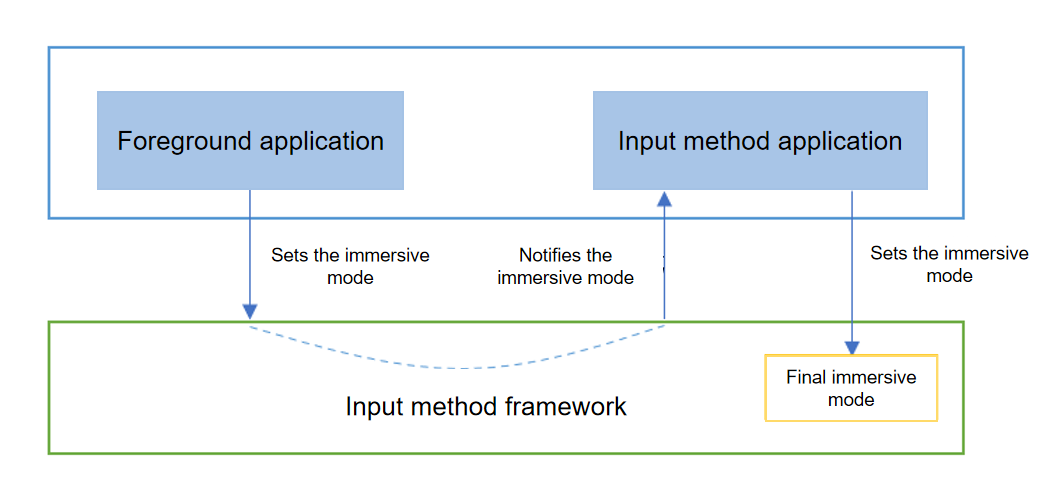
-
The foreground application sets the desired immersive mode based on the application scenario.
-
The desired immersive mode of the foreground application is then passed to the input method application through the input method framework.
-
The input method application determines the final immersive mode for the input method framework based on the immersive mode of the foreground application.
Access Guide
-
The foreground app sets the immersive mode for the edit box through keyboardappearance. The following is the sample code.
TextArea({placeholder: 'Immersive mode'}) .keyboardAppearance(KeyboardAppearance.IMMERSIVE) TextArea({placeholder: 'Non-immersive mode'}) .keyboardAppearance(KeyboardAppearance.NONE_IMMERSIVE) -
The input method app subscribes to the editor attribute change event editorAttributeChanged, and detects the immersive mode expected by the foreground app through the immersiveMode field in the callback parameter EditorAttribute. The following is the sample code.
// Check whether the immersive mode is used. If the immersive mode is used, select the immersive mode. inputMethodEngine.getKeyboardDelegate().on("editorAttributeChanged", (attr : inputMethodEngine.EditorAttribute) => { console.info('recv editorAttributeChanged, immersiveMode: ', attr.immersiveMode); if (attr.immersiveMode == inputMethodEngine.ImmersiveMode.DARK_IMMERSIVE) { this.panel?.setImmersiveMode(inputMethodEngine.ImmersiveMode.DARK_IMMERSIVE); console.info('recv editorAttributeChanged, panel:', this.panel?.getImmersiveMode()); } }) -
The input method app sets the immersive mode through setimmersivemode.
-
The IMMERSIVE mode is determined by the input method application.
-
The input method application cannot set the IMMERSIVE mode to the input method framework.
-
If the input method app receives IMMERSIVE as the immersive mode expected by the foreground app, it is recommended that the input method app set the final immersive mode to light immersive mode (LIGHT_IMMERSIVE) or dark immersive mode (DARK_IMMERSIVE) based on the current system theme mode.
The following sample code shows how to set the immersive mode. You must first use createPanel to obtain a panel instance, and then call the setImmersiveMode API using the obtained instance.
// Check whether the immersive mode is used. If the immersive mode is used, select the immersive mode. inputMethodEngine.getKeyboardDelegate().on("editorAttributeChanged", (attr : inputMethodEngine.EditorAttribute) => { console.info('recv editorAttributeChanged, immersiveMode: ', attr.immersiveMode); if (attr.immersiveMode == inputMethodEngine.ImmersiveMode.DARK_IMMERSIVE) { this.panel?.setImmersiveMode(inputMethodEngine.ImmersiveMode.DARK_IMMERSIVE); console.info('recv editorAttributeChanged, panel:', this.panel?.getImmersiveMode()); } }) -