After the DrawingRenderingContext object is bound to the Canvas component, you can draw shapes, texts, and images on the Canvas component.

The initial APIs of this module are supported since API version 12. Updates will be marked with a superscript to indicate their earliest API version.
[h2]constructor
constructor(unit?: LengthMetricsUnit)
Creates a Canvas object for drawing operations using the drawing API. Configuration of the unit mode for the DrawingRenderingContext object is supported.
Atomic service API: This API can be used in atomic services since API version 12.
Model restriction: This API can be used only in the stage model.
System capability: SystemCapability.ArkUI.ArkUI.Full
Parameters
| Name | Type | Mandatory | Description |
|---|---|---|---|
| unit | LengthMetricsUnit | No | Unit mode of the DrawingRenderingContext object. The value cannot be changed once set. The configuration method is the same as that of CanvasRenderingContext2D. Invalid values undefined, NaN and Infinity are treated as the default value. Default value: DEFAULT. |
size
get size(): Size
Obtains the size of the DrawingRenderingContext object.
Atomic service API: This API can be used in atomic services since API version 12.
Model restriction: This API can be used only in the stage model.
System capability: SystemCapability.ArkUI.ArkUI.Full
Return value
| Type | Description |
|---|---|
| Size | Size of the DrawingRenderingContext object. |
canvas
get canvas(): DrawingCanvas
Obtains the canvas object for drawing content.
Atomic service API: This API can be used in atomic services since API version 12.
Model restriction: This API can be used only in the stage model.
System capability: SystemCapability.ArkUI.ArkUI.Full
Return value
| Type | Description |
|---|---|
| DrawingCanvas | Canvas object for drawing content. |
invalidate
invalidate(): void
Invalidates the component and triggers re-rendering of the component.
Atomic service API: This API can be used in atomic services since API version 12.
Model restriction: This API can be used only in the stage model.
System capability: SystemCapability.ArkUI.ArkUI.Full
DrawingCanvas12+
type DrawingCanvas = import('../api/@ohos.graphics.drawing').default.Canvas
Draws content on the DrawingRenderingContext.
Atomic service API: This API can be used in atomic services since API version 12.
Model restriction: This API can be used only in the stage model.
System capability: SystemCapability.ArkUI.ArkUI.Full
| Type | Description |
|---|---|
| import('../api/@ohos.graphics.drawing').default.Canvas | Canvas object. |
Size
Provides size information of the DrawingRenderingContext object.
Atomic service API: This API can be used in atomic services since API version 12.
Model restriction: This API can be used only in the stage model.
System capability: SystemCapability.ArkUI.ArkUI.Full
| Name | Type | Read Only | Optional | Description |
|---|---|---|---|---|
| width | number | No | No | Width of the DrawingRenderingContext object, which corresponds to the width of the associated Canvas component. The unit can be vp or px. Default unit: vp |
| height | number | No | No | Height of the DrawingRenderingContext object, which corresponds to the height of the associated Canvas component. The unit can be vp or px. Default unit: vp |
[h2]Example 1: Drawing Shapes
This example demonstrates how to draw shapes using APIs in DrawingRenderingContext.
import { common2D, drawing } from '@kit.ArkGraphics2D';

// xxx.ets
@Entry
@Component
struct CanvasExample {
  private context: DrawingRenderingContext = new DrawingRenderingContext();

  build() {
    Flex({ direction: FlexDirection.Column, alignItems: ItemAlign.Center, justifyContent: FlexAlign.Center }) {
      Canvas(this.context)
        .width('100%')
        .height('50%')
        .backgroundColor('#D5D5D5')
        .onReady(() => {
          let brush = new drawing.Brush();
          // Draw a circle with center at (200, 200) and radius of 100, filled with RGBA(39, 135, 217, 255).
          brush.setColor({
            alpha: 255,
            red: 39,
            green: 135,
            blue: 217
          });
          this.context.canvas.attachBrush(brush);
          this.context.canvas.drawCircle(200, 200, 100);
          this.context.canvas.detachBrush();
          this.context.invalidate();
        })
      Button("Clear")
        .width('120')
        .height('50')
        .onClick(() => {
          let color: common2D.Color = {
            alpha: 0,
            red: 0,
            green: 0,
            blue: 0
          };
          // Fill the canvas using RGBA(0, 0, 0, 0).
          this.context.canvas.clear(color);
          this.context.invalidate();
        })
    }
    .width('100%')
    .height('100%')
  }
}
Figure 1 Circle with center at (200, 200) and radius of 100, filled with RGBA(39, 135, 217, 255)

Figure 2 Clearing the canvas with the Clear button

[h2]Example 2: Drawing Text
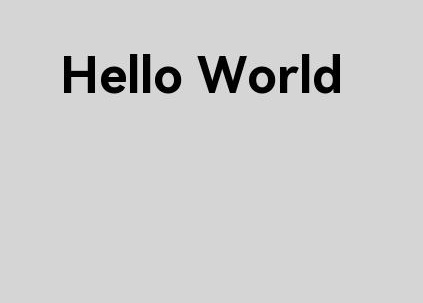
This example demonstrates how to draw custom text using drawTextBlob, with custom fonts loaded via makeFromRawFile (available since API version 18). When the drawing API is used, custom fonts from the rawfile directory can be loaded directly with drawing.Typeface.makeFromRawFile, eliminating the need to pre-register fonts through this.uiContext.getFont().registerFont or fontCollection.loadFontSync.
import { drawing } from '@kit.ArkGraphics2D';

// xxx.ets
@Entry
@Component
struct CanvasExample {
  private context: DrawingRenderingContext = new DrawingRenderingContext();

  build() {
    Flex({ direction: FlexDirection.Column, alignItems: ItemAlign.Center, justifyContent: FlexAlign.Center }) {
      Canvas(this.context)
        .width('100%')
        .height('50%')
        .backgroundColor('#D5D5D5')
        .onReady(() => {
          let font = new drawing.Font();
          font.setSize(50);
          // Load the custom font file HarmonyOS_Sans_Bold.ttf from the rawfile directory.
          const myTypeFace = drawing.Typeface.makeFromRawFile($rawfile('HarmonyOS_Sans_Bold.ttf'));
          font.setTypeface(myTypeFace);
          const textBlob =
            drawing.TextBlob.makeFromString("Hello World", font, drawing.TextEncoding.TEXT_ENCODING_UTF8);
          this.context.canvas.drawTextBlob(textBlob, 60, 100);
          this.context.invalidate();
        })
    }
    .width('100%')
    .height('100%')
  }
}