Overview
Precise audio-video (A/V) synchronization is a cornerstone of high-quality media playback. Synchronization must be maintained both during the original recording and when the content is played back on devices like phones, TVs, and media players.
Based on practical scenarios in HarmonyOS app development, the following typical use cases for A/V synchronization have been identified:
This document guides third-party video playback apps on correctly obtaining and using audio and video information to ensure synchronization during playback.

If you use a custom playback engine instead of AVPlayer, you can refer to this document to achieve the best practice.
How to Implement
A frame is the minimum processing unit of audio and video data. Audio and video streams are segmented into frames, and each of them is marked for display at specific timestamps. Audio and video can be downloaded and decoded independently. However, audio frames and video frames with matching timestamps must be shown together to ensure A/V synchronization.
[h2]A/V Synchronization Principle
- PTS, short for presentation timestamp, is the moment at which audio and video data is intended to be presented to users during playback. It indicates the time when the decoded audio and video data should be displayed on the screen or sent to the audio/video output device. PTS helps control the sequence and timing of audio and video playback to ensure that they are displayed or played at the appropriate times.
- DTS, short for decoding timestamp, indicates the timestamp when the decoder starts to decode audio and video data. It represents the exact time when the decoder should read and decode the incoming data stream. DTS manages the order in which the decoder decodes data, ensuring that the audio and video data is decoded in the proper order.
| Frame | Function |
|---|---|
| I-frame | Intra-encoded frame (intra picture) or key frame. I-frame is an independently encoded frame that can be independently decoded and does not depend on other frame data. |
| P-frame | Short for forward predictive frame. P-frame is a forward predictive frame. The encoding process depends on the previous frame for prediction, and the decoding process depends on the previous frame for correct decoding and reconstruction. |
| B-frame | Short for bidirectional prediction frame. B-frame is also a compressed frame. The encoding process is predicted based on the forward and backward frames. |
- A/V synchronization: The actual playback time difference between a video frame and an audio frame is used as an indicator. If the difference is greater than 0 ms, the video is ahead. If the difference is less than 0 ms, the audio is ahead. Considering the impact of collection and sampling rate, the timestamps cannot be completely the same. If the difference is within a proper range, the synchronization is normal.
- Quantification of synchronization side effects: Forcing the video frame to wait for the audio frame may cause temporary image stagnation. This stagnation is "freezing" in subjective experience. To objectively measure the severity, we focus on the worst case and define the criterion as follows: If the stagnation time of a single frame of an image exceeds 100 ms, the image is regarded as a stuttering. The stuttering time is calculated based on the continuous test period of 5 minutes.
- Supplementary indicator of smoothness: The definition of stuttering focuses on the limit of a single frame, while the average playback frame rate (average number of frames played per second) reflects the overall smoothness trend. The two indicators complement each other. Note that a high average frame rate does not mean no stuttering. Instant stuttering still needs to be determined based on the previous criterion.
Time difference = Time when the video is played – Time when the audio is played
| Time Difference Range | Subjective Experience |
|---|---|
| [-80 ms, 25 ms] | Unnoticeable |
| [-125 ms, -80 ms], [25 ms, 45 ms] | Noticeable |
| [-185 ms, -125 ms], [45 ms, 90 ms] | Unacceptable |
[h2]A/V Synchronization Solutions
Theoretically, due to inherent latency in the audio pipeline, there are three feasible solutions to ensure A/V synchronization during playback:
- Use continuous audio playback as reference: This solution uses the audio playback position as the primary time reference and matches the video playback position to it.
- Use system time as reference: This solution synchronizes both audio and video playback with the system time.
- Use video playback as reference: This solution uses the video playback position as the primary time reference and matches the audio playback position to it.
The table below describes the advantages and disadvantages of the three solutions.
| Solution Name | Advantage | Disadvantage |
|---|---|---|
| Using continuous audio playback as reference | 1. The human eye is less sensitive to minor video adjustments, making them hard to notice. 2. Adjusting video refresh timing is relatively straightforward. | If the video frame rate is unstable or rendering latency is high, it may cause video stutter or frame skipping. |
| Using system time as reference | It can maximize the prevention of frame skipping in both audio and video. | 1. It adds additional dependency on the system clock, increasing system complexity and maintenance costs. 2. The accuracy of the system clock is crucial for synchronization quality. If inaccurate, synchronization quality can be significantly compromised. |
| Using the video playback position as reference | Audio can be adjusted based on video frames, potentially reducing audio frame skipping. | 1. Audio playback may experience waiting or speeding up, which typically has a more severe and noticeable impact on users when compared with video adjustments. 2. If the video frame rate is unstable, it may cause difficulties in audio synchronization. |
In the first solution, the audio data stream is continuous, and no adjustments are made to the audio frame's presentation time, playback speed, or duration. Any adjustment to these parameters is easily perceptible to the human ear and can lead to audible audio artifacts. Addressing such artifacts typically requires audio resampling, which in turn can cause changes in pitch.
Therefore, mainstream multimedia apps generally adopt the audio playback position as the primary time reference. The subsequent sections will focus on explaining this solution in detail. (The other two options are beyond the scope of this topic.)
[h2]Using Continuous Audio Playback as Reference
By aligning the video playback position with the audio playback position as the main time reference, the synchronization between audio and video is adjusted to an imperceptible range for users, which is [-80 ms, 25 ms].
This solution:
- Synchronizes video with audio (mainstream solution).
- Obtains the audio rendering progress and dynamically adjusts the video rendering progress.
The goal is to achieve synchronization between audio and video within the range of [-80 ms, 25 ms].
Diagram of sequential audio frame playback
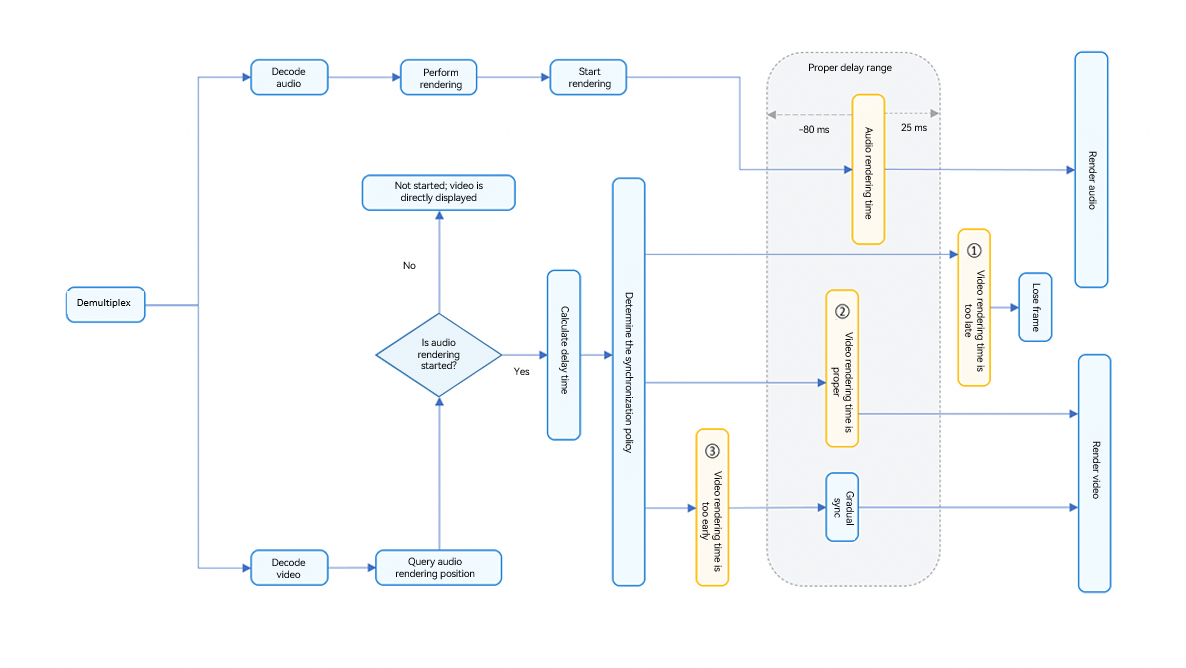
The audio and video pipelines must present each frame of data with the same timestamp. The audio playback position is used as the primary time reference, and the video pipeline only outputs video frames that match the latest rendered audio frame. For all possible implementations, it is critical to accurately calculate the timestamp of the last audio frame rendered. The OH_AudioRenderer_GetTimestamp() API is used to query the audio timestamp and delay information in each phase of the audio pipeline. The information can be used to control the video pipeline and synchronize the video frame with the audio frame.
Based on the diagram above, when a video frame is detected, the first step is to obtain the current audio rendering position. If the position is obtained, the delay between the video frame's PTS and the obtained position is calculated to decide the display strategy.
- If the video frame appears too early relative to the audio frame position, the video frame is held for a while before being displayed.
- If the delay is within an acceptable range, the video frame is immediately displayed.
- If the video frame is too late compared with the audio frame position, the video frame is dropped.
A/V Synchronization for Local Videos
Selecting and playing video resources from the local media library is a common scenario for third-party video apps.
[h2]How to Implement
The system provides the PhotoViewPicker() API to obtain local video resources. Third-party video playback apps can use the OH_AVSource_CreateWithFD() API to demultiplex local video resources and obtain and use the corresponding audio and video information. Subsequently, they can use the sequential audio frame playback solution to synchronize audio and video playback. The specific steps are as follows:
- Use PhotoViewPicker() to obtain local video resources.
- Use OH_AVSource_CreateWithFD() to demultiplex local video resources and obtain audio and video information.
- Use continuous audio playback as reference to play audio and video synchronously.
[h2]How to Develop
Use PhotoViewPicker() to obtain local video resources.
static async selectFileFromLocal(): Promise<string | undefined> {
  try {
    let result = await FileUtil.getPhotoViewPicker().select({
      MIMEType: photoAccessHelper.PhotoViewMIMETypes.VIDEO_TYPE,
      maxSelectNumber: 1
    })
    let selectFilePath = result.photoUris[0];
    if (!selectFilePath) {
      return undefined
    }
    return selectFilePath;
  } catch (e) {
    return undefined;
  }
}
Use OH_AVSource_CreateWithFD() to demultiplex local video resources to obtain the compressed audio and video streams.
int32_t Demuxer::Create(SampleInfo &info) {
    if (info.isLocal) {
        source = OH_AVSource_CreateWithFD(info.inputFd, info.inputFileOffset, info.inputFileSize);
    } else {
        source = OH_AVSource_CreateWithURI(info.networkUri);
    }

    CHECK_AND_RETURN_RET_LOG(source != nullptr, AVCODEC_SAMPLE_ERR_ERROR,
                             "Create demuxer source failed, fd: %{public}d, offset: %{public}" PRId64
                             ", file size: %{public}" PRId64,
                             info.inputFd, info.inputFileOffset, info.inputFileSize);
    demuxer = OH_AVDemuxer_CreateWithSource(source);
    // ...
}
Decode audio and video data to convert compressed data into playable raw data.
- For details about audio decoding, see Audio Decoding. Compressed audio streams are decoded into PCM data.
- For details about video decoding, see Video Decoding. Compressed video streams are decoded into YUV data.
When receiving a video frame, call OH_AudioRenderer_GetTimestamp() to obtain the information such as the audio rendering position.
int64_t framePosition = 0;
int64_t timeStamp = 0;
int32_t ret = OH_AudioRenderer_GetTimestamp(audioRenderer, CLOCK_MONOTONIC, &framePosition, &timeStamp);

audioTimeStamp = timeStamp;
Before the audio playback starts, the return values of the audio playback timestamp and framePosition are both 0. To prevent stuttering or other playback issues, synchronization is temporarily bypassed, allowing video frames to be rendered immediately.
if (ret != AUDIOSTREAM_SUCCESS || (timeStamp == 0) || (framePosition == 0)) {
    // first frame, render without wait
    videoDecoder->FreeOutputBuffer(bufferInfo.bufferIndex, true);
    std::this_thread::sleep_until(lastPushTime + std::chrono::microseconds(sampleInfo.frameInterval));
    lastPushTime = std::chrono::system_clock::now();
    continue;
}
Calculate the delay based on the video frame's PTS and audio rendering position.
- audioPlayedTime: expected rendering time of the audio frame.
- videoPlayedTime: expected display time of the video frame.
- waitTimeUs: delay of the video frame relative to the audio frame.
int64_t latency =
    (audioDecContext->frameWrittenForSpeed - framePosition) * 1000 * 1000 / sampleInfo.audioSampleRate / speed;
AVCODEC_SAMPLE_LOGI("VD latency: %{public}ld writtenSampleCnt: %{public}ld", latency, writtenSampleCnt);

nowTimeStamp = GetCurrentTime();
int64_t anchorDiff = (nowTimeStamp - audioTimeStamp) / 1000;
int64_t audioPlayedTime = audioDecContext->currentPosAudioBufferPts - latency + anchorDiff;
int64_t videoPlayedTime = bufferInfo.attr.pts;

int64_t waitTimeUs = videoPlayedTime - audioPlayedTime;
Configure the A/V synchronization policy based on the delay.
- [40ms, +∞): The video frame is later than the audio frame and therefore is dropped.
- [0ms, 40ms): The video frame is immediately displayed.
- (-∞, 0ms): The video frame is ahead of the audio frame, and progressive synchronization is selected based on service requirements.
if (waitTimeUs < WAIT_TIME_US_THRESHOLD_WARNING) {
    dropFrame = true;
    AVCODEC_SAMPLE_LOGE("VD buffer is too late");
} else {
    AVCODEC_SAMPLE_LOGE("VD buffer is too early waitTimeUs: %{public}ld", waitTimeUs);
    if (waitTimeUs > WAIT_TIME_US_THRESHOLD) {
        waitTimeUs = WAIT_TIME_US_THRESHOLD;
    }
    if (waitTimeUs > sampleInfo.frameInterval + PER_SINK_TIME_THRESHOLD) {
        waitTimeUs = sampleInfo.frameInterval + PER_SINK_TIME_THRESHOLD;
        AVCODEC_SAMPLE_LOGE("VD buffer is too early and reduced 33ms, waitTimeUs: %{public}ld", waitTimeUs);
    }
}
Perform progressive synchronization between audio and video. When the video frame is ahead of the audio frame, it waits for a period of time before being displayed.
if (waitTimeUs > 0) {
    std::this_thread::sleep_for(std::chrono::microseconds(waitTimeUs));
}
lastPushTime = std::chrono::system_clock::now();
ret = videoDecoder->FreeOutputBuffer(bufferInfo.bufferIndex, !dropFrame);

- After the OH_AudioRenderer_Start() API is called, there is a certain delay before the audio data is actually written to the hardware. Therefore, after the API is called, you need to wait for a certain period of time before obtaining a valid timestamp through OH_AudioRenderer_Start(). During this period, if no audio is played, it is recommended that the video frames be played at the normal speed first, and then gradually catch up with the audio position to reduce the playback start delay. For example, you can render the video at the standard frame rate before the audio output is stable. After the audio timestamp is available, perform slow rendering or frame loss based on the audio-video difference.
- After framePosition and timestamp move forward at a stable speed, it is recommended that OH_AudioRenderer_GetTimestamp() be called at an interval of at least 200 ms (for example, once every 200 ms to 1s). You do not need to query the values more frequently to avoid power consumption issues.
- After the OH_AudioRenderer_Flush() API is executed, the value of framePosition is recalculated (starting from 0).
- The OH_AudioRenderer_GetFramesWritten() API is not cleared during flushing. You are advised not to use this API together with the OH_AudioRenderer_GetTimestamp() API.
- During audio device switching, framePosition and timestamp returned by the OH_AudioRenderer_GetTimestamp() API will not be reversed. However, due to the delay in writing data to the new device, the audio progress may temporarily stop. It is recommended that the video frames be played smoothly without any frame freezing.
- The OH_AudioRenderer_GetTimestamp() API obtains the actual number of sampling frames written to the hardware, which is not affected by the playback speed. If the playback speed is set for the AudioRenderer, special processing is required for the calculation of the playback progress. The system ensures that only samples written after the speed change will be processed at the new speed.
A/V Synchronization for Online Videos
In addition to local playback, third-party video apps often stream video content from the network.
[h2]How to Implement
The system provides the OH_AVSource_CreateWithURI() API to demultiplex network video resources and obtain the corresponding audio and video information. Then, the sequential audio frame playback solution is used to synchronize audio and video playback. The specific steps are as follows.

Before using the OH_AVSource_CreateWithURI() API, you need to configure the network permission ohos.permission.INTERNET.
- Use the OH_AVSource_CreateWithURI() API to demultiplex network resources to obtain audio and video information.
- Use continuous audio playback as reference to play audio and video synchronously.
[h2]How to Develop
Use the OH_AVSource_CreateWithURI() API to demultiplex network resources to obtain audio and video information.
int32_t Demuxer::Create(SampleInfo &info) {
    if (info.isLocal) {
        source = OH_AVSource_CreateWithFD(info.inputFd, info.inputFileOffset, info.inputFileSize);
    } else {
        source = OH_AVSource_CreateWithURI(info.networkUri);
    }

    CHECK_AND_RETURN_RET_LOG(source != nullptr, AVCODEC_SAMPLE_ERR_ERROR,
                             "Create demuxer source failed, fd: %{public}d, offset: %{public}" PRId64
                             ", file size: %{public}" PRId64,
                             info.inputFd, info.inputFileOffset, info.inputFileSize);
    demuxer = OH_AVDemuxer_CreateWithSource(source);
    // ...
}
After the compressed audio and video streams are obtained, decode them by referring to Audio Decoding and Video Decoding, and then perform audio-video synchronization by referring to steps 3 to 7 in A/V Synchronization for Local Videos.