
You need to perform the operations in this section only when the DeviceVerify service is used.
Introduction
A service account is used for API authentication between servers. You can create a service account on the API Console of HUAWEI Developers, and then generate a JSON Web Token (JWT) in your app based on the public and private keys returned. With this JWT, your app can call Huawei public APIs that support service account-based authentication.
The JWT generated from a service account consists of the following parts:
Header
Payload
Signature
The three parts are concatenated through dots (.). You can obtain the signature by concatenating the header and payload and then signing the concatenated string using the SHA256withRSA algorithm.
Example
eyJra*****JjNjBjMXXX.
eyJhd*****JodHRXXX.
BRNss*****7az5oU7-Zp5g9X2WJVXXX
For more about JWT, please refer to Introduction to JSON Web Tokens.
Development Procedure
Create the key file of a service account.
Create and download the key file of a service account on the API Console of HUAWEI Developers. For details, please refer to API Console Operation Guide - Creating a Service Account Key.
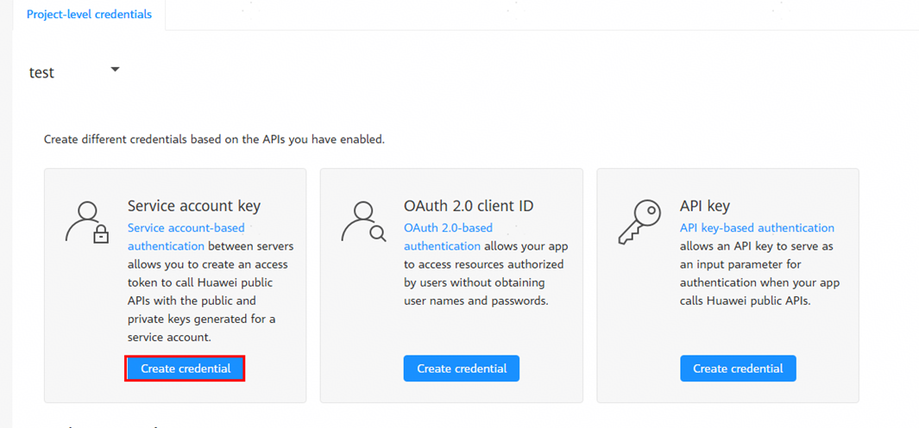

You need to apply for a developer-level service account credential on HUAWEI Developers.
The content of the service account key file is in the following format:
{
    "project_id": "*****",
    "key_id": "*****",
    "private_key": "-----BEGIN PRIVATE KEY-----\nMIIJQgIBADANBgkqhkiG9w0BAQEFAASCCSwwggkoAgEAAoICAQCKw6kJKtCh7qmMvp1u1dI27z2TKZrPOzHbQaXO/Eez0AWZ2EN+ouF496R3pfo7fQXC1XOT/YTbVC4DNZwWSMA54fu3/AOCY9Zzyi46OK*****==\n-----END PRIVATE KEY-----\n",
    "sub_account": "*****",
    "auth_uri": "https://oauth-login.cloud.huawei.com/oauth2/v3/authorize",
    "token_uri": "https://oauth-login.cloud.huawei.com/oauth2/v3/token",
    "auth_provider_cert_uri": "https://oauth-login.cloud.huawei.com/oauth2/v3/certs",
    "client_cert_uri": "https://oauth-login.cloud.huawei.com/oauth2/v3/x509?client_id=*****"
}
Generate the header in a JWT string.
Generate a JSON body and encode it using Base64 to obtain the header. The JSON body consists of the kid, typ, and alg fields, and the value of kid is the same as that of key_id in the key file.
{
  "kid": "*****",
  "typ": "JWT",
  "alg": "PS256"
}
Field Description kid The value is the same as that of the key_id field in the key file. typ Data type. The value is always JWT. alg Algorithm type. The value is always PS256. Generate the payload in a JWT string.
Generate a JSON body and encode it using Base64 to obtain the payload. The JSON body consists of the iss, aud, iat, and exp fields, and the value of iss is the same as that of sub_account in the key file.
{
  "aud": "https://oauth-login.cloud.huawei.com/oauth2/v3/token",
  "iss": "*****",
  "exp": 1581410664,
  "iat": 1581407064
}
Field Description aud The value is always https://oauth-login.cloud.huawei.com/oauth2/v3/token. iss Data generator ID. The value is the same as that of the sub_account field in the key file. exp UTC timestamp when a JWT string expires. It is recommended that the value be 3600 seconds later than that of iat. iat UTC timestamp when a JWT string is signed. The value is the number of seconds counting from 1970-01-01 00:00:00 (UTC) to the time when the JWT string is signed. Generate the token in a JWT string.
Use a dot (.) to concatenate the header and payload generated after Base64 encoding, and use private_key (kept by yourself not Huawei) in the key file and the SHA256withRSA/PSS algorithm to sign the concatenated string. Then, a signature is generated. Finally, use a dot (.) to concatenate the header, payload, and signature to generate the token.
Sample Code
You can generate a JWT from a service account by referring to the Java sample code. Modify parameters based on comments in the sample code before running it.
If you do not use Java, select the corresponding JWT open-source component for development.
import com.alibaba.fastjson.JSONObject;
import org.apache.commons.codec.binary.Base64;
import org.bouncycastle.jce.provider.BouncyCastleProvider;

import java.nio.charset.StandardCharsets;
import java.security.*;
import java.security.spec.InvalidKeySpecException;
import java.security.spec.PKCS8EncodedKeySpec;
import java.util.Objects;

public class JWTGenerateDemo_test {
    // please replace it with the private_key in your json file
    // this is the plain text in this demo, please encrypt the private key in your code, only get the string between
    // '-----BEGIN PRIVATE KEY-----\n' and '\n-----END PRIVATE KEY-----\n'
    private static final String PRIVATE_KEY = "xxxx";

    // please replace it with the sub_account in your json file
    private static final String ISS = "xxx";

    // please replace it with the key_id in your json file
    private static final String KID = "xxx";

    private static final String AUD = "https://oauth-login.cloud.huawei.com/oauth2/v3/token";

    private static final String ALG_PS256 = "PS256";

    private static final String DOT = ".";

    private static PrivateKey getPrivateKey(String key) throws NoSuchAlgorithmException, InvalidKeySpecException {
        PKCS8EncodedKeySpec keySpec = new PKCS8EncodedKeySpec(decodeBase64(key));
        KeyFactory keyFactory = KeyFactory.getInstance("RSA");
        return keyFactory.generatePrivate(keySpec);
    }

    private static byte[] decodeBase64(String Base64Str) {
        return Base64.decodeBase64(Base64Str.getBytes(StandardCharsets.UTF_8));
    }

    private String createJwt()
            throws NoSuchAlgorithmException, InvalidKeySpecException, InvalidKeyException, SignatureException {
        long iat = System.currentTimeMillis() / 1000;
        long exp = iat + 3600;// The validity period of the JWT string is 3600s.

        // jwt header
        JSONObject header = new JSONObject();
        header.put("alg", ALG_PS256);
        header.put("kid", KID);
        header.put("typ", "JWT");

        // jwt payload
        JSONObject payload = new JSONObject();
        payload.put("aud", AUD);
        payload.put("iss", ISS);
        payload.put("exp", exp);
        payload.put("iat", iat);

        // jwt signature
        byte[] encodeHeaderBytes = Base64.encodeBase64URLSafe(header.toString().getBytes(StandardCharsets.UTF_8));
        byte[] encodePayloadBytes = Base64.encodeBase64URLSafe(payload.toString().getBytes(StandardCharsets.UTF_8));
        String encodeHeader = new String(encodeHeaderBytes, StandardCharsets.UTF_8);
        String encodePayload = new String(encodePayloadBytes, StandardCharsets.UTF_8);
        String jwtHeaderAndPayload = encodeHeader + DOT + encodePayload;
        Signature signatureInstance = Signature.getInstance("SHA256withRSA/PSS", new BouncyCastleProvider());
        signatureInstance.initSign(getPrivateKey(PRIVATE_KEY));
        signatureInstance.update(jwtHeaderAndPayload.getBytes(StandardCharsets.UTF_8));
        String signature =
                new String(Objects.requireNonNull(Base64.encodeBase64URLSafe(signatureInstance.sign())), StandardCharsets.UTF_8);

        return jwtHeaderAndPayload + DOT + signature;
    }

    public static void main(String args[])
            throws InvalidKeySpecException, NoSuchAlgorithmException, SignatureException, InvalidKeyException {
        JWTGenerateDemo_test JWTGenerateDemo = new JWTGenerateDemo_test();
        JWTGenerateDemo.createJwt();// Obtain the JWT.
    }
}
Execute the main() function.
The recommended Java version is java8. The Maven dependency is as follows:
<dependency>
    <groupId>com.alibaba</groupId>
    <artifactId>fastjson</artifactId>
    <version>1.2.83</version>
</dependency>
<dependency>
    <groupId>org.bouncycastle</groupId>
    <artifactId>bcprov-jdk18on</artifactId>
    <version>1.74</version>
</dependency>
<dependency>
    <groupId>commons-codec</groupId>
    <artifactId>commons-codec</artifactId>
    <version>1.15</version>
</dependency>